
In public data collection (such as SEO ranking monitoring, e-commerce price comparison and price monitoring), QA automation regression testing, and AI Agent browser workflows, Python remains the primary development language. As teams upgrade their infrastructure from traditional requests + Selenium to high-concurrency asynchronous architectures based on asyncio, httpx, and Playwright, the integration approach for CAPTCHA handling modules is also facing refactoring.
Many teams used open-source OCR libraries early on to handle simple image CAPTCHAs, but when facing Cloudflare Turnstile, reCAPTCHA v2/v3/Enterprise, GeeTest v3/v4, or FunCaptcha and other CAPTCHAs based on behavioral risk control and dynamic encryption, why are simple OCR solutions failing? For the underlying logic, please refer to our previous analysis "From Anti-Scraping Upgrade to Enterprise Data Collection Strategy: Why Are Simple OCR Solutions Failing?". In modern risk control systems, engineering teams prefer to directly obtain verified Tokens, Cookies, or coordinates through professional Python CAPTCHA recognition APIs and complete submission in local sessions.
This article, from the perspective of Python asynchronous engineering, explains in detail how to directly wrap the NexCaptcha automated CAPTCHA solving interface based on standard HTTP and WebSocket protocols, and achieve seamless integration with Playwright browser contexts.
I. Why is it recommended to directly wrap native interfaces in Python async architectures?
When evaluating CAPTCHA solving platforms, many developers habitually search PyPI for third-party wrapper packages first. However, in production environments, directly using httpx and websockets to interface with official native APIs is often a more robust choice:
- Avoid synchronous blocking that breaks the Event Loop: Many old third-party SDKs rely on synchronous
requestsandtime.sleep()at the bottom. If placed directly inasynciocoroutines, they will block the entire event loop, causing a sharp drop in throughput for high-concurrency crawlers or test tasks. - Clearly control sessions and security boundaries: NexCaptcha's architecture design follows strict separation of responsibilities—the CAPTCHA solving interface does not send business requests on behalf of customers, nor does it retrieve target pages. Your business requests,
Session, andCookieremain entirely in your local Python environment. The interface only asynchronously returnstoken,cookie, text, or coordinates based on the passed page URL,sitekey, or image parameters, and finally your code submits them with the form. Maintaining your own thin wrapper layer allows clearer management of proxy IPs and session alignment. - Zero dependency lag: NexCaptcha currently does not provide a verified installable official Python SDK, but directly provides clear HTTP interface and WebSocket example code in the interface documentation. Writing a client class within a hundred lines using the project's existing
httpxlibrary is not only lightweight and controllable but also allows precise customization of timeout and retry strategies.
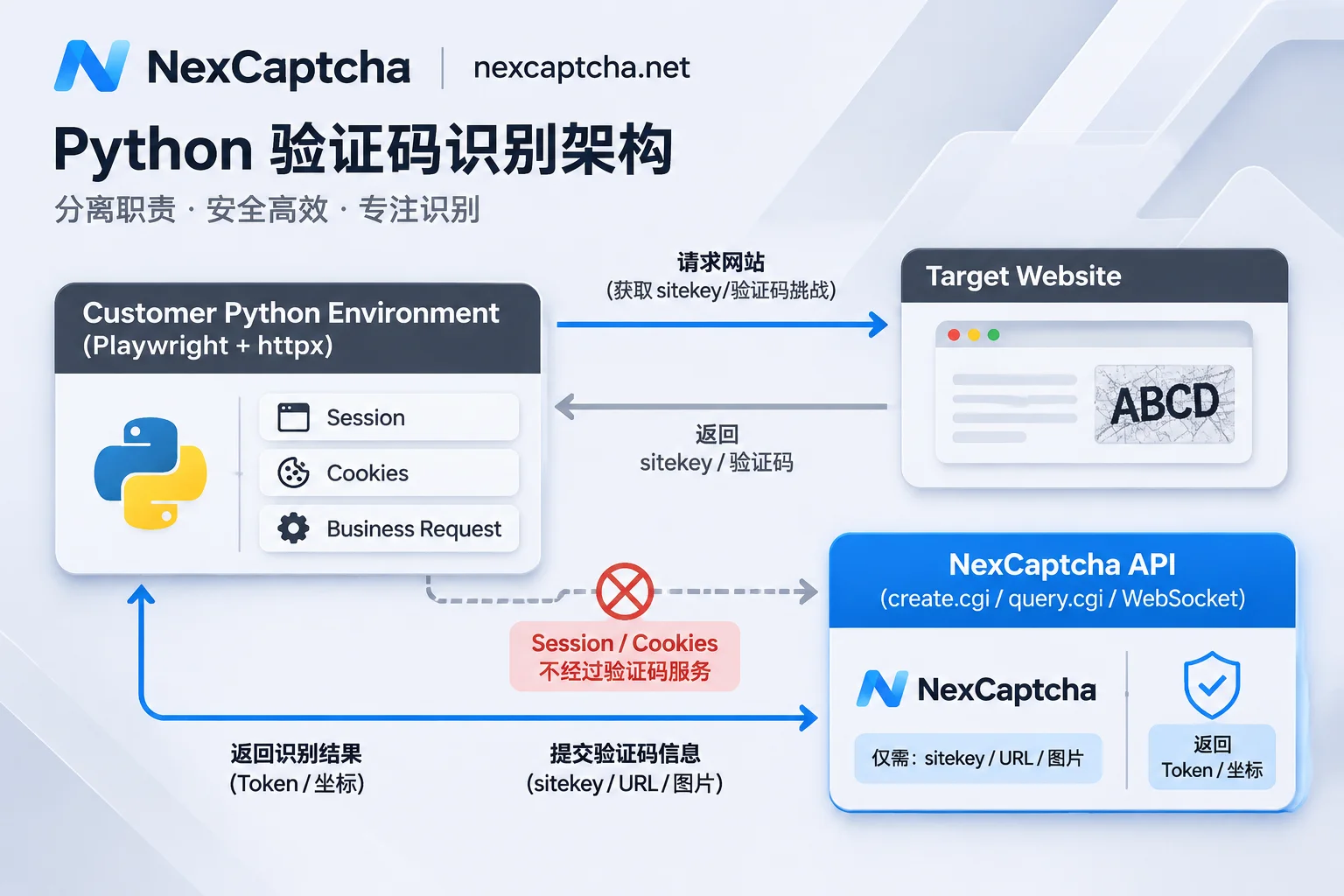
II. NexCaptcha Interface Protocol Structure and Parameter Specification
Before writing code, first clarify the core differences in interface form between NexCaptcha and traditional createTask/getTaskResult platforms:
- Authentication: API Key is uniformly passed in HTTP request headers, avoiding exposing keys in URL query parameters or logs.
- Endpoint division: Create recognition tasks via
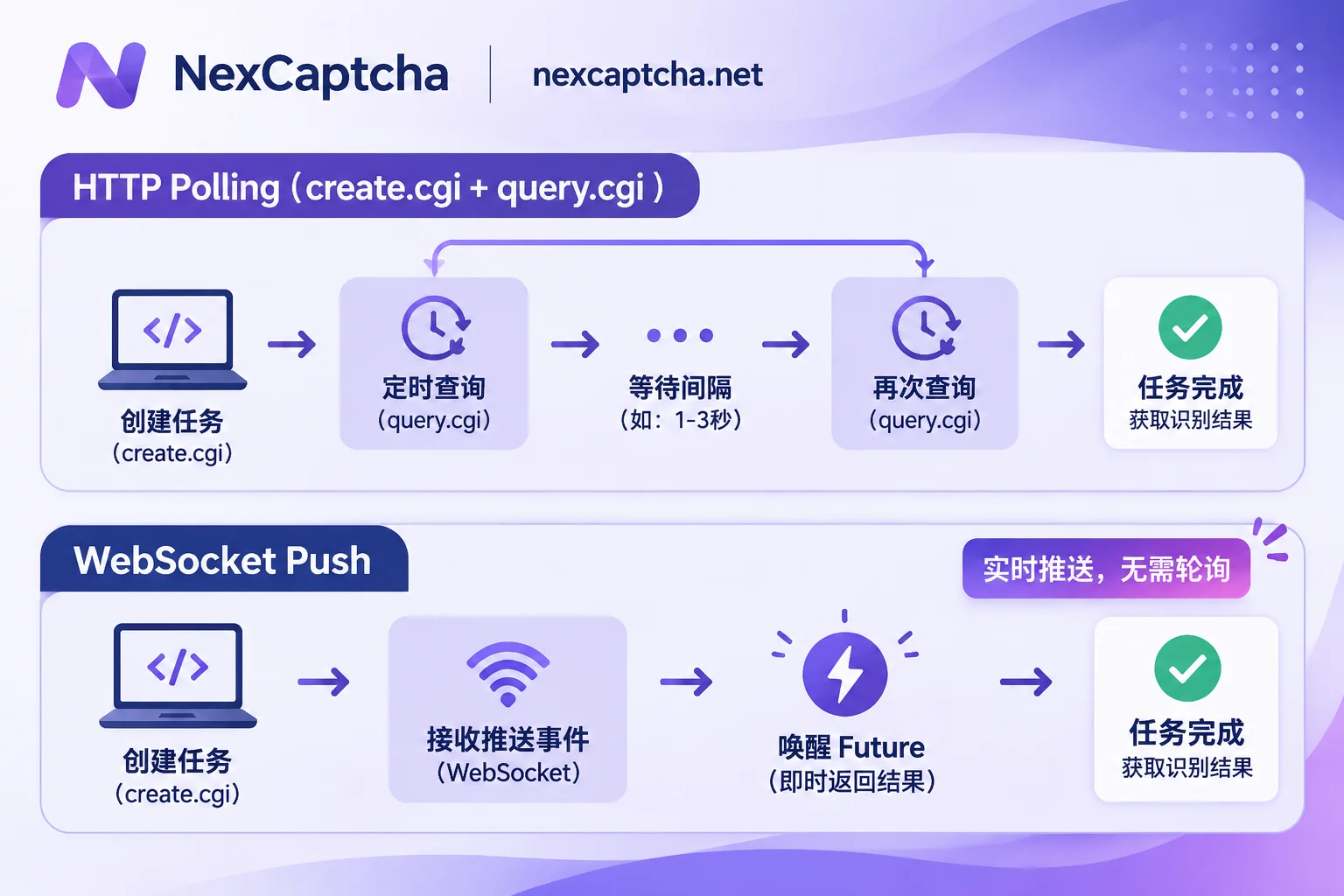
create.cgi, query task results viaquery.cgi; besides polling, it also supports WebSocket push for real-time reception of recognition results (note: the interface does not provide HTTP Webhook callbacks). - Parameter structure (Adapter mode): The request body selects the CAPTCHA type by product code, and specific parameters for that type are filled in the
adapterfield. To reduce developers' learning and migration costs, fields insideadapterfollow the industry-standardcreateTasknaming system (such aswebsiteURL,websiteKey, etc.), and the documentation also indicates the corresponding common Task Type name under each type (such asRecaptchaV2TaskProxyless). - Task state machine: The task lifecycle includes four states: processing, success, failure, expired. Billing is per-use deduction, only charged when creating a task; if the task fails or expires, the balance is automatically refunded.
Before formal coding, you can log into the console and find the corresponding CAPTCHA type in the Supported Types Directory. Each type is equipped with an online test bench; fill in the API Key to directly initiate a real task and quickly verify the required parameters and return format.
III. Python Async Client Wrapper Practice (based on httpx)
Below we use Python's httpx.AsyncClient to wrap a universal asynchronous CAPTCHA recognition client, including task creation, status polling, and exception stop-loss logic. For detailed handling principles of various timeouts, it is recommended to read "How to Handle CAPTCHA API Timeouts: Distinguish Four Types of Timeouts, Then Decide Retry, Stop-Loss, and Submission Timing" together.
1. Install Basic Dependencies
pip install httpx websockets playwright2. Write Async Polling Client (create.cgi + query.cgi)
import asyncio
import time
from typing import Dict, Any, Optional
import httpx

class NexCaptchaError(Exception):
    """验证码识别异常基类"""
    pass

class AsyncNexCaptchaClient:
    def __init__(
        self,
        api_key: str,
        base_url: str = "https://app.nexcaptcha.net/openapi",
        timeout: float = 30.0
    ):
        self.api_key = api_key
        self.base_url = base_url.rstrip("/")
        # 复用连接池,API Key 放在请求头
        self.client = httpx.AsyncClient(
            base_url=self.base_url,
            headers={
                "Authorization": f"Bearer {self.api_key}",
                "X-API-Key": self.api_key,
                "Content-Type": "application/json"
            },
            timeout=timeout
        )

    async def close(self):
        await self.client.aclose()

    async def create_task(
        self,
        product_code: str,
        adapter_params: Dict[str, Any],
        proxy: Optional[str] = None
    ) -> str:
        """
        调用 create.cgi 创建识别任务
        :param product_code: 产品编码(参照官方接口文档)
        :param adapter_params: 具体类型的参数,如 websiteURL, websiteKey
        :param proxy: 可选或必填的客户代理(不传则默认使用服务端代理池)
        """
        payload: Dict[str, Any] = {
            "product": product_code,
            "adapter": adapter_params
        }
        if proxy:
            payload["adapter"]["proxy"] = proxy

        resp = await self.client.post("/create.cgi", json=payload)
        resp.raise_for_status()
        data = resp.json()

        task_id = data.get("taskId") or data.get("task_id")
        if not task_id:
            raise NexCaptchaError(f"创建任务失败: {data}")
        return str(task_id)

    async def wait_for_result(
        self,
        task_id: str,
        poll_interval: float = 3.0,
        deadline: float = 120.0
    ) -> Dict[str, Any]:
        """
        调用 query.cgi 异步轮询任务结果
        处理任务状态:处理中、成功、失败、过期
        """
        start_time = time.monotonic()
        while (time.monotonic() - start_time) < deadline:
            resp = await self.client.get("/query.cgi", params={"taskId": task_id})
            resp.raise_for_status()
            data = resp.json()

            status = data.get("status")
            if status in ("success", "succeeded", "ready"):
                return data.get("solution") or data.get("data") or data
            elif status in ("failed", "expired"):
                # 任务失败或过期,系统会自动退回余额,客户端直接终止轮询
                raise NexCaptchaError(f"任务终止,状态: {status}, 详情: {data}")

            # 状态为 processing(处理中),非阻塞等待下一次查询
            await asyncio.sleep(poll_interval)

raise TimeoutError(f"等待验证码结果超时 ({deadline}s), taskId: {task_id}")Note: For specific request header field names and JSON response key names, please refer to the latest examples in the NexCaptcha Official Interface Documentation. If a task remains in processing state for a long time, you can follow "What to Do When a CAPTCHA Task Is Always Processing: First Distinguish 'Slow' and 'Stuck', Then Troubleshoot in Order" for diagnosis.
IV. Advanced: Using WebSocket Push Instead of High-Frequency Polling
In high-concurrency price monitoring or batch regression testing scenarios, hundreds or thousands of coroutines polling query.cgi simultaneously will generate a large amount of invalid network I/O. NexCaptcha natively supports WebSocket result push (for latency comparison between polling and push modes, refer to "What Is the Difference Between CAPTCHA API Polling and Callback: Process, Latency, Deployment Conditions, and How to Choose").
In Python, we can use the websockets library to maintain a long connection and immediately wake up the corresponding asyncio.Future when the server completes recognition:
import json
import asyncio
import websockets

async def listen_captcha_results(ws_url: str, api_key: str, pending_futures: dict):
    """
    WebSocket 结果监听协程示例
    当收到服务端推送的任务完成消息时,直接唤醒等待中的协程
    """
    extra_headers = {"X-API-Key": api_key}
    async with websockets.connect(ws_url, additional_headers=extra_headers) as ws:
        async for message in ws:
            event = json.loads(message)
            task_id = str(event.get("taskId", ""))
            status = event.get("status")

            if task_id in pending_futures:
                fut: asyncio.Future = pending_futures.pop(task_id)
                if not fut.done():
                    if status in ("success", "succeeded"):
                        fut.set_result(event.get("solution") or event)
                    elif status in ("failed", "expired"):
                        fut.set_exception(NexCaptchaError(f"任务 {status}: {event}"))
Through this event-driven mode, once the task is recognized, it can be pushed back to the local Python process within milliseconds, greatly shortening the Token in-transit loss time and leaving a more ample form submission window.
V. Combining Playwright for Parameter Extraction and Token Injection
Getting the Token is only the first step; the real difficulty lies in session consistency. Taking Cloudflare Turnstile or reCAPTCHA as examples, let's see how to chain the entire process in playwright.async_api:
from playwright.async_api import async_playwright

async def solve_and_submit_with_playwright():
    captcha_client = AsyncNexCaptchaClient(api_key="YOUR_NEXCAPTCHA_API_KEY")

    async with async_playwright() as p:
        browser = await p.chromium.launch(headless=True)
        context = await browser.new_context()
        page = await context.new_page()

        target_url = "https://example.com/login"
        await page.goto(target_url)

        # 1. 从页面 DOM 提取 sitekey
        sitekey = await page.locator("[data-sitekey]").get_attribute("data-sitekey")

        # 2. 创建识别任务(adapter 沿用 websiteURL / websiteKey 写法)
        task_id = await captcha_client.create_task(
            product_code="RecaptchaV2TaskProxyless",
            adapter_params={
                "websiteURL": target_url,
                "websiteKey": sitekey
            }
        )

        # 3. 异步等待返回 Token
        solution = await captcha_client.wait_for_result(task_id)
        token = solution.get("gRecaptchaResponse") or solution.get("token")

        # 4. 在客户自己的浏览器会话中注入 Token 并提交表单
        await page.evaluate(
            """(token) => {
                const el = document.querySelector('[name="g-recaptcha-response"]');
                if (el) el.value = token;
            }""",
            token
        )
        await page.click("button[type='submit']")

        await browser.close()
    await captcha_client.close()
Proxy and Session Alignment Key Points
NexCaptcha supports mainstream vendors including reCAPTCHA v2/v3/Enterprise (including invisible), Cloudflare Turnstile, GeeTest v3/v4, FunCaptcha/Arkose, DataDome, AWS WAF, Imperva, Tencent, NetEase Yidun, Alibaba Cloud, as well as general types such as image, slider, click, rotation, and voice (for the complete list, see the Official CAPTCHA Types Page; for unlisted types, samples can be submitted for quotation).
When integrating different types, pay attention to proxy configuration:
- Proxyless mode: If no proxy is passed, the NexCaptcha server's proxy pool is used by default for recognition.
- Bring-your-own-proxy mode: Some strong risk control types can accept, and some must accept the customer's own proxy. In this case, ensure that the proxy exit IP passed to
adapterand the browser environment'sUser-Agentare consistent with the session when your local Playwright initiates subsequent business requests. If the submission is rejected by the target site after the Token is returned, you can check one by one against "How to Troubleshoot CAPTCHA Token Verification Failure After Return: Time-effectiveness, Parameters, Injection, Scoring, and IP Layer-by-Layer Localization".
VI. AI Agent Scenario: Code-Free MCP Integration Solution
If your Python project is building an AI Agent based on large language models (such as an automated web operation assistant), you don't even need to hand-write the above HTTP wrapper code.
NexCaptcha provides a hosted MCP (Model Context Protocol) service, requiring no local deployment and directly using API Key authentication. It has five built-in standard tools: query products, query parameter models, create task, query task, query balance (only creating a task is charged; failure or expiration automatically refunds). Whether it's Claude Code, Claude Desktop, Cursor, Codex, VS Code, Gemini CLI, or your own MCP client written in Python that supports Streamable HTTP, you can directly configure and integrate. For specific configuration methods, see the MCP Integration Console or read the practical guide "Let AI Agents Work Like Humans: Automated CAPTCHA Recognition via MCP Standard".
VII. Engineering Suggestions for Migrating from 2Captcha / Anti-Captcha to NexCaptcha
For technical leaders and procurement teams comparing CAPTCHA solving platforms or planning migration, it must be clear: NexCaptcha's interface is not the traditional createTask/getTaskResult format, so existing code cannot be migrated by simply replacing the domain name.
However, thanks to the fact that fields inside adapter follow common naming such as websiteURL, websiteKey, and the interface documentation marks the corresponding common Task Type name for each type, the migration workload mainly focuses on request outer wrapper (create.cgi / query.cgi) and Header authentication rewriting.
When performing migration in a Python project, it is recommended to adopt the following three-step strategy:
- Abstract a unified Adapter layer: Keep the original parameter dictionary construction logic in business code, and only perform routing dispatch at the bottommost
HttpClientsending layer. - Dual-run by traffic ratio (gray release): Use Python configuration center to set traffic weights (e.g., first switch 10% traffic to NexCaptcha), and compare end-to-end latency, acceptance rate, and effective cost on both sides (for cost accounting methods, see "How to Calculate CAPTCHA API Success Rate: Three-Tier Caliber, Formula, and Effective Cost").
- Reconcile bills and full switch: After data alignment and business verification are stable, switch all traffic over. For details on migration from specific platforms, also refer to "How to Migrate from Anti-Captcha" and "How to Choose a CapSolver Alternative".
Conclusion and Compliance Notice
Whether you are building a high-concurrency public price monitoring and SEO data collection pipeline or maintaining an enterprise-level CI/CD automated testing suite, a lightweight Python async CAPTCHA solving wrapper based on httpx and websockets can significantly improve the system's throughput stability.
At the same time, please strictly observe compliance boundaries: NexCaptcha strictly prohibits using the service for credential stuffing, account theft, bulk registration, sending spam, evading bans, payment fraud, bypassing paywalls or DRM, and other illegal scenarios. Once a violating key is found, it will be directly disabled without refund.
If you are ready to start integration, you can now go to the NexCaptcha Registration Page to obtain an API Key—sign up and get test credits, no card binding required; account balance never expires, no subscription fee or minimum consumption limit, and tiered discounts are automatically triggered when usage reaches thresholds (supports Alipay, WeChat, USDT, and corporate transfer; for details, see the Pricing Page). If you have any technical questions during integration or migration, feel free to contact the official Telegram Customer Service for support.



