
In the automation engineering practice of 2026, AI Agent frameworks represented by Browser Use, LangGraph, CrewAI, and various Computer Use frameworks have become the core execution layer for enterprises to perform public data collection, cross-border e-commerce price comparison, SEO ranking monitoring, and QA regression testing.
When agents begin to have the ability to browse web pages autonomously, AI Agent CAPTCHA handling quickly changes from an "occasional edge anomaly" to a key bottleneck that determines whether the workflow can be closed-loop. Many teams' first reaction is: since the model already has powerful multimodal visual capabilities (VLM), why not just let the Agent take screenshots, recognize traffic lights or slider gaps, and then call mouse clicks?
However, in real production environments, agents that rely solely on "visual screenshots + simulated clicks" often fall into infinite retries in front of modern anti-scraping defenses, which not only causes task timeouts but also instantly burns through the large model's token budget. This article starts from the underlying logic of modern risk control, dissects why visual large models cannot handle mainstream CAPTCHAs, and provides an engineering-grade breakthrough solution based on API deterministic orchestration + hosted MCP autonomous invocation.
I. Three Engineering Bottlenecks of the Visual Route (VLM / Computer Use)
Using multimodal large models directly for CAPTCHA recognition may work for simple text graphics or early point-and-click in demo demos, but in scaled production it will immediately encounter three insurmountable gaps:
1. Modern CAPTCHAs Have Shifted to "Invisible and Proof-of-Work", There Is Simply No Image to See
Today's mainstream anti-scraping and WAF systems no longer rely solely on "look at the image and identify objects". For example, Cloudflare Turnstile, reCAPTCHA v3 / Enterprise invisible mode, AWS WAF, and DataDome have core verification mechanisms based on underlying browser environment entropy (Canvas/WebGL fingerprints), CDP (Chrome DevTools Protocol) connection feature detection, front-end encrypted computing power challenges (Proof-of-Work), and historical behavior scoring.
In front of such invisible verification, there is often not even a visual checkbox on the page, or even if the large model controls the mouse to click the checkbox, it will directly trigger rejection because the underlying protocol features of the headless browser are exposed. At this point, what the system really needs is a legitimate verification token or cookie, not a physical click on screen coordinates.
2. High Bills and Context Pollution Caused by Multi-Round Visual Reasoning
When the Agent encounters a dynamically refreshing nine-grid, rotating puzzle, or complex slider, each "screenshot -> encode high-resolution image -> send to large model for inference -> execute click -> screenshot again for verification" consumes thousands of multimodal input tokens. If continuous verification is encountered, a cycle of just a few minutes will generate inference bills far exceeding business value, and a large number of meaningless error screenshots will seriously pollute the Agent's context window, causing it to forget the original business instructions.
3. Action Delays Leading to Trajectory and Timeliness Judgment Failures
Interactive CAPTCHAs like GeeTest v3/v4, Tencent Waterproof Wall, and NetEase Yidun have millisecond-level risk control checks on drag trajectory acceleration, micro-jitter, and the time window from parameter initialization to submission. The large model's "thinking-tool call" delay of several seconds is an extremely obvious non-human feature in the eyes of the risk control engine.
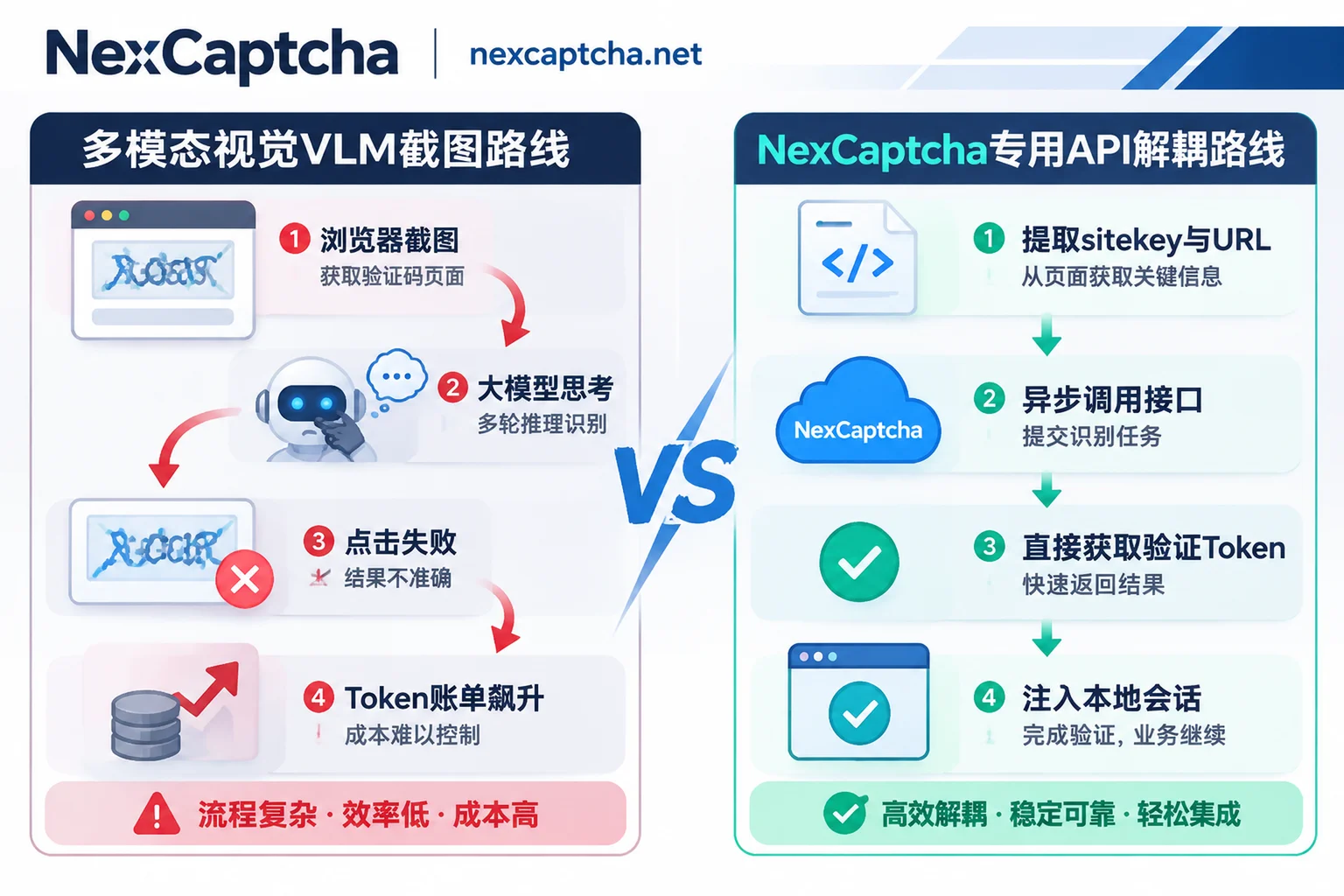
II. Architecture Decoupling: Let the Large Model Do "Scheduling", Leave Computing Power Challenges to Professional Interfaces
In mature enterprise-grade architectures (for a detailed cost comparison between self-built models and third-party services, see "Self-built CAPTCHA Recognition or Choose a CAPTCHA Solving Platform? Architecture Selection in Practice"), the core principle of AI Agent CAPTCHA handling is responsibility decoupling:
- AI Agent / Browser Execution Layer: Focuses on page navigation, DOM structure parsing, business logic judgment, and final data extraction.
- Dedicated CAPTCHA Recognition API (e.g., NexCaptcha): As an independent verification processing layer, receives the page URL (
websiteURL), site key (websiteKey), or challenge image, completes complex environment verification and image computation in an isolated high-reputation environment, and directly returns the finaltoken,cookie, recognized text, or coordinates to the Agent.
In this mode, the customer's own business requests, sessions, and cookies do not pass through the CAPTCHA solving service at all. After the Agent receives the returned token, it directly injects the form and submits it in the local browser session, which not only ensures the privacy and continuity of the business session but also completely bypasses the risk of CDP fingerprint exposure during the CAPTCHA rendering phase.
To adapt to different types of agent development paradigms, we can divide the integration solutions into two paths: "Hosted MCP Integration" and "Asynchronous API + WebSocket Orchestration".
III. Path 1: Zero-Code Integration, Empowering Agents with Autonomous Obstacle-Breaking Capabilities via Hosted MCP
If your team is using Claude Code, Claude Desktop, Cursor, Codex, VS Code, Gemini CLI, or custom Agent clients based on the Streamable HTTP protocol to perform autonomous exploration tasks, writing cumbersome interception scripts will slow down the iteration pace.
For this need, NexCaptcha provides an out-of-the-box hosted MCP service (for the underlying operating mechanism of the MCP protocol, you can read further "Make AI Agents Work Like Humans: Automated CAPTCHA Recognition via MCP Standard"):
- No Local Deployment: No need to install or maintain Node.js or Python processes on a local server; connect directly via a remote endpoint and authenticate using the API Key in the request header.
- Five Standardized Tools: The service includes five atomic tools: query products, query parameter models, create task, query task, query balance. When an Agent encounters an obstacle while browsing a web page, it can autonomously query the parameter structure required for the current CAPTCHA type, initiate a recognition task, and poll for the result.
- Transparent Billing Protection: Among the five tools, only calling "create task" incurs charges; querying the product catalog, parameter models, or task status is completely free; and when a task fails recognition or times out and expires, the system automatically refunds the balance, avoiding financial waste caused by Agent trial and error.
IV. Path 2: API + WebSocket Deterministic Orchestration for High-Concurrency Production Workflows
When the business enters large-scale price monitoring, SERP collection, or high-frequency automated regression testing, relying on the large model to autonomously decide when to call tools still has uncertainty (for how to prevent the Agent from infinite retries on exceptions, see "How to Handle CAPTCHAs in AI Agents: Tool Boundaries, Session Consistency, and Anti-Dead-Loop Design"). At this point, it is more recommended to use deterministic OpenAPI interfaces for interception at the Playwright / Puppeteer execution layer.
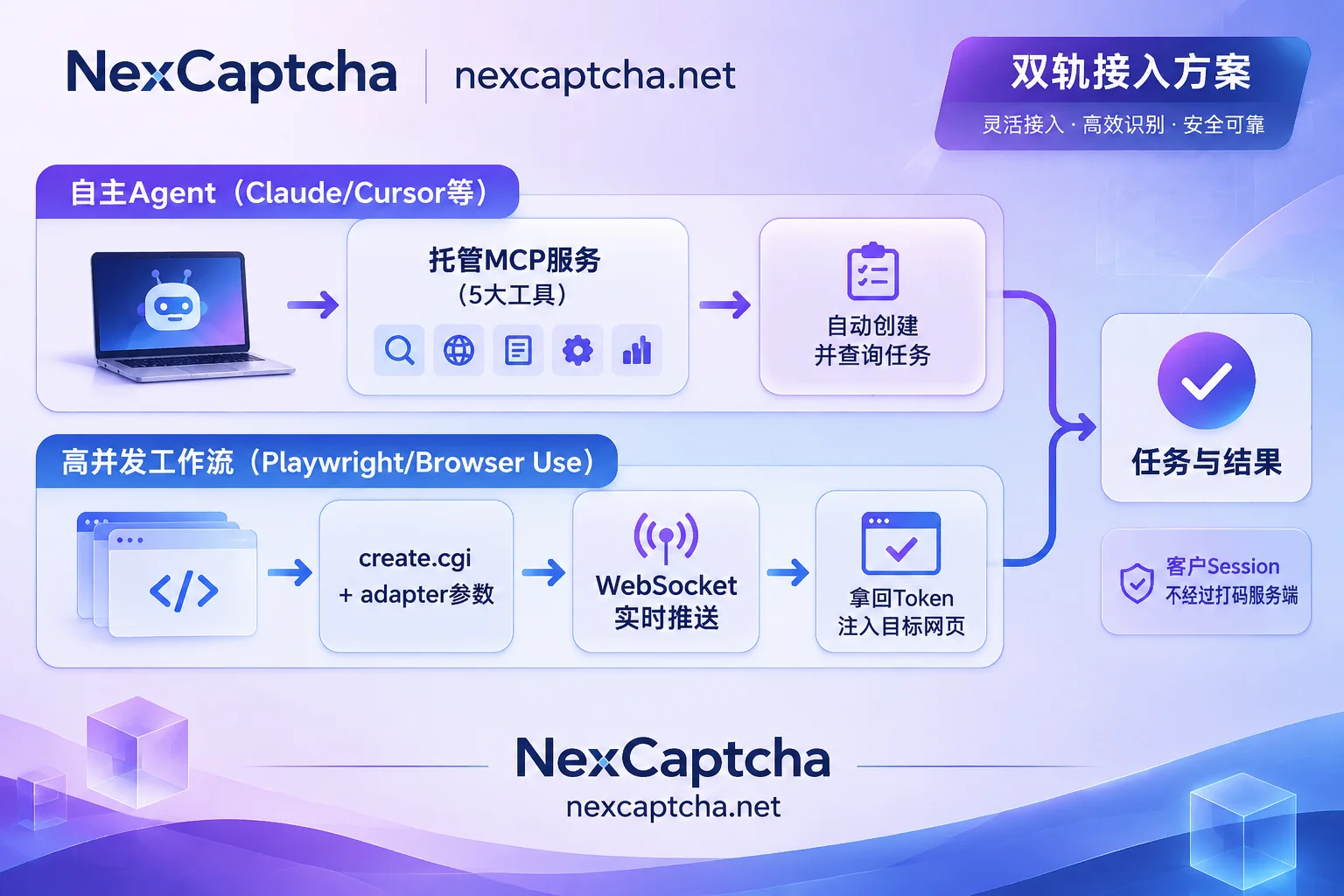
1. Unified Adapter Contract and Broad Type Coverage
In NexCaptcha's API design, tasks are uniformly created via create.cgi, results are queried via query.cgi, and the API Key is placed in the request header for authentication. Developers only need to select the corresponding product code from the supported types catalog and fill in the parameters for that type in the adapter field.
Currently, the platform natively supports reCAPTCHA v2/v3/Enterprise (including invisible), Cloudflare Turnstile, GeeTest v3/v4, FunCaptcha/Arkose, DataDome, AWS WAF, Imperva, Tencent, NetEase Yidun, Alibaba Cloud, MTCaptcha, Friendly Captcha, ALTCHA, Yandex SmartCaptcha, KeyCaptcha, Capy, Lemin, atbCAPTCHA, as well as various generic image, slider, point-and-click, rotation, and audio CAPTCHAs. If you encounter a long-tail customized type, you can also directly send samples to the platform for a quote.
2. Replace High-Frequency Polling with WebSocket Push to Tighten Agent Loop Time
In asynchronous task processing, tasks go through several states: "processing, success, failure, expired". Traditional getTaskResult periodic polling not only wastes network overhead but also lengthens the Agent's waiting time. By integrating NexCaptcha's WebSocket result push (for specific code implementation, see "How to Integrate Python CAPTCHA Recognition API: Asynchronous httpx Wrapper and WebSocket Push"), once recognition is complete, the server immediately pushes the token or coordinates to the client, maximizing the reduction of the agent's blocking time.
3. Flexible Proxy Strategy and Session Alignment
For target sites with different anti-scraping levels, some CAPTCHA types support optionally passing in the customer's own proxy, while some high-risk-control types (strongly bound to IP verification) must have the customer's own proxy passed in; if not passed, the system defaults to using the server's proxy pool to complete recognition. By aligning the exit proxy used by the Agent's browser with the proxy parameter passed in adapter, the probability of the token being rejected by the target site upon submission can be significantly reduced.
4. Smooth Migration from Traditional Platforms
For technical teams migrating from traditional crowdsourcing platforms like 2Captcha and Anti-Captcha, although it is not possible to seamlessly switch by merely replacing the domain name (the outer request structure and request header authentication logic need to be rewritten), NexCaptcha's API documentation clearly indicates the corresponding common task type name under each type (e.g., RecaptchaV2TaskProxyless), and the field naming inside adapter follows the familiar createTask system notation (e.g., websiteURL, websiteKey). It is recommended that teams first conduct dual-run verification according to traffic ratio during migration, and then switch all traffic after confirming that success rate and latency data align.
V. AI Agent CAPTCHA Handling Solution Selection Comparison Table
To help architects and procurement managers make quick decisions, we summarize and compare the three common handling methods as follows:
| Evaluation Dimension | Pure Multimodal Vision (VLM / Computer Use) | Traditional Manual Crowdsourcing CAPTCHA Platform | NexCaptcha (API + Hosted MCP) |
|---|---|---|---|
| Applicable CAPTCHA Scope | Limited to simple static graphics and basic point-and-click; cannot handle invisible verification like Turnstile/v3 | High accuracy for image point-and-click, but slow for invisible token processing | Covers invisible tokens (reCAPTCHA/Turnstile/WAF) and various slider/point-and-click |
| Response Latency and Blocking | Extremely slow (multi-round screenshot + large model inference takes seconds to tens of seconds) | Slow (depends on manual queue, usually 15~45 seconds) | Fast (automated API processing + WebSocket real-time result push) |
| Integration and Maintenance Cost | Complex prompt tuning, DOM changes or pop-ups easily lead to infinite loops | Requires writing custom polling scripts, no native Agent protocol support | Provides deployment-free hosted MCP and console online test bench, plug and play |
| Comprehensive Financial Cost | Extremely high (huge token consumption for multimodal high-resolution images, charges apply even on failure) | Per-call billing, but high latency often causes Agent sessions to time out and become invalid | Per-call billing, automatic balance refund on task failure or expiration, automatic discount when usage reaches threshold |
VI. Conclusion and Quick Start
Today, as AI Agents move into deep waters, letting large models hard-solve anti-scraping CAPTCHAs is both a misallocation of expensive inference computing power and a violation of the technical objective laws of modern invisible risk control. By integrating NexCaptcha as a standardized verification processing layer into the workflow, engineering teams can not only free agents from the quagmire of infinite retries but also significantly reduce the overall operating cost (TCO) of the automation system.
You can start integration verification immediately with the following steps:
- Get Free Test Credits: Go to the NexCaptcha registration page to create an account. Test credits are given upon registration, no card binding required, account balance is permanently valid with no minimum consumption or subscription fee restrictions (supports Alipay, WeChat, USDT, and corporate transfer; see Pricing for details).
- Zero-Code Test in Console: Log in to the console product catalog. Each CAPTCHA type is equipped with an online test bench; fill in the API Key to directly initiate a real task test on the web page.
- Integrate into Agent or Script: According to your tech stack, check the hosted MCP configuration guide or OpenAPI documentation. If you have any questions during architecture migration or long-tail sample adaptation, feel free to contact Telegram online customer service for technical support.



