
When discussing the evolution of anti-crawling and human verification, many teams focus on invisible verification and interactive verification. However, in enterprise RPA (Robotic Process Automation), data collaboration between government and financial systems, legacy ERP inspections, and long-tail public data collection (such as supply chain price comparison and vertical industry directory queries), image CAPTCHAs (ImageToText) still account for a very high interception rate.
Unlike early simple numeric or standard font CAPTCHAs, the image CAPTCHAs that remain today have already completed a "complexity evolution": high-frequency noise, hollow fonts, severe distortion and overlapping, dynamic GIF frame stacking, and even Chinese four arithmetic operations requiring semantic understanding (arithmetic CAPTCHAs).
Previously, in "How to Integrate CAPTCHA Recognition API: Base64 Specifications, Parameter Configuration, and Session Maintenance", we outlined the basic encoding and integration specifications. This article approaches from the perspective of high-complexity deformed images, RPA process fault tolerance, and hybrid verification architecture, and discusses how to use a professional CAPTCHA recognition API to overcome persistent challenges in long-tail automation scenarios.
1. Why Are Traditional Image CAPTCHAs Still the "Invisible Killer" of Automation and RPA?
When evaluating "From Anti-Crawling Upgrades to Enterprise Data Collection Strategies: Why Simple OCR Solutions Are Failing?", many engineering teams have tried to solve image CAPTCHAs with open-source OCR libraries or local lightweight deep learning models, but often face extremely high maintenance costs after actual deployment. This mainly stems from three major variant trends in modern image CAPTCHAs:
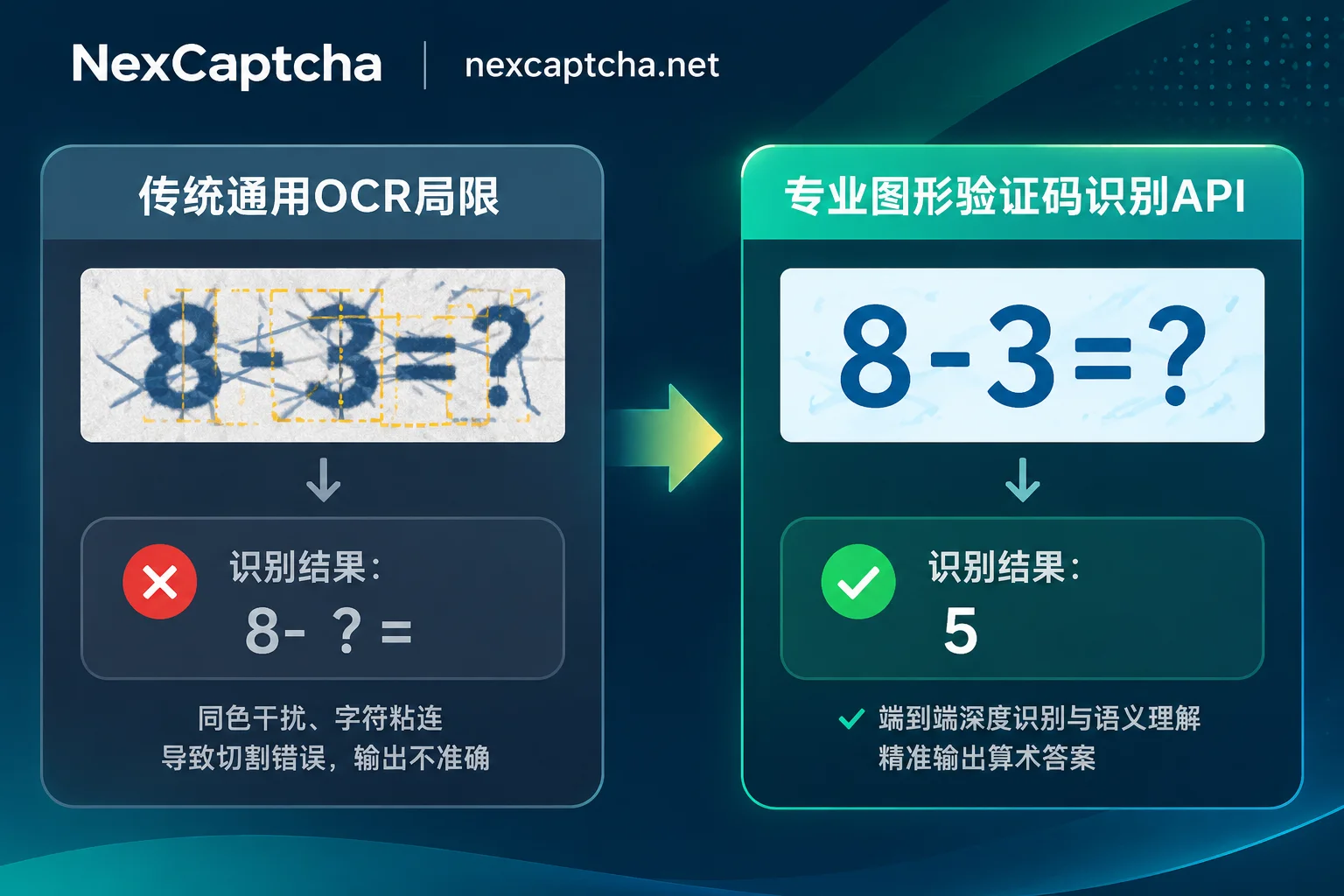
1. Strong Interference and Character Overlapping (Anti-Segmentation)
Traditional OCR relies on a pipeline of "binarization denoising + character segmentation + single-character classification". However, modern image verification widely uses interfering lines that run through and share the same color as the characters, hollow/shadow overlapping fonts, and perspective distortion, causing deep overlapping between characters. Once an error occurs in the segmentation stage, the subsequent recognition rate drops precipitously.
2. Arithmetic and Logic Q&A (Semantic Calculation)
In government queries, bidding announcement websites, and enterprise OA systems, image CAPTCHAs such as 叁 加 5 等于 ?, 18 - 9 = ?, or even those with color instructions (e.g., "Please calculate the sum of the red numbers in the image") are extremely common. Such images not only require recognizing characters but also require the interface to have semantic conversion and mathematical operation capabilities, directly returning the final calculation result rather than the literal original text.
3. "Non-Standard" Customization for Long-Tail Systems
In cross-platform price comparison or supply chain collaboration, an automated crawler or RPA robot may need to interface with hundreds of different small and medium-sized sites. Each site's image CAPTCHA has completely different dimensions, character sets (pure numbers, case-sensitive, rare Chinese characters), and background textures. If self-built model fine-tuning is adopted, each new site requires re-collecting samples, labeling, and training, and the R&D iteration cycle simply cannot match business needs.
2. Engineering Pitfalls: The "Image Capture and Session" Traps More Critical Than Recognition Rate
When integrating a CAPTCHA recognition API, many developers encounter the problem that "the characters returned by the interface are clearly correct to the naked eye, but submitting the form still prompts a CAPTCHA error." Besides the prohibition of secondary URL requests causing the server to refresh the answer emphasized in "How to Integrate CAPTCHA Recognition API: Base64 Specifications, Parameter Configuration, and Session Maintenance", there are three easily overlooked engineering details in complex scenarios:
- Transparent Channel (Alpha Channel) Turning Black Background Causes Recognition Failure
Some legacy systems generate PNG CAPTCHAs with transparent backgrounds and black fonts. If, during screenshot or canvas conversion in automation scripts, RGBA is incorrectly converted directly to RGB (defaulting to fill with pure black background), the entire image becomes all black, making it unreadable by any recognition interface. Before transcoding, always fill the transparent background with pure white. - High-DPI Screens (Retina / DPI Scaling) and CSS Cropping Offset
When running RPA / browser automation (such as Playwright, Selenium) on Windows Server or in containers, system-level scaling (e.g., 125%, 150%) or CSS pseudo-element occlusion often causes images captured byelement.screenshot()to have truncated edges (for example, the final "=" or operator symbol of an arithmetic problem is lost, turning+into-). It is recommended to prioritize Canvas export (toDataURL) or network-layer interception of the response body to obtain the original image. - Strictly Distinguish Session Responsibility Boundaries
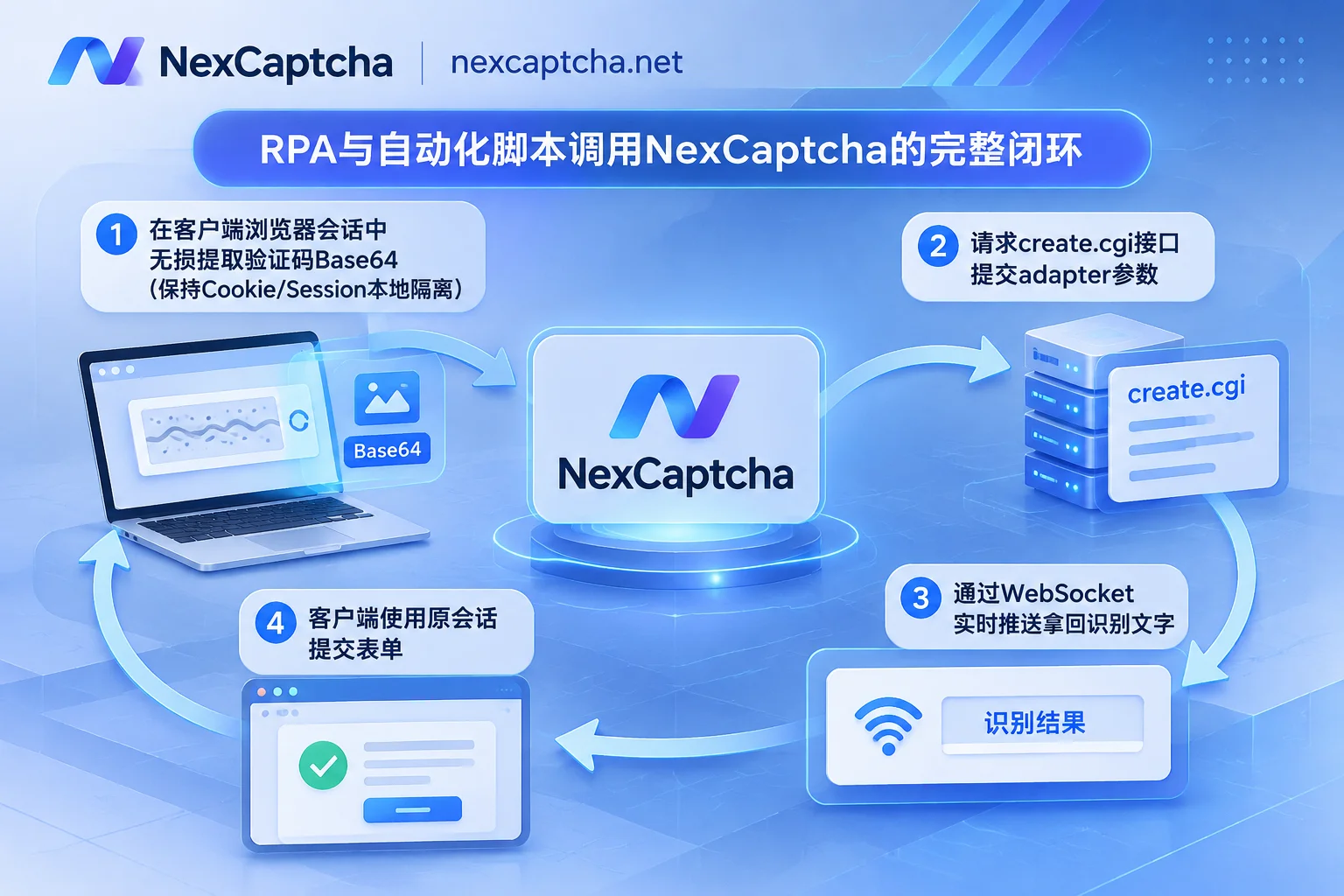
The core mechanism of NexCaptcha CAPTCHA recognition service is: it is only responsible for parsing the image or verification parameters into text, coordinates, or tokens; the customer's own business requests, Session, and Cookie do not pass through this service at all. This means that after obtaining the recognition result, your own client must submit it along with the form in the original Cookie context, thereby ensuring absolute security and isolation of the enterprise intranet or login state.
3. NexCaptcha CAPTCHA Recognition API Architecture and Integration Practice
In response to the above complex images and long-tail requirements, NexCaptcha has unified general image, arithmetic, slider, click, rotation, and even mainstream token-based verifications (such as reCAPTCHA, Cloudflare Turnstile, Geetest v3/v4, Alibaba Cloud, Tencent, etc.) into a standardized interface system.
1. Interface Mechanism and State Flow
NexCaptcha adopts an asynchronous task architecture, with the API Key uniformly placed in the HTTP request header (Header) for authentication:
- Create Task (
create.cgi): Select the corresponding product code according to the console's product catalog, and fill in the parameters for that type in theadapterobject. To facilitate teams migrating from other platforms, the interface documentation marks the corresponding common task type name under each type (for example, the commonImageToTextTaskfor image types), and the internal fields ofadapteralso follow common conventions (such as thebodyfield for passing image Base64). - Get Result (
query.cgior WebSocket push): A task includes four states:处理中,成功,失败,过期. In addition to polling the query interface, you can also directly establish a WebSocket connection to receive recognition results actively pushed by the server.
2. Why Recommend WebSocket Push for Image Recognition?
Many government or financial query systems have image CAPTCHAs with extremely short lifecycles (e.g., they expire if not submitted within 30 seconds after generation), and the system itself responds slowly during peak periods. Traditional HTTP polling not only wastes valuable time windows due to fixed intervals (e.g., checking every 2-3 seconds) but also generates a large amount of unnecessary network overhead during high-concurrency collection.
With NexCaptcha's WebSocket result push, once the underlying engine completes image parsing or arithmetic calculation, the result is pushed directly back to the client within milliseconds (for specific code encapsulation, refer to "How to Integrate Python CAPTCHA Recognition API: Asynchronous httpx Encapsulation, WebSocket Push, and Playwright Integration Practice"), maximizing the timeliness of form submission.
3. Zero-Code Testing in Console and Custom Quotation
Before formally writing code, developers can directly log in to the console. Each CAPTCHA type is equipped with an online test bench—simply fill in your API Key and upload a sample CAPTCHA image from the target system to immediately initiate a real task and intuitively verify whether the recognized text or arithmetic result is accurate.
If you encounter an extremely obscure industry-specific custom image CAPTCHA or special interaction type that is not found in the existing supported types list, you can directly send samples to customer service (Telegram consultation) for evaluation and custom quotation.
4. Empowering AI Agents and Intelligent RPA: Zero-Code Invocation via Hosted MCP
As enterprise automation evolves toward AI Agents, many teams have begun using large models to drive browsers for complex cross-system operations. However, when general multimodal large models face severely distorted CAPTCHAs or scenarios requiring precise pixel coordinates, they not only take extremely long to infer and incur high token costs but also easily produce "hallucinations" leading to consecutive input errors that trigger account lockouts (see "Self-Built CAPTCHA Recognition or Choosing a CAPTCHA Solving Platform? Architecture Selection Practice from Open-Source OCR, Large Model Invocation to Enterprise API").
To this end, NexCaptcha provides a hosted MCP service that requires no local deployment:
- Plug and Play: No need to maintain complex middleware locally; directly use API Key authentication. The official page already provides configuration examples for mainstream tools such as Claude Code, Claude Desktop, Cursor, Codex, VS Code, Gemini CLI, and other clients supporting Streamable HTTP can also directly connect.
- Five Standard Tools: Built-in five standard tools: query products, query parameter models, create task, query task, and query balance. When an AI Agent encounters an image CAPTCHA during automated testing, RPA, or public data collection, it can automatically trigger the MCP tool to complete recognition and fill in the form.
- Transparent Billing: During MCP invocation, only "create task" is charged per call; query operations are completely free; if a task fails recognition or expires, the system automatically refunds the fee to the balance.
5. Platform Smooth Migration and Cost Control Recommendations
For technical leads and procurement teams maintaining legacy CAPTCHA-solving scripts (e.g., those that integrated traditional crowdsourced CAPTCHA solving or old OCR platforms, refer to "How to Choose a Super Eagle Alternative: Architecture Evolution and Migration Practice from Screenshot Upload to Token Direct Solving"), it is recommended to follow these steps when migrating to NexCaptcha:
- Clarify Interface Format Differences: NexCaptcha's interface is not in the outer format of
createTask/getTaskResult. Existing code for platforms such as 2Captcha or Anti-Captcha cannot be migrated by simply replacing the domain name. You need to rewrite the outer routing (create.cgi/query.cgi) and request header authentication logic, but the parameter structure insideadaptercan largely reuse the original logic. - Dual-Run Verification by Traffic Ratio: When switching in the production environment, it is recommended to first route 10%-20% of task traffic to NexCaptcha through the configuration center, compare the end-to-end pass rates and time consumption of both sides, and then switch over fully after the data is fully aligned.
- Flexible Billing and Settlement System: NexCaptcha adopts a per-call billing model, with automatic refunds for failed or expired tasks; account balance never expires, with no monthly subscription fees or minimum consumption thresholds, and tiered discounts are automatically triggered when usage reaches thresholds. The system is priced in USD and supports Alipay, WeChat Pay, USDT, and corporate bank transfers (for specific unit prices and tiered rules, please refer to the official pricing page).
Compliance Statement: NexCaptcha only provides services for legitimate browser automation, QA regression testing, AI Agent development, and public data collection scenarios. It is strictly prohibited to use the interface for credential stuffing, account theft, bulk malicious registration, sending spam, evading security bans, payment fraud, or bypassing paywalls/DRM. Once a violation is found, the offending key will be immediately disabled without refund.
Conclusion
Whether it is an arithmetic image CAPTCHA requiring semantic calculation, a character CAPTCHA with heavy interference and overlapping, or a slider and token verification triggered in a mixed manner on the same site, a stable recognition foundation is key to ensuring the SLA of automated pipelines. Now you can go to the NexCaptcha registration page to create an account for free (registration grants test credits, no card binding required), upload your first CAPTCHA sample on the console's online test bench, and experience efficient, low-latency automated recognition services.



