
In public data collection (such as cross-border e-commerce price monitoring, SERP ranking tracking), QA automated regression testing, and AI Agent web interaction scenarios, Cloudflare Turnstile recognition has become a core issue that engineering teams cannot avoid. As Google fully incorporates traditional reCAPTCHA into Google Cloud and significantly reduces free quotas (see "reCAPTCHA Recognition API Practice: Enterprise Assessment System, v3 Low Score Diagnosis and High Concurrency Scheduling after GCP Full Incorporation"), many medium and large sites and SaaS platforms accelerated their migration to the free and visually puzzle-free Cloudflare Turnstile between 2025 and 2026.
If your team has already solved basic DOM mount detection, cData/chlPageData dynamic parameter extraction, and JS callback injection in the early stage (refer to our earlier article "How to Integrate Cloudflare Turnstile Recognition API: Rendering Detection, Dynamic Parameter Extraction and Callback Injection"), but recently still frequently encounters "the frontend successfully obtains the Token, but submitting the business form returns 400/403 rejection", or "after passing the first screen verification, subsequent AJAX/Fetch interfaces still pop up verification in an infinite loop", then the problem is usually no longer in frontend DOM operations, but has hit Cloudflare's fully tightened backend Siteverify verification and session-level clearance risk control system in 2026.
This article will disassemble Turnstile's latest risk control interception logic from the perspective of architecture evolution, and provide a high-availability engineering solution based on NexCaptcha captcha recognition service.
I. Three Major Risk Control Evolutions of Cloudflare Turnstile in 2026
To identify why the recognized result is rejected by the target site, we first need to understand the defense upgrades on both client and server sides of Cloudflare:
1. Full Popularization of Turnstile Spin and Siteverify Backend Verification
In the past, many long-tail sites only embedded the Turnstile component on the frontend but missed backend Token verification, or only did a simple non-empty check. In 2026, Cloudflare launched an upgraded Turnstile Analytics (intuitively exposing abnormal traffic of unverified Tokens) and the Turnstile Spin tool—developers only need to run a command in Claude Code or Cursor to automatically complete standard server-side POST /turnstile/v0/siteverify verification logic in the existing codebase.
This means that almost all integration points now strictly enforce backend verification:
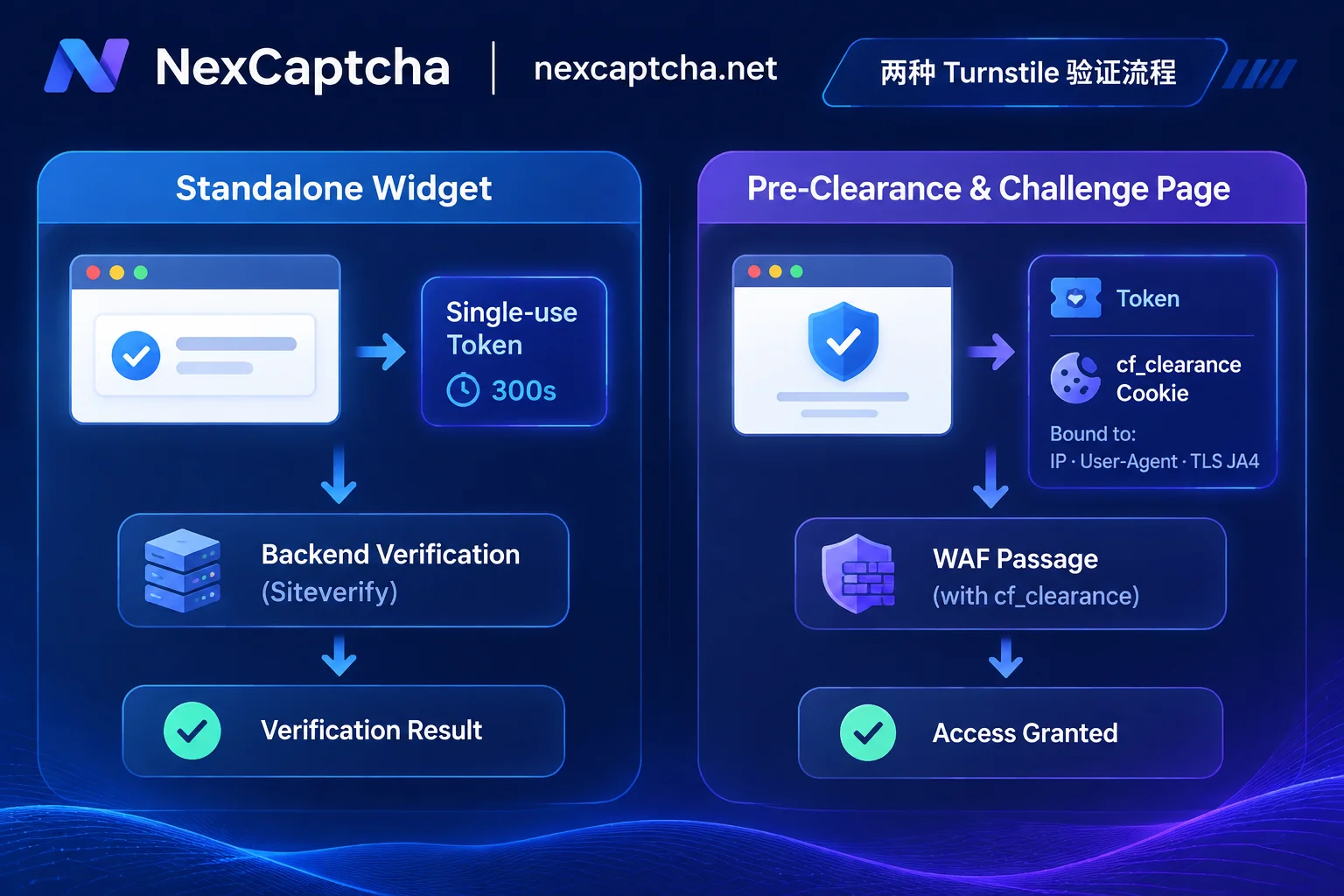
- Single-use and 300-second validity: Each Token is at most 2048 characters, valid for only 300 seconds (5 minutes) from generation, and can only be verified once by
siteverify. Repeated or timed-out submissions will directly triggertimeout-or-duplicate. - Remote IP and context comparison: Many backend frameworks (such as Supabase Auth or custom gateways) force
remoteip(the client request IP seen by the server) when callingsiteverify, and compare whether the returnedhostname,action, andcDatastrictly match the current business context.
2. Pre-Clearance and Tiered cf_clearance System
Current single-page applications (SPAs) widely adopt Turnstile's Pre-Clearance mode. When this mode is enabled for the component, passing verification not only produces a Turnstile Token for form submission but also writes a cf_clearance Cookie to the current domain for subsequent fetch() / XHR requests to directly pass through Cloudflare WAF.
More importantly, Cloudflare has clarified three security levels of Clearance (Interactive > Managed > Non-Interactive). The cf_clearance obtained from low-level challenges cannot bypass high-level WAF rules; meanwhile, Cloudflare introduced the Precursor continuous behavior verification engine in 2026, which continuously refreshes cf_clearance status throughout the session lifecycle based on client signals.
3. Subdomain Verification Link Extension
According to Cloudflare's 2026 changelog, when performing browser environment verification, Turnstile also initiates network requests to hagen.challenges.cloudflare.com or brunhild.challenges.cloudflare.com in addition to the original main challenge domain. If your automation container or proxy firewall is configured with an overly rigid domain whitelist that blocks these subdomain requests, it will cause the frontend component to silently degrade or issue invalid credentials marked as abnormal.
II. Precise Triage of Interception Forms: Standalone Component vs. Waf Challenge Page
Before writing an automated recognition scheduler, the first step must be to distinguish the two completely different forms at the interception triage layer (this is also a core principle in "Public Price Monitoring Captcha Handling Practice: Interception Triage, Session Alignment and High Concurrency Scheduling for Multi-platform Price Comparison Collection"):
| Comparison Dimension | Standalone Turnstile Widget | Full-screen Challenge Page (Cloudflare Challenge / Pre-Clearance) |
|---|---|---|
| Trigger Position | Within the target site's own login, registration, search, or checkout form | Directly returns HTTP 403/503 when accessing the page, or Fetch response header contains Cf-Mitigated: challenge |
| Core Parameters | websiteURL, websiteKey (and optional action, cData) | In addition to URL and Key, heavily relies on dynamically generated cData, chlPageData (pagedata) and userAgent for each rendering |
| Delivery Output | One-time Turnstile Token (filled into cf-turnstile-response and submitted with the form) | Token and corresponding cf_clearance Cookie, which need to be injected into browser or HTTP client session |
| Proxy and Environment Requirements | Whether to pass a custom proxy depends on whether the target site's backend verifies remoteip | cf_clearance strictly binds to IP, UA, and TLS (JA4) fingerprint, must maintain consistent session exit |
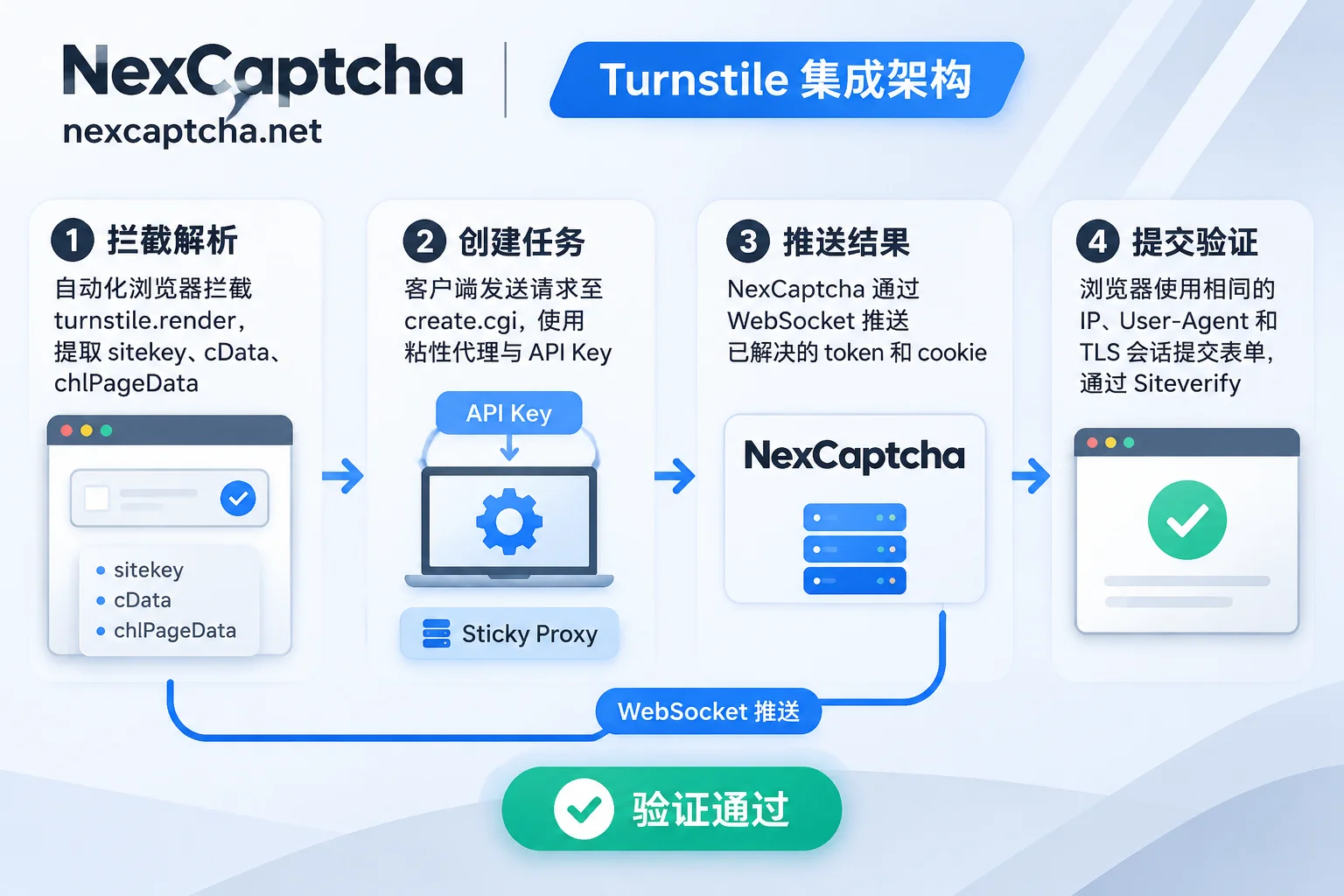
Among the captcha types supported by NexCaptcha, comprehensive interface support is provided for Cloudflare Turnstile and various WAF challenges. Developers do not need to maintain a huge fingerprint countermeasure rule base locally; they only need to pass the extracted page parameters to the API, retrieve the Token or Cookie, and complete the submission in their own session.
III. Why Is the Token Still Rejected? Four Elements of Session Alignment
In actual troubleshooting, over 80% of "recognition succeeded but submission failed" cases are not due to errors in the recognition result itself, but due to a split between the recognition environment and the submission environment (for detailed calculation logic of the three-layer success rate, please refer to "How to Calculate Captcha API Success Rate: Three-layer Caliber, Formulas and Effective Cost").
Since NexCaptcha's design principle is that the customer's own business requests, Session, and Cookie do not pass through this service, and the Token is submitted by the customer along with their own form, the following four dimensions must be aligned when integrating Turnstile:
- Exit Proxy IP Alignment:
The NexCaptcha interface supports optional proxy for some types and mandatory customer proxy for specific types (if not provided, the server's proxy pool is used by default). When the target site enablescf_clearancestrict verification or strictly comparesremoteipinsiteverify, be sure to pass the fixed session proxy (Sticky Proxy) used by your current collector when requesting the recognition interface, ensuring that the captcha-solving exit IP is exactly the same as the IP you later use to submit the form. - User-Agent and Request Header Alignment:
Whether submitting via Playwright/Puppeteer or downgrading to a pure HTTP client, theUser-Agentwhen submitting business requests must remain consistent with that when creating the captcha task. Never temporarily change UA or randomly rotate request headers after obtaining the result. - TLS and HTTP/2 Fingerprint Alignment:
When you need to reusecf_clearanceCookie for high-frequency public data collection, if you first obtain the Cookie via browser or interface and then directly stuff it into standard Pythonrequestsorurlliblibrary for requests, Cloudflare edge nodes will directly determine the Cookie invalid because Python's default JA4 TLS fingerprint and HTTP/2SETTINGSframe do not match the declared browser UA. In this case, you should continue to send requests within the same browser context, or use an HTTP client that supports simulating browser TLS fingerprints. - One-time Dynamic Parameters Must Not Be Re-rendered:
In full-screen Challenge mode,cDataandchlPageDataare one-time流水 parameters. If the native Turnstile script has already consumed and rendered this set of parameters in the browser, then sending the same set of parameters to the API will inevitably cause conflict errors. The correct approach is to intercept parameters early in page load via route interception or Hookwindow.turnstile.renderand block native rendering.
IV. Engineering Integration Practice: create.cgi / query.cgi and WebSocket Fast Push
Since Turnstile Token only has a 300-second lifespan and high-concurrency tasks are extremely sensitive to latency, traditional long-interval HTTP polling often wastes the precious valid time window. NexCaptcha adopts a unified create.cgi task creation and query.cgi result query architecture, and supports WebSocket result push (for asynchronous encapsulation techniques, we recommend reading "How to Integrate Python Captcha Recognition API: Asynchronous httpx Encapsulation, WebSocket Push and Playwright Joint Debugging Practice").
1. Interface Structure and Smooth Migration Design
The NexCaptcha interface authenticates the API Key in the request header, selects the type by product code in the request body, and fills in the specific parameters of that type within the adapter object.
- Friendly to migrating teams: If you are migrating from traditional platforms such as 2Captcha or Anti-Captcha (see "How to Choose a 2Captcha Alternative: From Crowdsourcing Latency to WebSocket Push and Adapter Smooth Migration Practice"), you will find that the NexCaptcha API documentation indicates the corresponding passing task type name under each type (such as
TurnstileTaskProxyless, etc.), and the fields insideadapterdirectly follow the naming conventions of thecreateTasksystem (such aswebsiteURL,websiteKey). - Migration suggestion: Since the outer request paths (
create.cgi/query.cgi) and request header authentication methods are different, existing code cannot simply change the domain and run directly. It is recommended that the technical team encapsulate a lightweight Adapter at the gateway layer, first run dual traffic at a 10%~20% ratio, and then switch over fully after verifying that the pass rate and latency data match completely.
2. Quick Verification with Online Test Bench
Before writing code for joint debugging, you do not need to set up a local environment for blind testing. Simply open the console product catalog and find Cloudflare Turnstile; each type is equipped with an online test bench—fill in your API Key and the extracted site parameters to initiate a real task on the web page and visually inspect the returned Token or Cookie structure.
3. Task State Machine and Billing Guarantee
In the scheduler design, only branch processing around the four core states returned by the interface is needed:
处理中(processing): Keep waiting (recommended to use WebSocket to listen for push, reducing invalid polling).成功(success): Immediately extract Token, inject into form, and trigger business submission.失败(failed)/过期(expired): Trigger retry strategy (such as refreshing page to re-capture dynamic parameters). NexCaptcha adopts a per-use deduction, automatic refund to balance on task failure or expiration mechanism, ensuring that your testing and production budgets only pay for successfully recognized results.
V. AI Agent and R&D Efficiency: Zero-code Takeover of Turnstile via Hosted MCP Service
In 2026, more and more teams use Claude Code, Cursor, VS Code, or self-developed AI Agents for automated inspection, QA testing, and web data collection (for background, see "AI Agent Captcha Handling Guide: Why Multimodal Vision (VLM) Cannot Handle Invisible Risk Control, and How to Break Through with API + MCP").
Facing Turnstile, an invisible/checkbox verification that relies on underlying environmental signals, letting a vision large model (VLM) "look and click" is not only token-costly but also highly prone to triggering infinite loops due to automation traces. To this end, NexCaptcha provides an out-of-the-box hosted MCP service:
- No local deployment: Hosted based on the Streamable HTTP standard, authentication is completed simply by configuring your API Key. The official page directly provides ready-to-use configuration for Claude Code, Claude Desktop, Cursor, Codex, VS Code, Gemini CLI.
- Five standard tools working together: Built-in five tools: query products, query parameter models, create task, query task, and query balance. When an AI Agent encounters Turnstile interception while operating a browser, it can autonomously first call "query parameter models" to confirm which DOM attributes need to be extracted, then call "create task" and "query task" to retrieve the Token and inject it into the page.
- Transparent billing: Among the 5 tools, only "create task" incurs charges; query tools are completely free, and tasks that fail or expire are also automatically refunded.
VI. Summary and Integration Suggestions
To handle Cloudflare Turnstile recognition in 2026, the technical focus has shifted from simply "clicking the checkbox" to "accurately distinguishing Standalone and Challenge forms + strictly aligning proxy IP and session fingerprints + millisecond-level asynchronous scheduling to beat the Siteverify time limit".
Whether you are an architect responsible for large-scale public data collection, a QA engineer maintaining CI/CD automated testing pipelines, or a technical lead conducting TCO cost accounting and migration for a captcha platform (see Pricing and Billing Description), you can quickly start verification through the following steps:
- Go to the NexCaptcha registration page to create an account and obtain an API Key (registration includes free test credits, no card binding required, balance never expires, no monthly subscription fees or minimum consumption limits, automatic tiered discounts when usage reaches thresholds, supports Alipay, WeChat, USDT, and corporate transfer).
- Refer to the Open API documentation or run your first Turnstile recognition task on the console online test bench.
- If you encounter difficult scenarios in parameter extraction or high-concurrency proxy coordination on specific sites, you are also welcome to browse the Industry Solutions page or directly communicate with our engineering team via Telegram online customer service for custom solutions.



