
In public data collection (e.g., e-commerce price comparison, SEO ranking monitoring), QA automation regression, and RPA workflows, slider CAPTCHAs are one of the most common human verification forms. Many development teams, after integrating a slider CAPTCHA recognition API, often encounter two tricky problems: first, the API returns the gap coordinates, but the script drags the slider and always misses by a few pixels, unable to fit perfectly; second, the slider position is perfectly aligned, but releasing the mouse still prompts "Verification failed, please try again."
These issues usually arise because the architecture does not distinguish between "pure visual coordinate puzzle" and "strict risk-control behavior verification," or because the conversion relationship between front-end DOM rendering and original image dimensions is ignored. This article, from an engineering implementation perspective, breaks down the two integration modes of slider CAPTCHA recognition APIs, coordinate conversion details, and anti-risk-control fallback design.
I. Two API Modes for Slider CAPTCHAs: Get Coordinates or Get Token?
Although slider CAPTCHAs on web pages look similar (all involve dragging a slider to fill the gap in the background image), the underlying verification logic is completely different. Before calling an automated CAPTCHA solving API, the first step is to determine which type the target site's slider belongs to, and thus decide whether to use "coordinate mode" or "token mode."
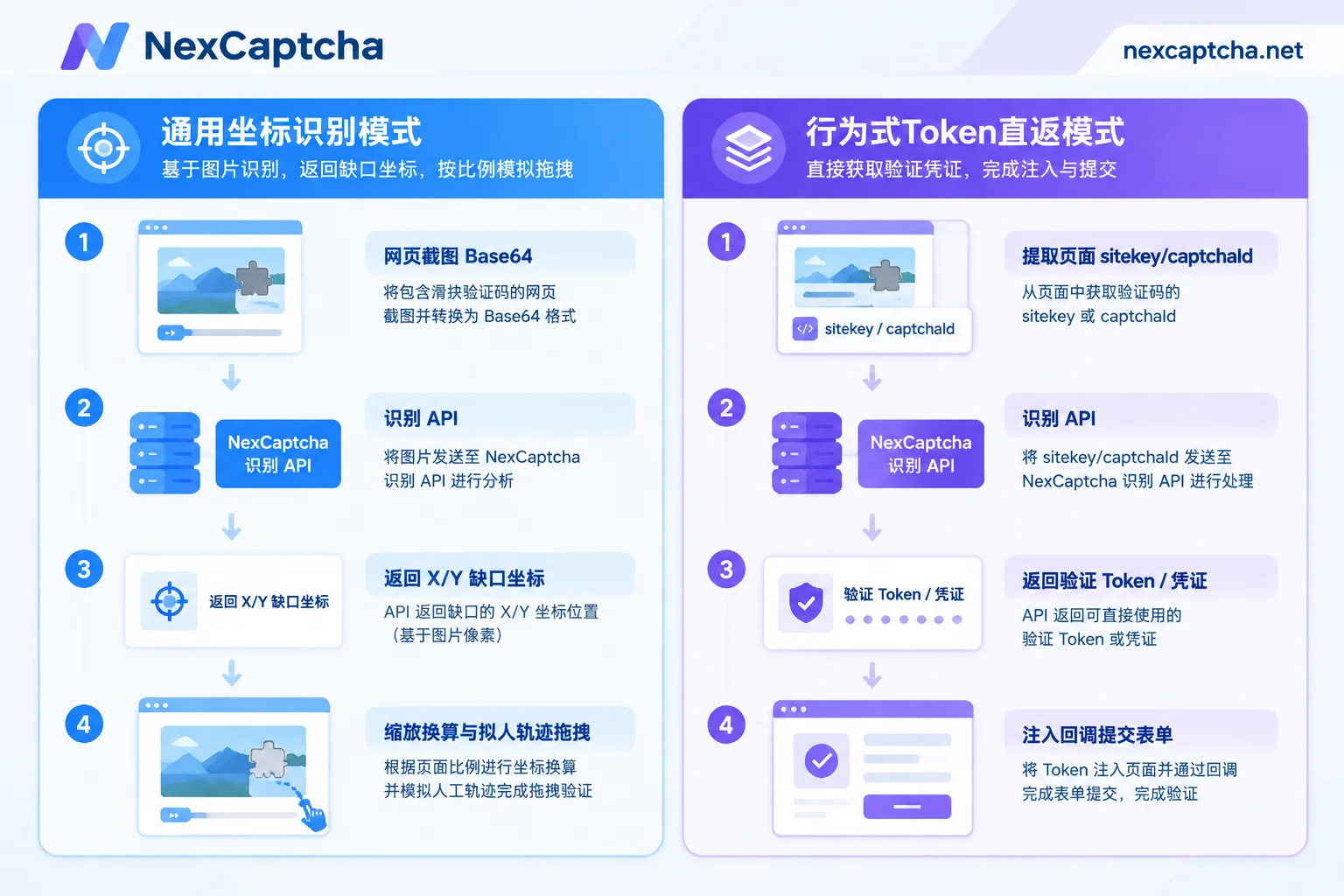
1. Generic Coordinate Recognition Mode (Input Image → Return X/Y Coordinates)
- Applicable scenarios: Self-developed slider components, open-source front-end puzzle plugins, conventional business systems with medium risk-control strength.
- Workflow: Your automation script (e.g., Playwright, Puppeteer, or Selenium) extracts the background image and slider image from the page (or directly captures the CAPTCHA area), converts them to Base64 encoding, and sends them to the recognition API (for image encoding details, refer to "How to Integrate an Image CAPTCHA Recognition API: Base64 Specifications, Parameter Configuration, and Session Persistence"). The API recognizes the gap position and returns coordinates, and then your script controls the mouse to simulate dragging to complete verification.
2. Behavior-Based Token / Credential Direct Return Mode (Input Page Parameters → Return Verification Credential)
- Applicable scenarios: GeeTest (v3/v4), Tencent Waterproof Wall, NetEase Yidun, Alibaba Cloud, DataDome, AWS WAF, and other mature commercial behavior CAPTCHAs.
- Why can't you just rely on coordinate dragging? The core of these CAPTCHAs is not the front-end puzzle, but the back-end multi-dimensional behavior modeling. The front-end JS SDK collects the complete trajectory array (Track) from mouse press to release, sliding acceleration, dwell time, device fingerprint (Canvas/WebGL), and hundreds of other dimensions, encrypts and packs them, and sends them to the server for verification. Simply using automation frameworks'
dragAndDropmechanical sliding is easily identified as machine behavior. - Workflow: Directly select the corresponding product type in the API (see the supported types page or the console product catalog), and pass in the page URL (
websiteURL) and initialization parameters (e.g.,gt,challenge,captchaId, etc.). The API directly returns the Token, verification credential, or Cookie required to pass verification. Your script only needs to inject the credential into the front-end callback or submit it directly with the business form (for specific differences in GeeTest, you can read "Differences Between GeeTest v3 and v4: Initialization, Parameters, Secondary Verification, and Architectural Differences in Automation Integration").
II. Coordinate Mode Implementation Details: Why Does the Coordinate Align but the Puzzle Doesn't Fit?
When you use a generic slider recognition API and get the returned x coordinates, passing the values directly to the mouse movement function often fails. In engineering implementation, you must go through the following three-step calibration:
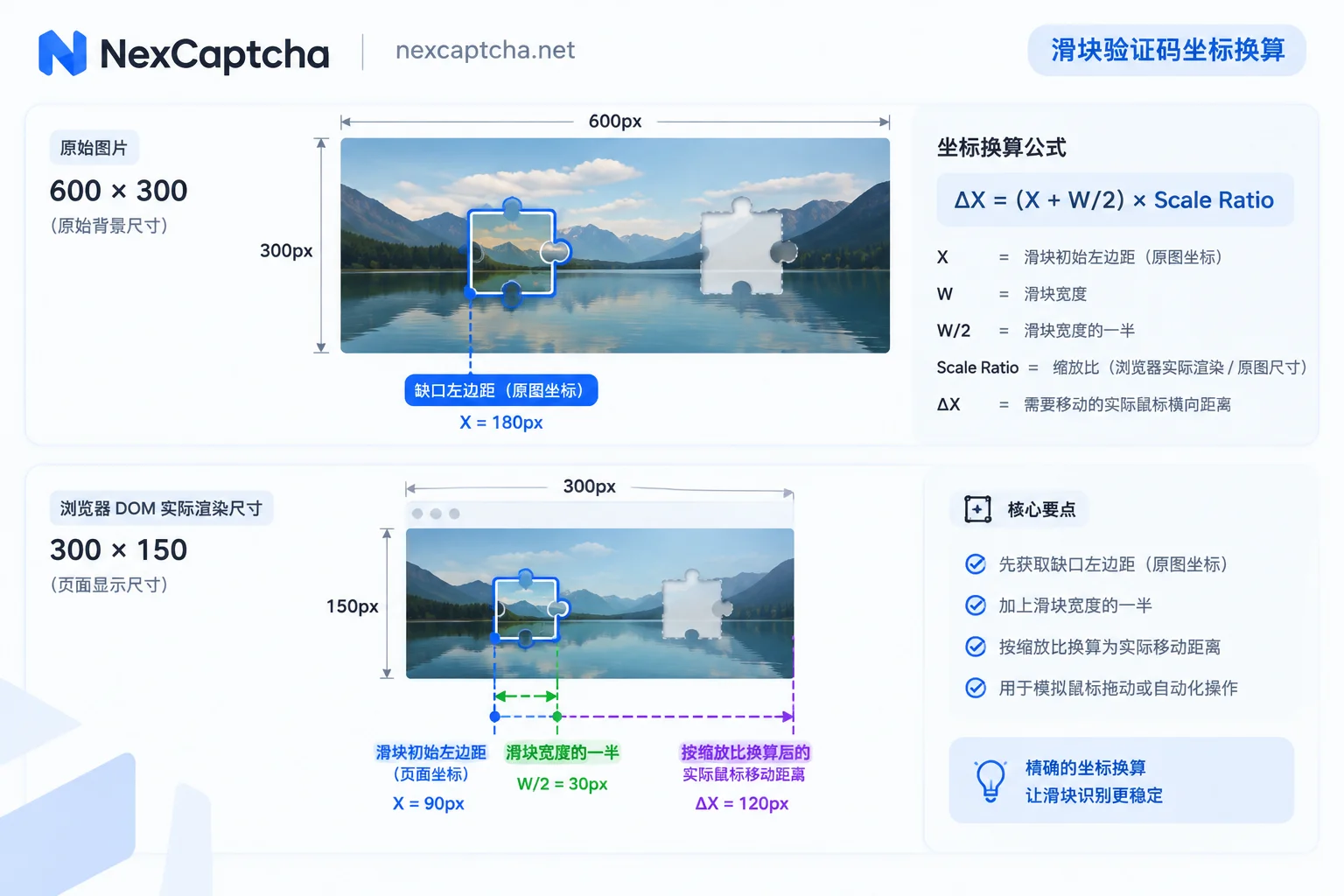
1. Scale Ratio Between Original Image Size and DOM Rendered Size
Many websites deliver CAPTCHA background images with a resolution of 600×300 or 680×390, but the front-end displays them scaled to 300×150 or 340×195 via CSS.
- If you download the original image URL and send it to the recognition API, the coordinates returned by the API are calculated based on the original image size.
- When performing mouse drag in the browser, the movement distance must be based on the actual rendered width of the DOM element.
Conversion formula:
// 获取图片在页面上的实际渲染宽度与原始宽度
const renderWidth = bgElement.clientWidth;
const naturalWidth = bgElement.naturalWidth;
const scale = renderWidth / naturalWidth;

// 实际需要移动的基础距离
const targetX = apiResultX * scale;
2. Deduct Slider Initial Offset and Center Point Conversion
After obtaining the scaled coordinates, you also need to confirm two things:
- Does the API return the left edge or the center point of the gap? If the API returns the center point coordinates of the groove, and you calculate the movement distance of the slider's left edge, you need to subtract half the slider width (e.g.,
distance = targetX - (sliderWidth / 2)). - Does the slider have an initial left margin (Initial Offset) on the canvas? Most puzzle sliders are not flush with the leftmost edge of the background image (
x = 0) in the initial state; they are usually5pxto15pxaway from the left edge. Therefore, the final movement distance should be:最终滑动距离 = 缺口左边缘渲染坐标 - 滑块初始左边缘偏移量.
3. Human-Like Drag Trajectory Design
Even for sliders with medium risk control, teleporting (one-step to target) or absolutely uniform linear movement will trigger front-end interception. When controlling the mouse via Puppeteer or Playwright (for integration details, refer to "How to Integrate Puppeteer with CAPTCHA APIs: From Parameter Extraction and Token Injection to Target Site Rejection Troubleshooting"), it is recommended to add basic physical motion characteristics:
- Variable speed movement: Accelerate for the first 70% of the distance, decelerate and fine-tune for the last 30%.
- Overshoot and backtrack: Simulate human visual error, first slide past the target position by
2~4px, pause for100~200ms, then drag back to the exact position. - Y-axis micro-jitter: When humans drag the mouse horizontally, the Y coordinate inevitably fluctuates randomly by
±1~2px; it should not remain rigidly aty = 0.
III. NexCaptcha Slider Recognition API Integration Process
NexCaptcha unifies various generic sliders and mainstream vendors' behavior CAPTCHAs into a standard asynchronous API system. Customers' own business requests, sessions, and cookies do not pass through the CAPTCHA solving server, ensuring session privacy and consistency.
1. API Call Specifications
- Authentication: Place the obtained API Key in the HTTP request header.
- Create task (
create.cgi): Select the corresponding product code according to the API documentation, and fill in the parameters for that type in theadapterobject. To facilitate smooth migration from other platforms, the documentation annotates the corresponding common task type names under each type, and the internal fields ofadapterfollow the familiar naming conventions such aswebsiteURL,websiteKey, etc. - Get result (
query.cgior WebSocket): Tasks have states such as processing, success, failure, and expired. You can poll for results viaquery.cgi, or establish a WebSocket connection to receive completion pushes in real time, eliminating the overhead of high-frequency polling (if you encounter latency fluctuations, refer to "How to Handle CAPTCHA API Timeouts: Distinguish Four Types of Timeouts, Then Decide Retry, Stop-Loss, and Submission Timing").
2. Python Integration Example (Creating and Querying Tasks)
The following code shows the skeleton logic for submitting a task and polling for results via the HTTP API (for more language details, see "Python CAPTCHA Recognition API Integration: Task Submission, Polling, Exception Handling, and Result Injection"):
import time
import requests

API_KEY = "YOUR_NEXCAPTCHA_API_KEY"
BASE_URL = "https://app.nexcaptcha.net/openapi"

headers = {
    "Authorization": f"Bearer {API_KEY}",
    "Content-Type": "application/json"
}

# 1. 创建滑块识别任务(具体 product 编码与 adapter 字段请对照接口文档)
payload = {
    "product": "YOUR_PRODUCT_CODE",
    "adapter": {
        "websiteURL": "https://example.com/login",
        # 通用滑块可传图片 Base64,行为滑块可传 gt/challenge 或 captchaId 等参数
    }
}

create_resp = requests.post(f"{BASE_URL}/create.cgi", json=payload, headers=headers).json()
task_id = create_resp.get("taskId")

# 2. 轮询查询结果(生产环境也可使用 WebSocket 推送)
result_data = None
for _ in range(30):
    time.sleep(2)
    query_resp = requests.get(f"{BASE_URL}/query.cgi", params={"taskId": task_id}, headers=headers).json()
    status = query_resp.get("status")

    if status == "success":
        result_data = query_resp.get("result")
        break
    elif status in ("failed", "expired"):
        raise RuntimeError(f"任务未成功,状态: {status}")

print("识别结果:", result_data)
Online debugging tip: Before writing actual code, it is recommended to log in to the console and use the built-in online test bench. Each CAPTCHA type provides a visual form; fill in your API Key to launch a real task and quickly verify whether parameter extraction is correct.
IV. Production Anti-Risk-Control: Proxy Consistency and "Slider Automatic Upgrade" Fault Tolerance
In continuously running data collection, price comparison, and automated testing scenarios, merely getting a single demo to work is not enough; you also need to handle the following two production-level boundary issues:
1. Proxy IP and Network Egress Strategy
Some high-risk-control CAPTCHAs verify whether the IP that obtained the CAPTCHA matches the IP that ultimately submits the business form. When calling the NexCaptcha API, some types support optionally passing the customer's own proxy, while some strictly verified types require the customer's proxy; if not provided, the server's proxy pool is used by default. If the business side receives the Token but submission is rejected by the target site, priority should be given to checking whether the egress IP and User-Agent on both ends are consistent (see "How to Troubleshoot Verification Failure After CAPTCHA Token Return: Time Validity, Parameters, Injection, Score, and IP Layer-by-Layer Localization").
2. Defense Mechanism Against "Slider Dynamically Upgrading to Click"
Many mainstream behavior CAPTCHAs (such as NetEase Yidun, GeeTest, etc.) now enable intelligent dynamic switching strategy by default: when the same IP or device fingerprint triggers verification at high frequency in a short time, or when two consecutive sliding trajectories are suspicious, the front-end popup will seamlessly upgrade from "sliding puzzle" to "text click," "icon click," or "reasoning puzzle."
If the automation script hardcodes "only find slider element," it will crash with an error once the upgrade is triggered. A robust engineering approach is:
- Multi-branch feature detection: After the CAPTCHA popup is triggered, first determine the specific challenge type currently rendered (slider, text click, or icon click) through DOM selectors or network request interception.
- Dynamic routing API: NexCaptcha also supports click, rotation, graphic, and composite CAPTCHAs from major vendors. The script can dynamically switch the product code and
adapterparameters passed increate.cgibased on the detected challenge type, achieving adaptive fallback. - AI Agent integration solution: If your automation workflow is driven by a large model-based AI Agent (e.g., using Claude Code, Cursor, VS Code, or Gemini CLI), you can directly integrate the hosted MCP service provided by NexCaptcha. No local deployment is required; with API Key authentication, the Agent can autonomously call the five tools "query products, query parameter models, create task, query task, query balance," flexibly responding to sudden CAPTCHA type changes on the page (refer to "How AI Agents Handle CAPTCHAs: Tool Boundaries, Session Consistency, and Dead Loop Prevention Design").
V. Cost Control and Low-Risk Migration Recommendations
For technical leaders evaluating CAPTCHA solving platforms or planning to migrate from platforms like 2Captcha, Anti-Captcha, CapSolver, etc., cost transparency and switching stability are crucial:
- Pay per valid result: NexCaptcha adopts a pay-per-use model; only task creation is charged, and failed or expired tasks automatically refund the balance; account balance never expires, with no monthly subscription fees or minimum spending thresholds. After reaching a usage threshold, tiered discounts are automatically applied (for specific unit prices and discount tiers, please refer to the pricing page).
- Dual-run verification for smooth switching: Since different platforms have differences in outer request formats and status code definitions, migration requires rewriting the outer request and authentication logic. It is recommended to first align parameters in a test environment, then run dual traffic in production at a small percentage of 5%~10%, comparing latency, success rate, and effective cost per thousand between the two sides. Once the data matches, switch over completely.
If you are looking for a stable and responsive slider CAPTCHA recognition solution for your automation project, you can visit the registration page to get an API Key (sign up and receive test credits, no credit card required), with support for Alipay, WeChat, USDT, and corporate bank transfers. For custom sliders not in the sample list or integration questions, you can also directly contact Telegram customer service to send samples for quotation and technical discussion.



