
In public data collection (e.g., e-commerce price comparison, SEO ranking monitoring), QA automated regression testing, and AI Agent web interaction scenarios, click captchas are one of the most common interactive interception methods. Whether it's a word-order click requiring "click the Chinese characters in order" or an icon/grid click requiring "click all specified targets in the image," if not handled properly, the automation pipeline will get stuck on the verification popup.
Previously, in "How to Integrate a Slider Captcha Recognition API: Coordinate Mode vs Token Mode Selection, Scaling Conversion, and Trajectory Anti-Interception", we discussed distance calculation for single-axis sliding. The difficulty of click captchas lies in: it not only involves multi-target localization in a 2D plane (X/Y axes) but also heavily relies on the semantic association between "prompt instructions" and the "background image," as well as strict click order.
This article will provide a complete engineering breakdown of the click captcha recognition API integration process: from standardized collection of images and prompts, API calls, coordinate space conversion, to anti-bot details in simulated clicks.
I. Why is building your own click captcha recognition model often difficult to maintain?
Many technical teams initially try to use open-source vision libraries (e.g., two-stage solutions based on YOLO + Siamese networks) or locally deployed multimodal large models (VLMs) to recognize click captchas. However, in production environments, self-built solutions typically encounter three bottlenecks:
- Rapid iteration of character sets and icon samples: Major vendors (e.g., Geetest v3/v4, NetEase Yidun, Tencent Waterproof Wall) regularly update artistic fonts, rare characters, 3D distorted icons, and background interference textures. Fixed-weight open-source models experience a cliff-like drop in accuracy every few weeks.
- High cost of semantic reasoning: When encountering prompts like "Please click the objects in the image that can be used for drinking water" or complex idiom word-order restoration, traditional CV models cannot understand semantics. Locally deployed multimodal large models not only require high GPU memory costs but also have inference times that can slow down high-concurrency collection queues.
- Coexistence of multiple forms: The same target site may dynamically switch between generic image click, Geetest click, or rotate/slider verification based on risk control levels.
By integrating a unified captcha recognition API service, development teams can delegate complex target detection and semantic matching to cloud APIs, pay per use, and automatically receive refunds for failed or expired tasks, allowing them to focus on core business logic.
II. Two Integration Paths for Click Captchas: Coordinate Mode vs Protocol Token Mode
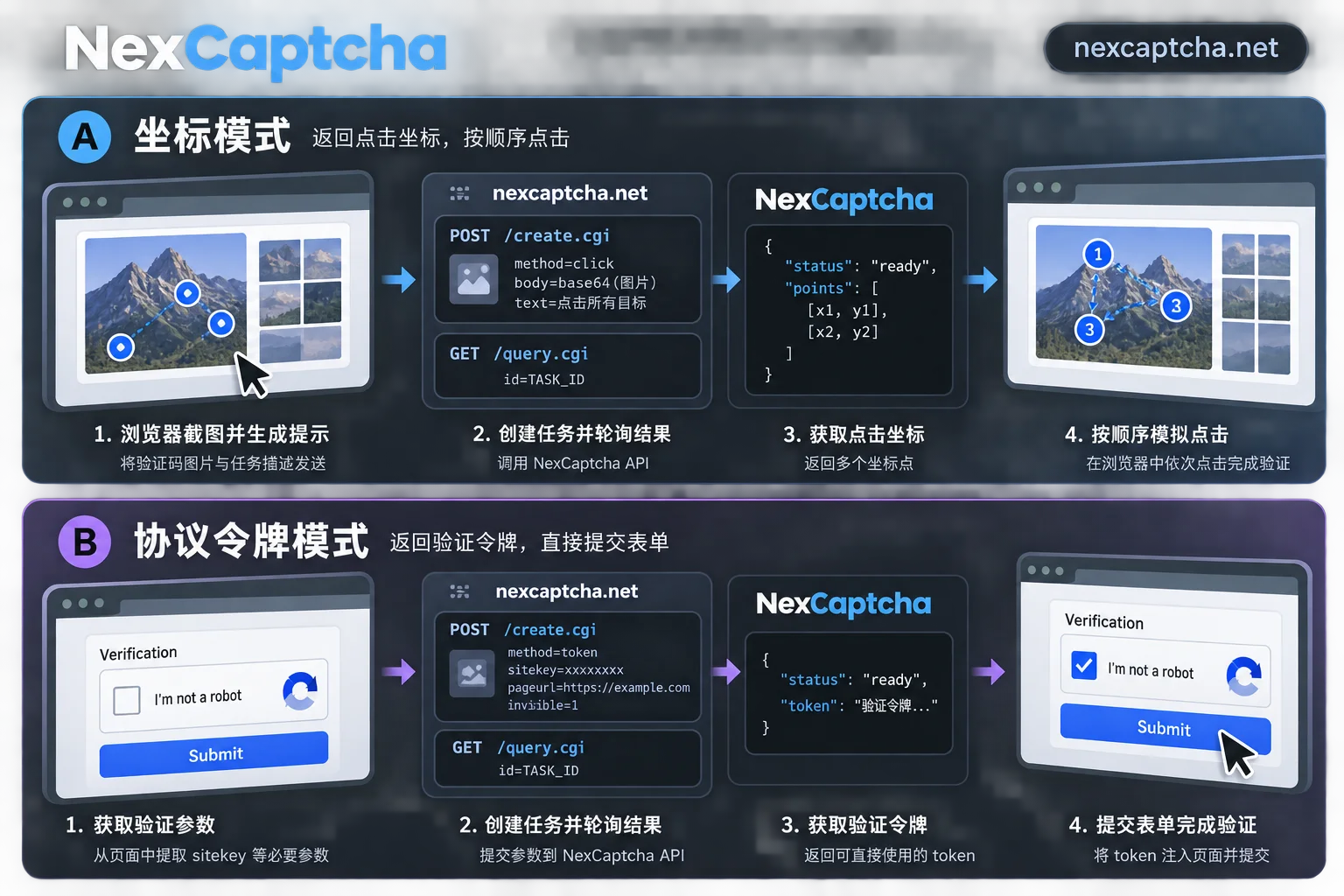
Before calling a click captcha recognition API, first determine which type of protection the target page uses and choose the corresponding integration mode (you can check on the NexCaptcha supported captcha types page):
- Path A: Generic Coordinate Recognition Mode (returns
[(x1, y1), (x2, y2), ...])
Suitable for various self-developed click boxes, customized graphic clicks, or scenarios where you want to directly simulate real mouse clicks via Playwright / Puppeteer / Selenium. The client captures the captcha image and prompt information and sends them to the API, which returns a sequence of target center coordinates for the browser automation script to click. - Path B: Vendor Protocol Token Mode (returns encrypted credentials / Token)
Suitable for standard commercial captchas like Geetest v3/v4, Tencent, NetEase Yidun, FunCaptcha/Arkose, hCaptcha, etc. For such components, besides screenshot clicking, you can also directly extract page initialization parameters (e.g.,websiteURL,gt,challenge, orcaptchaId) and send them to the API to directly obtain a verification token, which is then submitted with the business form. (For a detailed comparison of Geetest architecture, refer to "Differences Between Geetest v3 and v4: Initialization, Parameters, Secondary Verification, and Architectural Differences in Automation Integration").
The following sections will focus on the coordinate recognition and simulated click chain, which is the most universal and most prone to engineering detail errors.
III. Core Pain Point 1: How to Properly Extract Background Image and Prompt?
More than half of click captcha recognition failures are due to non-standard submitted images. Unlike pure character captchas, click captchas contain two information sources: the background area to be clicked and the prompt area telling what to click.
When collecting data for submission, follow these guidelines (for detailed encoding requirements, refer to "How to Integrate an Image Captcha Recognition API: Base64 Specifications, Parameter Configuration, and Session Maintenance"):
1. Distinguish Between "Text Prompt" and "Image Prompt"
- Text instruction prompt: For example, the DOM node directly contains plaintext
请依次点击:“春”、“花”、“秋”、“月”. In this case, simply capture the clean background image as Base64 and pass the prompt text as a text parameter toadapter. Small image/icon prompt: To prevent prompts from being directly extracted from the DOM, many click captchas render the prompt as a separate small image (e.g., 3-4 small icons or artistic character slices at the bottom). There are usually two parameter submission methods (refer to the model description for the corresponding product code in the console product catalog):
- Combine the background image and the bottom prompt area into one complete image and submit;
- Or, according to API field requirements, submit the main image Base64 and prompt image Base64 separately.
2. Prefer Original Image or Precise Screenshot of Container Node
- Avoid full-screen screenshot cropping distortion: Do not capture the entire browser viewport and then estimate pixel cropping. Instead, use the automation framework to locate the captcha background image's
<img>or<canvas>element and take an element-level screenshot (e.g., Playwright'slocator.screenshot()). - Remove irrelevant overlays: Before screenshotting, ensure the captcha image is fully loaded and there is no "loading" spinner or mouse hover semi-transparent overlay blocking the target text.
IV. API in Action: Using create.cgi and query.cgi to Get Click Coordinates
NexCaptcha uses a unified asynchronous task architecture: create a recognition task via create.cgi, then poll results via query.cgi (or receive push via WebSocket). The API Key is authenticated in the HTTP request header.
Note: NexCaptcha's captcha solving API only handles recognition and returns results. Customer business requests, sessions, and cookies remain in the local session and do not pass through the solving server, ensuring business environment isolation and security.
Below is a reference code framework for calling the click captcha recognition API with Python and clicking using Playwright:
import time
import base64
import requests

API_KEY = "YOUR_NEXCAPTCHA_API_KEY"
BASE_URL = "https://app.nexcaptcha.net/openapi"

def solve_click_captcha(image_bytes: bytes, prompt_text: str, product_code: str) -> list:
    """
    提交点选验证码图片并获取坐标列表
    :param image_bytes: 验证码截图二进制数据
    :param prompt_text: 提示词,如 '请依次点击:山,水,风'
    :param product_code: 控制台对应的点选产品编码(请以官网接口文档为准)
    """
    headers = {
        "Authorization": f"Bearer {API_KEY}",
        "Content-Type": "application/json"
    }

    img_b64 = base64.b64encode(image_bytes).decode("utf-8")

    # 1. 创建识别任务 (create.cgi)
    create_payload = {
        "productCode": product_code,
        "adapter": {
            "body": img_b64,
            "comment": prompt_text  # 具体字段名请参照控制台对应类型的参数模型
        }
    }

    resp = requests.post(f"{BASE_URL}/create.cgi", headers=headers, json=create_payload, timeout=15)
    resp_data = resp.json()
    task_id = resp_data.get("taskId")
    if not task_id:
        raise RuntimeError(f"创建任务失败: {resp_data}")

    # 2. 轮询识别结果 (query.cgi)
    for _ in range(20):
        time.sleep(1.5)
        query_resp = requests.post(
            f"{BASE_URL}/query.cgi",
            headers=headers,
            json={"taskId": task_id},
            timeout=10
        )
        result_data = query_resp.json()
        status = result_data.get("status")

        if status == "success":
            # 返回解析后的坐标列表,例如 [{'x': 120, 'y': 85}, {'x': 210, 'y': 160}]
            return result_data.get("solution", {}).get("coordinates", [])
        elif status in ("failed", "expired"):
            # 任务失败或过期会自动退回余额
            raise RuntimeError(f"识别未通过,状态: {status}")

    raise TimeoutError("查询验证码结果超时")
Before writing code, developers can open the NexCaptcha console. Each type has an online test bench where you can enter your API Key and upload a sample image to launch a real task and intuitively confirm the returned data structure. For specific product codes and adapter field definitions, please refer to the official API documentation.
V. Core Pain Point 2: Why Does Verification Still Fail After Getting Coordinates?
Many developers report: "I plotted the (x, y) returned by the API on the locally saved screenshot, and the positions match perfectly, but when the browser clicks, it keeps failing." This is usually caused by coordinate space inconsistency and interaction risk control.
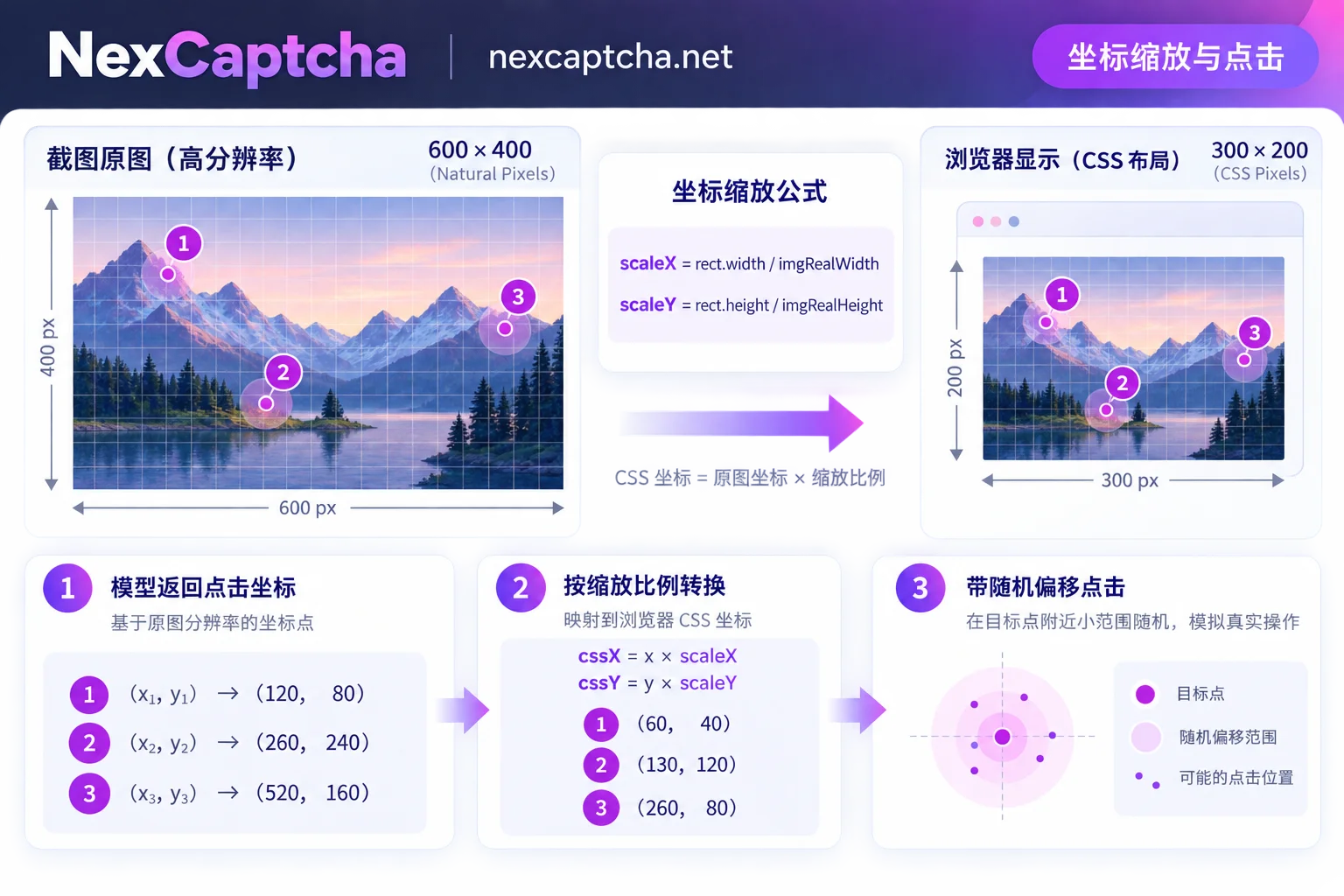
1. DPR (Device Pixel Ratio) and CSS Rendering Size Scaling Conversion
When you take element screenshots on a Retina screen, high-DPI screen, or a headless browser with deviceScaleFactor > 1 set, the actual pixel width of the captured image (naturalWidth / screenshot resolution) is often 1.5 or 2 times the page CSS layout width (clientWidth).
However, mouse click APIs in automation testing tools (Playwright / Puppeteer / Selenium) use the page CSS viewport coordinate system. If you directly use coordinates calculated from high-DPI screenshots to click, you will inevitably click off to the bottom-right corner.
Standard conversion formula:
// 假设 imgElement 为页面上的验证码图片 DOM 节点
const rect = imgElement.getBoundingClientRect();

// 计算 CSS 渲染尺寸与送检图片实际宽高(imgRealWidth / imgRealHeight)的比例
const scaleX = rect.width / imgRealWidth;
const scaleY = rect.height / imgRealHeight;

// 换算为相对于元素左上角的 CSS 偏移量
const clickOffsetX = apiCoord.x * scaleX;
const clickOffsetY = apiCoord.y * scaleY;

// 若使用全页面绝对坐标点击,需加上元素自身的左上角视口偏移
const pageClickX = rect.left + clickOffsetX;
const pageClickY = rect.top + clickOffsetY;
2. Strictly Follow Click Order and Time Intervals
For word-order clicks or icon sequential clicks, the coordinate array returned by the API is strictly ordered according to the prompt. When iterating through the array to perform clicks, note:
- Avoid instant 0ms consecutive clicks: Humans typically have a visual search pause of
250ms ~ 600msbetween finding and clicking the first and second characters. If the script clicks all 4 coordinates within 5 milliseconds, the front-end behavior collection script will directly flag it as an automation tool. - Add slight random jitter: Target text or icons usually have a click hotspot of about
30px × 30px. You can add a Gaussian random offset of±2px ~ ±4pxto the center coordinates to avoid rigidly clicking the exact geometric center every time. - Watch for the "Confirm" button: Some click captchas auto-submit after clicking the specified number; others require clicking a "Confirm/Submit" button at the bottom. Before clicking "Confirm," it's recommended to also allow an interval of
200ms ~ 400ms.
VI. Convenient Solutions for AI Agents and Cross-Platform Migration
Beyond traditional crawlers and QA automation scripts, if you are building an AI Agent with autonomous web operation capabilities (for related architecture design, refer to "How to Handle Captchas in AI Agents: Tool Boundaries, Session Consistency, and Anti-Deadlock Design"), or planning to migrate from another captcha solving platform, NexCaptcha offers two engineering efficiency features:
- Hosted MCP Service Integration: NexCaptcha provides a hosted MCP service that requires no local deployment and supports direct API Key configuration in clients like Claude Code, Claude Desktop, Cursor, VS Code, Gemini CLI, etc. It includes five standard tools: query product, query parameter model, create task, query task, and query balance, enabling AI assistants to autonomously invoke click recognition capabilities during automated debugging.
- Smooth Migration Reference: If you previously used platforms like 2Captcha or Anti-Captcha, although NexCaptcha's outer routes are
create.cgi/query.cgi(migration cannot be done by simply replacing the domain), we have annotated the corresponding common task type names under each type in the API documentation, and the internal parameters ofadapterlargely follow industry-familiar field naming. During migration, you only need to rewrite the outer request wrapper and header authentication, and after validating with a small traffic dual-run, you can switch over fully.
Conclusion
Getting the click captcha recognition API right boils down to three things: capturing clear images that contain complete prompt semantics, correctly converting the scaling ratio between submitted image pixels and page CSS coordinates, and simulating a natural sequential clicking rhythm.
NexCaptcha uses a pay-per-use mechanism, with balances that never expire, no monthly fees or minimum spending thresholds, and automatic refunds for failed or expired tasks (see the pricing page for details). Now go to the NexCaptcha registration page to get free test credits (no card required) and quickly run your first click captcha recognition task in the online test bench. If you encounter specially customized click samples, feel free to contact Telegram support and send samples for a quote.



