
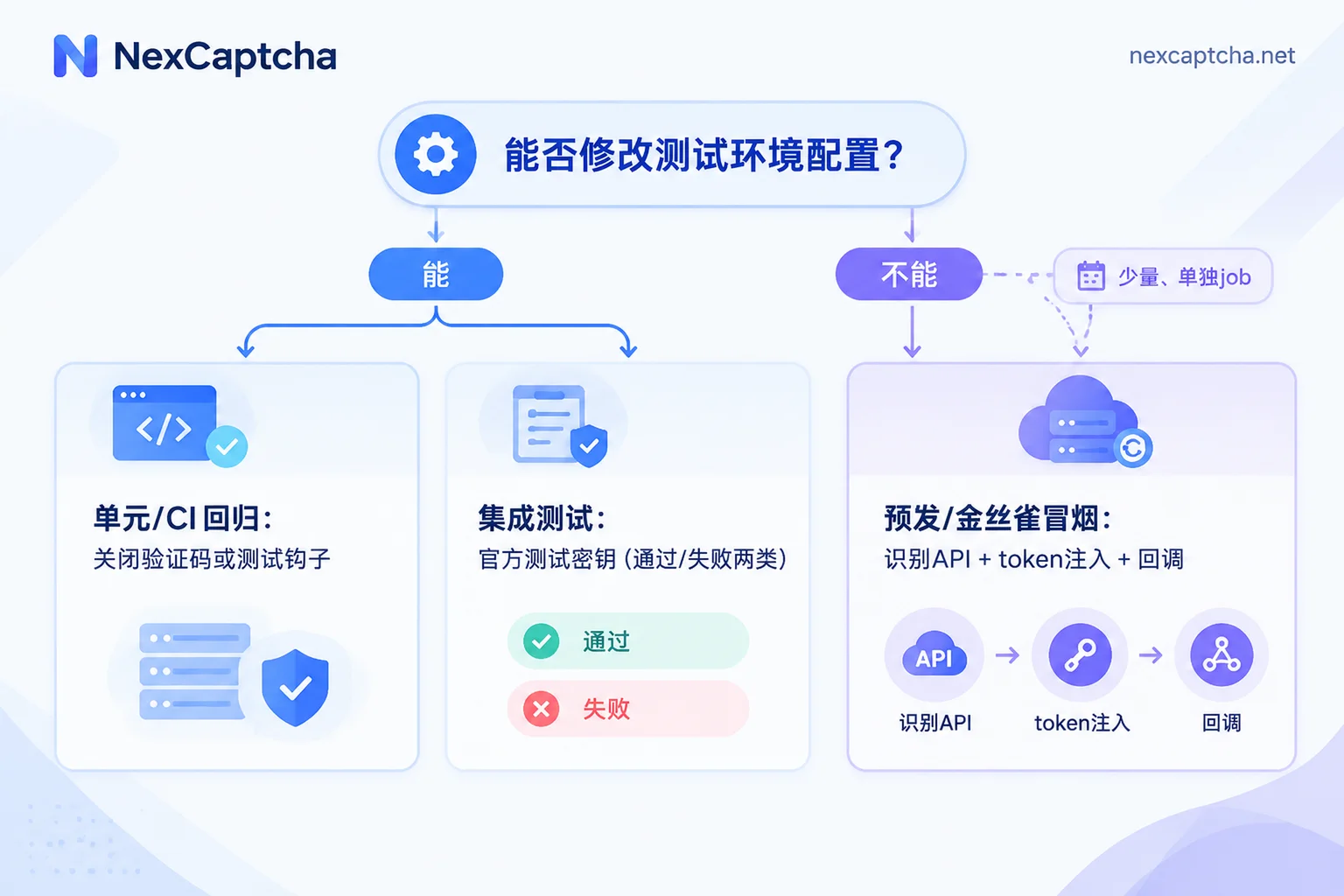
When doing CAPTCHA testing in Selenium, the first step is not to teach the script to "solve CAPTCHAs," but to decide by test layer whether the CAPTCHA should appear at all:
- Unit tests and daily CI regression: Disable CAPTCHAs in the test environment, or replace them with official test keys from CAPTCHA vendors, so that every run yields predictable results.
- Verifying the integration chain "frontend component → token → server-side validation": Continue using test keys, and use "always fail" test keys to cover error branches.
- Pre-release or canary smoke tests where real CAPTCHAs must be faced and keys cannot be changed: Only then consider having Selenium extract page parameters, call a recognition API to obtain a token, inject it into the page, and trigger callbacks. Keep only a small number of such test cases for smoke checks.
The following sections elaborate on these three layers. The premise is that the system under test belongs to your own team, or you have explicit authorization.
First confirm two things: CAPTCHA type and what you can change
Before starting, answer two questions that determine which path to take.
- Which CAPTCHA type the page uses. reCAPTCHA v2 checkbox, v3 score, Enterprise, Cloudflare Turnstile widget, hCaptcha, and custom image CAPTCHAs all have different testing methods. Some only require writing a token to a hidden field, while others require calling a frontend callback function to complete. If unsure about the version, refer to the version determination method for reCAPTCHA recognition API.
- Whether you have configuration permissions for the current environment. If you can change the sitekey and secret of the test environment, or add environment flags, prioritize the first and second layer solutions. Only in environments where configuration cannot be changed, such as third-party hosted or external pre-release, do you need the third layer.
Layer 1: Disable CAPTCHAs in the test environment or leave test hooks
The official Selenium documentation lists "handling CAPTCHAs in tests" as an discouraged practice. CAPTCHAs are designed to block automation, and regular functional tests should not try to crack them. The official recommendation offers two approaches: disable CAPTCHAs directly in the test environment, or add a test-only bypass hook.
Three points to note during implementation:
- Put the switch in server-side configuration and differentiate by environment. The switch does not exist at all in production configuration. Do not control it via frontend parameters or request headers, otherwise external requests might also trigger the bypass.
- Limit the scope of the hook. For example, only effective for test networks or dedicated test accounts, and confirm in release checks that it is not enabled in production.
- Recognize what this layer tests. It verifies business logic such as registration, login, and ordering, but cannot prove that the CAPTCHA integration itself is correct.
Layer 2: Test the integration chain with official test keys
To confirm that "the component loads, the token is generated, and the server validates," while keeping results stable, you can use test keys provided by CAPTCHA vendors. The following table lists publicly available test keys from several vendors:
| Vendor | Test Site Key | Behavior |
|---|---|---|
| reCAPTCHA v2 | 6LeIxAcTAAAAAJcZVRqyHh71UMIEGNQ_MXjiZKhI (Secret: 6LeIxAcTAAAAAGG-vFI1TnRWxMZNFuojJ4WifJWe) | Validation requests always pass; the widget displays a test-purpose notice |
| Cloudflare Turnstile | 1x00000000000000000000AA | Visible widget, always passes |
| Cloudflare Turnstile | 2x00000000000000000000AB | Visible widget, always fails |
| Cloudflare Turnstile | 3x00000000000000000000FF | Forces an interactive challenge |
| hCaptcha | 10000000-ffff-ffff-ffff-000000000001 (Secret: 0x0000000000000000000000000000000000000000) | Returns a test token without interaction, passes server-side validation |
Some notes on usage:
- Replace frontend sitekey and server-side secret as a pair. If only the frontend sitekey is replaced, the real secret will reject the test token. Turnstile's test secrets also come in "pass" and "fail" variants; refer to Cloudflare's testing documentation for combinations.
- The reCAPTCHA test keys in the table above correspond to v2. For v3 and Enterprise test environment configurations, confirm separately according to Google's current documentation; do not apply them directly.
- Prevent test keys from leaking into production. If test keys are mistakenly used in production, CAPTCHAs become useless. It is recommended to assert in deployment checks that the production sitekey is not in the list of test keys.
Using Turnstile's "always passes" test sitekey as an example, the Selenium test case only needs to wait for the token to be written to the hidden field and then submit the form:
from selenium import webdriver
from selenium.webdriver.common.by import By
from selenium.webdriver.support.ui import WebDriverWait

driver = webdriver.Chrome()
# 自有测试环境,前后端已配置 Turnstile 测试密钥
driver.get('https://staging.example.test/signup')

driver.find_element(By.NAME, 'email').send_keys('[email protected]')

# 测试 sitekey 会自动产出 token,等隐藏域有值再提交
WebDriverWait(driver, 15).until(
    lambda d: d.find_element(By.NAME, 'cf-turnstile-response').get_attribute('value')
)
driver.find_element(By.CSS_SELECTOR, 'button[type=submit]').click()

# 断言业务结果,而不是只断言“有 token”
WebDriverWait(driver, 15).until(lambda d: '注册成功' in d.page_source)
With the "always fails" key, you can also cover branches that are often overlooked:
- When validation fails, does the page show an understandable message, and is the submit button state correct?
- After server rejection, is no data written and no email sent?
- When the user retries, can the widget reset, and is the old token prevented from being submitted again?
- When an interactive challenge appears, are the page layout and timeout messages normal? Such test cases check page behavior and typically do not expect automatic passing.
Layer 3: When smoke testing against real CAPTCHAs is necessary
Some scenarios cannot change keys, such as externally hosted pre-release environments, third-party login pages, or when you need to confirm that production protection configurations are actually effective. In these cases, Selenium must work with an external recognition service to form a closed loop:
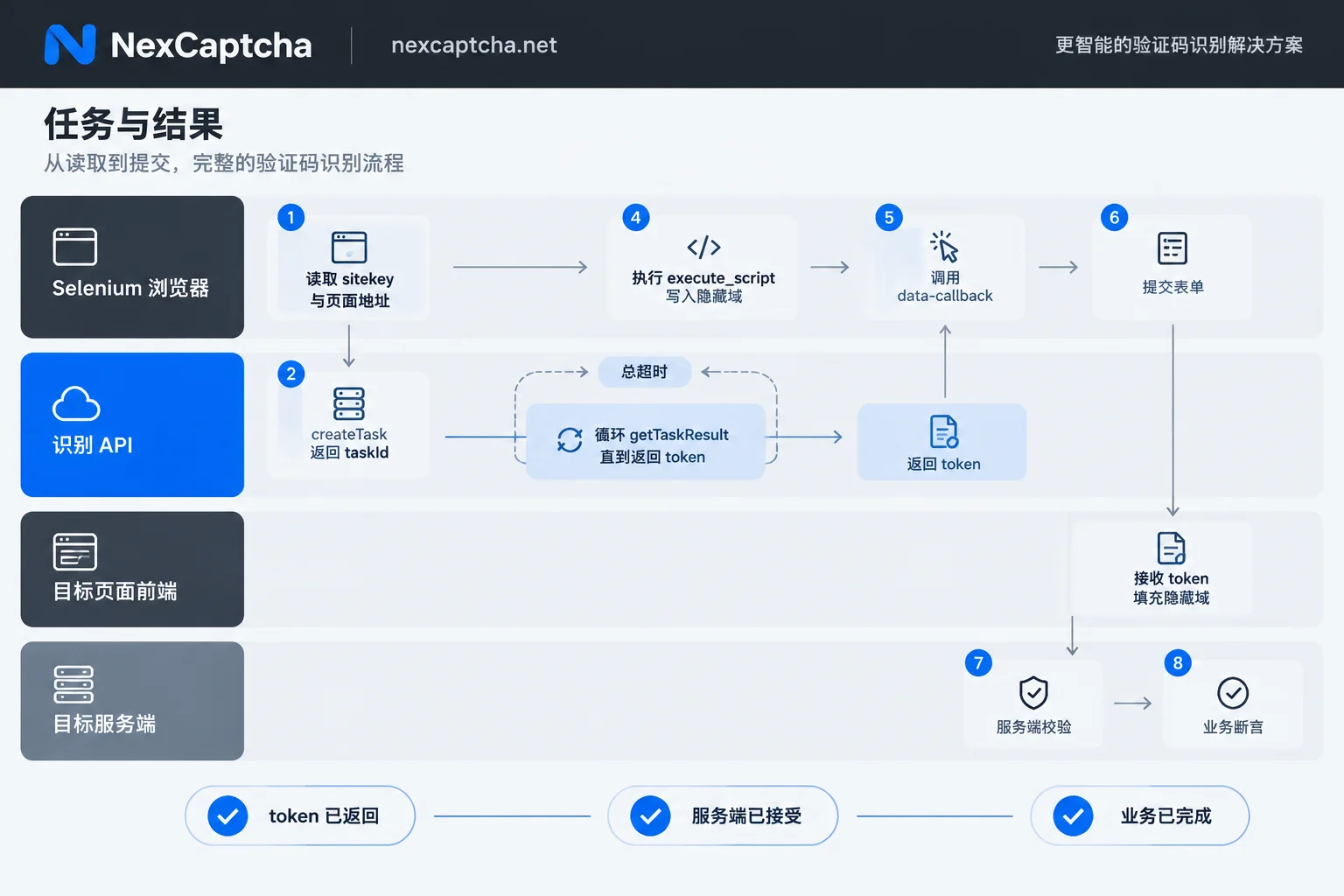
The pseudo-code below is only to illustrate the structure and cannot be run directly. For task type names and field names, refer to the current API documentation of the service you use:
# 伪代码:结构示意
site_key = 用 Selenium 读取验证码容器的 data-sitekey
page_url = driver.current_url

task_id = 调用 createTask
          clientKey 从 CI 密钥管理读取,不写进代码
          task = { 类型: <按验证码类型填写>, 页面地址: page_url, sitekey: site_key }

循环调用 getTaskResult(task_id),设置轮询间隔和总超时
  仍在处理 → 等待后继续
  失败或超时 → 记录 taskId 与耗时,标记为“依赖失败”
  返回 token → 结束循环

driver.execute_script 把 token 写入对应隐藏域
  (如 g-recaptcha-response、cf-turnstile-response)
页面若绑定了 data-callback → 用同一个 token 调用该回调
提交表单 → 断言业务结果(跳转、提示、后端记录)
The most error-prone aspects of this layer:
- Session consistency. Reading parameters, obtaining the token, and submitting the form must be done in the same driver session and on the same page. Do not reuse tokens across test cases or pages.
- Timeliness and timeout. Tokens have an expiration time; submit them as soon as possible after obtaining them. Polling must have an overall timeout to avoid infinite hangs. For troubleshooting when a task stays processing for a long time, refer to What to do when a CAPTCHA task is stuck in processing and How to handle CAPTCHA API timeouts.
- Writing only to hidden fields is often insufficient. In frontend frameworks like React and Vue, component state is usually updated via CAPTCHA callbacks. If you only change the DOM value, the submit button may remain disabled, so you need to explicitly call the callback function registered by the page.
- Distinguish between widgets and full-page interstitials. Turnstile widgets are not the same as Cloudflare full-page Challenges or DataDome blocks. Selenium by default exposes automation characteristics such as
navigator.webdriver, and under high-protection configurations may be blocked by a full-page interstitial, in which case injecting a token into the page will not help. For your own systems, a more reasonable approach is to agree on test traffic rules or whitelists with the security team, rather than disguising the browser in test cases, because results from a disguised browser do not represent real users. - Assertions in three layers. A token returned by the recognition service does not mean the target server validation passed; passing validation does not mean the business process is complete. The test log should record these three steps separately so that failures can be attributed to dependency issues or business defects. If the token is still rejected after being returned, you can troubleshoot layer by layer based on timeliness, parameters, injection, score, and IP; for how to choose the denominator when calculating success rate, refer to three-tier metrics for CAPTCHA API success rate.
Pacing for CI integration
A relatively safe arrangement is:
- Every commit: Run only Layers 1 and 2, with predictable results and no dependency on external services;
- Daily or before release: Create a separate job to run a small number of Layer 3 smoke tests. Keep this job separate from the main regression; on failure, alert first and retain taskId, stage timings, and screenshots, then decide whether to block the release;
- Key management: Put the recognition service's clientKey in CI's secret management. Do not output keys or full tokens in logs, screenshots, or test reports;
- Control call volume: Recognition services usually charge per task; set upper limits on the number and retries of smoke tests to avoid consuming a large amount of quota during an abnormal regression.
What to look for when choosing a recognition service for Layer 3
Only when Layer 3 is truly needed do you need to choose a recognition service. Focus on four things:
- Whether it covers the CAPTCHA types and versions on your page;
- Whether it provides a task-based API and supports both polling and callbacks;
- Whether failed tasks are billed;
- Look at latency percentiles such as P95, not just the average.
The NexCaptcha website introduces a unified REST task API, including createTask, getTaskResult, and getBalance, supporting polling and webhooks. Covered types include reCAPTCHA v2/v3/Enterprise, hCaptcha, Cloudflare Turnstile, etc. The website claims billing per thousand successful recognitions, refunds for failures, and provides test credits. Note that being in the supported list does not guarantee acceptance on your page and session. It is recommended to first run a few smoke tests in your own pre-release environment to verify the three-layer assertions before deciding whether to include it in a regular process. For specific types, pricing, and integration questions, visit the NexCaptcha website or contact engineers for confirmation.



