
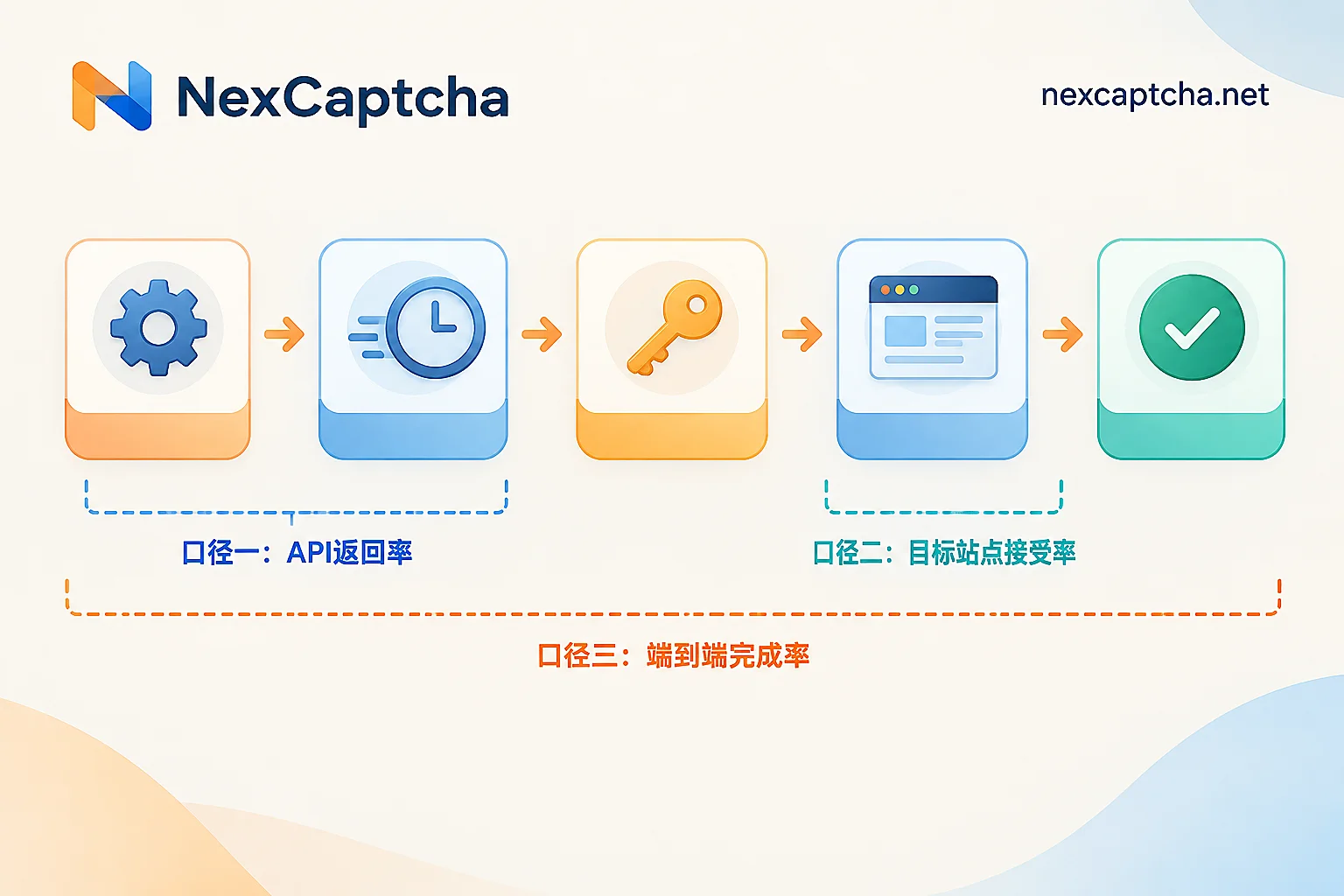
Many teams make selections by directly judging from "95% success rate" or "98%" in comparison tables, only to find after launch that automated tasks still fail in large numbers. The problem is usually not the percentage itself, but what its numerator and denominator actually are. A CAPTCHA API's success rate must be calculated in at least three layers; mixing any layer will lead to wrong conclusions.
Layer 1: API Return Rate — Did the result actually come back?
Formula: (Number of tasks returning valid results ÷ Total number of submitted tasks) × 100%
This layer only answers whether the recognition service returned a result. The numerator is tasks whose status entered completed and whose result field is available; the denominator is all requests successfully submitted and assigned a task ID. Failures typically manifest as queue timeouts, discarded tasks, or error codes like "unable to recognize."
Billing and deduction points also basically fall at this layer: most platforms charge by "successfully returned result," with failures not charged or partially refunded, but specific rules vary by provider and cannot be assumed to be consistent.
Be careful with the denominator definition. If requests with wrong parameters, invalid keys, or task type case mismatches causing 400s are also counted in the denominator, the success rate will be pulled down by yourself; conversely, excluding them without explaining in the report will inflate the number. It is recommended to record "request not accepted at all" and "accepted but recognition failed" as two separate columns.
Layer 2: Target Site Acceptance Rate — Can the result actually be used?
Formula: (Number of tasks passing target site validation ÷ Number of tasks submitted and injected into the target site) × 100%
This is the most easily overlooked and most misleading layer for selection. The API returning a token only means the recognition service considers the task finished; it does not mean the target website accepts it. Common rejection reasons include: token expired, token not matching the current session or browser fingerprint, score-based CAPTCHA score below the business threshold, or the target site flagging the submitting IP as suspicious.
NexCaptcha uses a task mode: submit a task and retrieve results via getTaskResult, either by polling or webhook. Regardless of which service is used, as long as "getting a token" and "business passing" are recorded as the same thing, Layer 2 failures will be hidden inside Layer 1's high success rate.
Layer 3: End-to-End Business Completion Rate — Did the entire flow go through?
Formula: (Number of successfully completed business flows ÷ Total number of initiated flows) × 100%
A business flow can be a completed search, a valid record entered into the database, or a submission going through. Many failures here are unrelated to CAPTCHA: invalid account state, rate-limited proxy IP, target site 5xx, changed page structure. During troubleshooting, decouple the CAPTCHA layer's return from the business layer's status; otherwise, problems from other stages will all be blamed on the recognition service, and switching to another provider will just repeat the same mistake.
"Success" Criteria Differ by CAPTCHA Type
The three-layer framework is universal, but the criteria at each layer vary by type:
- Standard image/character CAPTCHA: Check whether characters match exactly; one extra or missing character counts as failure, and error return rules must also be included in cost.
- Token-based (reCAPTCHA v2, Turnstile, hCaptcha, etc.): The deliverable is a token, which must be submitted within its validity period and pass backend validation. Tokens have a time-to-live, generally on the order of minutes; getting one and using it much later is basically a wasted recognition.
- Score-based (reCAPTCHA v3 / Enterprise): Getting a token does not mean passing. The server returns a risk score, and the target site decides its own threshold and follow-up action—allow directly, require secondary verification, or reject. Therefore, the success rate for such tasks can only be defined by the target site's actual behavior, not by "what the recognition service returned."
- Full-page protection and WAF (Cloudflare Challenge, DataDome, AWS WAF, etc.): Validation is often bound to TLS fingerprint, IP, UA, Cookie, and a whole environment. Independently generated credentials that are inconsistent with the client environment will be judged invalid directly. In such scenarios, proxy quality and browser environment may have a greater impact on results than recognition itself.
Success Rates Need a Window and Sample; Latency Needs Percentiles
"98% last week" and "92% yesterday" may simply be different samples, or the target site's policy changed. Any number that gives only a percentage without a statistical window, sample size, or task type distribution can only be taken as a reference.
Latency and success rate are two dimensions, and both need clear definitions. Averages flatten out the long tail; P50 reflects median experience, while P95 reflects the slowest 5% experience. For automated tasks, P95 often predicts timeout and retry costs better than the average. Vendor-reported percentile metrics should also specify the statistical window and sample definition; the vendor's definition does not equal your actual measured results in your environment.
Convert Unit Price to Effective Cost per Thousand Completions
A low unit price does not mean cheap. What is truly comparable is effective cost:
Effective cost = Total spend ÷ (Target site acceptances ÷ 1000)
An example calculation (all hypothetical numbers, not measured): Service A quotes 0.8 per thousand with 60% acceptance; Service B quotes 1.2 per thousand with 90% acceptance. To get 1000 accepted completions, A needs about 1667 submissions, costing about 1.33; B needs about 1111 submissions, costing about 1.33. The price difference is erased under the effective metric, and A's extra 40% submissions will also lengthen P95 and consume proxy bandwidth and concurrency budget.
There is another variable here: the scope of failure refunds. Some platforms refund immediately on failure, while others refund only for specific error codes. Before comparing, align billing definitions, billing units, currency, and statistical cycle; otherwise, even the right formula will not calculate accurately. NexCaptcha publicly states it charges per thousand successful recognitions and offers failure refunds and tiered volume discounts; for your specific task types and usage tier, still rely on the official page's statements at the time, and do not estimate all types using the lowest-tier unit price.
Run a Controlled Test That Can Support Decisions
To get credible data, the key is to change only the one variable being compared:
- Fix the environment: same batch of proxy IPs, same UA and browser fingerprint, same target environment.
- Fix concurrency: split traffic to each service at the same concurrency to avoid queueing differences affecting results.
- Fix the window: sample during the same time period, record sample size and task type distribution.
- Record all three columns: API return status, whether the target site accepts, and whether the business completes. Missing one column makes it impossible to tell which layer the failure is at.
- Show P50/P95 separately; do not report only one average.
- Validate with small traffic first, then decide whether to scale up; this is the way to minimize migration and switching risk.
Implementation Tracking: Minimum Field Set
To turn success rate into a continuously monitorable metric, at minimum record these fields: task type, submission time, return time, return status and error code, whether the result was injected successfully, target site response, and final business status. With these types of fields, the three-layer success rates can be calculated automatically, and next time there is an outage you will not have to guess.
Related reading: if failures concentrate after submission, see How to troubleshoot CAPTCHA validation failure after token return; if tasks are stuck in processing in large numbers, first see What to do when CAPTCHA tasks stay in processing; for choosing between polling and callbacks, see What is the difference between CAPTCHA API polling and callbacks; for cost metric details, see CAPTCHA platform cost comparison. The CAPTCHA types supported by NexCaptcha, billing details, and engineer contact entry are all on the official homepage (https://nexcaptcha.net/),需要看产品能力时可以从那里开始核对。



