
When handling CAPTCHA API timeouts, the first step is to determine which layer the timeout occurred at. Behind the error "timeout" there are at least four independent clocks: the timeout for a single HTTP request, the total polling budget from task submission to result retrieval, the validity period set by the target site for the token, and your automation script's own waiting limit. Their causes and solutions differ. If you use the same "retry on timeout" logic for all, common consequences include duplicate task creation, extra charges, rate limiting, or submitting an already expired token to the target site.
Below, we'll proceed in the order of "first locate, then handle separately."
First Determine Which Type of Timeout
| Timeout Type | Common Symptoms | Problem | Primary Action |
|---|---|---|---|
| HTTP request timeout | Connection timeout, read timeout, 502/504 | A single network request did not complete on time | Limited retries, and distinguish whether task ID was already obtained |
| Task polling timeout | Status remains processing, exceeds waiting budget | Slow solving, queueing, or parameters themselves unsolvable | Set total budget, decide retry or abort based on error code |
| Token expiration | API returns result, but target site rejects | Result obtained too late, or reused | Inject and submit immediately after obtaining |
| Client hang | Script stuck, or unhandled Promise Timeout | No upper limit on waiting, page context already invalid | Outer total timeout, plus resource cleanup |
Logs can quickly categorize:
- Error without obtaining a task ID: HTTP layer issue, concentrated at task creation.
- Task ID obtained but never completes: polling timeout.
- API returns success but target site still errors: likely token validity or submission method.
- Program stops at a step without any error: check client-side waiting logic first.
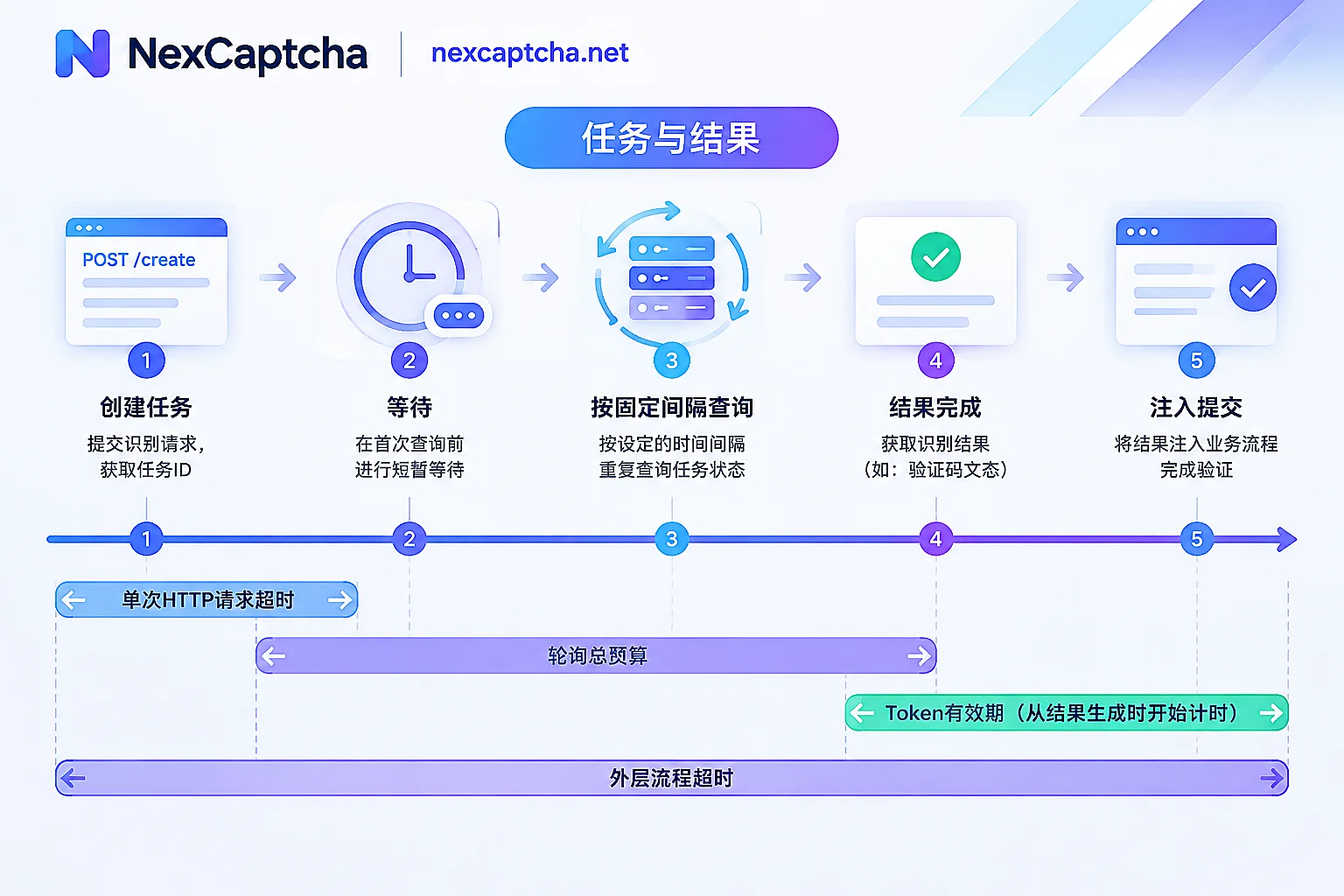
HTTP Request Timeout: Confirm Task Creation Before Retrying
Connection timeout and read timeout should be set separately. Connection timeout can be shorter to quickly detect network issues. Read timeout should allow margin for server processing. Don't use a single large global timeout for both.
The most critical is timeout during task creation (createTask). The request may have reached the server, the task may already be created, but the response was lost on the way back. Retrying directly will create a duplicate task. On platforms that charge per successful recognition, if both tasks are solved, both may be charged. Safer practices:
- Set creation retry count very low (e.g., 1-2 times), log each retry.
- Monitor creation-phase timeout rate. If persistently high, investigate network link or egress rather than masking with more retries.
- Once task ID is obtained, subsequent network errors should only retry result query (getTaskResult), never re-create the task due to query failure.
Task Polling Timeout: Set Initial Delay, Interval, and Total Budget
Solving takes time; polling more frequently won't produce results faster. Overly frequent polling may trigger rate limits on the recognition platform, and in severe cases, the egress IP may be temporarily blocked. Based on public information from several recognition providers, here are approximate empirical values as a starting point, then adjust with your own data:
- Graphical recognition typically returns within seconds; interactive CAPTCHAs (e.g., reCAPTCHA v2/Enterprise, Cloudflare Turnstile) commonly take tens to forty seconds.
- After submitting a task, wait 1-3 seconds before the first query, then query every 3-5 seconds.
- Total polling budget is typically 60-120 seconds. If exceeded, actively terminate and mark as timeout; don't wait indefinitely.
Budgets are best set per CAPTCHA type. Give graphical tasks a short budget and token-based tasks a longer one. Sharing a single 120s budget will delay detection of graphical task failures.
After a polling timeout, don't immediately create a new task with the same parameters. After such a long wait, the CAPTCHA component, session state, or parameters on the page may have changed. A more reasonable sequence: check if the page is still valid, if necessary reload the page, re-read parameters, then create a new task.
Use Error Codes to Decide Retry or Stop-Loss
Timeout is just a symptom; the platform's error code and task status reveal the cause. Broadly two categories:
- Can retry after waiting: queue full, concurrency limit, too frequent requests. For example, 2Captcha documentation: ERROR_NO_SLOT_AVAILABLE means temporarily no slots, should use exponential backoff, i.e., gradually increase wait time before retrying.
- Should not retry as-is: task itself unsolvable, e.g., 2Captcha's ERROR_CAPTCHA_UNSOLVABLE. Common causes: wrong sitekey, wrong page URL, wrong task type, or runtime environment mismatch with target page. Retrying with unchanged parameters will likely fail again while consuming time and quota. Correct action: abort process, re-verify parameters.
Error code names and meanings differ across platforms. Retry rules must be mapped per your actual platform's documentation, not copied from others.
Token Expiration: Problem Often After Obtaining Result
The target site has its own token validity rules; the recognition service cannot extend them. For Google reCAPTCHA, official docs state each response token is valid for only 2 minutes and can be verified only once. If expired or reused, verification returns timeout-or-duplicate.
Note that this clock starts counting from token generation, not when your program receives it. Several periods consume validity:
- Delay from polling interval: result generated but not retrieved until next query.
- After receiving token, program does data scraping, waiting for rendering, or other slow operations.
- Reusing the same token after submission failure.
Principle: schedule the CAPTCHA step as close as possible before the submission action. After obtaining the result, inject and submit immediately without inserting time-consuming operations. On submission failure, obtain a new token, don't reuse the old one. If the API returns success but the target site still rejects, refer to How to Troubleshoot CAPTCHA Token Verification Failure After Return to check validity, parameters, injection method, score, and IP one by one.
Automation Client Hang: Add Outer Timeout for the Whole Flow
In Playwright, Puppeteer, Selenium, or Node.js async code, common issues are waiting without limit or no cleanup after timeout. For example, in Node.js, a Promise with timeout is rejected but not caught, causing an unhandled Promise Timeout error, leaving timers and pages unclosed.
Suggestions:
- Besides single request timeout and polling budget, set an outer limit for the entire "solve CAPTCHA and complete submission" segment.
- On timeout, cancel ongoing queries, clear timers, close or reset pages as needed.
- If the page has navigated or context destroyed during waiting, abort current task immediately; don't inject results into an invalid page.
Consider Callbacks Instead of Polling for High Concurrency
When many tasks poll simultaneously, many connections and coroutines hang waiting for results, easily exhausting connection pools and triggering rate limits. If your recognition service supports Webhook callbacks, switch to server-side notification upon task completion, eliminating repeated client queries. The cost is needing a publicly accessible endpoint that handles duplicate and out-of-order notifications. For deployment conditions and trade-offs of both methods, see What's the Difference Between CAPTCHA API Polling and Callback.
A Reference Processing Flow (Pseudocode)
Below is generic pseudocode to illustrate how timeouts nest. Field names and status values are per your platform's official documentation; not directly runnable.
总超时 = 按类型设定(例如图形任务较短,token任务 90 秒)

任务ID = 创建任务(参数),单次请求超时 + 最多重试 1~2 次并记录
若创建失败:记录原因,结束

等待 1~3 秒
循环,直到超过总超时:
    结果 = 查询结果(任务ID),网络错误只重试查询,不重建任务
    若 结果 = 完成:立即注入并提交,记录“取到结果→提交”的耗时,结束
    若 结果 = 不可解类错误:中止,检查参数
    若 结果 = 排队/限流类错误:指数退避后继续
    否则:等待 3~5 秒

超过总超时:标记超时,检查页面是否仍有效,再决定是否重新加载并新建任务
What to Log for Faster Troubleshooting
Log at least these fields per task:
- Local request ID and platform task ID
- CAPTCHA type
- Creation time, first query time, completion time
- Status and error code from each query
- Interval from result retrieval to submission
- Whether target site ultimately accepted
With this data, you can separately measure creation-phase timeout, solving time P50 and P95, and token expiration rate. Then you know whether to adjust network, budget, or submission order.
Points to Confirm When Implementing on NexCaptcha
According to NexCaptcha's homepage, it uses createTask, getTaskResult, getBalance task mode, supports polling and Webhook for result retrieval, key in request body as clientKey, charges per thousand successful recognitions, refunds on failure. The layered timeouts, idempotent retries, and callback solutions above can map directly to this flow.
Items not stated on the homepage need confirmation before integration: the specific error code returned on task timeout, and when refunds for timed-out or failed tasks return to balance. These directly affect retry rules and reconciliation; it's recommended to observe during low-traffic testing or confirm via the engineer contact entry on the official homepage. For complete integration steps at the language level, see Python CAPTCHA Recognition API Integration and How to Integrate Node.js CAPTCHA Recognition API.



