
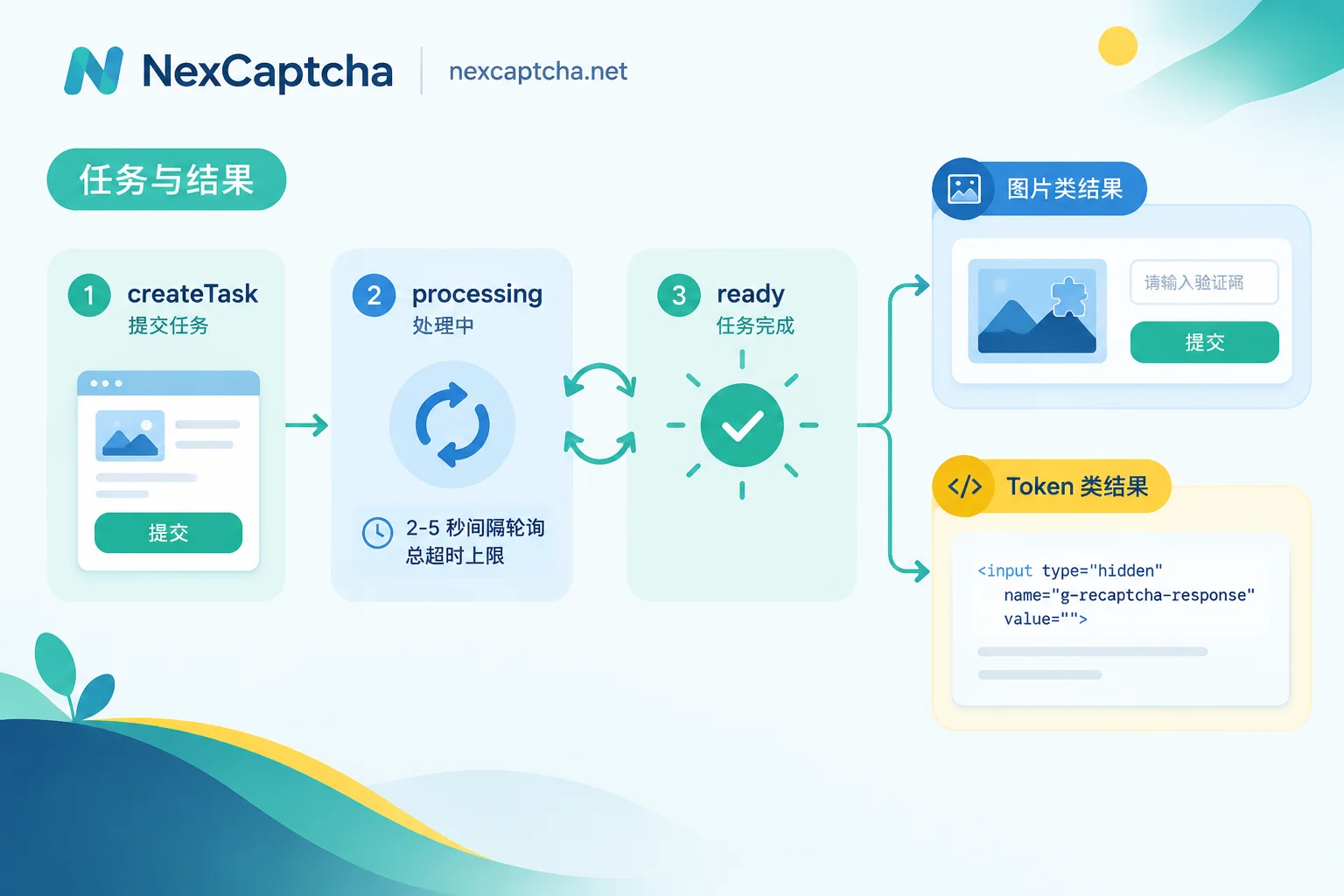
Integrating a CAPTCHA solving API in Node.js essentially involves two distinct things: submitting a task and retrieving the result when it's available. Most task-based services follow the same asynchronous model—first POST /createTask to submit and get a taskId, then POST /getTaskResult to poll, or provide a callbackUrl at submission time and wait for a callback push (CapSolver, 2Captcha, and others all document this structure). Before stabilizing these two steps, first confirm which type of CAPTCHA you're submitting, as it directly determines the request body fields and how to use the return value.
First Distinguish the Two Task Types—Don't Use the Same Fields
Image/character type—standard image CAPTCHAs, click challenges, slider screenshots. The input is usually a Base64-encoded image, and the output is a text string (commonly under the solution.text field) that you fill back into the page's input field.
Token type—reCAPTCHA v2/v3/Enterprise, Cloudflare Turnstile, hCaptcha, GeeTest, etc. The input is websiteURL, siteKey, and optional parameters, and the output is a credential token (reCAPTCHA often returns gRecaptchaResponse, Turnstile returns token). This token needs to be injected into the page rather than typed into a visible input field.
The most common pitfall with these two types is misaligned judgment criteria: getting a token only means the solving service delivered the credential—the target site still performs backend validation, scoring, and session checks. Treating "received the result" as "flow complete" will steer your troubleshooting in the wrong direction from the start. Also, the Turnstile widget and the full-page Cloudflare Challenge are not the same thing—the former is an embedded page component, while the latter has different trigger locations, parameters, and purposes. Don't mix up tasks between the two.
Wrapping a Minimal Task Client in Node.js
Node 18+ includes fetch built-in, so no extra dependencies are needed; teams used to axios can swap in the same way. Keep keys in environment variables—don't commit them to the codebase or log them.
The following code is a flow illustration; field names should follow your chosen service's current official documentation:
// 伪代码:只示意流程,勿直接用于生产
const KEY = process.env.CAPTCHA_CLIENT_KEY;
const API = process.env.CAPTCHA_API_BASE; // 例如 https://api.example.com

async function createTask(task) {
  const res = await fetch(`${API}/createTask`, {
    method: 'POST',
    headers: { 'Content-Type': 'application/json' },
    body: JSON.stringify({ clientKey: KEY, task }),
  });
  const data = await res.json();
  if (data.errorId !== 0) throw new Error(data.errorCode);
  return data.taskId;
}
Submitting a token-type task with task roughly looks like this (fields are illustrative structures only):
{ type: 'ReCaptchaV2Task', websiteURL, websiteKey, callbackUrl? }For image-type tasks, put the Base64 image into the image field. Note that task type names vary in spelling and casing across services—verify each one when migrating rather than guessing.
Polling: Set Limits on Interval, Backoff, and Total Timeout
Polling is the simplest to implement, but you must set your own boundaries—the most problematic scenario is a broken while (true) that doesn't error out but slowly drains your concurrency and budget.
- Single interval: 2–5 seconds recommended, either fixed or with slight backoff per attempt;
- Set a global total timeout, e.g., 60–120 seconds; on timeout, treat the task as failed and proceed to cleanup;
- For each response, check
errorIdfirst; non-zero should be handled in a separate branch, not mixed with "still processing"; - Set a concurrency cap per session—solving tasks are external dependencies and shouldn't pile up without limit.
If you have high volume or are latency-sensitive, the callback mode saves more resources, but only if you have a publicly reachable, signature-verifying, idempotent endpoint; local development and CI environments typically lack such an address, making polling more convenient. For more on the trade-offs between polling and callbacks, see What's the difference between CAPTCHA API polling and callbacks.
Error Handling: Classify "Failures" First
Different errors require opposite retry strategies—mixing them together only amplifies costs:
- Parameter errors (missing siteKey, invalid URL, bad image format): retrying is pointless—fix the request first;
- Auth or balance errors: don't retry, trigger an alert;
- Still processing: keep polling—this is a status, not an error;
- Solving failure or timeout: you can retry a limited number of times, but beware that creating duplicate tasks may incur duplicate charges—the business layer should ideally have deduplication or an idempotency key;
- Network exceptions: retry with exponential backoff and cap the maximum attempts.
A practical approach is to converge these categories into explicit return statuses (success / retryable / non-retryable / timeout), so the caller only handles three cases instead of checking every error code individually.
Getting the Result Is Only Half the Battle: Injection and Session Matching
This is the most underestimated part in Node.js scenarios. In frameworks like Playwright, Puppeteer, or Crawlee:
- Fill image-type results into the corresponding input field, then submit as the page normally would;
- Write token-type results into the page's designated hidden node, commonly
name="g-recaptcha-response"orname="cf-turnstile-response", or call the callback function exposed by the page to trigger submission; - For scenarios like reCAPTCHA v3 and Turnstile that rely on reputation scores and behavioral signals, try to ensure the IP, User-Agent, and session are consistent between solving and submission—if they don't match, even a valid token will be rejected.
If the returned token is rejected by the site, the suggested troubleshooting order is: timeliness → whether parameters and siteKey match → whether the injection node is correct → whether scores and fingerprints match. How to troubleshoot CAPTCHA token validation failures after return has a more complete layer-by-layer approach, and for the automated injection part you can also refer to How to do Playwright CAPTCHA testing.
When to Hand This Work to a Managed API
If your team already builds its own recognition models or maintains human solvers, let's be clear first: for image CAPTCHAs in your own or authorized environments, official test keys or self-trained models are often sufficient—there's no need to add a paid layer just for uniformity. The value of a managed API mainly appears in three scenarios—many and frequently changing CAPTCHA types, needing stable results across regions, and not wanting to invest engineering resources in solving maintenance long-term.
NexCaptcha provides a unified REST task API (task domain api.nexcaptcha.net), authenticates with clientKey in the request body, and uses the same createTask / getTaskResult task model with polling or webhooks. Its key features are per-thousand successful solve billing, refunds on failure, and tiered volume discounts plus test credits—these are from the official site's statements; for specific pricing, type coverage, and test credits, refer to the official homepage and the information provided when contacting their engineers. The official site also advertises partial task format compatibility with 2Captcha, Anti-Captcha, CapSolver, and CapMonster, but when migrating, verify field names, task type casing, SDK versions, callback methods, and error codes task by task—don't interpret "compatible" as "just swap the domain and it works"; the traditional image upload API and the task JSON API are also not the same thing.
The official site advertises multi-language SDKs for Python/Node/Go, but until you've verified the exact package names, installation commands, and method signatures through official channels, it's safer to directly wrap REST requests using Node's built-in fetch rather than installing third-party packages with the same name from unknown sources. Also note that NexCaptcha's clientKey is used for solving API authentication and differs from the API keys for other products on the site—don't mix them up, and never include them in article examples, logs, or screenshots. For type coverage, pricing details, and migration introduction, the entry point is NexCaptcha official website.
Pre-Launch Checklist
- Keys are read only on the server side, never appearing in frontend artifacts, repositories, or logs;
- Request fields have been verified for each task type, and type names exactly match the service documentation;
- Polling has interval, total timeout, and concurrency caps—no unbounded loops;
- Errors are classified as retryable / non-retryable, with sufficient troubleshooting fields logged;
- A complete loop has been run in the target environment with small traffic—not just getting a token, but the business action actually succeeding;
- Billing expectations for failures and duplicate task creation are clearly understood.
Once these steps are done, your Node.js-side integration is essentially solid; most remaining issues will lie in the target site's validation rules, not in your HTTP client.



