
What problem does the image CAPTCHA recognition API solve?
Image CAPTCHAs (Normal CAPTCHA / Image-to-Text) are traditional distorted-character or math-based CAPTCHAs, unlike complex CAPTCHAs such as reCAPTCHA or Turnstile that require front-end interaction and encrypted tokens. The core capability of an image CAPTCHA recognition API is image OCR and formula parsing: it takes a CAPTCHA image as input and outputs the recognized text string.
When developers encounter image CAPTCHAs in automated testing, public data collection, or CI regression, they need to submit the CAPTCHA image to a recognition service and use the result to fill in the target site's form for verification. Mainstream services use REST APIs, and the task type is typically named ImageToTextTask.
Technical specifications: task type and Base64 handling
Task type definition
The image CAPTCHA recognition task is usually defined as ImageToTextTask in the REST API. A complete request includes authentication credentials (e.g., clientKey) and a task object:
{
  "clientKey": "YOUR_API_KEY",
  "task": {
    "type": "ImageToTextTask",
    "body": "BASE64_ENCODED_IMAGE"
  }
}
Base64 encoding standards
The CAPTCHA image must be converted to a Base64-encoded string for transmission; this step is the most error-prone during integration:
The Data URI prefix must be removed: The string returned by browser toDataURL() usually contains the data:image/png;base64, prefix. When submitting to the API, you need to strip this part and keep only the pure Base64 encoding.
Newline handling: Some encoding libraries insert newlines (\n) into the Base64 string. These must be removed before submission.
Supported image formats: Mainstream services support common formats such as JPG, PNG, and GIF, but support for newer formats like WebP and AVIF varies. Check the documentation before integration.
When extracting CAPTCHA images in Playwright or Puppeteer, it is recommended to directly get the element's screenshot Buffer and convert it to Base64:
// 伪代码示例,实际参数需查阅对应平台文档
const captchaElement = await page.locator('img.captcha');
const imageBuffer = await captchaElement.screenshot();
const base64Image = imageBuffer.toString('base64');
Tuning parameters: improving recognition accuracy
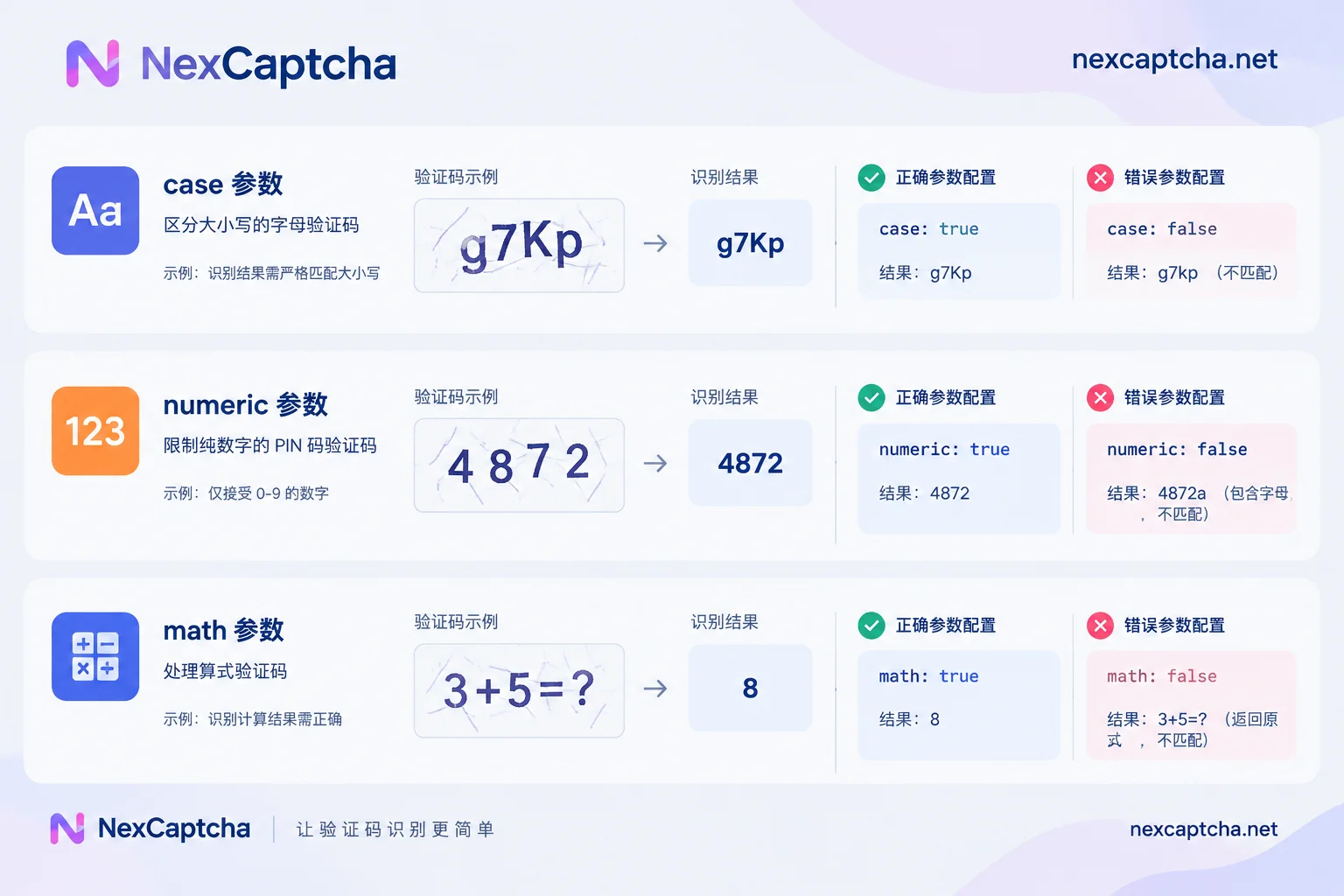
Image CAPTCHAs in different business scenarios have different characteristics. Mainstream recognition APIs provide various parameters to help optimize recognition rates:
case: case sensitivity
A boolean parameter that controls whether English letter case is strictly distinguished. Some sites require exact case matching, while others do not distinguish. Setting "case": true requires the recognition service to preserve the original case; setting false may convert everything to lowercase or uppercase.
numeric: character set filtering
Restricts the character types in the recognition result. Common values:
0: unrestricted; may include digits, letters, and symbols1: digits only2: letters only3: digits or letters only, no symbols
When you know the CAPTCHA contains only digits (e.g., a numeric PIN), setting "numeric": 1 can significantly improve accuracy.
math: arithmetic CAPTCHA
A boolean parameter that indicates the CAPTCHA image is a math expression (e.g., 3 + 5 = ?). When set to "math": true, the recognition service returns the calculation result (e.g., 8) instead of the formula string itself (e.g., 3+5).
minLength / maxLength: length constraints
Restricts the character length range of the recognition result, helping filter out obviously incorrect results. For example, if the CAPTCHA is known to be a fixed 4-digit number, you can set "minLength": 4, "maxLength": 4.
Task workflow: create, poll, and callback
Image CAPTCHA recognition typically follows a standard task lifecycle:
- Create task: Send a POST request to the
/createTaskendpoint, including the task type and image data. - Get task ID: The service returns
taskId, which is used to query results later. Poll or callback:
- Polling: Periodically call
/getTaskResultto query task status untilstatusbecomesready. - Callback: Provide
callbackUrlwhen creating the task; the service pushes the result once recognition is complete.
- Polling: Periodically call
The polling interval is typically recommended to be 1–3 seconds to avoid rate limiting from excessive requests. The callback method requires a publicly accessible HTTPS endpoint and is suitable for high-concurrency scenarios.
Task status transitions:
processing(处理中)→ ready(完成)
                   ↘ failed(失败)
On successful recognition, the result is usually in the solution.text field of the response.
NexCaptcha uses a unified createTask/getTaskResult interface to handle various CAPTCHA types, including image CAPTCHAs. Developers can view supported CAPTCHA types and integration examples on the NexCaptcha homepage.
The key to automation integration: session persistence
This is the most failure-prone part of image CAPTCHA recognition in automated workflows.
Root cause
An image CAPTCHA is strictly bound to the session (Session/Cookie) at generation time on the server side. When the CAPTCHA image is generated, the target site records the answer for that image on the server and associates it via Session ID or Cookie. When the CAPTCHA answer is submitted, the server checks whether the submitter's Session matches the one at generation time.
Incorrect approach
In automation scripts, a common mistake is to download the CAPTCHA image again using an independent HTTP request:
# 错误示例:独立请求会刷新 Session
import requests
captcha_url = driver.find_element('img.captcha').get_attribute('src')
image_data = requests.get(captcha_url).content  # 新 Session
This approach causes the target server to refresh the session, invalidating the original CAPTCHA. Even if the recognition service returns the correct string, the target site will reject the verification.
Correct approach
Method 1: Direct screenshot of DOM element
Use browser automation tools to screenshot the CAPTCHA element directly, staying in the same browser session:
# 伪代码:保持会话的正确方式
captcha_element = driver.find_element('img.captcha')
image_buffer = captcha_element.screenshot_as_png
base64_image = base64.b64encode(image_buffer).decode()
Method 2: Reuse network context
If HTTP requests are necessary, ensure the browser's Cookies and Session are reused:
# 伪代码:复用 Cookie
cookies = driver.get_cookies()
session = requests.Session()
for cookie in cookies:
    session.cookies.set(cookie['name'], cookie['value'])
image_data = session.get(captcha_url).content
In Playwright, you can use the network context obtained via page.context() to make requests, ensuring Cookie consistency.
Troubleshooting boundaries: recognition success ≠ verification passed
Two concepts must be strictly distinguished:
API recognition success: The recognition service successfully returns a string, and the task status is ready.
Target site acceptance: The target website passes verification and allows the user to continue.
Even if API recognition succeeds, the target site may still reject the verification. Reasons include:
- CAPTCHA expired: Image CAPTCHAs usually have a time limit (30 seconds to a few minutes). If recognition takes too long or submission is delayed, it can expire.
- Case mismatch: The case returned by the recognition service does not match the actual requirement, due to incorrect configuration of the
caseparameter. - Session mismatch: As mentioned earlier, Session/Cookie inconsistency.
- IP restrictions or rate-based risk control: The target site detects abnormal request patterns and triggers additional protection.
When troubleshooting, locate the issue layer by layer: first confirm whether the recognition service returned a result, then confirm whether the result meets format requirements, and finally confirm whether the session and timing are correct.
Selection considerations: accuracy, latency, and billing criteria
When choosing an image CAPTCHA recognition API, consider the following dimensions:
Character recognition accuracy
Mainstream services typically have accuracy between 85% and 95%, affected by CAPTCHA complexity (distortion level, interference lines, background noise). Accuracy should be tested with CAPTCHA samples from actual business scenarios, as CAPTCHA characteristics vary greatly across sites.
Task latency
Image CAPTCHA recognition latency is typically between 1–5 seconds (P50) and 5–15 seconds (P95). Latency includes network transmission, queuing, and recognition computation time. For scenarios requiring real-time interaction (e.g., user registration flows), P95 latency is more informative.
Billing criteria
Billing rules need to be clarified:
- Billed per successful recognition: Charged only when a result is returned; failed recognitions are not billed.
- Billed per submission: Charged regardless of recognition success.
- Refund policy: Some services offer refunds for recognition errors, but you must verify that the target site indeed rejected the result and submit the refund request within the specified time.
The unit price is usually settled per thousand requests, with image CAPTCHA prices ranging from $0.5 to $2 per 1000 requests. The actual effective unit price should consider accuracy and refund ratio.
Integration cost
SDK support, documentation completeness, and error handling clarity affect integration efficiency. A unified REST interface can reduce the complexity of maintaining multiple CAPTCHA types.
NexCaptcha's unified task interface supports image CAPTCHAs and other mainstream CAPTCHA types, bills per successful recognition, and offers refunds for failures. Latency percentiles and current pricing can be found on the NexCaptcha homepage.
Further integration and troubleshooting
An image CAPTCHA recognition API is an external service component in an automated workflow. Complete integration requires handling:
- Exception handling: Retry and fallback strategies for recognition timeouts, network errors, insufficient balance, etc. For detailed timeout classification and solutions, see How to handle CAPTCHA API timeouts.
- Result injection: Fill the recognition result into the target site's form, handling dynamic forms and JavaScript validation.
- Error diagnosis: When verification continues to fail, troubleshoot layer by layer whether it is a recognition error, session issue, or site risk control. How to troubleshoot verification failure after CAPTCHA token returns provides systematic guidance.
- Test environment isolation: When integrating CAPTCHA recognition in CI/CD, use test keys and isolated environments to avoid affecting production data. How to do Playwright CAPTCHA testing introduces practices for test keys and environment isolation.
Image CAPTCHA recognition may seem simple, but engineering it requires handling encoding standards, parameter configuration, and session consistency, among other details. Understanding the task lifecycle and troubleshooting boundaries can significantly reduce integration failure rates.



