
When a web AI Agent encounters a CAPTCHA, it is not advisable to let the large model take screenshots, interpret images, and click on its own. A more robust approach is to make CAPTCHA handling an external tool with clearly defined responsibilities:
- Agent detects that the page is blocked and decides whether to call the tool.
- Tool performs four tasks within the same browser session: extract parameters, call the recognition service, inject the result, and check whether access is granted.
- The entire process is constrained by timeouts, retry limits, and circuit breakers. Upon failure, it hands over to a human or ends the task, preventing the Agent from repeatedly trying different methods on its own.
This article covers scenarios limited to systems you own or are authorized to use, permitted public data workflows, and accessibility assistance. If you are just testing your own website, see the "Testing Your Own System" section at the end; in many cases, you won't need a paid recognition service.
Why Not Let the Agent "Look at the Image and Click the CAPTCHA"
Many people's first reaction is: multimodal models can understand screenshots, so just let it click. In practice, three problems arise.
First, the visible part often has no puzzle to solve. Mechanisms like Cloudflare Turnstile, reCAPTCHA v3, and AWS WAF primarily judge based on browser environment fingerprints, behavioral features, and backend risk scores. The page might only show a checkbox, or nothing at all. The model understanding the screenshot won't improve these backend judgments.
Second, the operation itself easily appears mechanical. Each step involves "screenshot, inference, output coordinates, click," which is time-consuming, and coordinates may be off. Drag trajectories and click rhythms can also exhibit automation characteristics.
Third, the Agent doesn't know the reason for failure. After clicking and failing, the model typically tries clicking elsewhere or refreshing. This easily falls into a loop, consuming context and API costs.
Traditional character images and click-based images can sometimes be recognized by the model. However, delegating to specialized image recognition tasks yields fixed result formats, more predictable costs, and is more suitable for processes that need stable operation.
First, Clarify Responsibilities: Each Layer Does Its Own Job
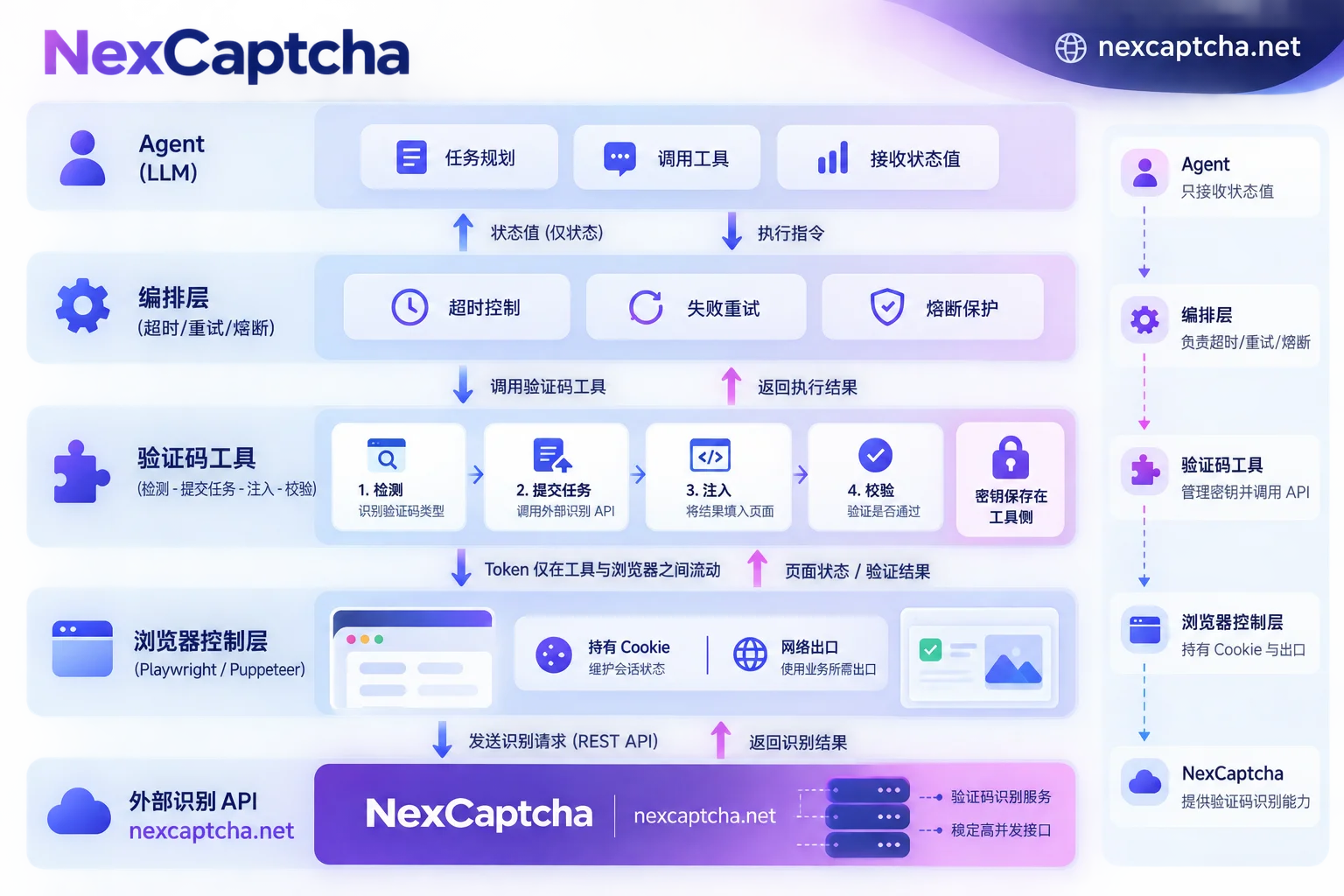
- Agent (LLM): Understands task goals, determines whether the current page can proceed. When blocked, calls the CAPTCHA tool and decides the next step based on the status returned by the tool.
- Browser control layer (Playwright, Puppeteer, Browser Use, etc.): Holds the page, cookies, and network egress, executes DOM reads, script injections, and submissions.
- CAPTCHA tool (your own wrapper): Uses rules to detect CAPTCHA type, assembles recognition tasks, waits for results, fills back into the page, and checks whether access is granted after submission.
- Recognition service (CAPTCHA solving REST API): Receives tasks, asynchronously returns tokens, text, or coordinates.
- Orchestration layer: Manages timeouts, retry counts, budgets, and circuit breakers, and logs.
Two easily overlooked details:
- Token should not pass through the LLM. Recognition results are often long strings. Letting the model copy-paste may truncate them and waste context. The tool should inject internally and only return status to the Agent.
- Recognition service keys should not enter prompts or tool descriptions. Keys are read by the tool from environment variables or a secret management service; the Agent cannot see them.
Some recognition service providers already offer wrappers or MCP tools for frameworks like LangChain and Browser Use (as per their own descriptions). The division of labor under these wrappers is the same as above; whether using existing wrappers or not, these boundaries must be maintained.
Step 1: Use Rules to Determine the Interception Type
Different CAPTCHA types require different parameters and handling. Detection should preferably be done with code rules, such as matching DOM selectors, iframe addresses, and script features. Do not let the model guess the type from screenshots.
- reCAPTCHA v2: Has checkbox and invisible versions, requires sitekey and page URL.
- reCAPTCHA v3: No interaction, calculates score based on action, so also requires action parameter.
- reCAPTCHA Enterprise: Requires a separate Enterprise task type, cannot be handled as regular v2/v3. (For differences between v2 and v3, see reCAPTCHA v2 vs v3 difference.)
- hCaptcha: Requires sitekey; some pages have additional parameters.
- Cloudflare Turnstile component: Embedded in forms, sitekey can be found, writes to
cf-turnstile-responseupon passing. - Cloudflare full-page Challenge: Blocks the entire page. The pass result is usually stored in the session; this is a different task type from the component and should not be confused.
- Image, slider, click-based CAPTCHAs, and GeeTest v3/v4: Require capturing images or extracting their respective initialization parameters; results may be text, coordinates, or a set of verification values.
If the recognition service does not support the detected type, the tool should directly return unsupported and not attempt forcefully.
Step 2: Complete One Closed Loop per Tool Call
The following is structural pseudocode to illustrate responsibilities and return values. It is not runnable SDK code for any provider; field names should follow the current documentation of the service used.
# 伪代码:仅示意结构
def handle_captcha(session, max_wait_s=120) -> dict:
    info = detect_captcha(session.page)   # 规则检测:类型、sitekey、页面URL、action等
    if info is None:
        return {"status": "no_captcha"}
    if info.kind not in SUPPORTED_KINDS:
        return {"status": "unsupported", "kind": info.kind}

    task_id = solver.create_task(info.to_task())       # 密钥从环境变量读取
    result = solver.wait_result(task_id, max_wait_s)   # 轮询或回调
    if result.status != "ready":
        return {"status": result.status, "kind": info.kind, "task_id": task_id}

    inject_result(session.page, info, result.solution)  # 回填并触发回调/提交
    accepted = verify_after_submit(session.page, info)  # 是否离开拦截状态
    return {"status": "accepted" if accepted else "rejected",
            "kind": info.kind, "task_id": task_id}
When registering it as an Agent tool, clearly state three things in the tool description:
- When to call.
- What each returned status means.
- Maximum calls per page.
Additionally, explicitly tell the Agent in the system prompt: do not click the CAPTCHA area yourself.
Waiting for results can use polling or callbacks. Agent tasks generally last long; polling is simple to implement. Callbacks require a publicly accessible endpoint and suit high-concurrency orchestration layers. For choosing between them, see What is the difference between CAPTCHA API polling and callback.
Step 3: Results Must Return to the Same Session
Many "Token received but still can't pass" issues stem from this step.
- Parameters must be extracted in real-time from the current page. Do not cache the previous sitekey or action; they may change after page redesign or route changes.
- Inject the result immediately upon receipt. Tokens have expiration. Do not let multiple Agents get tokens first and then queue up to use them.
- Writing fields alone is not enough; trigger subsequent actions. Results are usually written into hidden fields like
g-recaptcha-response,h-captcha-response,cf-turnstile-response. But many pages rely ondata-callbackcallbacks or frontend events to continue; without them, the form won't submit. Invisible version callback names and trigger methods vary by site and need to be checked against the specific page's scripts; there is no universal approach. - Environment parameters must be consistent. Some task types require or allow submitting proxy, User-Agent, and other environment parameters. If submitted, they must match the browser's actual egress. Whether submission is required depends on the task documentation.
- Do not change sessions arbitrarily. After a full-page Challenge is passed, changing network egress or browser context may trigger it again.
For framework-specific implementation details, see How to integrate Puppeteer CAPTCHA interface. If still rejected after returning, follow the sequence in How to troubleshoot CAPTCHA token verification failure after return to locate layer by layer.
Step 4: Install Brakes on the Agent
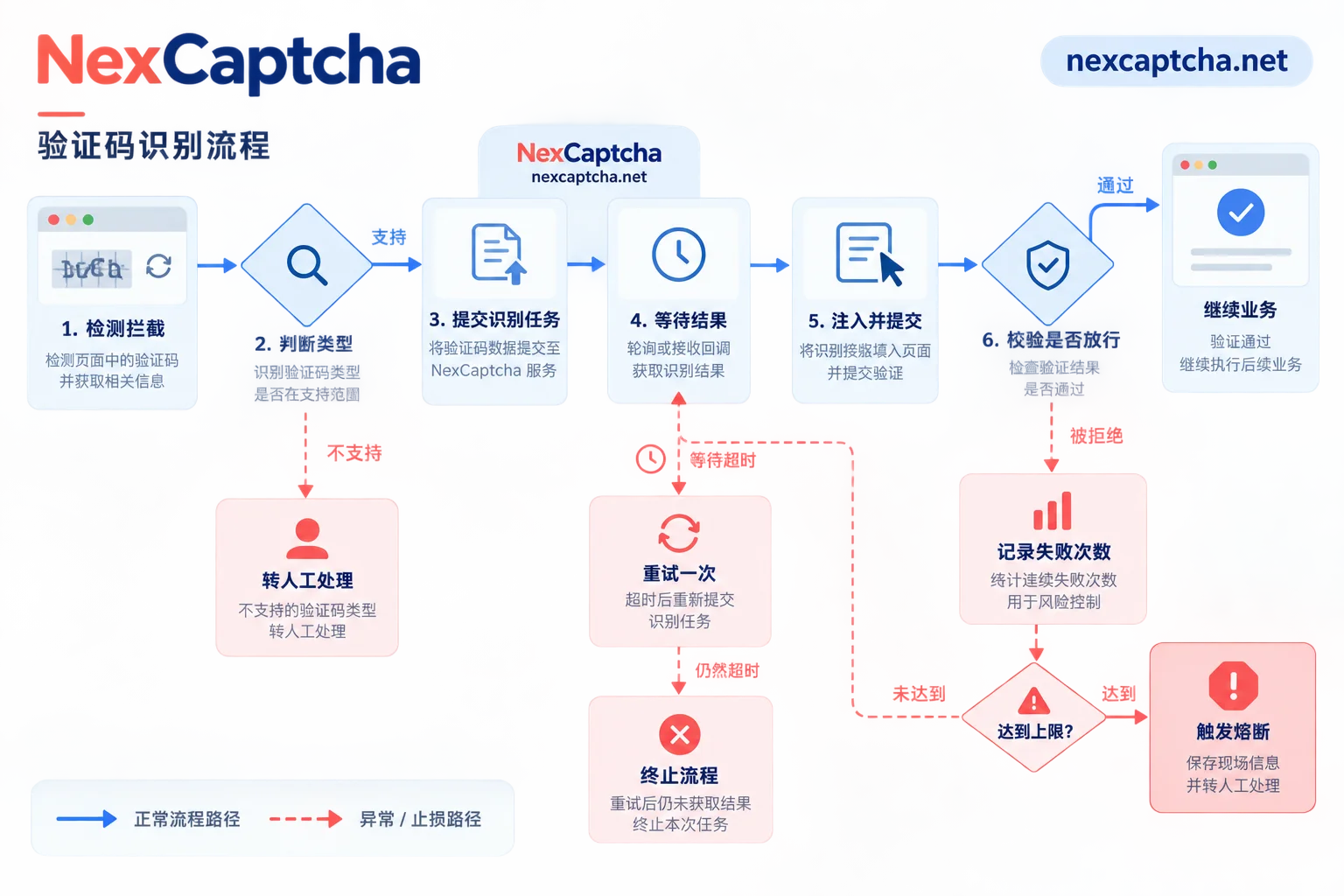
Preventing dead loops relies on hard rules in the orchestration layer, not on the model stopping itself.
- Single wait limit. If the recognition task exceeds a set time, judge as timeout; do not wait indefinitely. There are different types of timeouts with different handling, see How to handle CAPTCHA API timeout; if a task stays in processing for a long time, refer to this troubleshooting guide.
- Per-page call limit. For example, at most 2 calls per page. This number is just an example; set according to business tolerance.
Handle by failure type.
unsupported: Directly hand over to human.- Occasional
timeout: Can retry once. - Consecutive
rejected: Indicates the problem is likely in session, environment, or injection method; another token won't solve it. Should stop and save the scene (screenshot, URL, task_id).
- Site-level circuit breaker. When a target site's acceptance rate drops below a threshold over a period, pause calls to that site to avoid continuous cost consumption.
- Budget limit per task. Limit the maximum number of recognition calls and money spent per Agent task.
- Reduce triggers from the source. Maintaining session stability, controlling access frequency, and using reputable network egress can reduce CAPTCHA occurrence probability. But don't attribute all failures to IP.
Success Should Be Viewed in Three Layers
- Recognition service returned a result: Only means the task is complete.
- Target site accepted the result: Page leaves the interception state, form passes validation.
- Business completed: Agent actually got the data it needed or completed the operation.
Log these three layers separately, along with task_id, CAPTCHA type, and durations for each segment. When calculating acceptance rate, specify the denominator: all initiated tasks or tasks that returned success. Otherwise, data from different time periods and services cannot be compared.
Testing Your Own System: Don't Use Paid Recognition First
If the Agent is doing CI regression on your own system, mainstream CAPTCHA vendors generally provide test sitekeys or test modes (as per their documentation). Using them in the test environment allows stable passage without a recognition service. Real CAPTCHA integration is reserved for a few dedicated test cases. For implementation, see How to do Playwright CAPTCHA testing.
What to Check When Integrating a Recognition Service
Take NexCaptcha as an example. The official website describes a unified REST task model: submit tasks with createTask, get results with getTaskResult, check balance with getBalance, and supports polling and webhook. The types listed on the official site cover reCAPTCHA v2/v3/Enterprise, hCaptcha, Turnstile and Challenge, GeeTest, and various image-based CAPTCHAs. For billing, the official site claims per-thousand successful recognitions with refunds for failures.
Currently, no official MCP or Agent-specific package for NexCaptcha has been verified. So a more practical approach is to write a thin wrapper yourself according to the above structure and register it as an Agent tool. Before integration, confirm in the following order:
- Your target CAPTCHA type is in the supported list.
- Task fields match the current documentation.
- Test the target site's acceptance rate and P95 latency with small traffic.
- Estimate real cost using Effective unit price algorithm for per-thousand billing.
For supported types, pricing, and engineer contact information, see NexCaptcha official website.



