
After a task is submitted successfully, getTaskResult keeps returning processing. There are mainly four common causes:
- The wait time simply hasn't elapsed yet. Token-type tasks usually take anywhere from over ten seconds to several tens of seconds.
- The polling code is flawed, for example missing an overall timeout, failing to handle error fields, or querying the wrong taskId.
- The task parameters contain "soft errors" that prevent the backend from completing the challenge.
- The proxy chain or the target site has an issue.
You should start troubleshooting from your own code, then verify the parameters, and only after that suspect the proxy, the target site, or server-side queuing. The first few items are the easiest to check and also the most likely to be the culprit.
Regardless of the cause, polling must have an overall timeout. Set an upper limit based on the task type (a common practice for Token-type tasks is 60–120 seconds). Stop waiting when the limit is reached, record the taskId, and then decide whether to resubmit according to your strategy.
First, Determine: Is It "Slow" or Truly "Stuck"?
createTask returning a taskId only means the task has been queued and the challenge is not yet complete. Afterward, the task status switches between processing and ready, and before completion every query will return processing or a similar "not ready" response.
So the first step is to compare the wait time against the task type:
- Image OCR (ImageToText and similar): usually returns within seconds. If 30 seconds have passed with no result, you can basically treat it as an anomaly.
- Token-type tasks (reCAPTCHA v2/v3/Enterprise, Cloudflare Turnstile/Challenge, GeeTest v4, Arkose, etc.): the backend has to complete the challenge flow at the browser or protocol level, so over ten seconds to several tens of seconds is common. If you expect OCR-like speed, it's easy to mistakenly think the task is stuck.
It's recommended to track the P50 and P95 wait times separately by type, rather than only looking at the average. Suppose the P95 for a certain task type is around 40 seconds; then a 30-second timeout will prematurely discard some tasks that would have succeeded. Conversely, if the P50 suddenly jumps from over ten seconds to a full minute, that's a sign something has changed.
Troubleshoot in Order
1. Is There a Problem with the Polling Code Itself?
Many cases of "always processing" turn out to be a client-side issue:
- No overall timeout: the loop only exits on ready, so it waits forever on failed or errored tasks.
- Only checking status, not error fields: task-based API responses usually contain both an error indicator (an errorId-like field) and a status. If the code only checks "if it's not ready, keep waiting," a failed task will be mistaken for processing.
- Querying the wrong task: under concurrency, the taskId gets overwritten, an old variable is reused, or the query key belongs to another account.
- Polling too frequently: querying several times per second can trigger rate limiting. After getting a 429 or being throttled, the code then treats that exception as "not complete." Documentation from multiple platforms recommends querying every 3–5 seconds; some platforms also limit the number of queries per task, and exceeding it may result in rate limiting or discarding.
- HTTP-layer errors: request timeouts, an intermediate proxy caching the response, or a retry library swallowing exceptions will all ultimately manifest as "never getting a result."
How to check: log the raw response body, HTTP status code, taskId, and timestamp on every query. If the raw response actually already contains error information, then the problem lies in your parsing logic.
2. Do the Task Parameters Match the Page?
Parameter errors are not necessarily rejected at the createTask stage. Some errors only surface when the backend actually goes to complete the challenge, manifesting as the backend retrying repeatedly until the platform-side timeout. Common cases:
- The websiteKey doesn't match what the page actually loads. Different pages of the same site, as well as test and production environments, may use different keys.
- The websiteURL is filled in with the pre-redirect address, not the actual protocol, domain, and path after redirection.
- Missing context parameters, such as the pageAction for reCAPTCHA v3, the Enterprise flag, or the action and cData for Turnstile.
- Wrong task type selected, for example submitting an Enterprise version as a regular v2, or treating a Cloudflare full-page Challenge as a Turnstile widget.
It's best to extract parameters from the actual network requests in the browser developer tools, which is more reliable than searching the page source. For specific extraction methods, see How to integrate the Puppeteer captcha interface.
3. Is the Proxy Chain Working Properly?
If you're using a task type with its own proxy, the server needs to access the target site through the proxy you provided. The following situations can all cause a task to stay in processing for a long time, or to fail after multiple network retries:
- Proxy authentication failure or connection timeout;
- The exit IP being returned 403/429 by the target site;
- The exit IP already being risk-controlled by the target site.
How to compare: with the same set of parameters, submit several times each using a confirmed working proxy, or switch to a no-proxy task type (if that type supports it). If only the tasks using a particular proxy get stuck, the problem is the proxy. You can also first open the target page directly through that proxy to see if it loads normally.
4. Target Site Changes and Server-Side Queuing
If the target site changes its captcha integration method, or the verification service temporarily increases difficulty (for example, requiring multiple rounds of selection), tasks of the same type will slow down overall, and the server-side queue will back up accordingly.
The characteristic of this situation is: tasks of the same type slow down even after changing parameters and proxies, while other types are normal. In this case, changing your own code won't help much. You should record the time window and a batch of taskId samples to contact the service provider, while slowing down or pausing on the business side.
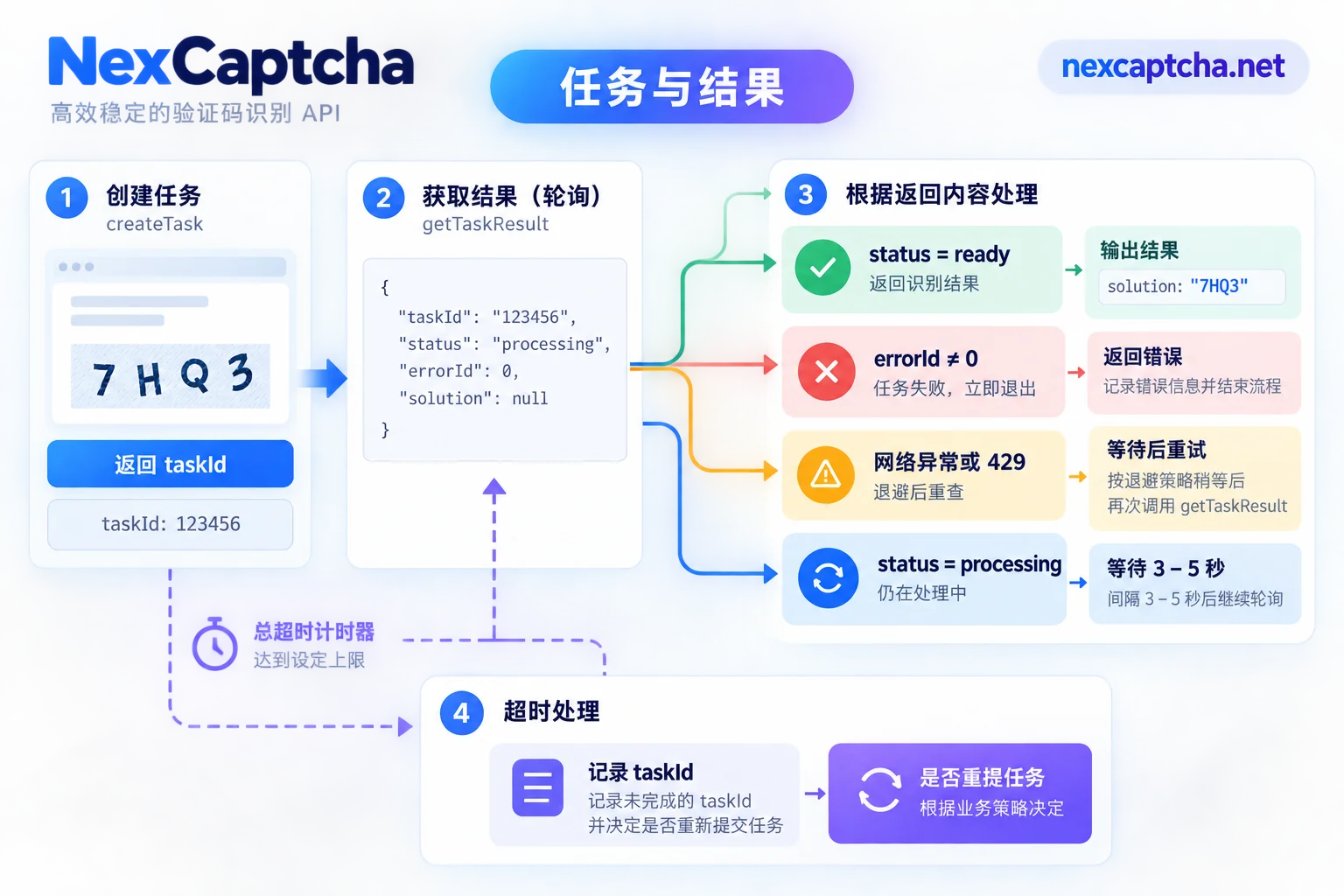
A Polling Implementation with a Fallback
The following is generic pseudocode and cannot be run directly. For field names and error indicators, refer to the official documentation of the platform you're using:
# 伪代码:按任务类型设置等待上限,数值按自己统计的 P95 调整
DEADLINE     = { 'image_ocr': 30, 'token_task': 120 }   # 秒
INITIAL_WAIT = { 'image_ocr': 2,  'token_task': 10 }    # 首次查询前等待
INTERVAL     = 4                                       # 秒,建议 3–5

function wait_result(task_id, task_kind):
    start = now()
    sleep(INITIAL_WAIT[task_kind])
    while now() - start < DEADLINE[task_kind]:
        resp = http_post(GET_RESULT_URL,
                         body = { clientKey: read_from_env(), taskId: task_id },
                         timeout = 10)
        if resp is network_error or resp.http_status == 429 or resp.http_status >= 500:
            log(task_id, resp)
            sleep(backoff())          # 网络/限流异常:退避后再查
            continue
        if resp.error_flag != 0:      # 任务已失败:立即退出,不要继续等
            return Failed(task_id, resp.error_code)
        if resp.status == 'ready':
            return Ready(task_id, resp.solution, elapsed = now() - start)
        sleep(INTERVAL)               # 仍在 processing:正常等待
    return TimedOut(task_id, elapsed = now() - start)
This logic has several key points:
- Wait a bit before the first query. Querying immediately after a Token task is submitted will only generate invalid requests.
- Handle the three cases separately. Task errors exit immediately; network exceptions or rate limiting are retried after a backoff; only genuine processing waits at the normal interval.
- Return the elapsed time and taskId. This makes it easy to track P50/P95 by type and to have samples to check with the service provider when problems arise.
- Read keys from environment variables or a secret management service. Don't hardcode them into code, logs, or screenshots.
If you use callbacks (webhooks) instead of polling, you still need a local timer, because a callback that never arrives doesn't automatically become a failure signal. For how to choose between the two, see What's the difference between captcha API polling and callbacks.
What to Do After a Timeout
- Determine the cause first, then decide whether to resubmit. Don't immediately resubmit infinitely with the same parameters. If the problem is parameters or the proxy, resubmitting will only repeat the failure.
- Token-type tasks need to consider page state. If the browser page has been sitting too long, the session or the challenge on the page may have already expired. It's best to refresh the page and re-extract parameters before retrying.
- Set an upper limit on retries. For example, retry at most once or twice, and record and skip beyond that, to avoid a single task dragging down the whole batch.
- Getting a result doesn't mean business success. After the Token is returned, the target site may still reject it, which is a different type of problem; see How to troubleshoot verification failure after a captcha token is returned. For distinguishing different timeouts such as connection timeout and wait timeout, see How to handle captcha API timeouts.
- Confirm the billing rules. Figure out how the platform you're using bills timed-out and failed tasks respectively, and then decide how many extra submissions your retry strategy can afford.
Troubleshooting on NexCaptcha
NexCaptcha uses the createTask / getTaskResult task model and supports both polling and webhooks. The API domain is api.nexcaptcha.net, and the key goes in the clientKey field of the request body. The troubleshooting order above also applies:
- Confirm that the clientKey and taskId correspond to the same account and the same task, and that your code handles the error fields;
- Verify the task type and page parameters;
- Check the proxy chain.
The official site states billing is per thousand successful recognitions, with refunds for failures. How timed-out tasks are specifically counted and the exact names of error indicator fields should be based on the official documentation and the engineers' responses.
If, after repeated verification, tasks of the same type still keep getting stuck, you can compile the task type, the time period when the problem occurred, a few taskId samples, and whether a proxy was used, and submit them through the engineer contact entry on the NexCaptcha official website, so they can locate the problem more easily.



