
Handling CAPTCHAs in SERP collection can be done in four steps. First, determine whether the response is a CAPTCHA interception, such as Google's /sorry/ page, rather than a timeout, consent popup, or empty result. Second, decide how to handle it based on proxy cost: cheap rotating IPs can be isolated and retried with a new node, while fixed sessions or high-cost proxies may warrant in-place solving. Third, if solving, ensure that the data-s parameter, proxy and User-Agent, and session Cookie match those at the time of interception; otherwise, even if the solving service returns a token, Google may not accept it. Fourth, regardless of the approach, validate the page content and calculate success rate based on the number of valid records obtained, not the number of HTTP 200 responses.
Additionally, the appearance of a CAPTCHA indicates that the request has been flagged as suspicious. For large-scale collection, it is better to first reduce the trigger rate and treat solving as a fallback, rather than making every keyword wait for a CAPTCHA.
This article discusses permitted data workflows such as collecting public search results and monitoring rankings. Before collecting, please confirm the target site's terms, rate limits, and your team's compliance requirements.
First Confirm: This Is Indeed a CAPTCHA Interception
For Google, when interception is triggered, the following typically occurs:
- The request is 302 redirected to a
/sorry/indexpage; - The page displays "Our systems have detected unusual traffic from your computer network";
- The page embeds a reCAPTCHA checkbox challenge (v2 or Enterprise form) with server-generated dynamic parameters, commonly including
data-s,q, and the callback URLcontinue.
Google Help Center explains such prompts as the system detecting unusual traffic from your network. Common causes include excessive concurrency, low IP reputation (e.g., data center IPs), and abnormal client characteristics.
In code, do not rely solely on status codes; classify responses into categories:
| Symptom | Category | Follow-up Action |
|---|---|---|
| Final URL contains /sorry/, or page shows "unusual traffic" text | CAPTCHA interception | Proceed to policy routing below |
| Page is cookie/privacy consent popup | Consent wall | Handle consent flow, do not call solving |
| 200 but no result container | Thin page or structural change | Enter data validation failure queue |
| Connection timeout, 5xx | Network or proxy failure | Retry as network error |
Accurate classification directly affects cost. If consent walls or empty pages are mistaken for CAPTCHAs and sent for solving, money is spent but the problem remains.
First Line of Defense: Reduce the Trigger Rate
For SERP collection, each solving attempt typically adds seconds to tens of seconds of wait time for that request and incurs additional costs. So the first step should be to reduce the occurrence of interceptions:
- Control concurrency and pacing. Set request rate limits per IP and per session; avoid concentrating a large number of keyword queries through the same exit in a short time.
- Proxy quality and region matching. Low-reputation data center IPs are more likely to be blocked. For ranking monitoring that requires city or country targeting, the exit region must match the target region.
- Consistent client characteristics. User-Agent,
sec-ch-ua, and other request headers, TLS handshake features should match the declared browser. When using Playwright or Selenium, also check if the browser exposes obvious automation features. - Moderate session reuse. A session Cookie can be used continuously for a period, but not indefinitely.
With these measures, CAPTCHAs will only appear for a few requests. Then the cost of solving can be calculated clearly.
After Being Blocked: Switch IP and Retry, or Solve in Place?
This is a branch that large-scale teams most need to explicitly write into policy. The decision depends on how much the IP or session is worth.
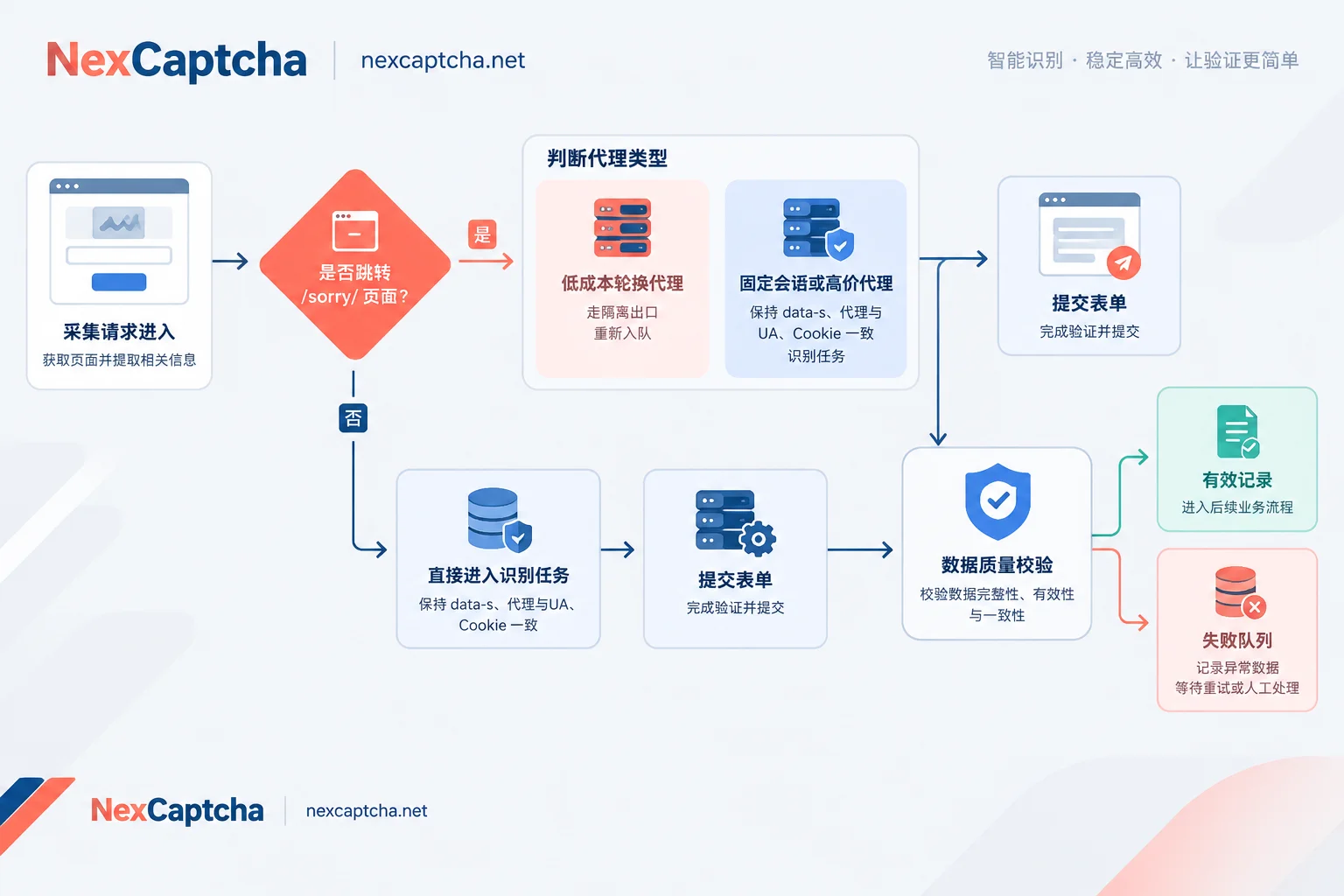
- Dynamic rotating proxies (charged per request or per traffic, low cost to switch IP): After a sorry trigger, mark the exit as isolated for a period, requeue the keyword, and retry with a new node. Overall latency and cost are usually lower than in-place solving.
- Fixed sessions (sticky sessions), fine-grained city targeting, dedicated or high-cost proxies: Such exits are not easily replaceable. You can call a solving API to solve the sorry page, save the restored Cookie, and let the session continue to collect subsequent keywords.
A hybrid strategy is possible, but set limits. For example, abandon after two consecutive triggers on the same session, and retry a keyword at most N times. This prevents a bad exit from repeatedly consuming solving costs.
For In-Place Solving, Three Contexts Must Be Consistent
Google strictly validates the context of the token submitted from the sorry page. A token returned by a solving service only means the challenge is answered; whether Google accepts it depends on the consistency of the following three items:
- Submit the dynamic
data-sparameter. It is generated by the server with the page, and must be extracted in real-time from the current HTML, not cached or omitted. - The solving task must use the same proxy and User-Agent as the scraper. That is, you must provide the current exit's proxy information to the solving service. It is recommended to allocate a separate proxy sub-account or limited-permission credentials for this purpose, rather than handing over the main account.
- Include the current session's Cookie when submitting the form (e.g., NID). When submitting the token along with
qandcontinue, use the same Cookie jar, and after success, use the returned Cookie to continue requesting thecontinueaddress.
Below is generic process pseudocode; task type names and field names are placeholders. Refer to the current official documentation of your solving service:
# 伪代码:字段名为示意,不可直接运行
resp = fetch(serp_url, proxy=P, ua=UA, cookies=jar)

if is_sorry_page(resp):
    ctx = parse_sorry(resp.html)        # sitekey, data_s, q, continue
    if is_cheap_rotating(P):
        quarantine(P); requeue(keyword); stop

    task = create_task(
        type   = <支持 data-s 的 reCAPTCHA v2 类任务>,
        pageURL = resp.final_url,
        siteKey = ctx.sitekey,
        dataS   = ctx.data_s,
        proxy   = P, userAgent = UA)
    token = wait_result(task, timeout=T)   # 轮询或回调

    r2 = submit_sorry(ctx.q, ctx.continue, token,
                      proxy=P, ua=UA, cookies=jar)
    if is_sorry_page(r2):
        record("token_rejected"); quarantine(P); stop
    jar.update(r2.cookies)
    resp = fetch(ctx.continue, proxy=P, ua=UA, cookies=jar)

validate_serp(resp, keyword, region)
When waiting for results, you can choose polling or callback; for the difference, see What is the difference between CAPTCHA API polling and callback. Do not set the timeout threshold T too loosely. When you get the token, the page context may already be expired; rather than submitting, it is better to abandon and requeue. For details, see How to handle CAPTCHA API timeout.
Token Returned but Page Still Sorry: Check in This Order
In this case, do not immediately assume it is a solving service issue, nor that the IP is definitely banned. Check item by item from largest to smallest impact:
- Is data-s from the current page? Did you mistakenly use a previous value when retrying?
- Is the solving task's proxy and UA exactly the same as those used by the scraper? Could proxy pool rotation cause different exits on both sides?
- Is the Cookie from the same jar? Could concurrent tasks mix up?
- Is the token expired? How long has passed from receiving the token to submitting?
- Are the sitekey and page URL correct? Did you use the final URL after redirects?
- If all above are fine and still rejected, consider that the exit's reputation is too low and handle it with isolation policy.
For a more general layer-by-layer troubleshooting method, see How to troubleshoot CAPTCHA token verification failure after return.
Even with 200, Validate: What Counts as a Valid SERP
Solving the CAPTCHA and getting HTTP 200 only means the request passed; the result may not be usable. Common "false successes" include:
- Thin SERP: Significantly fewer results, or missing organic result blocks;
- Region mismatch: Exit IP jumped to another country or city, ranking data does not match the target market;
- Consent wall: Regions like the EU may first show a consent page with no results.
It is recommended to set several hard validations at the parsing layer; any failure cannot be counted as success:
- Core result container exists, selectors can match;
- Number of valid results is not below a set threshold;
- Page's echoed query matches the requested keyword;
- Page language and region signals match task settings.
Failed validation pages should enter a separate queue, with HTML retained. This helps distinguish whether the search engine changed its layout, the parser has an issue, or a soft block occurred.
Which Metrics to Use to Judge if This Handling Is Worth It
Success rate must have a clear denominator. It is recommended to track at least four metrics:
- Trigger rate = number of requests encountering sorry ÷ total requests, to measure the effectiveness of the first line of defense;
- Solving return rate = number of tasks returning token ÷ number of solving tasks submitted;
- Acceptance rate = number of times no longer sorry after submission ÷ number of tokens submitted;
- Valid record rate = number of keywords passing data validation ÷ number of keywords planned for collection.
Cost should also be calculated per valid record. An applicable estimation framework (the following is hypothetical, not actual measurement):
Cost per valid record = (proxy cost + solving cost + extra request cost from retries) ÷ number of valid records
Assume trigger rate is 5%, and solving acceptance rate is only 60%, then 40% of the solving cost is spent on rejected tokens. At this point, you should first check context consistency, or switch to IP switching strategy for low-cost exits; simply buying more solving quota will not solve the problem. How the solving service charges and whether failed tasks incur fees will directly affect this formula. See How CAPTCHA API charges per thousand calls.
Things to Confirm Before Integrating a Solving Service
If you decide to do in-place solving on fixed session exits, when choosing a service, focus on: whether it supports reCAPTCHA v2/Enterprise and can pass data-s, whether it supports proxy tasks (using your proxy to solve), which callback or polling methods are supported, and how failed tasks are billed.
NexCaptcha provides a unified REST task interface: submit tasks with createTask, get results with getTaskResult, supporting polling and webhook. The types listed on the official website cover reCAPTCHA v2/v3/Enterprise, etc. The self-described billing is per thousand successful solves, with refunds for failures, and a test quota is provided. For SERP sorry pages involving data-s, confirm with the official before integration which task type to use and how fields are named. After confirmation, use a small batch of real keywords for comparison, check acceptance rate and valid record rate, and then decide whether to scale up. Type descriptions, prices, and engineer contact information are on the NexCaptcha homepage.



