
GeeTest v3 and v4 Are Two Independent Architectures
GeeTest v4 is a completely new product that is not backward compatible with v3's interfaces and parameters. v4 removes request stickiness, allowing clients and servers to independently request the nearest GeeTest node, reducing latency and improving disaster recovery. Developers and automation testers need to distinguish initialization processes, communication parameters, server-side validation mechanisms, and recognition API task structures by version.
Client Initialization Mechanism Differences
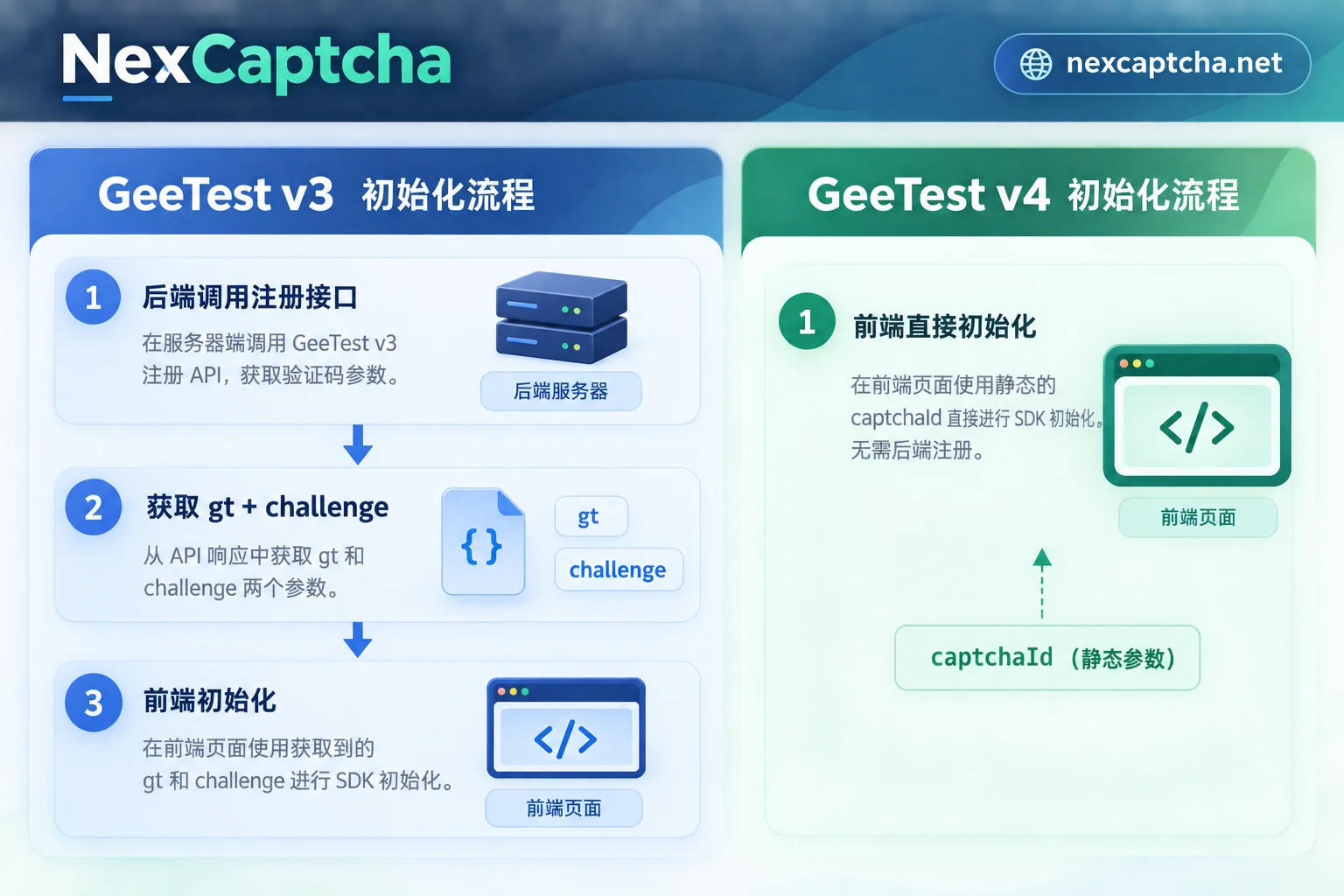
v3 initialization process: The host site's backend must first call GeeTest's register interface to obtain a dynamic challenge and public key gt, then inject them into the frontend:
// v3前端初始化示例
initGeetest({
  gt: "从后端获取的公钥",
  challenge: "从后端获取的动态challenge",
  // 其他配置
}, function (captchaObj) {
  captchaObj.onReady(function () {
    captchaObj.verify();
  });
});
The challenge is dynamically generated for each session, has a short validity period, and must be re-requested from the business backend if it expires.
v4 initialization process: The frontend does not need to request a challenge from the business backend in advance. Instead, it directly uses a static public key captcha_id to load the SDK:
// v4前端初始化示例
initGeetest4({
  captchaId: "静态公钥captcha_id",
  product: "bind", // 或 float、popup
}, function (captcha) {
  captcha.onReady(function () {
    captcha.showCaptcha();
  });
});
The captcha_id is fixed, so the frontend can directly include it in configuration or environment variables, eliminating one backend interaction.
Verification Challenge Forms and Interaction Mode Differences
v3 verification types: Primarily explicit interaction, including slide puzzle, text click, icon click, and spatial reasoning. All traffic must complete interactive verification; there is no passive pass mechanism.
v4 verification types: Introduces adaptive mode:
- Low-risk users: passive one-tap pass (OneTap/NoCaptcha), no interaction required
- Medium-risk users: slide puzzle or text/icon click
- High-risk users: complex interactions such as Gobang, match-3, etc.
GeeTest dynamically rates users based on device characteristics, behavioral traces, and history. Low-risk traffic can pass directly, reducing verification friction for normal users.
Communication Parameters and Encryption Mechanism Differences
v3 communication process:
- Frontend loads SDK and calls /get.php to obtain verification configuration
- During user interaction, behavioral data is submitted via /ajax.php
- Uses a combination of RSA and AES to encrypt mouse trajectories, timestamps, etc., to generate the key parameter w
- After verification passes, the frontend generates three fields: geetest_challenge, geetest_validate, geetest_seccode
v4 communication process:
- Frontend directly loads SDK based on captcha_id, with request paths changed to /v4/ (e.g., gcaptcha4.geetest.com)
- Collects multi-dimensional device features and behavioral traces to generate a single or staged w parameter
After verification passes, the frontend directly generates four credential fields:
- lot_number: serial number, valid for 10 minutes, unique per event
- captcha_output: verification output digest
- pass_token: pass credential
- gen_time: generation timestamp
v4's lot_number is a per-event serial number with a fixed validity period of 10 minutes. When submitting a business form, it must be submitted along with the other three fields within the validity period.
Server-Side Secondary Validation Mechanism Differences
v3 server-side validation:
- Receives geetest_challenge, geetest_validate, geetest_seccode submitted by the frontend
- Uses the private key for signature comparison or calls GeeTest's validation interface
- Return format is usually a boolean value or status code
v4 server-side validation:
- Validation interface: gcaptcha4.geetest.com/validate
- The business backend must use the private key captcha_key to generate a sign_token by performing an HMAC-SHA256 one-way hash on lot_number
- Submits the sign_token along with lot_number, captcha_output, pass_token, gen_time for validation
- Returns a JSON object containing a result field (success/fail)
v4's signature mechanism changed from RSA to HMAC-SHA256. The server must compute sign_token locally and cannot directly pass captcha_key to GeeTest. Signature logic example (pseudocode):
# v4服务端签名示例(伪代码)
import hmac
import hashlib

captcha_key = "业务私钥"
lot_number = "前端提交的流水号"

sign_token = hmac.new(
    captcha_key.encode(),
    lot_number.encode(),
    hashlib.sha256
).hexdigest()

# 提交sign_token、lot_number、captcha_output、pass_token、gen_time到校验接口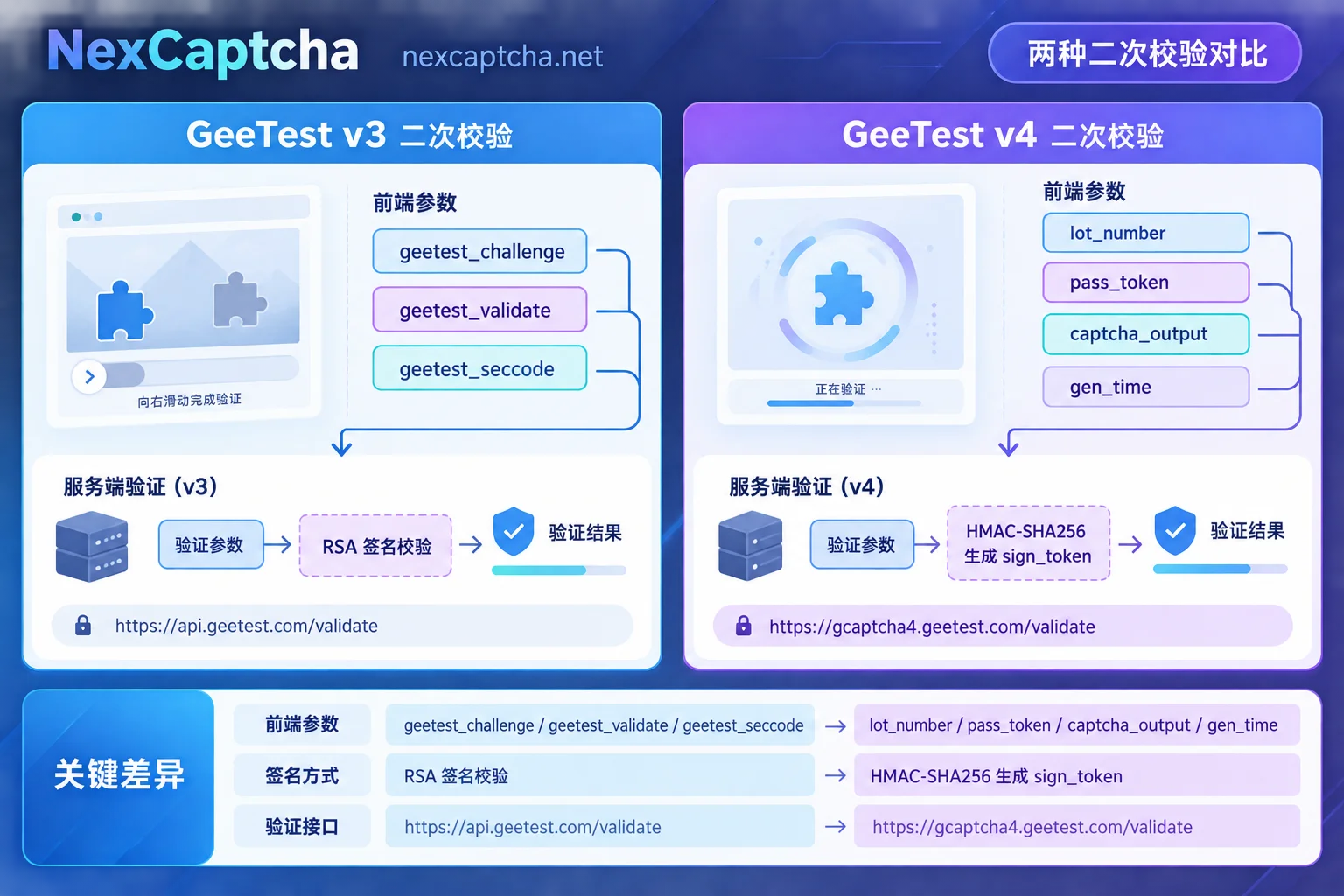
Automation Recognition API Task Construction Differences
In mainstream CAPTCHA recognition services (such as 2Captcha, CapSolver, NexCaptcha, etc.), v3 and v4 task types are completely different.
v3 tasks must dynamically extract challenge:
- Task type: GeeTestTaskProxyless or GeeTestTask
- Required parameters: gt (public key), challenge (dynamic session identifier), target URL
- challenge changes each session. Automation scripts need to first visit the host page or simulate the business backend register interface to extract the current challenge
- On successful recognition, returns fields such as validate, seccode, which are injected into the form and submitted
v4 tasks only need static captcha_id:
- Task type: GeeTestV4TaskProxyless or GeeTestV4Task
- Required parameters: captchaId (static public key), target URL
- Optional parameters: riskType (verification risk type, e.g., slide, icon, gobang)
- On successful recognition, returns lot_number, pass_token, gen_time, captcha_output, which are directly injected into the form and submitted
captcha_id is fixed, so automation scripts can write it into a configuration file without dynamic extraction per session, reducing one HTTP request and parsing step.
Generic REST task submission example (using NexCaptcha as an example, pseudocode):
// v3任务创建请求
{
  "clientKey": "your_api_key",
  "task": {
    "type": "GeeTestTaskProxyless",
    "websiteURL": "https://example.com",
    "gt": "从页面提取的gt公钥",
    "challenge": "从页面或后端提取的动态challenge"
  }
}

// v4任务创建请求
{
  "clientKey": "your_api_key",
  "task": {
    "type": "GeeTestV4TaskProxyless",
    "websiteURL": "https://example.com",
    "captchaId": "静态公钥captcha_id"
  }
}
After submitting the recognition task, poll the getTaskResult interface to obtain the result. v3 returns validate and seccode; v4 returns four fields including lot_number and pass_token. Inject them into the corresponding form fields and submit the business request. For specific polling, timeout handling, and error code mapping, refer to What is the difference between CAPTCHA API polling and callback and How to handle CAPTCHA API timeout.
Recognition Result and Business Submission Differences
v3 result injection:
- Inject validate into form field geetest_validate
- Inject seccode into form field geetest_seccode
- Inject the original challenge into form field geetest_challenge
- Submit all three fields together to the business backend
v4 result injection:
- Inject lot_number into form field lot_number
- Inject captcha_output into form field captcha_output
- Inject pass_token into form field pass_token
- Inject gen_time into form field gen_time
- Submit all four fields together to the business backend, which then calls GeeTest's validation interface using the aforementioned HMAC-SHA256 mechanism
Note that lot_number is valid for only 10 minutes. If more than 10 minutes pass between recognition completion and form submission, GeeTest's secondary validation will return failure. If you encounter a situation where validation fails after token return, refer to How to troubleshoot CAPTCHA token validation failure after return to pinpoint issues related to timeliness, parameters, injection, and IP layer by layer.
Migration and Compatibility Recommendations
GeeTest v3 and v4 cannot be mixed. During migration, you need to:
- Frontend code modification: Change initGeetest to initGeetest4, remove challenge request logic, and use static captcha_id instead
- Backend validation modification: Change v3's signature comparison or interface validation to v4's HMAC-SHA256 signature computation and new interface calls
- Automation script modification: Change v3 task types to v4 task types, remove the challenge extraction step, and modify result field injection logic
- Test environment isolation: v3 and v4 public/private keys are completely different. You must use the corresponding version's keys during testing and cannot mix them.
If your business has both v3 and v4 instances (e.g., some pages have not been migrated yet), you need to distinguish versions in your code based on page characteristics or configuration and call the corresponding initialization and validation logic.
For existing CAPTCHA recognition service users, when migrating to a service that supports v4, you can perform small-scale A/B testing to verify task types, parameter formats, return fields, and success rates before switching entirely. For specific migration steps, refer to the low-risk migration process in How to choose a CapSolver alternative or How to choose a 2Captcha alternative.
The architectural differences between GeeTest v3 and v4 cover the entire process from initialization, parameters, communication, validation, to automation integration. Developers and testers need to choose the corresponding integration solution by version and cannot directly reuse v3 code to handle v4 tasks. If you need a unified interface to handle multiple CAPTCHA types (including GeeTest v3/v4, reCAPTCHA, hCaptcha, Turnstile, etc.), you can visit NexCaptcha homepage to learn about the unified REST API and task billing instructions.



