
In public data collection (such as e-commerce price comparison and industry sentiment monitoring) and enterprise-level QA automation regression testing, Tencent Cloud TCaptcha (formerly 'Tencent Waterproof Wall', commonly identified as TCaptcha or TJCaptcha) is one of the most frequently encountered risk control components for developers.
With Tencent Cloud's recent continuous upgrades to protection policies—including the introduction of slider obfuscation mode, random popup authentication (dynamically switching between slider puzzle, text click, six-grid, and spatial reasoning), and strict domain verification mode—the maintenance cost of traditional 'OpenCV gap recognition + Selenium trajectory dragging' solutions has risen sharply. Once the target site enables random popup policies, the visual cropping and DOM manipulation scripts originally written for a single slider will directly fail.
This article starts from the underlying interaction mechanism of Tencent Captcha and explains how to achieve stable processing of Tencent Captcha through the NexCaptcha Captcha Recognition API, covering the complete engineering chain from parameter extraction, asynchronous task scheduling, to credential injection and exception troubleshooting.
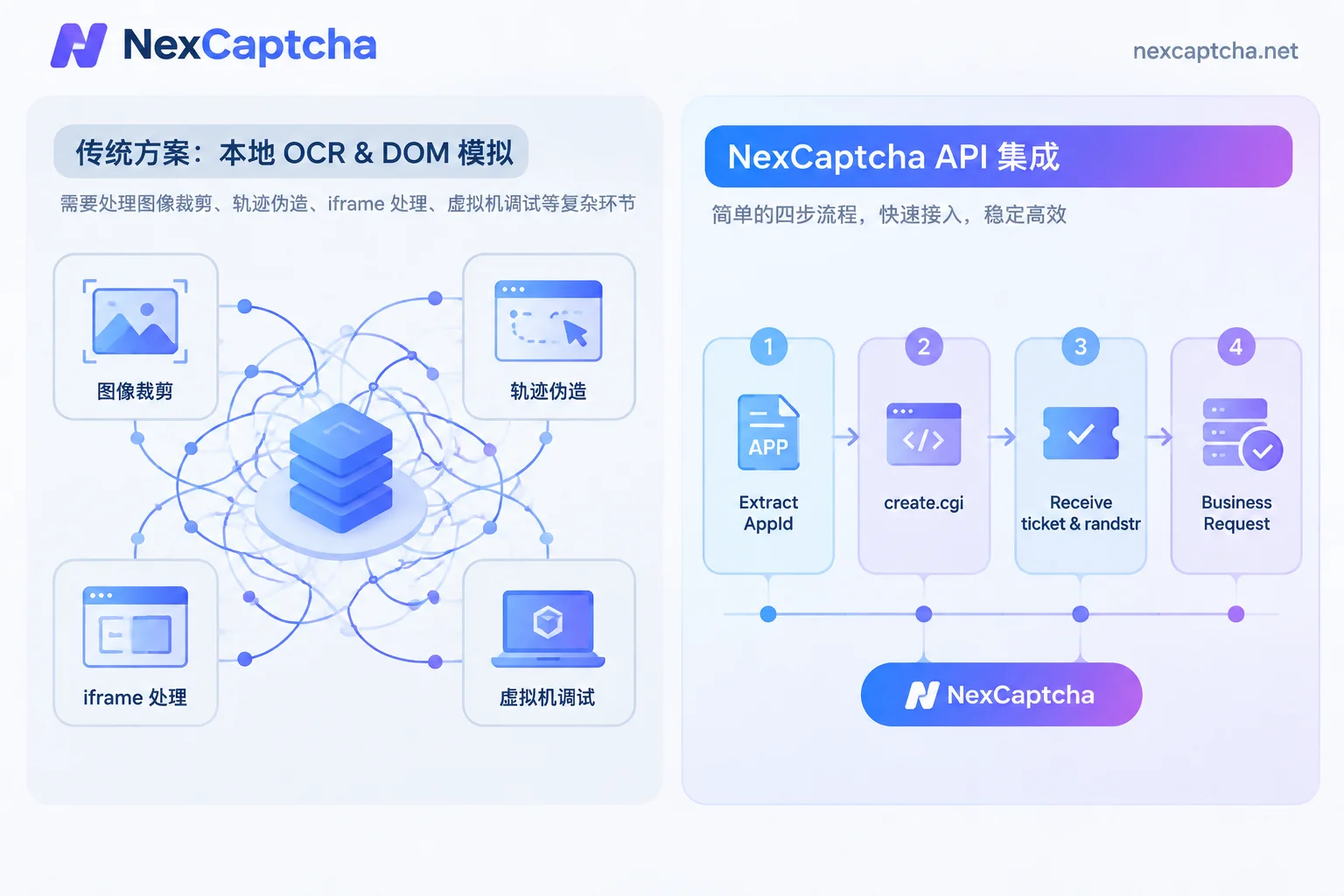
I. Why Are Traditional Local OCR and Trajectory Simulation Increasingly Difficult to Maintain?
When evaluating whether to build captcha recognition in-house or choose a captcha solving platform, many teams initially try to use open-source vision libraries with browser automation tools to handle Tencent sliders. However, in actual production environments, this approach faces three technical barriers:
- Dynamic challenge type switching (random popup mode): Tencent Cloud supports dynamically issuing challenge types based on real-time risk scores. In the same session, the first challenge might be a slider puzzle, and the second might become sequential Chinese character clicking or icon clicking. Maintaining multiple local recognition models and DOM interaction logic is not only time-consuming but also significantly increases container memory overhead.
- Cross-domain iframe and dynamic virtual machine (tdc.js): The interaction of Tencent Captcha runs in an independent cross-domain iframe (e.g.,
turing.captcha.gtimg.com). Its core environment collection and behavior encryption logic are driven by a dynamically generatedtdc.js(CHAOS VM bytecode virtual machine). Each time it loads, the encryption key, opcode index, and module call order change dynamically, and it strictly validates DOM events, browser fingerprints, and PoW (Proof of Work). - Strict domain verification and disaster recovery ticket trap: Under strict domain verification mode, abnormal requests initiated from non-target domain contexts are directly blocked; if local environment patching or trajectory simulation triggers risk control, the component sometimes does not directly report an error but returns a disaster recovery ticket or error code prefixed with
trerror_, causing subsequent business API validation failures.
To focus R&D efforts on core business, a more efficient engineering practice is to delegate complex challenge recognition to professional API services, directly obtain the final verification credentials (or coordinate data), and complete submission within your own business session.
II. Core Mechanism of Tencent Captcha: Business Decoupling and Dual-Credential Verification
Observing the standard web client integration of Tencent Captcha reveals that the captcha interaction system and the target site's business system are decoupled.
Regardless of whether the frontend displays the new 'I am human' checkbox (TJNCaptcha-global.js), traditional slider, or text click (TCaptcha.js / TJCaptcha.js), after verification passes, the Tencent Captcha component triggers the frontend-registered callback function callback(res), returning the following core data structure:
{
  "ret": 0,                   // 验证结果,0代表验证成功,2代表用户主动关闭
  "ticket": "t03...",         // 验证成功的票据(核心凭证 1)
  "randstr": "@abc...",       // 本次验证的随机串(核心凭证 2)
  "CaptchaAppId": "204455...",// 验证码应用 ID
  "bizState": null            // 自定义透传参数
}
The target website's business backend does not check how many pixels you slid or which coordinate you clicked; it only receives the ticket and randstr attached when the frontend submits the form, and then calls Tencent Cloud's server-side API to verify the validity of this pair of credentials.
This provides us with a clear automated integration approach:
- Protocol direct solving (Token mode): Extract the target page's site address (
websiteURL) and Tencent Captcha application ID (CaptchaAppId), directly obtain validticketandrandstrvia API, and inject them into the frontend callback or directly include them in the business request body for submission. - Visual assistance (coordinate/distance mode): If some highly customized business scenarios require fully preserving real browser physical click/drag actions, you can also pass the captured background image and prompt image to the general slider captcha recognition interface or click captcha recognition interface, obtain the coordinates, and then drive Playwright/Puppeteer to execute.
III. Pre-Integration Preparation: How to Quickly Locate Key Parameters?
Before using NexCaptcha to handle Tencent Captcha, you first need to extract basic configuration parameters from the target page. Open the browser developer tools (F12); you can usually quickly find CaptchaAppId (i.e., websiteKey / appId in API parameters) through the following three methods:
- Inspect DOM element attributes: Find the button or container element that triggers verification on the page, and check for attributes such as
data-appid. - Search global initialization code: Globally search for
new TencentCaptchain the Sources panel; the first string argument passed is usuallyCaptchaAppId. - Monitor network requests (most reliable): Filter
cap_union_prehandlerequests (sent toturing.captcha.qcloud.com) in the Network panel, and check theaidfield in its Query String parameters; this value is theCaptchaAppIdbound to the current business line.
IV. NexCaptcha Tencent Captcha Recognition API Integration in Practice
NexCaptcha supports dozens of mainstream captcha types including Tencent, Geetest, NetEase Yidun, Alibaba Cloud, reCAPTCHA, and Turnstile (for the full list, see the official supported types page or log in to the console product catalog).
In terms of interface design, NexCaptcha adopts a unified asynchronous task flow: create a recognition task via create.cgi, poll for results via query.cgi or receive recognition results via WebSocket real-time push. The customer's own business requests, Session, and Cookie are fully retained locally and do not pass through the captcha solving server.
1. API Call Flow and Python Example
Before calling, please go to the NexCaptcha registration page to obtain an API Key (free test credits upon registration, no credit card required). You can also first enter your API Key in the console's online test bench and initiate a real test task.
Note: For the specific product code (product) and field definitions withinadapter, please refer to the latest NexCaptcha official API documentation. The documentation specifies the corresponding task type name for each type, and the internal fields ofadapterfollow the industry-standard naming conventions such aswebsiteURL,websiteKey, etc., making it easy to migrate quickly from other platforms.
Below is a reference structure for submitting a task and polling results using Python:
import time
import requests

API_KEY = "YOUR_NEXCAPTCHA_API_KEY"
BASE_URL = "https://app.nexcaptcha.net/openapi"

def solve_tencent_captcha(page_url: str, app_id: str, proxy: str = None):
    headers = {
        "Authorization": f"Bearer {API_KEY}",
        "Content-Type": "application/json"
    }

    # 1. 构造 adapter 参数(具体产品编码与字段名请对照官方接口文档)
    adapter_params = {
        "websiteURL": page_url,
        "websiteKey": app_id
    }
    # 若业务开启了严格的同 IP 校验,建议传入客户自己的代理
    if proxy:
        adapter_params["proxy"] = proxy

    payload = {
        "product": "TENCENT_TASK_CODE",  # 请替换为控制台文档中腾讯验证码对应的产品编码
        "adapter": adapter_params
    }

    # 2. 创建识别任务
    create_resp = requests.post(f"{BASE_URL}/create.cgi", json=payload, headers=headers, timeout=15)
    create_data = create_resp.json()
    task_id = create_data.get("taskId")
    if not task_id:
        raise RuntimeError(f"创建任务失败: {create_data}")

    # 3. 轮询查询结果(高并发场景推荐使用 WebSocket 推送替代轮询)
    for _ in range(30):
        time.sleep(2)
        query_resp = requests.get(
            f"{BASE_URL}/query.cgi",
            params={"taskId": task_id},
            headers=headers,
            timeout=10
        )
        res_data = query_resp.json()
        status = res_data.get("status")

        if status == "success":
            return res_data.get("solution")  # 包含返回的 ticket / randstr 等凭证数据
        elif status in ("failed", "expired"):
            # 任务失败或过期系统会自动退回余额
            raise RuntimeError(f"识别未通过,状态: {status}, 详情: {res_data}")

    raise TimeoutError("查询验证码结果超时")
If you are integrating in a Node.js or headless browser environment, you can refer to our Node.js captcha recognition API integration guide and Puppeteer captcha API integration in practice.
2. AI Agent and MCP Zero-Code Integration
If your team is using Claude Code, Cursor, VS Code, or self-developed AI Agents for automated inspections and web interactions, you do not need to write the HTTP polling code above. NexCaptcha provides a hosted MCP (Model Context Protocol) service, requiring no local deployment and authenticating with just an API Key. The AI assistant can autonomously complete product lookup, parameter model lookup, task creation, and result retrieval through five built-in standard tools (see Automation Breakthrough in the AI Agent Era: From MCP Integration to Seamless Captcha Recognition in Practice for details).
V. Two Modes of Result Injection and Credential Injection
After obtaining the API's returned verification result (including ticket and randstr), how do you return it to the target website? Depending on the automation architecture, there are usually two approaches:
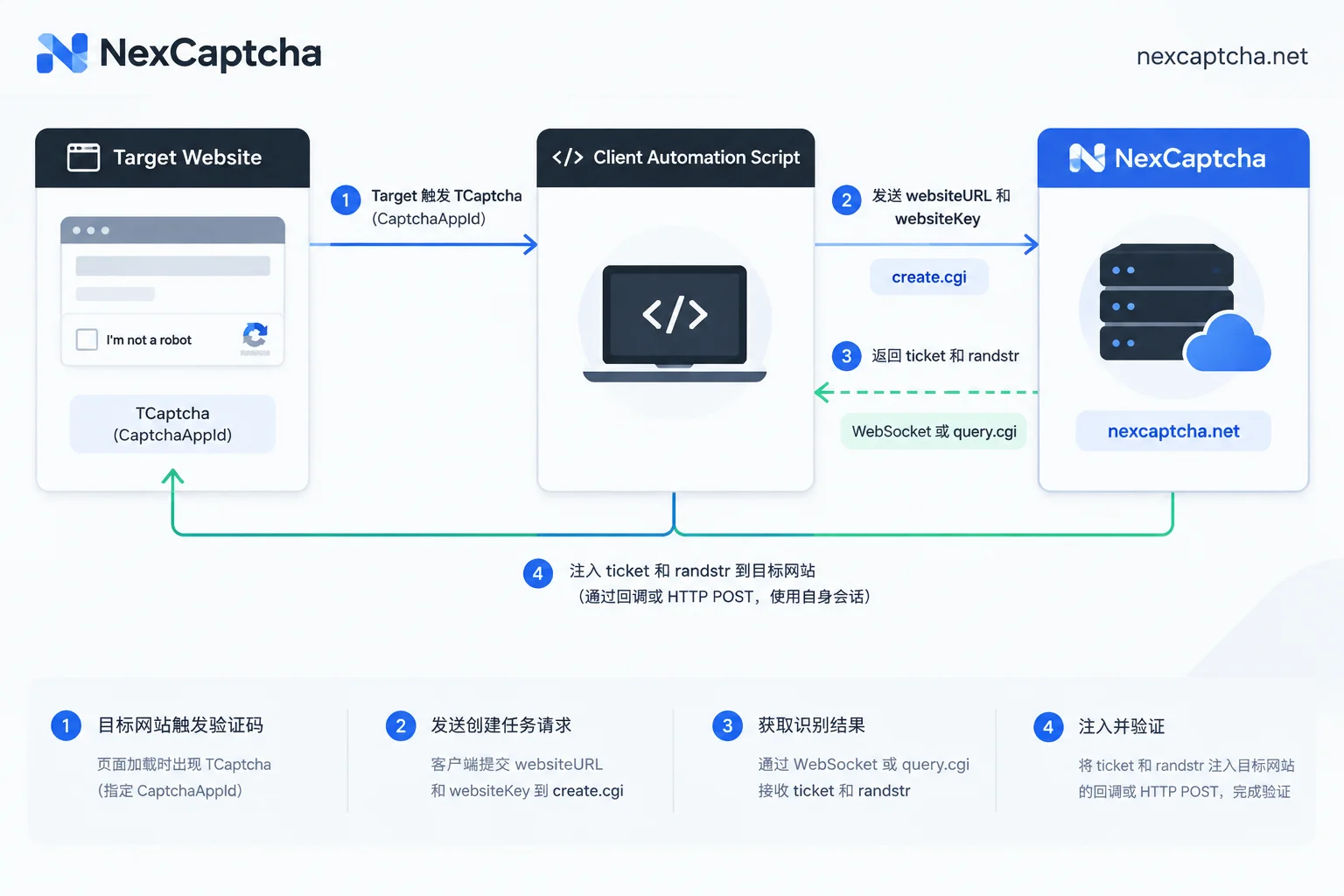
Mode A: Pure HTTP Protocol Direct Submission (Suitable for High-Concurrency Data Collection)
In many public data query or login APIs, after the frontend triggers risk control (e.g., returns HTTP 430 or a specific business error code and issues contextId), it simply requires ticket and randstr to be included when resending the request or calling the verification API.
In this case, there is no need to launch a browser; simply include the credentials returned by the API in your business POST request body (e.g., {"ticket": "...", "randstr": "..."}) and submit directly using your original business Session. This method offers high single-machine concurrency and extremely low memory usage.
Mode B: Playwright / Selenium Callback Injection (Suitable for QA Regression Testing)
In end-to-end UI automation testing, subsequent business logic is often bound to the callback function of the frontend TencentCaptcha instance. At this point, you can directly trigger the callback in the browser context via page.evaluate(), or write the credentials into hidden form fields:
// 在 Playwright / Puppeteer 中注入识别结果示例
await page.evaluate(({ ticket, randstr, appid }) => {
  const mockRes = {
    ret: 0,
    ticket: ticket,
    randstr: randstr,
    CaptchaAppId: appid,
    bizState: null
  };
  // 如果页面将回调挂载到了全局或特定实例,直接调用它
  if (typeof window.onCaptchaCallback === 'function') {
    window.onCaptchaCallback(mockRes);
  }
}, { ticket: solution.ticket, randstr: solution.randstr, appid: '2044554539' });
VI. Common Errors and Pitfall Avoidance Guide (Why Does Validation Still Fail After Obtaining a Ticket?)
When integrating Tencent Captcha, you may encounter situations where the API successfully returns credentials but submitting them to the target site's business API indicates verification failure. Based on Tencent Cloud's official server-side ticket verification error codes and engineering experience (you can also read How to troubleshoot verification failure after captcha token is returned), please focus on the following four points:
| Common Phenomenon / Tencent Cloud Error Code | Core Cause Analysis | Engineering Solution |
|---|---|---|
7: captcha no match | randstr and ticket do not match. | Ensure that ticket and randstr returned from the same task are submitted as a pair; do not mix return values from different tasks in a concurrent queue. |
8: verify timeout | Ticket expired. After the frontend generates ticket, the default validity period is 5 minutes (some high-sensitivity businesses may shorten it). | Follow the 'use immediately after obtaining' principle; do not pre-batch stockpile tickets; initiate the business request immediately after obtaining the result. |
9: Sequence repeat | Ticket has been repeatedly verified. | Each ticket is a one-time consumable; if the business request is retried due to network timeout, you must call the API again to obtain a new ticket. |
15: decrypt fail or domain blocking | CaptchaAppId is passed incorrectly, field value is truncated, or Tencent Cloud's 'strict domain verification mode' and IP consistency risk control are triggered. | 1. Verify that the passed websiteURL includes the complete protocol and path (must match the real page that triggered the verification); 2. Pass a proxy IP (Proxy) consistent with your business request egress when creating the task to keep the session network environment aligned. |
Additionally, when switching platforms (e.g., migrating from 2Captcha, Anti-Captcha, or traditional image captcha platforms to NexCaptcha), since each platform's outer routing and authentication formats differ, it is recommended to first run dual tests at a small traffic ratio, compare effective cost and pass rate, and then switch fully (refer to Super Eagle Alternative and Architecture Evolution in Practice).
Conclusion
Faced with Tencent Captcha's continuously iterating obfuscated sliders, dynamic click challenges, and virtual machine hardening, decoupling the recognition process and delegating it to a standardized API like NexCaptcha allows engineering teams to completely bid farewell to tedious reverse environment patching and model retraining.
NexCaptcha uses a pay-per-use model, automatically refunding balance for failed or expired tasks, with no subscription fees or minimum consumption limits, and supports Alipay, WeChat, USDT, and corporate bank transfer (see Pricing and Billing Details). Register for free to get an API Key and experience the online test bench. If you have any questions when integrating specific samples or customized scenarios, feel free to contact our Telegram online support or visit the Industry Solutions page for technical support.



