
In early domestic crawler tutorials, RPA workflow orchestration, and QA automation testing, Super Eagle (Chaojiying) was almost the first third-party CAPTCHA solving platform that many developers encountered. By capturing the CAPTCHA image on a webpage and sending it along with the account password, softid (software ID), and codetype (e.g., 1902 for alphanumeric, 9800 for text click) to the Processing.php interface, one could synchronously obtain the recognized text or click coordinates.
However, as more businesses go global or domestic target sites fully upgrade their protection systems, technical teams often find that the workflow relying on "screenshot + image upload" starts to frequently fail. At this point, looking for a Super Eagle alternative is often not simply because static image recognition is insufficient, but because the business has encountered engineering bottlenecks that the traditional image CAPTCHA solving model cannot cover.
This article starts from the technical evolution of CAPTCHA defenses, breaks down the core differences between traditional image upload interfaces and modern unified recognition APIs, and provides a practical migration guide for smoothly evolving existing code to NexCaptcha.
I. Why Engineering Teams Start Looking for a Super Eagle Alternative
When evaluating CAPTCHA platform migration, the pain points faced by R&D and architects typically focus on the following four aspects:
1. Evolution from "Visual Image Challenges" to "Dynamic Scripts and Token Challenges"
Super Eagle's core capability is built on image recognition (uploading userfile binary stream or file_base64). This logic is very intuitive for handling static characters, arithmetic problems, regular text clicks, and pure gap sliders.
However, in current public data collection (e.g., cross-border e-commerce price comparison, SERP ranking monitoring) and automated regression testing, many web pages no longer pop up simple images but instead use modern CAPTCHAs based on front-end environment fingerprints and back-end encrypted verification—such as Cloudflare Turnstile, reCAPTCHA v2/v3/Enterprise (including invisible mode), GeeTest v3/v4, FunCaptcha/Arkose, DataDome, AWS WAF, etc.
Faced with such verification, even if you take a screenshot in the browser, obtain coordinates, and simulate clicks, the complex mouse trajectory detection and device fingerprint verification on the front end will still cause interception; for reCAPTCHA v3 or Turnstile invisible modes, there may be no image to capture at all. What modern automation engineering truly needs is to directly pass in the page URL and site parameters, and have the API return a valid verification token, cookie, or encrypted credential, which the client then injects into the session for submission.
2. Contradiction Between Synchronous Blocking Connections and High-Concurrency Scheduling
Most traditional HTTP image upload interfaces use a single synchronous long-connection mode (e.g., setting a 60-second HTTP timeout to wait for direct results). This is convenient when running a small number of scripts, but in high-concurrency collection or large-scale CI/CD regression testing, a large number of pending HTTP connections will quickly exhaust the client's connection pool or coroutine resources. Once complex verification time fluctuates, it is difficult for the client to distinguish whether it is a network disconnection or the server is still processing.
3. Additional Development Burden Caused by Error Refund Mechanisms
In traditional per-question billing systems, points are deducted immediately as long as the interface returns text or coordinates (i.e., err_no == 0). If the recognized characters or coordinates are judged incorrect by the target site during actual submission, the developer needs to save the pic_id of that attempt and write additional logic in the business code to call the "error refund" interface to recover the loss. This invisibly lengthens the exception handling chain.
4. Disconnection Between Authentication Management and New AI Toolchains (Agent / MCP)
Passing account, password hash, and softid in plaintext in the request body is not conducive to key rotation and permission isolation in enterprise multi-team collaboration. Meanwhile, as R&D teams introduce AI coding assistants like Claude Code, Cursor, or build autonomous AI Agent workflows, traditional CAPTCHA interfaces lack standardized Model Context Protocol support.
II. Architecture Comparison: Traditional Image CAPTCHA Solving vs. NexCaptcha Unified Recognition Interface
As a CAPTCHA recognition API service for browser automation, AI Agents, QA regression, and public data collection teams, NexCaptcha is architecturally compatible with both traditional "image/coordinate recognition" and modern "token/cookie-level recognition".
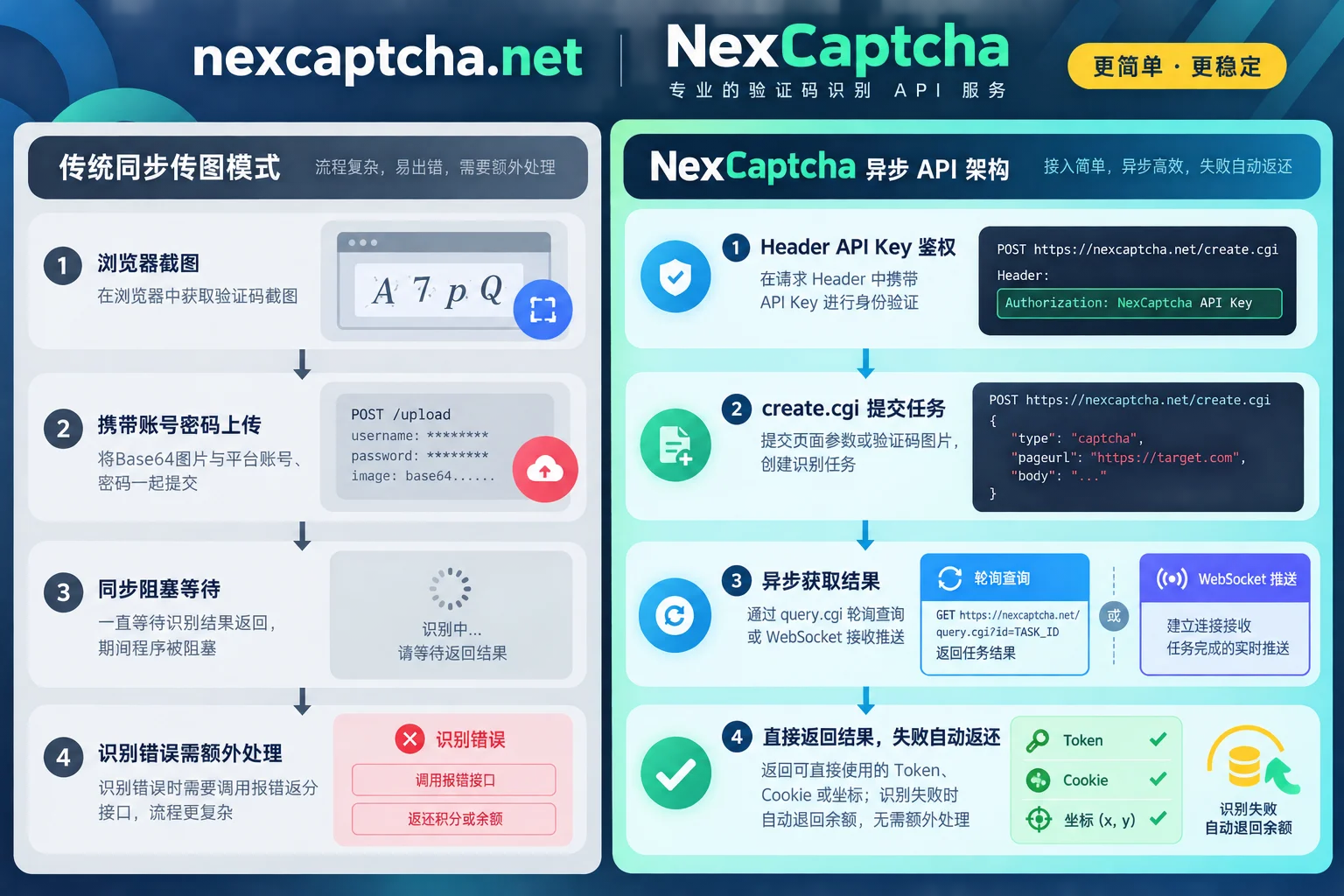
The differences between the two solutions in core engineering dimensions are as follows:
| Comparison Dimension | Traditional Image CAPTCHA Solving (e.g., Super Eagle) | NexCaptcha Unified CAPTCHA Recognition Service |
|---|---|---|
| CAPTCHA Type Coverage | Static image characters, arithmetic problems, regular text/icon clicks, basic slider positioning | Covers general types such as image, slider, click, rotation, audio; also supports reCAPTCHA v2/v3/Enterprise, Turnstile, GeeTest v3/v4, FunCaptcha, DataDome, AWS WAF, Imperva, Tencent, NetEase Yidun, Alibaba Cloud, etc. View full catalog |
| Interaction and Return Results | Pass in image binary or Base64, return recognized text or coordinate string (pic_str) | Pass page URL, sitekey, or image parameters by type; asynchronously return Token, Cookie, text, or coordinates |
| Communication and Concurrency Model | Single HTTP synchronous wait for return | Asynchronous task model: create.cgi to create a task, query.cgi to query results, or receive results in real-time via WebSocket |
| Session and Proxy Boundary | Only uploads screenshot images, does not involve target site network sessions | Customer's business requests, Session, and Cookie do not pass through this service; for some types, customer's own proxy is optional or required; if not provided, server-side proxy pool is used |
| Authentication Method | Request parameters carry user, pass/pass2, softid | Uniformly use API Key in HTTP request header for authentication |
| Billing and Refund Logic | Points deducted upon successful return; recognition errors require actively calling the error refund interface | Charged per use, automatically refunded to balance on task failure or expiration; balance never expires, no subscription fee or minimum consumption, automatic tiered discounts when usage reaches thresholds |
| Settlement and Team Support | RMB recharge of points | USD pricing, supports Alipay, WeChat, USDT, corporate transfer, suitable for unified procurement by domestic and international teams |
III. Migration and Refactoring Solutions for Three Typical Business Scenarios
Migrating an existing project from Super Eagle to NexCaptcha does not mean tearing down all automation code. Depending on the type of CAPTCHA you currently handle, there are two paths: "smooth replacement" and "dimensional upgrade".
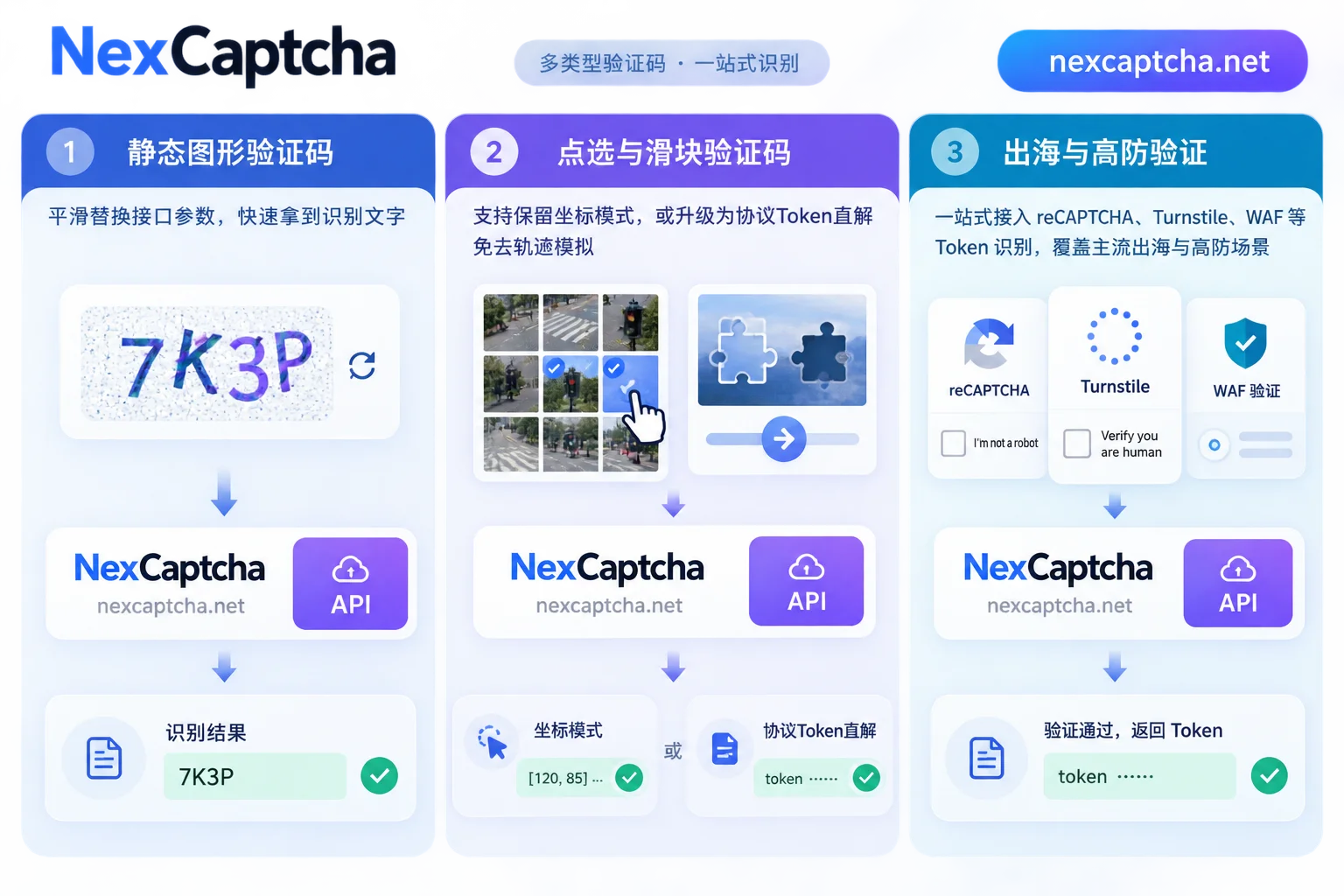
Scenario 1: Existing Static Image CAPTCHA (e.g., original codetype=1902)
If your system still handles traditional alphanumeric image CAPTCHAs, the migration work mainly involves replacing the interface call layer. For Base64 encoding details and session maintenance, you can also refer to our previous article "How to Integrate Image CAPTCHA Recognition API: Base64 Specification, Parameter Configuration, and Session Maintenance".
- Original Logic: Capture CAPTCHA element image -> assemble
user/pass2/softid/codetype=1902/file_base64-> POST toProcessing.php-> parsepic_str. - NexCaptcha Integration: Put API Key in request header, call
create.cgiinterface, select general image recognition type by product code, pass image parameters inadapterfield. After obtaining task ID, poll viaquery.cgior wait for WebSocket push to get the recognized text.
Scenario 2: Text Click and Slider Puzzle (e.g., original codetype=9800 / 9900)
In Super Eagle, click-type CAPTCHAs typically use 9800 with str_debug instructions to obtain coordinates, and sliders use 9900 to identify gap positions.
When migrating to NexCaptcha, you have two options:
- Continue using coordinate mode: If the target site only has a simple self-developed slider or click CAPTCHA, you can directly use NexCaptcha's corresponding general slider, click, and rotation types, pass in the image, and get coordinates back. The existing front-end scaling conversion and click code need no major changes (see "How to Integrate Click CAPTCHA Recognition API" and "How to Integrate Slider CAPTCHA Recognition API").
- Upgrade to protocol token mode (recommended): If your crawler uses click/slider recognition because it encounters GeeTest v3/v4, Tencent Waterproof Wall, NetEase Yidun, or Alibaba Cloud CAPTCHA, and previously used screenshots with Selenium to simulate dragging but often got blocked due to trajectories, you can now directly switch to NexCaptcha's dedicated types! No need to take screenshots and write complex human-like sliding trajectories; directly extract page initialization parameters (e.g.,
gt,challenge, orcaptchaId) and pass them to the API, get back the verification credential and directly fill it in for submission. Stability and speed will see a qualitative leap (refer to "How to Integrate GeeTest CAPTCHA Recognition API").
Scenario 3: New Overseas and High-Defense Sites (reCAPTCHA / Turnstile / WAF)
For Cloudflare Turnstile, reCAPTCHA v2/v3/Enterprise, FunCaptcha, DataDome, and other interceptions that Super Eagle could not handle before, NexCaptcha uses the same create.cgi / query.cgi interface specification for all. You only need to look up the corresponding product code in the console and fill in parameters such as websiteURL, websiteKey in adapter; no need to maintain SDKs from multiple vendors for different CAPTCHA types.
IV. Code-Level Interface Modification Comparison
To give technical leads evaluating migration an intuitive understanding of the modification workload, we compare the changes in request structure below.
1. Authentication and Request Outer Layer Modification
An engineering boundary to note: NexCaptcha focuses on delivering CAPTCHA recognition results (Token, Cookie, text, or coordinates) to the customer, does not send requests to the target website on behalf of the customer, nor retrieve the target page; meanwhile, NexCaptcha's interface uses its own create.cgi / query.cgi specification (not 2Captcha's createTask format), and does not provide HTTP Webhook callbacks or official installed SDKs. Developers can integrate lightweightly via standard HTTP requests or WebSocket.
In the API documentation, NexCaptcha labels each type with a common task type name (e.g., RecaptchaV2TaskProxyless), and the internal fields of adapter follow industry-standard naming conventions (e.g., websiteURL, websiteKey), making it easy to understand and map. You can directly refer to the NexCaptcha OpenAPI documentation for complete message examples.
Modification Checklist:
- Remove plaintext credentials: Delete the
user,pass2,softidparameters concatenated into the form in the code, and instead read the NexCaptcha API Key from environment variables and put it in the request header. - Decouple submission and retrieval: Split the original one-step synchronous request into
create.cgi(submit task to get task ID) andquery.cgi(query status), or establish a long connection to receive completion pushes via WebSocket. Task status is clearly divided into: processing, success, failure, expired. - Simplify exception handling: Delete the original "call error refund interface" branch. In NexCaptcha, as long as the task status becomes "failure" or "expired", the system automatically refunds the balance. The client only needs to decide whether to retry based on business strategy (for timeout and retry boundary design, refer to "How to Handle CAPTCHA API Timeouts").
2. AI Agent and Modern R&D Workflow Integration (MCP Support)
If your team is developing browser automation Agents based on large models, or daily uses Claude Code, Claude Desktop, Cursor, Codex, VS Code, Gemini CLI for assisted development, NexCaptcha provides an out-of-the-box hosted MCP (Model Context Protocol) service.
You do not need to deploy any relay service locally. Simply use API Key authentication to configure and connect directly in clients that support Streamable HTTP. This service includes five standard tools: query products, query parameter models, create tasks, query tasks, query balance (only task creation is charged; failure or expiration refunds). For specific configuration, refer to the NexCaptcha MCP Integration Guide.
V. Four-Step Low-Risk Migration Recommendations
Replacing infrastructure in a production environment—stability comes first. Whether you are responsible for price monitoring data collection or maintaining an enterprise-level QA automation pipeline, it is recommended to follow these four steps:
- Inventory existing tasks and conduct online testing
First, sort out all Super Eaglecodetypeused in existing code and any new unresolved CAPTCHA types. Go to the NexCaptcha Console Product Catalog to find the corresponding product code. If you encounter a special niche CAPTCHA not in the catalog, you can directly send samples for a quote. Register an account to receive test credits (no card required). The console provides an online test bench for each type; enter your API Key to launch a real task directly on the web page and verify the return structure first. - Write a unified Adapter encapsulation layer
In your crawler or automation testing framework, abstract a unifiedCaptchaSolverinterface layer. Encapsulate NexCaptcha'screate.cgiandquery.cgi(or WebSocket listener) internally, and expose methods compatible with the original business calls. - Dual-run validation by traffic percentage
Do not switch all at once. It is recommended to introduce a traffic distribution switch through a configuration center (e.g., first route 10%–20% of task traffic to NexCaptcha), focusing on verifying the final submission pass rate, end-to-end latency, and true effective cost on both sides (for calculation methods, refer to "CAPTCHA Platform Cost Comparison: Public Pricing, Billing Metrics, and True Cost Algorithms of Mainstream Platforms"). - Full switch and monitoring alerts
After dual-run data matches and exception refund and retry logic are verified, switch all traffic to the new interface, and take offline redundant code such as error refunds from the old platform.
Compliance and Security Notice: During integration and migration, please ensure that your business scenarios comply with compliance requirements (e.g., public data collection, SEO monitoring, QA automation testing of your own systems, RPA and accessibility assistance, etc., see Solutions Page). NexCaptcha strictly prohibits use for credential stuffing, account theft, bulk registration, spam sending, ban evasion, payment fraud, bypassing paywalls or DRM, and other illegal purposes. Keys that trigger violations will be directly disabled without refund.
Conclusion
From early "screenshot upload for character recognition" to today's "multi-dimensional parameters and token-level asynchronous recognition", the escalation of CAPTCHA对抗 is driving the iteration of underlying toolchains. If you are looking for a Super Eagle alternative that can take over your existing image, slider, and click tasks while also solving modern CAPTCHAs like reCAPTCHA, Turnstile, and GeeTest in one place, why not immediately register to get a NexCaptcha API Key and claim free test credits, or run your first recognition task in the console test bench. For high-concurrency tiered discounts or special sample integration needs, feel free to contact us via the Pricing Page or Official Telegram Support.



