
In e-commerce public price comparison monitoring, SEO ranking collection, and QA automated regression testing for enterprise web applications, GeeTest is one of the most commonly encountered behavioral verification components. Many development teams, when integrating the GeeTest CAPTCHA recognition interface, clearly receive a successful response from the recognition service, but after submitting the parameters along with the business form to the target server, they still receive verification failure or parameter expiration errors.
Most of these problems are not caused by errors in the recognition algorithm itself, but by pitfalls in the engineering pipeline such as "parameters being consumed by the frontend prematurely", "dynamic serial number reuse", or "backfill timing disconnected from secondary verification signature".
If you are not yet clear about the underlying differences between the two generations of GeeTest architecture, you can first read the previous article on this site "Differences Between GeeTest v3 and v4: Architecture Differences in Initialization, Parameters, Secondary Verification, and Automation Integration". On this basis, focus on how to robustly integrate the GeeTest CAPTCHA recognition API into the automated engineering pipeline, breaking down parameter interception, interface calls, credential submission, and troubleshooting step by step.
1. Why is directly simulating slider dragging becoming increasingly difficult to maintain?
In the verification processes of GeeTest v3 and v4, whether it is slider puzzle, text click, icon click, or invisible verification, the interactive interface presented on the frontend is merely a "sandbox" for collecting behavioral characteristics.
If traditional UI automation solutions are adopted (such as taking screenshots in the browser, calculating gap offset, simulating mouse trajectory dragging), engineering teams usually face three maintenance costs:
- Background image obfuscation and dynamic restoration: v3 background images are often split and shuffled, requiring close tracking of frontend Canvas restoration logic; v4 frequently adjusts adaptive question types (e.g., temporarily switching from slider to word-order click).
- Trajectory and environment risk control verification: Frontend scripts package mouse movement acceleration, dwell time, page load time, and device characteristics into encrypted
wparameters. Simple uniform or fixed trajectory libraries are easily detected. - High browser rendering overhead: In high-concurrency public data collection or large-scale regression testing, attaching full GUI rendering and executing drag actions for each task significantly increases CPU and memory usage.
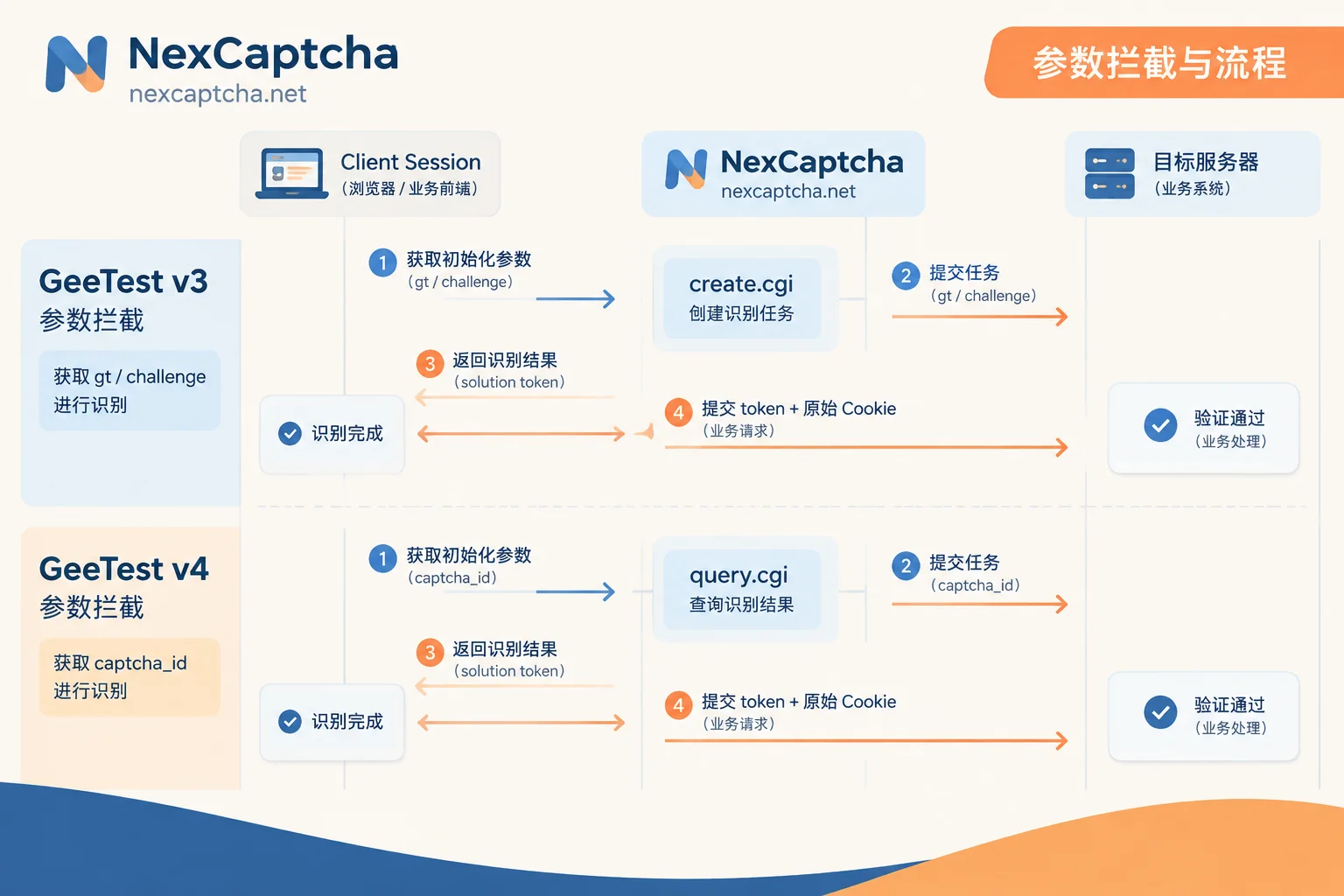
By integrating the NexCaptcha CAPTCHA recognition API, automation programs do not need to maintain complex image restoration and encryption logic locally. They only need to pass in the page's verification initialization parameters to asynchronously obtain the credential dictionary required for verification, and then the customer's own session completes subsequent business submission.
2. The Critical Step Before Integration: Accurately Extract and "Not Pollute" Initialization Parameters
The first watershed for GeeTest recognition success lies in whether the parameters passed to the CAPTCHA solving interface are "fresh and unconsumed". The extraction methods for GeeTest v3 and v4 are completely different.
1. GeeTest v3: Intercept gt and Dynamic challenge
In the v3 architecture, before each verification trigger, the business frontend first requests the business backend's initialization interface (common paths include register, init, gt, etc.) to obtain a set of JSON data:
websiteURL: The full URL of the current page triggering the CAPTCHA.gt: 32-character fixed merchant public key identifier (usually unchanged for the same site).challenge: 32-character dynamic verification serial number (changes with each initialization, strictly single-use).geetestApiServerSubdomain(optional): If the target site uses a private or specific API domain (e.g.,api-na.geetest.com), it should also be extracted and passed.
Key Engineering Pitfall (Preventing Challenge from Being Consumed Twice):
When using Puppeteer, Playwright, or Selenium, if the page has automatically loadedgt.jsand calledinitGeetestto render the CAPTCHA popup, the frontend script has often already used thischallengeto make aget.phprequest to the GeeTest server (sometimes even concatenating the 32-characterchallengeinto 34 characters).
Once thischallengehas been consumed by the page's own session, passing it to an external recognition API will cause conflicts or invalidation. The correct approach is to intercept the business initialization interface response via route interception (e.g., Playwright'spage.route), or intercept subsequent network requests ofgt.js, and send the pure 32-characterchallengedirectly to the recognition interface.
2. GeeTest v4: Extract captcha_id and Optional Risk Configuration
GeeTest v4 eliminates the server-side pre-registration step of challenge, and instead the frontend directly initiates a load request via captcha_id. Parameter extraction is more straightforward:
websiteURL: The full address of the current page.captchaId: The 32-character verification ID corresponding to the site, obtainable from the page'sinitGeetest4({ captchaId: '...' })script configuration or from query parameters of requests togcaptcha4.geetest.com/load.riskType(optional): Some sites specify verification subtypes during initialization or inloadrequests (e.g.,slide,word,icon,ai, etc.). Filling in adapter parameters as needed helps improve processing accuracy.
3. Call NexCaptcha Interface to Complete GeeTest CAPTCHA Recognition
NexCaptcha uses a unified asynchronous task interface architecture: create a recognition task via create.cgi, then poll via query.cgi or use WebSocket push to obtain results. Note that NexCaptcha does not send business requests to the target website on behalf of the customer; the customer's own Session and Cookies remain in the local environment throughout.
1. Build Request (create.cgi)
In the interface documentation, each CAPTCHA type is labeled with its corresponding product code and pass-through task type name (e.g., GeeTest without proxy or with proxy mode), and the fields within the adapter object follow the familiar naming conventions of websiteURL, gt, challenge, etc., facilitating smooth migration from other platforms.
Below is a reference structure for submitting a GeeTest recognition task and obtaining results using Python:
import time
import requests

API_KEY = "YOUR_NEXCAPTCHA_API_KEY"
CREATE_URL = "https://app.nexcaptcha.net/openapi/create.cgi"
QUERY_URL = "https://app.nexcaptcha.net/openapi/query.cgi"

headers = {
    "Authorization": f"Bearer {API_KEY}",
    "Content-Type": "application/json"
}

# 示例:构建 GeeTest v3 识别任务请求体
# 具体产品编码请对照控制台产品目录或接口文档
payload_v3 = {
    "productCode": "GEETEST_V3_PROXYLESS",  # 按接口文档填入对应产品编码
    "adapter": {
        "websiteURL": "https://example.com/login",
        "gt": "022397c99c9f646f6477822485f30404",
        "challenge": "38c0168576e204c23a4863a16202cac9"
    }
}

resp = requests.post(CREATE_URL, json=payload_v3, headers=headers, timeout=15)
task_data = resp.json()
task_id = task_data.get("taskId")

# 轮询查询结果(生产环境高并发建议接入 WebSocket 推送)
while True:
    time.sleep(2)
    q_resp = requests.get(f"{QUERY_URL}?taskId={task_id}", headers=headers, timeout=15)
    result = q_resp.json()
    status = result.get("status")

    if status == "success":
        solution = result.get("solution", {})
        print("识别成功,返回凭证:", solution)
        break
    elif status in ("failed", "expired"):
        raise RuntimeError(f"任务未成功,状态:{status},该次任务费用将自动退回余额")
If you are not sure how to fill in the parameters for the target site, you can first open the console online test bench, fill in the API Key and the captured parameters to create a real task, and intuitively verify the return structure. For the trade-offs between polling and push, you can refer to "What's the Difference Between CAPTCHA API Polling and Callback: Process, Latency, Deployment Conditions, and How to Choose" (Note: NexCaptcha uses WebSocket push instead of traditional HTTP Webhook, eliminating the need to expose a public callback port).
4. After Obtaining Recognition Results, How to Correctly Backfill and Submit Business Requests?
Many developers integrating for the first time ask: "The interface returned a string of fields, but there is no corresponding input box on the page. Where should I put them?"
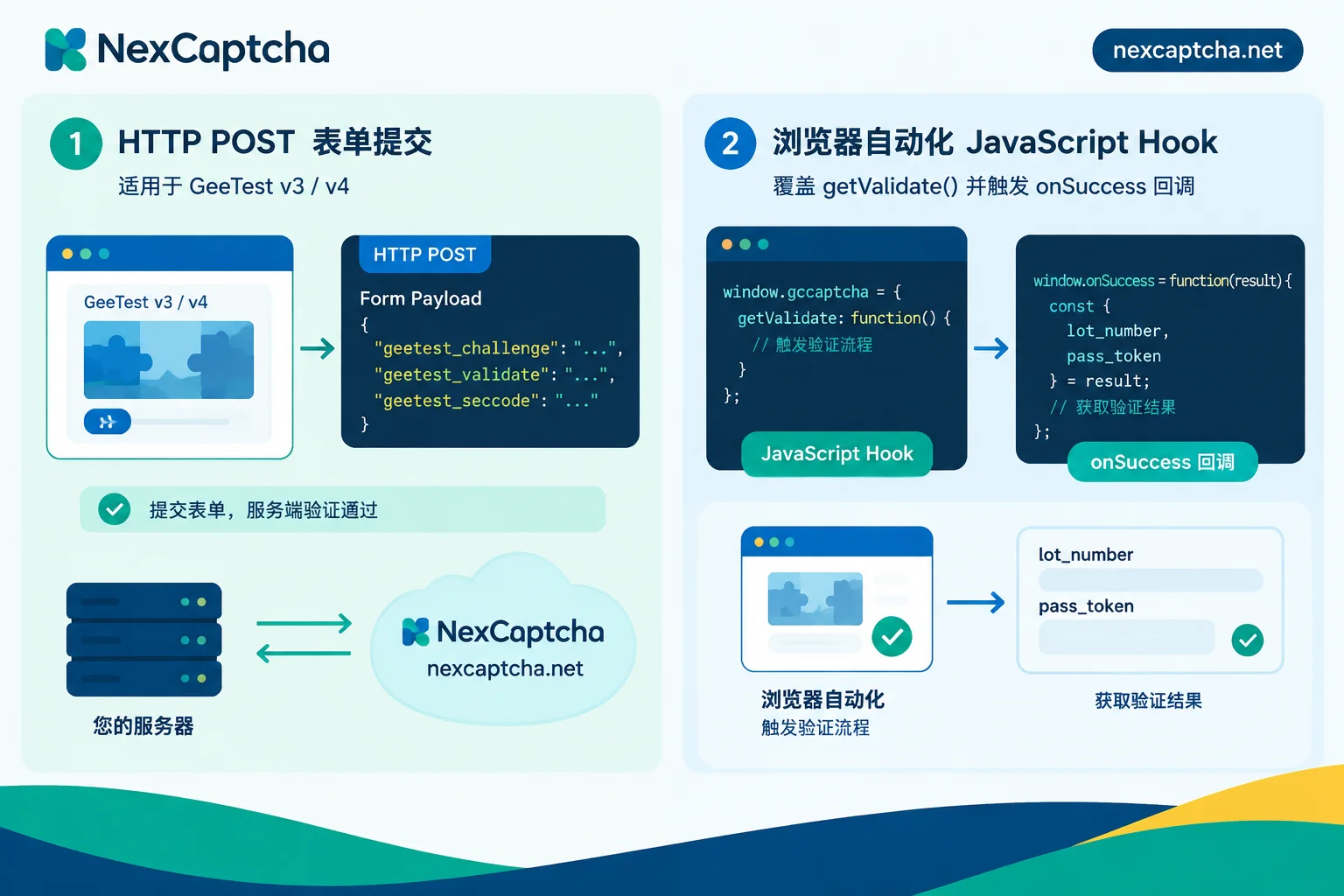
The returned credential structures for GeeTest v3 and v4 are different, and the backfill paths are divided into two modes: protocol-layer direct submission and browser DOM/callback injection.
1. Check the Return Fields of the Two GeeTest Generations
| GeeTest Version | Core Fields Returned by Recognition Interface | Role of Business Backend Secondary Verification | |
|---|---|---|---|
| GeeTest v3 | challenge (Note: may have 2 extra verification suffix characters compared to input), validate, seccode (usually `validate\ | jordan`) | Business backend sends all three along with merchant private key to GeeTest server for secondary verification |
| GeeTest v4 | captcha_id, lot_number, pass_token, gen_time, captcha_output | Business backend uses lot_number and captcha_key to perform HMAC-SHA256 signature to generate sign_token, then submits along with other fields to gcaptcha4.geetest.com/validate for verification |
2. Mode A: HTTP Protocol-Layer Direct Submission with Form (Recommended)
In data collection or interface-level automated testing, if the business submission interface (such as login, query, price comparison search) itself sends HTTP POST, then there is no need to render the frontend CAPTCHA component at all:
- Use the current client Session to request the business site's GeeTest initialization interface, obtain
gtandchallenge(or extract v4'scaptcha_idfrom the page). - Call NexCaptcha recognition interface to obtain the result dictionary.
- Directly use the same Session (keeping Cookies and IP consistent) to construct the business POST request, mapping the returned fields to the parameter names required by the business interface (e.g., common v3 names
geetest_challenge,geetest_validate,geetest_seccode).
Note on encoding details: In v4'sapplication/x-www-form-urlencodedform submission,captcha_outputoften contains Base64-encoded characters (e.g.,=,+,/). Be sure to use standard URL encoding (e.g., convert=to%3D), otherwise the GeeTest secondary verification interface may return-50005format error.
3. Mode B: DOM and Callback Function Injection in Browser Automation
If the business request strongly depends on frontend framework (e.g., Vue/React component internal state) packaging and encryption, and submission must be triggered by clicking a page button, you can backfill in Puppeteer or Playwright as follows:
- For v3 embedded form mode: Check if the DOM contains three hidden fields
input[name="geetest_challenge"],input[name="geetest_validate"], andinput[name="geetest_seccode"], and directly write the corresponding values returned by the recognition interface into the.valueattribute. - For overriding
initGeetest/initGeetest4callbacks: Before page script execution (e.g., usingpage.addInitScript), hook the globalwindow.initGeetestorwindow.initGeetest4function, save thecaptchaObj.onSuccess(callback)callback function passed by the business code, and rewrite thegetValidate()method to directly return the credential object recognized by NexCaptcha, then actively trigger theonSuccesscallback to drive the frontend into the next business logic step.
If you are building a browser agent based on large models, you can also directly integrate the NexCaptcha hosted MCP service, and call the create task and query task tools with API Key authentication in Claude Code, Cursor, or Gemini CLI. Combined with the session isolation strategy in "How AI Agents Handle CAPTCHAs: Tool Boundaries, Session Consistency, and Anti-Dead-Loop Design", you can avoid the agent falling into infinite retries before the slider popup.
5. Token Returned Successfully but Business Verification Rejected? Four-Step Quick Troubleshooting
When the recognition interface returns success but the target website says "verification failed, please retry", you can troubleshoot in the following order (for general troubleshooting logic, also refer to "How to Troubleshoot Verification Failure After CAPTCHA Token Return: Time, Parameters, Injection, Scoring, and IP Layer-by-Layer Localization"):
- Check if v3's
challengeis filled with old value: Thesolution.challengereturned by the recognition interface usually appends 2 characters to the end of the original 32-character string. When submitting the business form, you must use the latestchallengereturned by the recognition interface, not the original value passed to the recognition interface. - Verify Session Cookie is not broken: In v3, the business backend often stores the state when issuing
challengein the server-side Session (e.g., Redis orJSESSIONID). If the request for obtaining initialization parameters and the final business form submission request do not carry the same set of Cookies, the business backend will directly determine the serial number mismatch. - Check proxy IP and exit consistency: Some high-risk-control sites verify whether the
user_ipin the GeeTest return result matches the business request source IP. For such sites, you need to pass the customer's own proxy parameters in theadapterwhen calling the NexCaptcha interface, ensuring the recognition exit and business submission exit are consistent. - Confirm
pass_tokenvalidity period: GeeTest verification credentials have a strict time window after generation (if timeout, it returnspass_token expireorillegal gen_time). After obtaining the recognition result, initiate the business submission immediately; do not cache a large number of results before queuing requests.
6. Conclusion and Integration Recommendations
The core of incorporating GeeTest CAPTCHA recognition into an engineering system is to decouple "image and trajectory reverse engineering that is susceptible to frontend revisions" into standard API calls, while strictly managing the single-use lifecycle of dynamic parameters and session consistency locally.
NexCaptcha supports mainstream CAPTCHA types including GeeTest v3/v4, reCAPTCHA, Cloudflare Turnstile, Tencent, NetEase Yidun, and Alibaba Cloud. It uses a pay-per-use model, automatically refunds balance for failed or expired tasks, and the balance never expires with no monthly subscription fee (see pricing for details).
If you are looking for a stable recognition interface for automated testing, SEO monitoring, or public price comparison systems, or plan to smoothly migrate from an existing CAPTCHA solving platform, you are welcome to directly register to get an API Key (free test credits upon registration, no card binding required), and quickly run your first real integration test in the console.



