
Choosing a CapSolver alternative is most reliable in four steps:
- List the task types you are currently using one by one.
- Calculate the cost of each task type using "the number of times actually accepted by the target site," not just comparing listed prices.
- Verify API fields, proxy parameters, error codes, and callback behavior item by item.
- Run 5%–10% of traffic in parallel with your existing platform for a period, then decide whether to switch completely.
Common alternative approaches fall into three categories: platforms with AI recognition plus human fallback, such as 2Captcha; platforms focused on pure automation and high throughput, such as CapMonster Cloud; and services offering a unified REST API and claiming compatibility with multiple task formats, such as NexCaptcha. Which is more suitable mainly depends on your CAPTCHA types, concurrency scale, and how much modification effort you can invest during migration.
First, Confirm: Is the Problem Really with the Platform?
Many teams consider switching platforms because "the token was obtained, but submission still fails." Before migrating, you need to distinguish one point: when a CAPTCHA platform returns status: ready, it only means the platform completed the computation and generated a token. Whether the target site accepts that result is a separate matter.
If the proxy IP, User-Agent, TLS fingerprint, or cookies used when submitting the token do not match the context when the token was generated, the target's risk control may still deem it invalid. In such cases, failures may continue regardless of which platform you switch to.
It is recommended to first check layer by layer according to Troubleshooting Methods for Verification Failure After Token Return:
- Whether the token has exceeded its validity period;
- Whether parameters such as sitekey, pageurl, and action are correct;
- Whether the token is injected in the correct location and at the correct time;
- Score requirements for score-based CAPTCHAs (e.g., reCAPTCHA v3);
- Whether the proxy is consistent.
After ruling out these factors, if the problem still concentrates on certain types of delays, failure rates, or prices, then consider replacement.
Step 1: Inventory the Tasks You Run on CapSolver
CapSolver uses a JSON-based task model, and the request body is uniformly authenticated with clientKey. Different tasks return results in different ways:
- Standard image CAPTCHAs (e.g.,
ImageToTextTask): callingcreateTaskdirectly returns the recognized text. - Token-based CAPTCHAs (reCAPTCHA, Cloudflare Turnstile, GeeTest, DataDome, etc.): calling
createTaskfirst returnstaskId, then the client pollsgetTaskResultuntil the status becomesready.
Therefore, when taking inventory, do not just note "used reCAPTCHA"; break it down into the following items:
- Specific task type: reCAPTCHA v2, v3, or Enterprise; whether a proxy is included (ProxyLess and proxied versions are different tasks).
- Cloudflare form: embedded Turnstile components and full-page Challenge have very different parameters. Standard Turnstile usually only requires sitekey and pageurl. Full-page Challenge on some platforms requires a static/sticky proxy and submission of page context such as action, data, and pagedata. For the difference, refer to Comparison of Turnstile and 5-Second Shield.
- Invocation method: synchronous result retrieval, asynchronous polling, or already using callbacks.
- Volume and requirements per task type: daily call volume, peak concurrency, and the maximum acceptable wait time for the business.
This list determines which types the candidate platform needs to cover. A catalog saying "supported" is not enough; you must confirm whether it supports the specific variant you actually use.
Step 2: Understand the Differences Among the Three Alternative Approaches
The descriptions below come from third-party review articles and each platform's own statements, not our own testing conclusions.
| Approach | Representative | Suitable Scenarios | Points to Verify |
|---|---|---|---|
| AI recognition + human fallback | 2Captcha | Mixed CAPTCHA types, long-tail niche types | Latency may fluctuate; look at P95, not just average |
| Pure automated recognition | CapMonster Cloud | Concentrated types, pursuing high-concurrency batch processing | Enterprise-level protection types need item-by-item confirmation of support |
| Unified API + multi-format compatibility | NexCaptcha | Wanting minimal code changes, many types | Compatibility scope needs verification task by task |
Regarding NexCaptcha, the official website publicly states the following:
- Uses a unified REST API with three methods:
createTask,getTaskResult, andgetBalance, supporting polling and webhook callbacks; authentication is also placed in the body'sclientKey. - The homepage lists 33 pricing types, covering reCAPTCHA v2/v3/Enterprise, hCaptcha, Turnstile/Challenge, GeeTest v3/v4, FunCaptcha/Arkose, DataDome, AWS WAF, and various image, slider, and click CAPTCHAs.
- Charges per thousand successful recognitions, refunds failures, and claims compatibility with some task formats of platforms such as CapSolver and 2Captcha.
Note that these are all statements from the site. The specific scope of "partial compatibility" must be confirmed item by item during migration.
If your pain points also include migrating from 2Captcha, you can refer to Migration Steps for a 2Captcha Alternative; the checking approach in both articles is generic.
Step 3: Calculate "Cost per Thousand Business-Accepted Requests," Not Just Compare Listed Prices
The listed price unit for each platform is usually "USD per thousand," but the billing criteria are not the same. Some charge per successful return, while others refund failures as judged by the platform. Tokens rejected by the target site are usually not covered by refunds.
When comparing, it is recommended to uniformly use the following formula:
Effective cost = Actual charged amount ÷ Number of times accepted by target site × 1000
Below is a purely hypothetical calculation example, used only to demonstrate the method:
- Platform A: listed price $1.00 per thousand. All 1000 submissions are charged, and the target site accepts 850. Effective cost ≈ $1.18 per thousand.
- Platform B: listed price $1.20 per thousand. 50 platform failures are refunded, actual charge for 950, and the target site accepts 900. Effective cost ≈ $1.27 per thousand.
In this hypothesis, A, with the lower listed price, also has a lower effective cost. But if A's acceptance rate drops to 75%, the conclusion would reverse. Therefore, you must test with your own traffic.
Three other costs should also be included:
- Extra calls caused by retries after failures;
- Impact of waiting time on data freshness;
- Work hours required for migration and maintenance.
For a more complete explanation of billing criteria, see How CAPTCHA APIs Charge per Thousand.
Step 4: Verify Migration Fields Item by Item
Even if the new platform claims compatibility with CapSolver's format, do not assume "only changing the domain will make it 100% usable." It is recommended to verify the following for each task:
- API endpoint and key: replace with the new platform's API domain and
clientKey. Store keys in environment variables or a secret management service, not in the code repository. - task.type name: including capitalization and naming for proxied and non-proxied versions. For example, what
ReCaptchaV2TaskProxyLessis called in the other party's documentation must be compared one by one. - Proxy parameter format: whether the proxy is split into multiple fields or combined into a single string; how to write protocol and authentication information.
- Additional context fields: e.g., action, data, pagedata for Turnstile/Challenge; pageAction and minimum score requirements for reCAPTCHA v3.
- Return structure: the field name for the token in the solution; whether values such as userAgent that need to be used synchronously are included.
- Error code mapping: whether situations such as insufficient balance, parameter errors, task timeout, and unrecognizable are consistent in code and meaning on both sides. Your retry logic depends on these judgments.
- Polling and callbacks: recommended polling interval, maximum task lifetime, and callbackUrl request format. For when polling and callbacks are each suitable, refer to Difference Between Polling and Callbacks.
The easiest approach is to add a thin adapter layer in your code so that business code does not directly depend on any one vendor's fields. Below is illustrative pseudocode, not a directly runnable SDK for any platform:
provider = load_config('CAPTCHA_PROVIDER')   # 'current' 或 'candidate'
task = build_task(provider, captcha_kind, page_context, proxy)
task_id = provider.create_task(client_key=env('PROVIDER_KEY'), task=task)
result = wait_result(provider, task_id, interval=3s, timeout=120s)
ok = submit_to_target(result.token, same_session, same_proxy)
log(provider, captcha_kind, latency, result.status, ok, cost)
There are two key points:
- The browser session and proxy that use the token must remain consistent with those when the token was generated;
- Logs must record both "platform status" and "whether the target site accepted," otherwise later comparisons cannot be calculated.
Step 5: Small-Traffic Dual Run, Then Decide Whether to Switch
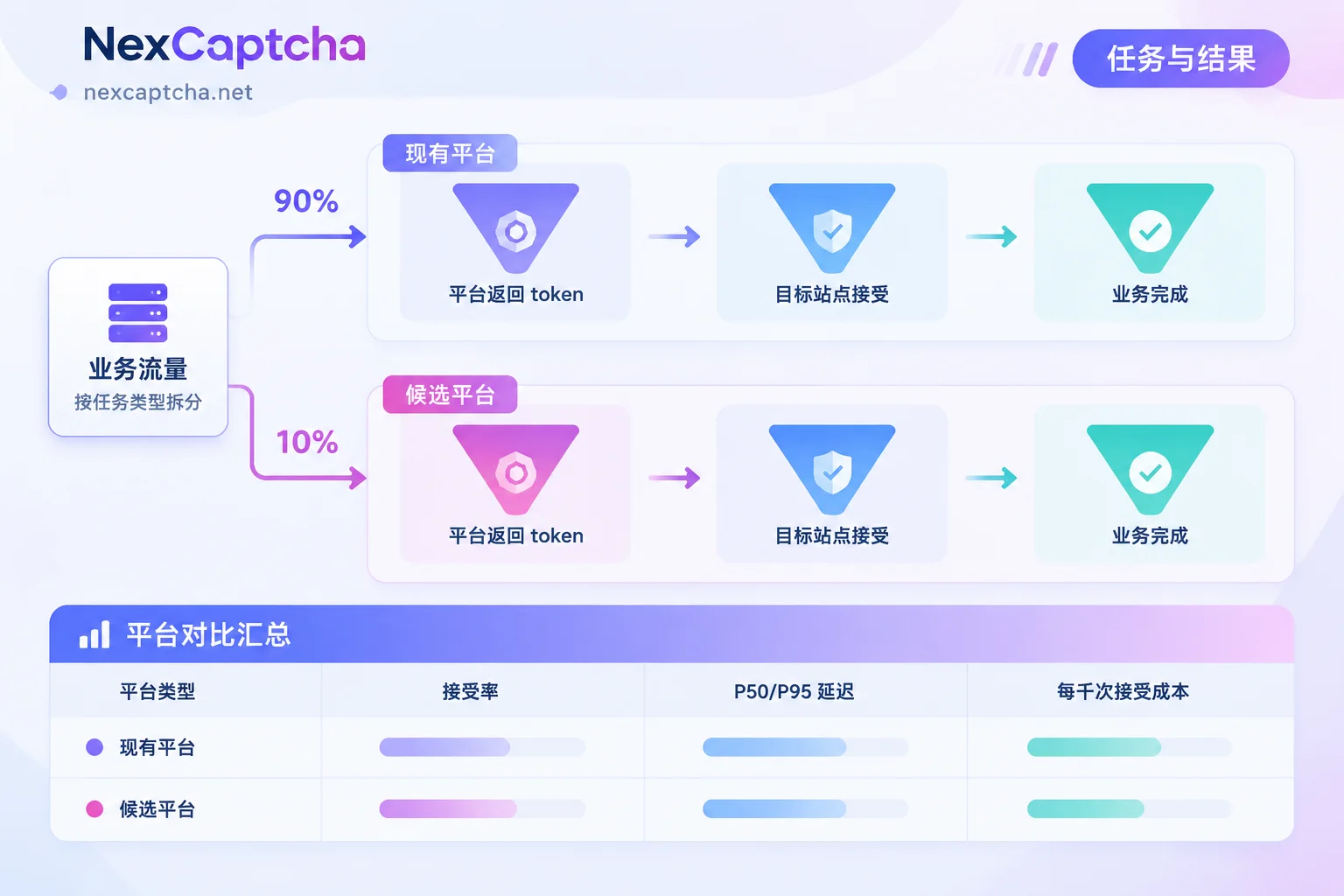
The specific approach is as follows:
- Choose a test environment: use your own system or a target environment for which you have authorization.
- Allocate traffic: by task type, assign 5%–10% of traffic to the candidate platform, while the rest continues to go through CapSolver.
- Keep conditions consistent: keep time periods, proxy pools, and browser configurations as similar as possible to avoid attributing environmental differences to the platform.
Collect statistics separately by type:
- Platform return rate;
- Target site acceptance rate (clearly state the denominator: total submissions or platform successes);
- P50 and P95 latency (do not mix with averages);
- Effective cost.
- Decide the switching scope: only switch the types that perform better. The remaining types can stay on the original platform or continue to be observed.
Many teams ultimately adopt a multi-platform coexistence approach, such as a primary platform plus a backup. This is usually more stable than a one-time full replacement. For the complete version of the selection approach, see Six-Step Judgment for Choosing a CAPTCHA Solving API.
When There Is No Need to Rush to Switch
In the following situations, the benefits of switching platforms may not be obvious:
- Failures mainly come from your own pipeline: e.g., inconsistent proxy and session, or injecting after the token expires.
- Only CI regression testing of your own system: official test keys provided by CAPTCHA vendors usually suffice; there is no need to integrate a paid recognition service for this. Refer to Playwright CAPTCHA Testing Practices.
- Very small business volume: the work hours for migration and validation may exceed the cost savings from switching platforms.
If, after completing the above inventory and cost calculation, you want to include NexCaptcha as a dual-run candidate, you can check CAPTCHA types, pricing, and migration instructions on the NexCaptcha homepage, and confirm the field mapping for your task types through the engineer contact entry. After confirmation, arrange a small-traffic test.



