
The hCaptcha solving API does not “click through” the captcha for you. It asynchronously generates an hCaptcha response token on the server based on page parameters, and your automation flow passes it to the page. Four things most commonly go wrong during integration: incomplete parameter collection, token expiration, failure to trigger the page callback after injection, and inconsistent session environments.
The following describes the actual integration sequence. It applies to authorized testing, monitoring, and automation workflows on systems you own or have permission to test.
First, understand how the token is validated
After a user passes hCaptcha on the page, the page gains a response token, usually starting with P1_, stored in a hidden textarea[name="h-captcha-response"]. For compatibility, some sites also read g-recaptcha-response.
After form submission, the target site’s backend sends this token along with its secret and sitekey as a URL-encoded POST to https://api.hcaptcha.com/siteverify for verification, sometimes including the client’s remoteip.
This mechanism imposes three direct constraints:
- Tokens are single-use. The same token cannot be submitted repeatedly; create a new task when retrying.
- Tokens have a validity period, typically around 120 seconds. The entire process from task creation to form submission must finish within this window.
- Verification happens on the target site’s backend. A token returned by the solving service only means the first step is complete. Whether the target site accepts it depends on its siteverify result and its own risk-control rules.
What parameters to collect before submitting a task
Third-party solving APIs for hCaptcha tasks generally require the following information. Refer to the current documentation of the platform you use for exact field names.
- websiteURL: The full URL of the page where the captcha appears, not just the domain.
- websiteKey (sitekey): The hCaptcha public key on the page, commonly found in the
data-sitekeyattribute or as a parameter ofhcaptcha.render(). - rqdata (Enterprise only): hCaptcha has a standard version (Checkbox / Invisible) and an Enterprise version. Enterprise pages often dynamically generate a piece of contextual data, sometimes called
rqdataand sometimesenterprisePayloadby different platforms. Whenever the page provides this data, capture the current value each time you create a task and submit it together. Missing data or using an old value will likely cause the generated token to fail the target site’s validation. - Proxy mode selection: Most platforms offer both Proxyless (using the service’s exit IP) and Proxy (using your own proxy) tasks. If the target site validates
remoteipor has strict fingerprint or TLS checks, choose Proxy mode so that the solving exit IP matches your browser’s exit IP. Only when such checks are absent is Proxyless the more convenient choice.
Task flow: create, wait, retrieve
Mainstream captcha REST APIs use an asynchronous task flow:
- Call createTask to submit the task and get an
taskId; - Poll task status via getTaskResult, or configure a webhook in advance to wait for a completion notification;
- Once the status becomes complete, retrieve the token.
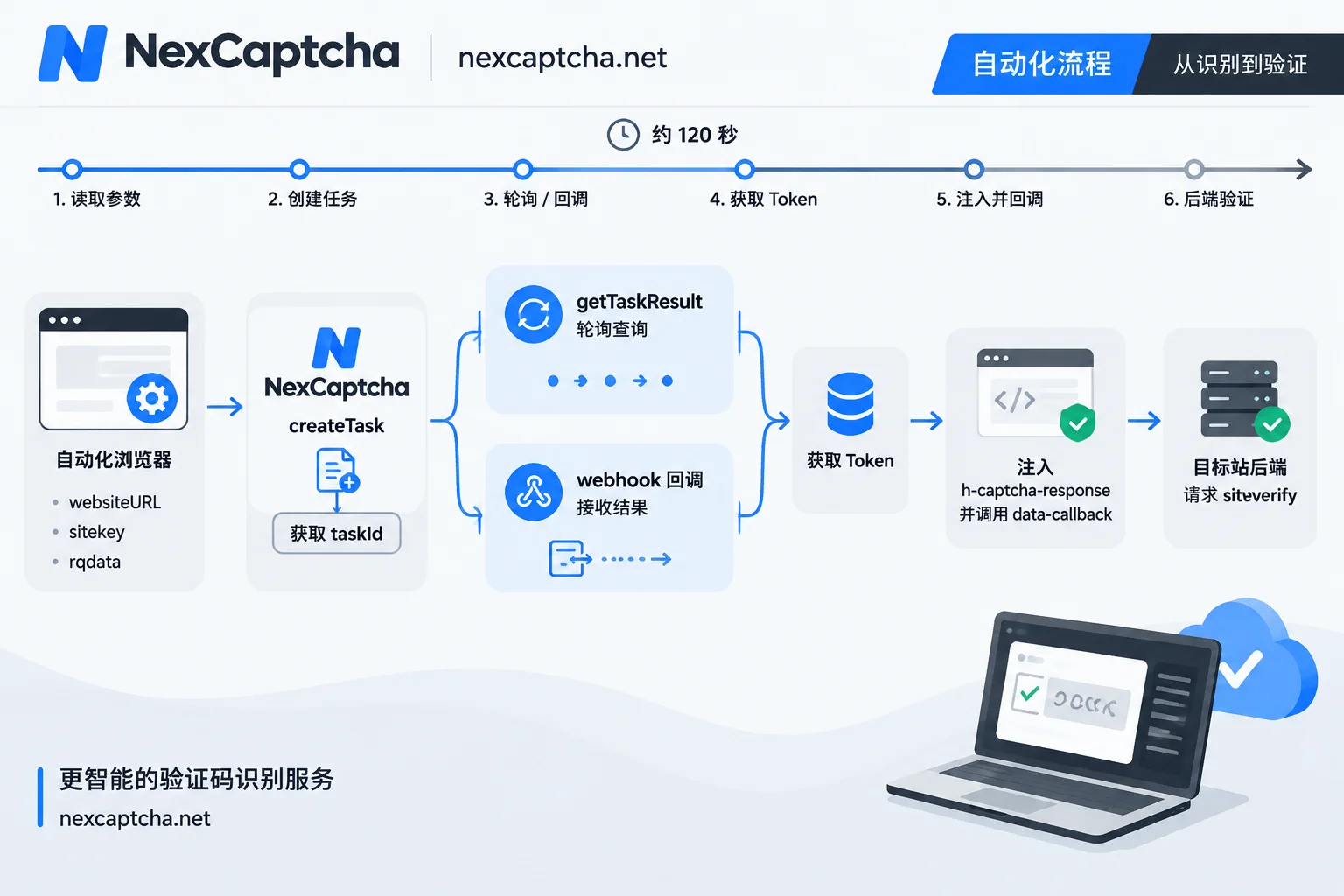
Since the token is valid for only about 120 seconds, plan your waiting strategy around this window:
- Do not make polling intervals too long or too frequent;
- Set an overall timeout for each task; after timeout, abandon the task and create a new one. Do not continue submitting a token that may have expired;
- If there are queuing, retries, or manual steps, include their time in the budget.
For guidance on when to use polling versus callbacks, see The difference between captcha API polling and callbacks. For Python submission, polling, and exception handling, see Python captcha solving API integration.
Taking NexCaptcha as an example, the official site describes a unified REST task mode with three methods: createTask, getTaskResult, and getBalance. The API domain is api.nexcaptcha.net, and the key is placed in the clientKey field of the request body. The following example is pseudocode only, to illustrate the data structure. For hCaptcha task type names, Enterprise field names, and endpoint paths, always refer to the current API documentation:
// 伪代码:字段名与类型名以当前官方文档为准,不可直接运行
createTask 请求体:
{
  "clientKey": "<YOUR_CLIENT_KEY>",
  "task": {
    "type": "<hCaptcha 任务类型,按文档区分 Proxyless / Proxy>",
    "websiteURL": "https://your-test-site.example/login",
    "websiteKey": "<页面 sitekey>",
    "<Enterprise 上下文字段>": "<当前页面的 rqdata,仅在存在时提交>"
  }
}

→ 返回 taskId
→ 用 getTaskResult 轮询,或等待 webhook 通知
→ 状态完成后读取 Token
Keys should only be stored in environment variables or a secrets management service. Never commit them to a code repository or log them.
Using the token in Playwright / Puppeteer / Selenium
After obtaining the token, simply filling it into the textarea often does not let the form proceed. The reason is that many hCaptcha integrations configure data-callback: the page waits for this callback function to be invoked before enabling the submit button or moving to the next step.
The general approach has two steps:
- Write the token into
h-captcha-response. If the page also readsg-recaptcha-response, write it there as well. - Locate and call the callback function. The function name can be found in the
data-callbackattribute of the hCaptcha container. If the site renders hCaptcha via JavaScript usinghcaptcha.render(), the callback is specified in the render parameters and must be confirmed by reading the page scripts.
An illustrative Playwright snippet follows. Puppeteer’s page.evaluate() usage is essentially the same; Selenium can use execute_script:
// 示意代码:仅用于自有或获授权的测试页面
await page.evaluate((token) => {
  document.querySelectorAll('textarea[name="h-captcha-response"], textarea[name="g-recaptcha-response"]')
    .forEach((el) => { el.value = token; });
  const box = document.querySelector('[data-callback]');
  const fnName = box && box.getAttribute('data-callback');
  if (fnName && typeof window[fnName] === 'function') {
    window[fnName](token);
  }
}, token);
Injection and submission must occur within the same browser session. When running multiple tasks concurrently, use taskId and page instances to map them correctly and avoid passing a token from page A to page B.
The solving service returned a token but the target site rejects it: troubleshooting order
First confirm which stage the problem is in:
- Result returned: The solving service has returned a token;
- Target site accepted: siteverify passed;
- Business completed: login succeeded, data retrieved, or the form actually submitted successfully.
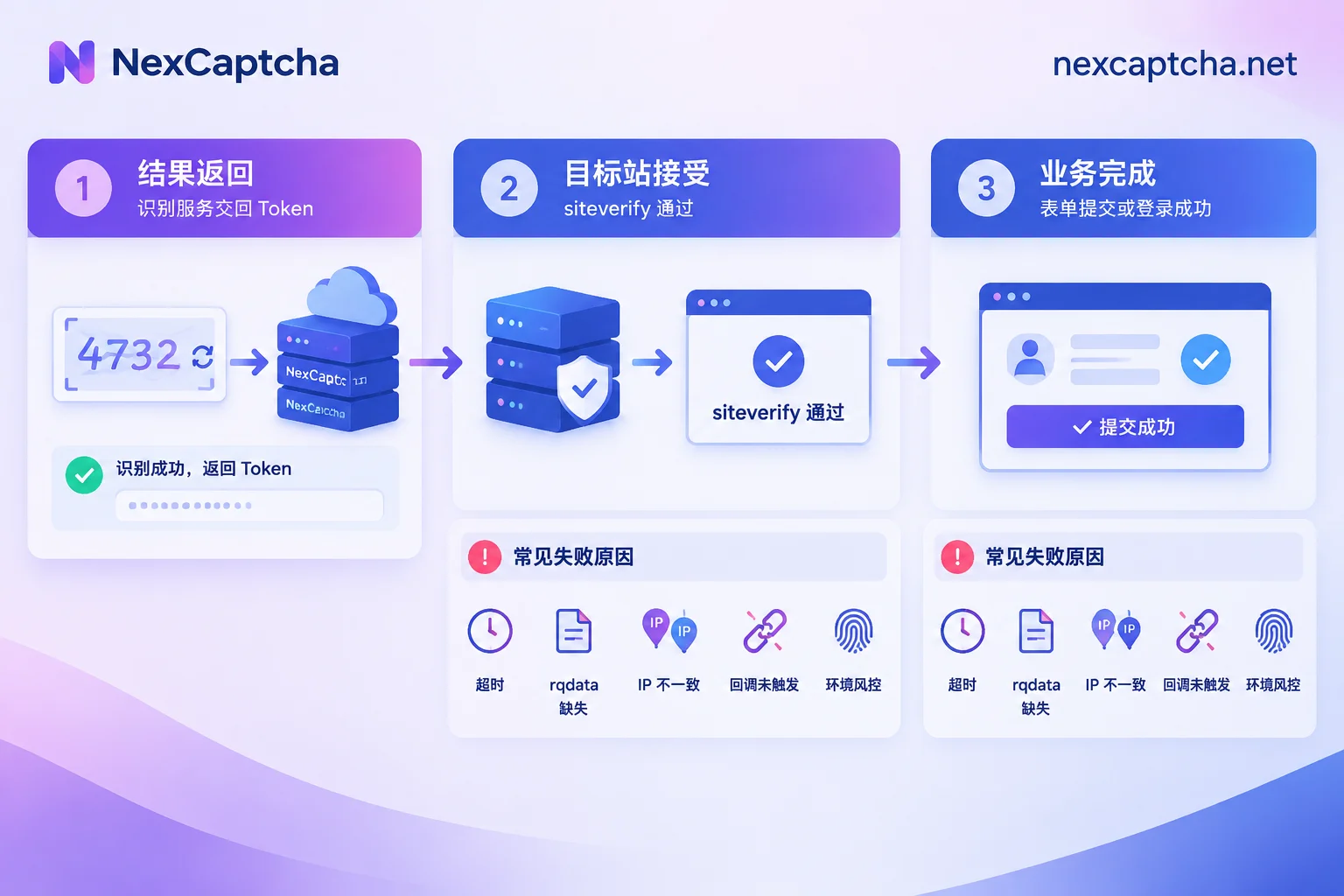
If you have the token but the latter two stages fail, check in this order:
- Timeout: Record the time from createTask to form submission. If it approaches or exceeds about 120 seconds, first reduce waiting and intermediate step times.
- Enterprise page: Confirm whether the page has contextual data such as rqdata and whether each task submission uses a newly captured value.
- IP consistency: If the target site includes
remoteipin siteverify and you use a Proxyless task, it may be rejected due to IP mismatch. Switch to Proxy mode and make it use the same exit IP as the browser. - Callback triggered: If the token is filled in but the page does not proceed, it is usually because
data-callbackwas not called, or the wrong function was called. - Combined risk control: WebDriver flags, browser fingerprints, TLS characteristics, and similar issues can also cause request rejection; captcha failure may be only the surface symptom. These should be investigated from the browser environment itself; switching solving services usually will not fix them.
Do not immediately blame “bad IP” or “bad solving service” on every failure. Log each stage separately to pinpoint the actual bottleneck.
QA scenarios: use test keys whenever possible
If you are testing your own system, hCaptcha officially provides test sitekeys and secrets for development environments. CI regression tests can generally cover form flows with test keys and do not require additional paid solving steps. Only when integrating with real captchas or verifying production configurations is it necessary to use a solving API. For environment isolation practices, see How to do Playwright captcha testing.
Selection and small-scale validation before launch
NexCaptcha’s official site lists hCaptcha among supported types, states billing per thousand successful solutions, offers refunds for failed solutions, and provides test credits. However, being listed in a catalog does not guarantee success on every site or in every session. In particular, Enterprise field naming, Proxy task syntax, and the time distribution for different hCaptcha challenge types should be based on current documentation and your own test results.
Start with a small-scale test on an authorized target page, and record at least these metrics:
- Token return rate;
- Target site acceptance rate, with a clear denominator;
- P50 and P95 latencies, reported separately—do not mix them with averages;
- Actual cost per valid result.
For billing and refund calculation, see How captcha APIs bill per thousand requests. If migrating from another platform, verify task type names, fields, and callback formats one by one; see How to choose a 2Captcha alternative.
Once your requirements are confirmed, visit the NexCaptcha official site to check currently supported captcha types, pricing, and migration notes. You can also contact engineers via the homepage to confirm specific parameter requirements for hCaptcha Enterprise.



