
Both methods deliver the same recognition result—the difference is who notifies whom.
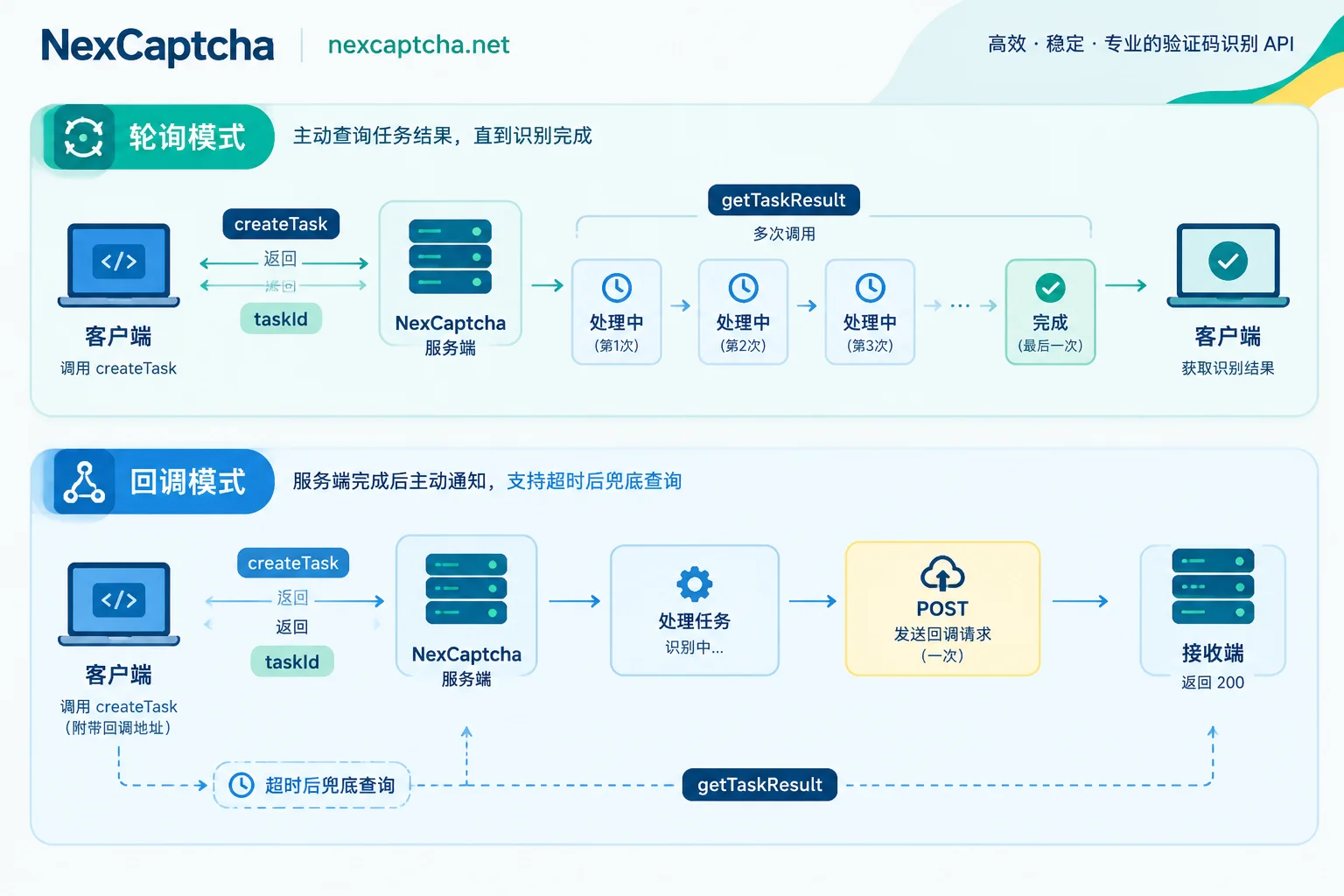
- Polling: After your program submits a task, it asks the server "is it done yet?" every few seconds.
- Callback: You provide a public URL when submitting the task, and the server POSTs the result back once it's ready.
The following environments are easiest with polling: local scripts, single-machine Playwright/Selenium, and internal networks without a public entry point.
The following scenarios are better suited for callbacks: distributed scraping, backends driven by message queues, and high-concurrency task pools. Callbacks reduce empty requests and deliver results more promptly. The trade-off is that you must maintain a reliable receiver, and it's best to keep polling as a fallback.
How the two approaches work
Most CAPTCHA recognition APIs use an asynchronous task model. You call createTask to submit a task, get a taskId, and recognition runs on the server. Tasks that return tokens—like reCAPTCHA, Cloudflare Turnstile, and GeeTest—typically take seconds to tens of seconds. The only difference between polling and callback is how the result gets back to you.
Polling (pull)
- Call createTask and get a taskId.
- Call getTaskResult at a fixed interval or a progressively increasing interval.
- If the status is still "processing", keep waiting; when it becomes "complete", extract the token or coordinates; if an error is returned, enter exception handling.
Callback (push)
- Include a callback URL in the createTask request. Some platforms also require registering the receiving domain in advance, such as 2Captcha's pingback mechanism.
- When the task completes, the platform sends an HTTP request to that URL to push the result.
- Your receiver parses the result and hands it off to downstream business logic.
Five key differences
| Dimension | Polling | Callback |
|---|---|---|
| Network requirement | Only outbound internet access needed | Requires a publicly reachable HTTPS receiver |
| Result perception latency | Additionally affected by polling interval | Pushed immediately upon completion |
| Request count | Multiple empty queries while processing | One push upon completion |
| Code structure | Linear wait within the same flow | Submission and reception separated; requires correlation ID |
| Failure risks | Mainly timeouts and rate limiting | Lost pushes, receiver downtime, or slow responses |
1. Network conditions determine whether callback is feasible
Polling only needs outbound access. Programs behind NAT, on office computers, or on machines without a fixed public IP can all run it.
Callback requires you to expose a routable, always-on receiving address, usually with HTTPS certificates, firewall rules, and inbound protection. If your automation runs on a laptop or an internal CI, setting up a public entry point just for callbacks isn't worthwhile.
2. Latency: the polling interval directly adds to wait time
Callbacks notify as soon as the task completes. Polling only discovers the result at the next query.
Rough estimate: assuming a polling interval of T and result completion times uniformly distributed between queries, you wait about T/2 extra on average and up to about T extra in the worst case. For a 5-second interval, that's about 2.5 seconds extra on average and nearly 5 seconds in the worst case. This is an estimate based on assumptions, not measured values.
For a single task, this difference is often negligible. But if there are multiple CAPTCHAs in the chain, or the token has a short validity period (reCAPTCHA tokens typically expire in minutes), this extra wait eats into time for subsequent operations.
3. Request volume: empty polling queries accumulate
A task that takes 20 seconds to process and is polled every 3 seconds generates six or seven requests with no result. With thousands of concurrent tasks, these empty queries significantly increase your outbound connections and put pressure on the server. Polling too frequently can also trigger rate limiting from the provider.
Callbacks compress multiple queries into a single push. The larger the scale, the more valuable this becomes.
4. Code structure: callbacks require you to correlate results yourself
With polling, a Playwright or Puppeteer script can submit the task, wait for the result, and immediately inject the token into the page—all in the same function. Browser session, page state, and result naturally stay together.
With callbacks, submission and reception happen in two different services. You need to use the taskId (or your own correlation ID) to map the pushed result to the correct task, such as:
- Waking a suspended browser session;
- Updating a database record;
- Delivering the result to a downstream queue.
Mismapping leads to hard-to-debug issues like "token injected into the wrong page."
5. Failure handling: callbacks don't guarantee delivery in one shot
Pushes can fail due to network blips, receiver downtime, or slow responses. Some platforms impose strict response deadlines on receivers—for example, CapMonster Cloud documentation requires the receiver to respond within 2 seconds.
Polling has a simpler failure surface: mainly overall timeouts and rate limiting, all handled within your own process.
How to choose
When polling fits
- Local or single-machine scripts.
- Browser automation testing your own systems or systems you're authorized to test.
- Low-concurrency scenarios.
- Environments without a public entry point.
CI regression tests also typically use polling. Also, if you're testing your own site, first check whether the CAPTCHA vendor provides official test keys—using test keys avoids calling a recognition service entirely. See How to do Playwright CAPTCHA testing.
When callback fits
- Stateless backends or multi-worker distributed scraping.
- Queue-driven pipelines.
- High-concurrency, latency-sensitive businesses.
The reliable production approach: callback first, polling as fallback
Normally rely on callbacks. If a task hasn't received a push beyond the expected duration, proactively call getTaskResult once to check its status, preventing tasks from hanging forever. This query also doubles as reconciliation.
General polling implementation
The following is general pseudocode. Field names and status values depend on your service's documentation.
task_id = createTask(任务参数)
sleep(初始等待)            # token 类任务很少在一两秒内完成
deadline = now() + 总超时
while now() < deadline:
    r = getTaskResult(task_id)
    if r 表示完成:   return r 中的结果
    if r 表示错误:   按错误类型重试或放弃
    sleep(间隔)             # 常见 3~5 秒,可逐步拉长
记录 task_id,按超时处理
Three things to note:
- Don't poll too frequently: shorter intervals increase both empty queries and rate-limiting risk.
- Always set an overall timeout: otherwise the loop runs forever if a task goes wrong.
- Record the taskId: if something goes wrong, you can use it to reconcile with the provider.
For a complete Python integration example, see Python CAPTCHA Recognition API Integration.
What a callback receiver needs to do
The following is also general pseudocode. The specific request format and verification method depend on the provider's documentation.
POST /captcha-callback
  校验来源(签名、共享密钥参数或来源 IP,取决于服务商)
  解析 taskId 和结果
  若该 taskId 已处理过:直接返回 200(保证幂等)
  写入存储或投递到队列
  立即返回 200,不在这里执行耗时业务
Why idempotency matters: When platforms retry pushes, the same result may arrive more than once.
Why respond immediately: Putting slow operations like token injection or form submission inside the receiver easily exceeds the platform's response deadline, causing the platform to treat the push as failed.
Finally, remember that receiving the result in your receiver only means the recognition result has been returned. Whether the target site accepts it and whether the business truly completes must be determined and tracked separately downstream.
How to use it on NexCaptcha
NexCaptcha's official website describes a unified task model:
- Endpoints: createTask, getTaskResult, getBalance;
- API domain: api.nexcaptcha.net;
- Key: placed in the clientKey field of the request body;
- Result retrieval: both polling and webhook.
For polling, just use the loop above. If you plan to use callbacks, confirm the following with official documentation or engineers before integration, then write your receiver accordingly:
- The format of the push request body;
- Whether it includes a signature and how to verify it;
- Retry count and interval after a failed push;
- Response deadline requirements for the receiver.
You can find this information and the supported CAPTCHA types on the NexCaptcha official website or by contacting their engineers.



