
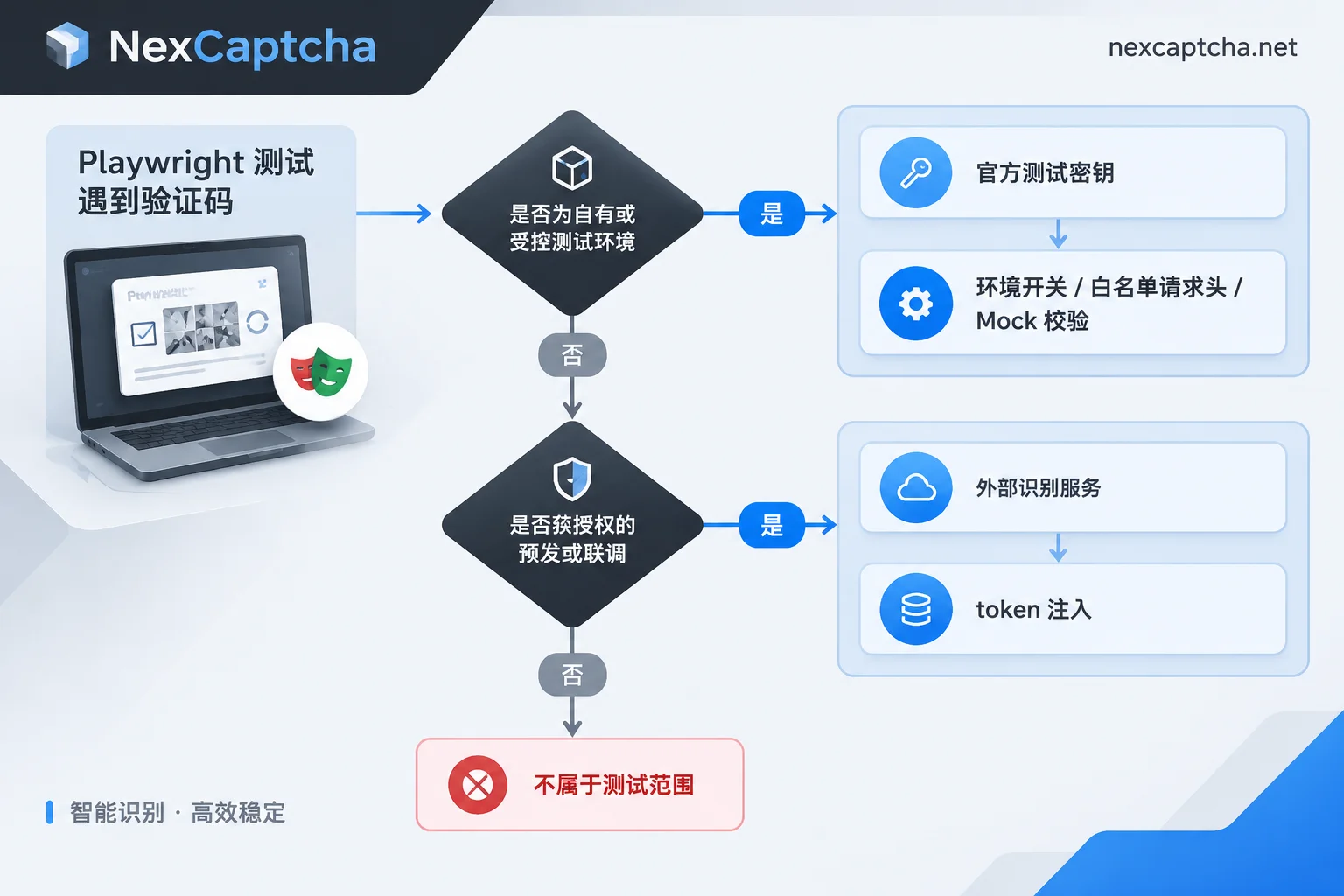
When Playwright tests are blocked by CAPTCHAs, don't look for "bypass" tricks first. If you're testing your own system, the most reliable way to do E2E and CI regression is to make CAPTCHAs produce predictable results in the test environment: use the official test keys provided by the CAPTCHA vendor, or disable/allow validation in the test environment. Only scenarios that must face real CAPTCHAs, such as pre-release smoke tests and authorized full-chain integration, require integrating an external recognition service. In such cases, assertions should separate "obtaining the token" from "actually completing the business flow."
First Determine Which Scenario You're In
- Local development, PR checks, nightly regression (own system): What you need to verify is business logic such as forms, login, and orders; the CAPTCHA itself is not the object under test. Just use test keys or environment switches.
- Verifying CAPTCHA integration itself: For example, whether the frontend component can render, whether the backend correctly calls the validation API, and whether a prompt is shown on failure. Use the "always pass" and "always fail" combinations from the test keys to cover this.
- Pre-release or production smoke tests, authorized third-party system integration: The page uses real sitekeys and real risk control; you cannot change the configuration. In this case, you need an external recognition service to work with Playwright to inject tokens.
Target sites outside the authorized scope are not within the scope of this testing discussion.
Solution 1: Use Official Test Keys to Make Results Predictable
reCAPTCHA v2: Google provides a fixed test sitekey 6LeIxAcTAAAAAJcZVRqyHh71UMIEGNQ_MXjiZKhI and a matching secret key in the reCAPTCHA FAQ. When using this key pair, validation requests always pass, and the component displays a test-purpose notice. The reCAPTCHA Enterprise key system is different from v2; for testing methods, refer to Google Cloud's key documentation and do not directly apply v2 test keys. For the differences between the two versions in interaction and validation, see reCAPTCHA v2 vs v3 differences.
Cloudflare Turnstile: Official public test sitekeys are provided. For example, 1x00000000000000000000AA always passes, 2x00000000000000000000AB always fails, and there are corresponding test secret keys. Using these two sitekeys in two test groups covers both "normal submission after successful validation" and "correct interception and prompt on validation failure."
In practice, have the application read the sitekey and secret from environment variables, and inject test values from the test environment. Playwright's webServer can directly pass environment variables to the service under test:
// playwright.config.ts(片段)
import { defineConfig } from '@playwright/test';

export default defineConfig({
  webServer: {
    command: 'npm run start',
    url: 'http://localhost:3000',
    env: {
      TURNSTILE_SITE_KEY: '1x00000000000000000000AA',
      TURNSTILE_SECRET_KEY: '<Cloudflare 文档中的测试 secret>',
    },
  },
});
Negative test cases require a separate service instance using 2x...AB, or a separate CI job.
A few points to note:
- Test keys should only appear in test configurations. You can add a check step in the release pipeline to confirm that production configurations do not contain test values.
- Test keys only prove that the integration code flow is correct; they cannot prove that production keys, domain bindings, and risk control thresholds are also configured correctly. A small amount of verification in the real environment is still needed before launch.
- Turnstile test keys only apply to the Turnstile component embedded in the page. Cloudflare full-page Challenge is triggered by site protection rules and is unrelated to the page sitekey; test traffic must be handled separately in your own Cloudflare rules. For the difference between the two, see What is the difference between Turnstile and the 5-second shield.
Solution 2: Environment Switches, Whitelist Request Headers, or Mock Validation
If test keys are inconvenient to use (for example, one test environment serves both manual and automated testing), you can directly allow traffic in the test environment:
- Disable CAPTCHA via Feature Flag: The simplest. The cost is that neither the frontend component nor the backend validation is covered by tests.
- Whitelist request headers: The backend skips validation when it recognizes a specific request header. In Playwright, you can use
use.extraHTTPHeadersto add the header uniformly, but it will be sent with all requests made by the page, including third-party domains. If you only want to send it to your own API, you can append it by domain using routing:
test.beforeEach(async ({ context }) => {
  await context.route(`${process.env.BASE_URL}/api/**`, async (route) => {
    await route.continue({
      headers: { ...route.request().headers(), 'x-e2e-bypass': process.env.E2E_BYPASS_TOKEN ?? '' },
    });
  });
});
The value of this request header should be managed as a secret: stored in CI Secrets, effective only in the test environment, and rotated regularly.
- Mock backend validation: The request to verify the token with the CAPTCHA vendor is sent by the backend, so Playwright's
page.routecannot intercept it. To mock it, fix the validation result in the backend via dependency injection or a test double.
The common benefit of these approaches is that test results are no longer affected by risk control fluctuations, avoiding a large number of flaky tests.
Why We Don't Recommend Stealth Plugins and Simulated Mouse Trajectories
Simulating human mouse trajectories, adding random delays, and loading stealth plugins can occasionally pass locally. However, protections like Turnstile, reCAPTCHA v3, and DataDome comprehensively judge browser fingerprints, TLS characteristics, runtime environment, and network reputation. Behavior simulation alone is hard to keep stable in the long run. CI machines are mostly on data center egress, and headless environment characteristics are more obvious; a configuration that passes today may fail tomorrow, making it unsuitable as a foundation for regression testing.
Solution 3: Integration Process When You Must Face Real CAPTCHAs
In authorized pre-release smoke tests or full-chain acceptance, the common process has four steps:
- Extract parameters: Locate the CAPTCHA container, read the sitekey and the current page URL. reCAPTCHA v3 and Enterprise often also require an action. Some page parameters are dynamically rendered by JS; wait for the component to finish loading before reading.
- Create a recognition task and get the result: Call the recognition service's REST API, first create a task, then get the token via polling or callback.
- Inject and trigger submission: Use
page.evaluate()to write the token into a hidden field, such asg-recaptcha-responseorcf-turnstile-response. If the component is configured withdata-callback, the page's submission logic often depends on this callback; you also need to call the corresponding callback function with the token. - Assert business results: Check business results such as post-login redirect, order number, and success prompt.
import { test, expect } from '@playwright/test';

test('预发登录冒烟 @captcha-real', async ({ page }) => {
  await page.goto(process.env.STAGING_LOGIN_URL!);

  // 1. 提取参数(以 reCAPTCHA v2 为例)
  const siteKey = await page.locator('[data-sitekey]').first().getAttribute('data-sitekey');
  const pageUrl = page.url();

  // 2. 调用识别服务(下方为伪代码,任务类型与字段名以服务商当前文档为准)
  const token = await solveCaptchaTask({ type: '<任务类型>', websiteURL: pageUrl, websiteKey: siteKey });

  // 3. 注入 token
  await page.evaluate((t) => {
    const field = document.querySelector<HTMLTextAreaElement>('textarea[name="g-recaptcha-response"]');
    if (field) field.value = t;
  }, token);

  // 4. 提交并断言业务结果,而不是只断言拿到了 token
  await page.getByRole('button', { name: '登录' }).click();
  await expect(page).toHaveURL(/dashboard/);
});
Among them, solveCaptchaTask needs to be implemented by yourself according to the documentation of the service you use. The logic is roughly as follows (pseudocode, not directly runnable):
solveCaptchaTask(params):
  taskId = POST createTask { clientKey, task: params }
  在总超时之内循环:
    等待几秒
    r = POST getTaskResult { clientKey, taskId }
    如果 r 已完成: 返回 r 中的 token
    如果 r 返回错误: 记录错误码并抛出,不要无条件重试
  抛出超时错误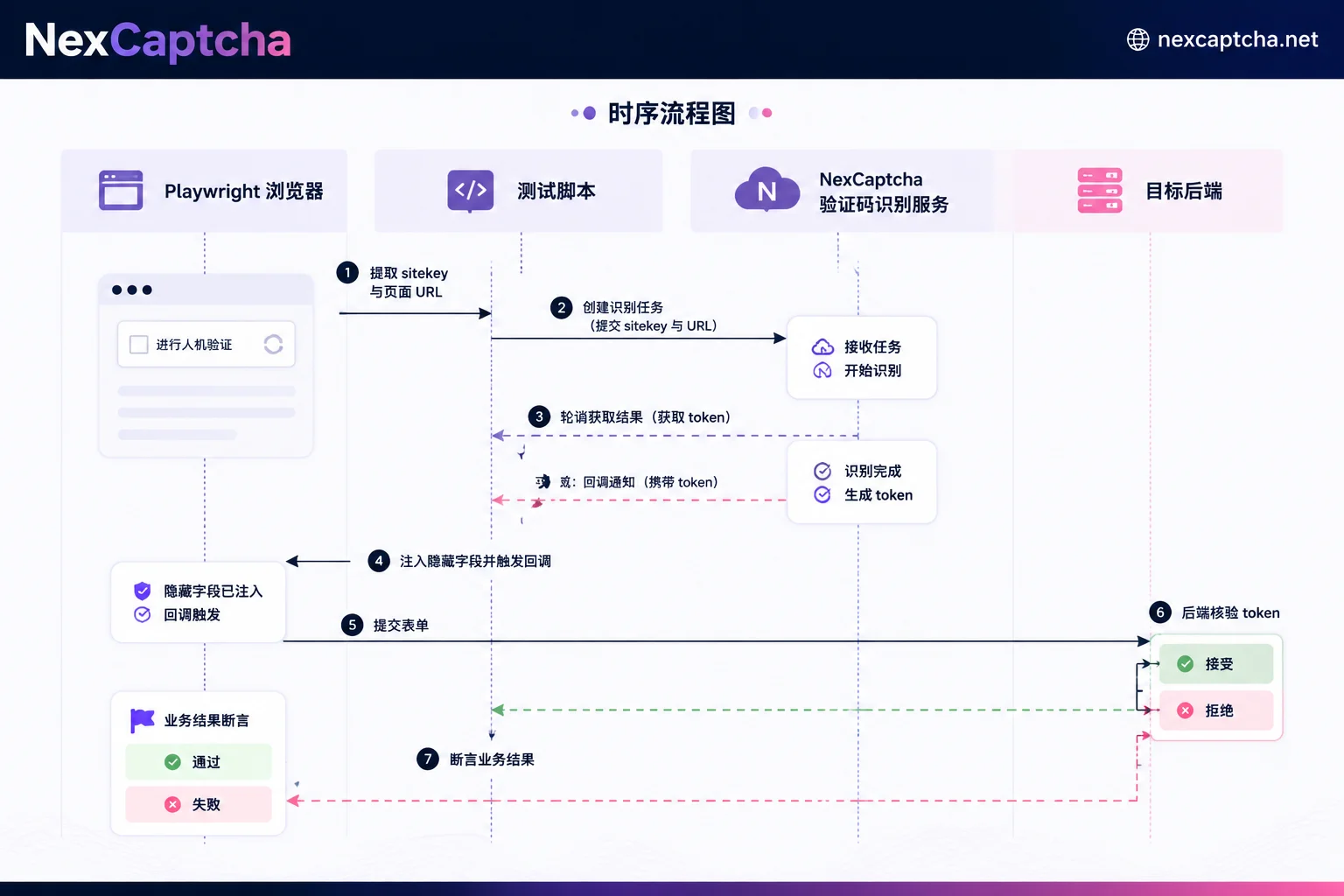
Tokens have an expiration time; after obtaining one, inject and submit it as soon as possible. Do not fetch the token first and then perform a long series of other steps. The timeout for the entire test case should also account for recognition time.
Assertions Should Be Layered in Three Tiers
When a test case with a real CAPTCHA fails, first figure out which layer the failure occurred at:
- Did the recognition service return a token? If it failed, the cause may be incorrect parameter extraction, wrong task type, or server timeout.
- Did the target backend accept the token? This is the most easily overlooked layer. Score-based CAPTCHAs like reCAPTCHA v3 and Enterprise are sensitive to the IP and context of the execution environment. If the browser's egress network does not match the network parameters used during recognition, the token may be returned but the backend rejects it due to a low score.
- Did the business flow complete? Even if the backend accepts the token, it does not mean the flow will definitely finish; it may still get stuck on other validations.
Tag failures with their layer in the test report, so troubleshooting does not attribute all problems to "the CAPTCHA service is bad" or "the IP is blocked."
How to Organize in CI
- Run in groups: Tag real CAPTCHA test cases with something like
@captcha-realand run them only in scheduled pre-release jobs. PR checks run only cases that use test keys. - Secret management: Store recognition service keys in CI Secrets, not in code or logs. Playwright traces and screenshots may record the injected form content; confirm before publishing or sharing CI artifacts.
- Control retries and costs: Even if the service charges by successful attempts, retries consume time and quota. It is recommended to set a separate retry limit for real CAPTCHA test cases. For how billing metrics are calculated, see How CAPTCHA API is billed per thousand calls.
What Part Can NexCaptcha Handle
The recognition step in step 2 above can be handled by a recognition service like NexCaptcha. According to its official website, NexCaptcha uses a unified REST task pattern: createTask to create a task, getTaskResult to query the result, also supports webhook callbacks, and getBalance to query the balance. The API domain is api.nexcaptcha.net, and the key is passed via clientKey in the request body. The types listed on the official website include reCAPTCHA v2/v3/Enterprise and Cloudflare Turnstile/Challenge, etc. For specific task type names and fields, please refer to the current official documentation.
It is only responsible for returning the recognition result. The browser session, parameter extraction, token injection, and business assertions are still done by your Playwright code. For your own system regression that can be solved with test keys, there is no need to add a paid step. When there is a genuine need for pre-release smoke tests or authorized integration, it is recommended to first verify the target system's acceptance with a small number of test cases before deciding whether to include them in scheduled jobs. You can view CAPTCHA types, billing methods, and engineer contact information on the NexCaptcha official website; if you write helper scripts in Python, you can refer to the polling and exception handling patterns in Python CAPTCHA recognition API integration.



