
The fundamental difference lies in "who makes the final decision".
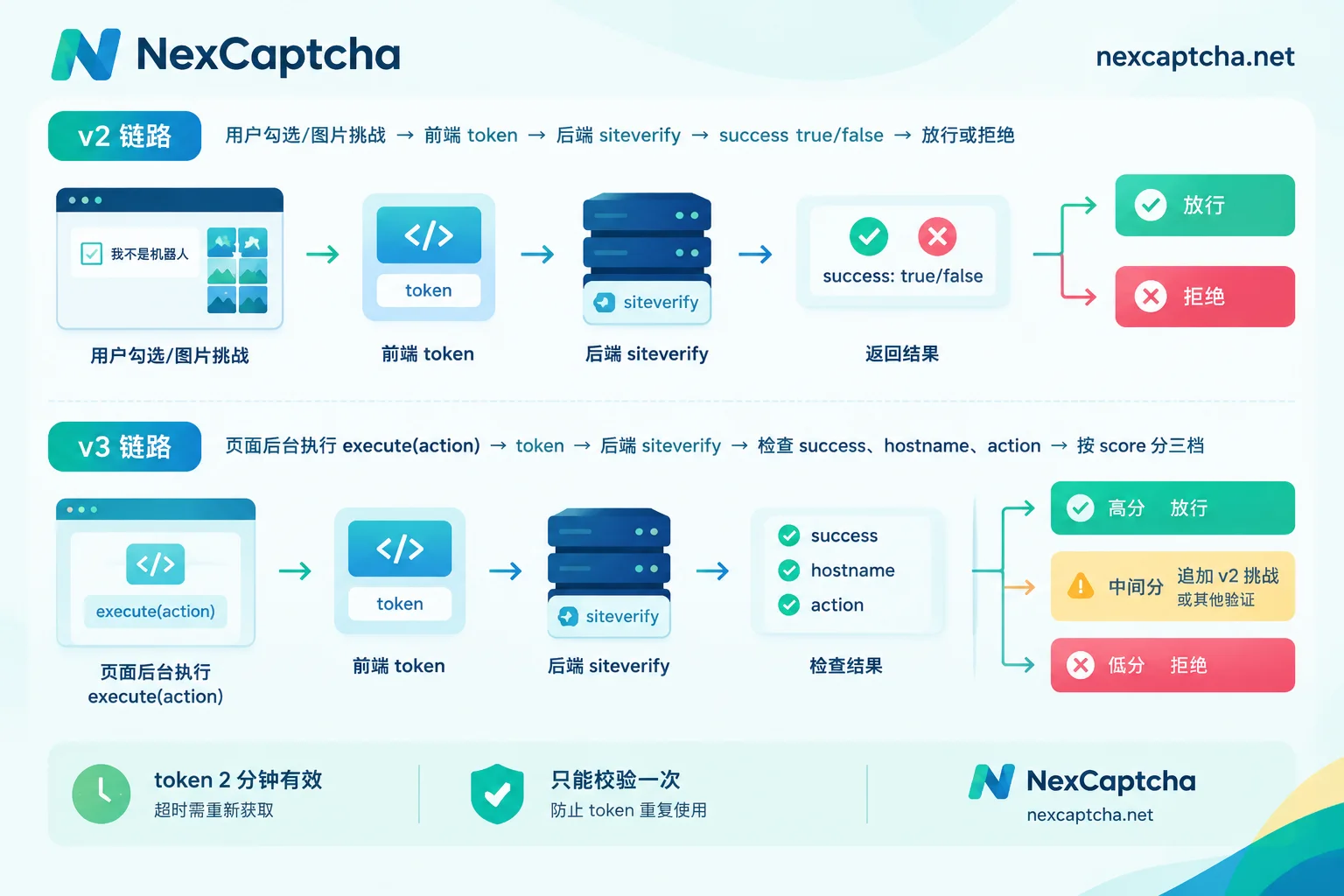
- reCAPTCHA v2: Users need to participate, such as checking a checkbox, and completing an image challenge when suspicious. Google's verification result is only pass or fail.
- reCAPTCHA v3: Users are completely unaware; no challenge pops up. Google only returns a risk score from 0.0 to 1.0 and an action label. Whether to block or not is decided by your backend.
So switching versions is not just changing a piece of frontend code. Backend logic, logging, threshold tuning, and parameters to prepare for automated testing will all change accordingly.
Core differences at a glance
| Dimension | reCAPTCHA v2 | reCAPTCHA v3 |
|---|---|---|
| What users see | Checkbox "I'm not a robot", or Invisible badge; image challenge when suspicious | Only a badge, no challenge ever |
| Decision method | Binary: success is true or false | Score: score from 0.0 (like a bot) to 1.0 (like a human) |
| Who decides to allow | Google's challenge result basically determines pass/fail | Your backend decides allow, review, or add verification based on threshold |
| action label | None | Yes, e.g., login, checkout; backend needs to compare |
| Deployment scope | Generally only on specific forms | Google recommends deploying on multiple pages to provide context for the risk model |
| token | Valid for 2 minutes, can only be verified once | Also 2 minutes, only once; recommend obtaining at submission time |
Frontend: v2 has two forms, v3 has one
v2 comes in two types:
- Checkbox: User actively clicks a checkbox. Low risk passes directly, suspicious triggers an image selection challenge.
- Invisible: No checkbox shown; verification is bound to a button or form submission. Most users don't notice it; only suspicious traffic sees an image challenge.
Note that Invisible v2 is still v2. It can present challenges, and the result is binary—not the same as v3. Many people see only the badge in the bottom right corner and assume it's v3; this judgment is unreliable.
v3 runs JavaScript in the background and never shows an image challenge to the user, regardless of risk level. The frontend obtains a token via grecaptcha.execute(siteKey, {action: 'login'}), then submits the token along with the form to the backend.
Additionally, v2 and v3 use different key types; a site key from one version cannot be directly used for the other. You need to apply for new keys when switching versions.
Backend: v3 hands the decision to you
Both versions have the backend send the token submitted by the frontend to Google's siteverify API for verification, but the handling after getting the result differs greatly.
v2: The key in the response is success, then just check if hostname and challenge_ts are reasonable. The challenge is already completed on the frontend; backend judgment is simple.
v3: success: true only indicates the token is valid, not that "this is a human". You also need to do two things:
- Compare action. The returned
actionmust match what this endpoint expects, preventing a token obtained on the homepage from being used on the login endpoint. - Decide handling based on score. Google does not disclose the scoring algorithm, and there is no universal threshold. 0.5 is a common starting point, but the specific value needs to be adjusted based on your own traffic.
Below is an illustrative pseudocode, only to show the order of checks; it cannot be run directly:
result = siteverify(secret, token)

if not result.success:           -> 拒绝(token 无效、过期或已被使用)
if result.hostname 不是本站:      -> 拒绝
if result.action != "login":     -> 拒绝(action 不匹配)

if result.score >= 0.7:          -> 正常放行
elif result.score >= 0.3:        -> 追加验证(如 v2 挑战、短信/邮件验证、人工审核)
else:                            -> 拒绝或限流
The 0.7 and 0.3 here are just examples. A safer approach: initially only log scores without blocking, observe score distribution, false-positive complaints, and attacks over a period, then set thresholds for each action. Sensitive operations like login and checkout can be stricter; browsing pages can be more lenient.
token rules: same for both versions, but v3 is more prone to timing errors
Tokens for both versions are valid for 2 minutes and can only be successfully verified once via siteverify. Submitting the same token a second time will fail.
A common v3 mistake is calling execute at page load; by the time the user fills the form and clicks submit, the token has expired. Google recommends obtaining the token when the user triggers a key action. v2 Checkbox has a similar issue: if the user checks it and then waits too long before submitting, it also expires and the component needs to be reset.
Behavior when exceeding the free quota differs
According to Google's FAQ, the standard (non-Enterprise) version has free call volume and QPS limits; the documented numbers are 1 million calls per month and 1,000 QPS. Actual quotas are subject to your project's current terms and console. When the quota is exceeded:
- v2: The frontend component directly shows an error to the user; the problem is easily noticed.
- v3: The frontend shows no change, but siteverify may return a fixed score (e.g., 0.9) with an error message related to over-quota.
This v3 behavior is dangerous. If the backend only looks at score, all requests during over-quota receive high scores, effectively disabling blocking. It's advisable to check error fields in the response and set alerts for "score distribution suddenly becoming a single value".
How to choose
- Just want to prevent form abuse, can accept some user friction: v2 Checkbox is simplest, with minimal backend logic.
- Don't want to disturb users, but still want a challenge when suspicious: use Invisible v2.
- Value conversion experience and have the capability for risk decisions: use v3. The premise is the team is willing to maintain thresholds, logs, and secondary verification flows; otherwise, even with scores, you can't use them.
- Want both experience and avoid false positives: combine v3 + v2. First use v3 scoring; high scores pass directly, mid scores trigger a v2 challenge or other verification, low scores are rejected. This way the vast majority of normal users remain unaware, and real users won't be blocked just because of score alone. Note that you need separate keys for each version.
If your business already involves the Enterprise version, its integration and billing differ from the standard version; don't directly apply the quota explanations in this article.
Automation and testing: identify version first, then prepare parameters
For teams doing regression testing, RPA, or public data collection on their own or authorized systems, getting the version wrong is one of the most common causes of task failure. You can judge by the following:
- Visible checkbox on the page: v2 Checkbox.
- Only a badge, but clicking submit may pop up an image challenge, with
data-size="invisible"commonly on elements: Invisible v2. - Script load URL contains
render=站点keyparameter, and callsgrecaptcha.executewith an action before submit: v3. - Loads enterprise-related scripts: Enterprise. It is not equivalent to standard v3 and needs separate handling.
Different versions require different inputs:
- v2: Usually only sitekey and page URL are needed; goal is to get a token to fill into
g-recaptcha-response. - v3: Besides sitekey and URL, you must specify an action consistent with the page's actual call, and understand the minimum score required by the target backend. If the action is wrong or the score is below the other party's threshold, the obtained token will still be silently rejected by their backend, often with no clear error on the page.
Therefore, when troubleshooting, separate three results: the recognition service returned a token, the target site accepted the token, the business process actually completed. Just getting a token does not mean success. Also, don't blame all failures on IP; token expiration, duplicate submission, action mismatch, and wrong version judgment are equally common.
If it's QA regression on your own system, Google's FAQ provides a dedicated test key for v2; you can first use it to verify the flow works without integrating an external service. When you need to handle v2, v3, or Enterprise in real integration or large-scale tasks, NexCaptcha supports these reCAPTCHA types through a unified task API (createTask to submit, getTaskResult to retrieve). For specific task types and fields, refer to the homepage instructions, and first verify the actual acceptance rate of the target site with small traffic. For a complete submission, polling, and result injection flow, see Python captcha recognition API integration; for how reCAPTCHA works overall, see this explanation.
Summary
v2 is characterized by "users solve, Google gives result"—simple to integrate but causes friction for users; v3 is characterized by "Google scores, you decide"—good experience but requires you to maintain thresholds, action verification, and over-quota monitoring. When choosing, first consider whether your team can handle the backend decision work, then consider user experience. For automation, first confirm which version the page uses, then prepare the corresponding parameters.



