
Migrating from Anti-Captcha to another captcha-solving API usually isn't about changing the domain—it's about three things:
- Whether the fields for each task type are truly identical;
- How error codes and billing metrics map;
- Whether the new platform is equally accepted in your target scenarios.
A safer sequence is: inventory existing tasks → extract an adapter layer → verify each task type item by item → rewrite error handling and cost tracking → run small-traffic canary comparison → ramp up gradually based on metrics, keeping a fallback throughout.
The following uses migration to NexCaptcha as an example. The same checklist applies to migrating to other services that are compatible with the task JSON format.
Step 1: Inventory What You Actually Use on Anti-Captcha
Anti-Captcha uses a task model with three main endpoints:
- POST
createTask: create a task; - POST
getTaskResult: get the result; - POST
getBalance: check balance.
Authentication places the clientKey in the JSON request body, not in the HTTP Authorization header.
Before migrating, list what is actually used in your code. You don't need to match the entire documentation:
- Task types: Which values of
task.typeactually appear, such asRecaptchaV2TaskProxyless,RecaptchaV3TaskProxyless,TurnstileTaskProxyless,ImageToTextTask, and proxy-enabled versions. Also count the call volume for each type to decide which to test first. - Optional parameters: Whether
callbackUrlis used for result push, whethersoftIdis passed, etc. - Result fields: Which field in
solutionyour business code reads—gRecaptchaResponse,token, ortext. Also check ifcost,createTime,endTimeare used for statistics. - Error handling: Which
errorCodehave dedicated branches, and where retry logic is written. - Integration method: Whether HTTP is called directly, or an Anti-Captcha SDK or third-party library is used. The library may hardcode hostnames, task type names, or even polling intervals, in which case simply changing the address may not work. You need to switch to your own HTTP calls or confirm that the new platform's SDK covers the same functionality.
This list becomes your acceptance checklist. Every line must have a clear conclusion on the new platform.
Step 2: Add an Adapter Layer Before Switching
If business code constructs Anti-Captcha request bodies everywhere, first consolidate calls into internal interfaces: create task, wait for result, check balance. The business side only receives a unified result object containing the answer, duration, cost, platform name, and error category.
This way both platforms can coexist via configuration, and canary routing, comparison, and fallback only require config changes, not code changes.
Below is a structural illustration. This is pseudocode and does not correspond to any real SDK:
solve(task_spec):
    provider = router.pick(task_spec.type)              # 按任务类型和放量比例选平台
    task_id  = provider.create_task(task_spec)
    result   = provider.wait_result(task_id, timeout)   # 轮询或回调
    return normalize(result)  # 统一为 answer / latency / cost / provider / error_class
Whether to use polling or callbacks in the adapter layer depends on your deployment conditions. See the difference between captcha API polling and callbacks.
Step 3: Protocol-Level Item-by-Item Comparison
NexCaptcha's public documentation states:
- The API also uses the
createTask,getTaskResult,getBalancetask flow; - The API domain is
api.nexcaptcha.net, and the key is also placed in the request bodyclientKey; - Results support both polling and webhook;
- It claims compatibility with some Anti-Captcha task formats.
The word "some" is the focus of the migration work.
| Aspect | Anti-Captcha Documentation | NexCaptcha Public Documentation | What to Confirm During Migration |
|---|---|---|---|
| Authentication | Request body clientKey | Request body clientKey | Store old and new keys separately; don't mix config names |
| Create task | createTask, task determined by task.type | createTask | Whether each type name (including case) is accepted |
| Get result | status is processing / ready, result in solution | getTaskResult, polling or webhook | Whether status values and field names in solution are identical |
| Callback | callbackUrl | Supports webhook | Parameter names, push format, retry mechanism |
| Errors | Numeric errorId + string errorCode | Full mapping not public | Whether the same error code names are used; confirm item by item |
| Billing | Charged per task, result includes cost | Charged per thousand successful solves, failures refunded | How to align statistical metrics |
NexCaptcha currently does not publish a per-task compatibility list or error code mapping table. The most reliable approach is two steps: first confirm the task list from Step 1 with the provider, then validate with small-traffic tests.
Step 4: Verify Parameters by Task Type
Compatibility issues often arise with advanced parameters; basic fields rarely cause problems.
- reCAPTCHA: v2, v3, and Enterprise are different tasks. v3's action and score requirements, and Enterprise's additional parameters, must be matched individually. For version detection and parameter extraction, see How to integrate reCAPTCHA solving API.
- Turnstile: Besides site URL and sitekey, if the page passes
actionorcData, confirm whether the new platform accepts them with the same field names. Also, Turnstile widgets and Cloudflare full-page Challenge are different task types. Match the type you originally integrated. - GeeTest: v3 and v4 have different parameter structures and cannot be mixed. See GeeTest v3 vs v4 differences.
- Image captchas: Options like
ImageToTextTaskimage encoding, size limits, case sensitivity, and character set constraints must have corresponding options on the new platform. - Proxy mode: Tasks with proxy must have their proxy field format verified. Proxyless and proxied versions may not map one-to-one on the new platform.
Step 5: Rewrite Error Handling, Don't Copy It
Anti-Captcha reports errors with errorId (0 means success) plus an errorCode string. Common ones include:
ERROR_KEY_DOES_NOT_EXISTERROR_NO_SLOT_AVAILABLEERROR_ZERO_BALANCEERROR_CAPTCHA_UNSOLVABLEERROR_RECAPTCHA_INVALID_SITEKEY
Many old codebases check against the numeric errorId directly—a high-risk point in migration. Even if the new platform uses the same error code names, the numbers may differ; if it has an independent error code system, you must remap everything.
We recommend categorizing errors in the adapter layer so business code only sees categories:
- Configuration errors (invalid key, invalid sitekey, parameter error): do not retry, alert immediately;
- Capacity errors (no available resources, etc.): retry with backoff;
- Balance errors: stop submitting and alert to avoid idle tasks;
- Solve failure errors: retry a limited number of times and include in failure statistics.
Timeouts and prolonged processing must also be handled separately, otherwise task pile-up can occur after switching. See How to handle captcha API timeouts and What to do when a task is stuck in processing.
Step 6: Compare Costs with the Same Metric
The two platforms bill differently:
- Anti-Captcha: Charges a dollar amount per task;
getTaskResultreturns ancostfield. According to their error code documentation, unsolvable tasks likeERROR_CAPTCHA_UNSOLVABLEmay still be charged. The error/complaint endpoint also has applicable types and time limits; refer to their documentation. - NexCaptcha: Prices per thousand successful solves, refunds failures, and offers volume discounts. The lowest unit price on the homepage does not represent the price for all captcha types.
Because billing methods differ, directly comparing unit prices is not meaningful. A more realistic cost calculation is:
Effective cost = Total spend in the statistical window ÷ Number of times the target site accepted and the business actually completed
The denominator excludes "got a token but submission was rejected" instances. Rejection may be due to token expiration, injection position, session, or IP—not necessarily the solving service. For troubleshooting, see How to troubleshoot captcha token validation failure after return. For more platform billing comparisons, see Captcha service cost comparison.
Step 7: Small-Traffic Canary Comparison, Then Gradual Ramp-Up
Token-based results are usually valid for only one submission and have a time limit. The same verification cannot use tokens from both platforms, so comparison must be request-level routing, not mirrored dual-send.
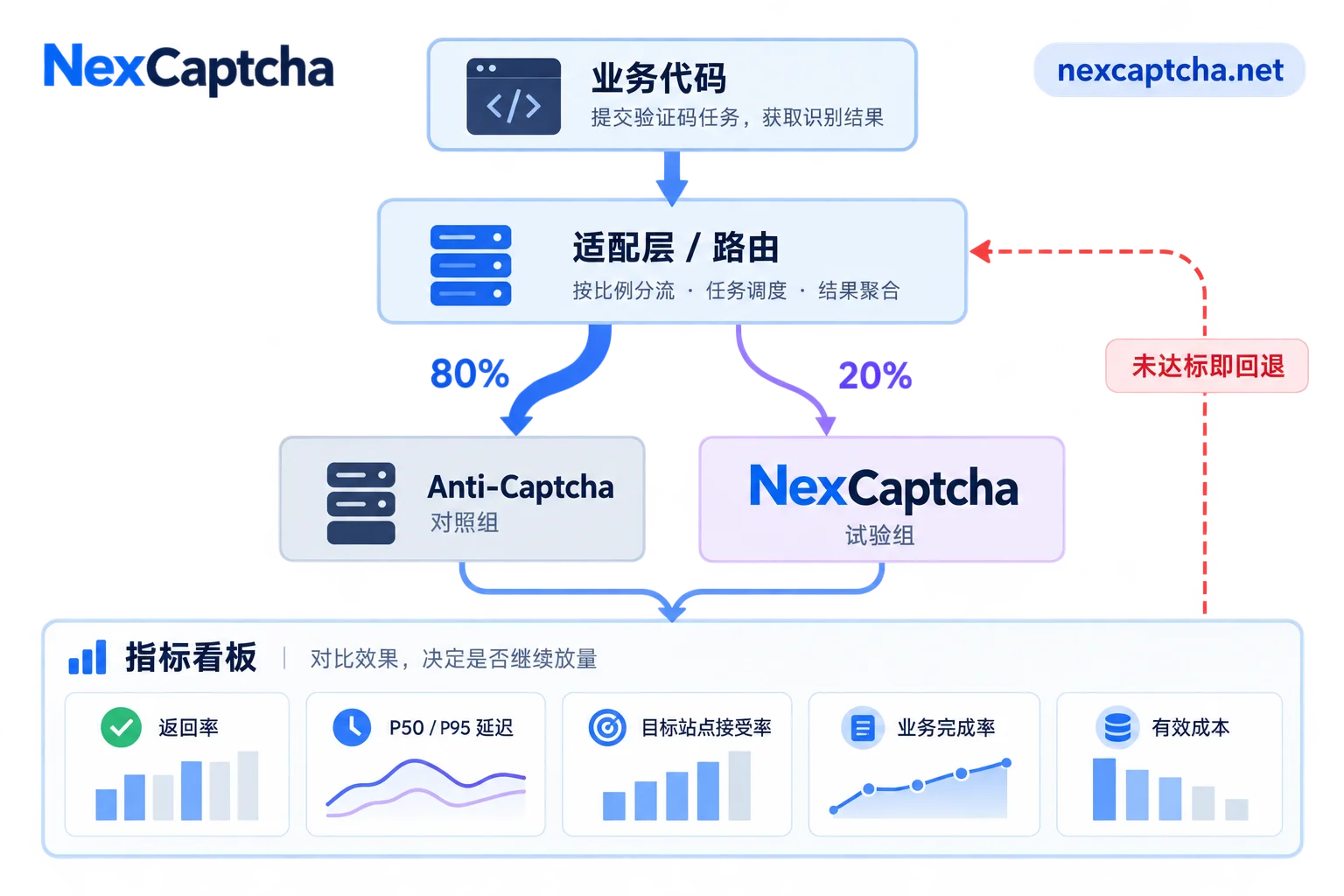
Specific steps:
- Control conditions: Conduct in your own or authorized environment; both groups use the same targets, same network egress, same concurrency, and same time period.
- Ramp-up order: Start with task types that have high call volume and simple parameters. Ramp up in steps like 5%, 20%, 50%, adjusting ratios to your business volume.
Record metrics by type: Track the following separately per task type, looking at averages and P95 separately, not mixed:
- Result return rate;
- P50 and P95 latency from submission to
ready; - Target site acceptance rate;
- Business completion rate;
- Effective cost.
- Pre-set fallback conditions: For example, if a type's acceptance rate is significantly lower than the Anti-Captcha control group for multiple consecutive windows, switch that type back to the original platform, investigate, and then ramp up again.
Data like latency and acceptance rate shown on the official website are from the provider's perspective; your own comparison results are the final word.
After Cutover
After full migration, consider a few more things:
- Keep the Anti-Captcha account and a small balance for a while as a fallback channel;
- Confirm balance alerts, callback URLs, and monitoring dashboards all point to the new platform;
- Clean old keys from configuration, environment variables, and logs.
If you've prepared the task inventory, visit the NexCaptcha website to check supported captcha types, pricing, and migration instructions. Then use the engineer contact entry to confirm compatibility for each task type in your list, and start small-traffic comparison with test credits.



