
First, the conclusion: the "per 1000 X yuan/dollars" listed for a CAPTCHA recognition API is just a pricing unit; platforms do not wait until 1000 tasks accumulate to settle. Most platforms deduct from your balance after each completed task, cost per solve = per-1000 price ÷ 1000. The billing trigger for mainstream platforms is "successfully returning a recognition result"; recognition failures or server timeouts are generally not charged, or the pre-authorized amount is refunded.
Another thing needs to be calculated clearly: what the platform considers "success" is delivering the token or text answer to you. Whether the target website accepts that result is usually invisible to the platform and does not lead to a refund. So when budgeting, besides looking at the quoted price, you also need to see how many recognitions actually let the business process complete.
How much does one call actually cost?
For example: a certain CAPTCHA type is priced at $1.00 / 1K (this is a hypothetical price, not an actual quote from any platform), then:
- Each successful recognition deducts $0.001
- 3,000 successful recognitions in a day deduct $3.00
- 500,000 successful recognitions in a month deduct $500
In common task-based APIs, the client first submits a task, then polls for the result, such as a combination of createTask and getTaskResult, along with an interface to query balance. By industry convention, polling for results and querying balance are not charged separately; fees are only deducted when a task produces a result. However, each platform sets its own rules, so before正式 integration you should run a small-volume test, then compare with billing records to confirm whether polling counts are included in the fee.
When is it charged, when not?
Mainstream cloud recognition platforms generally follow the rules below:
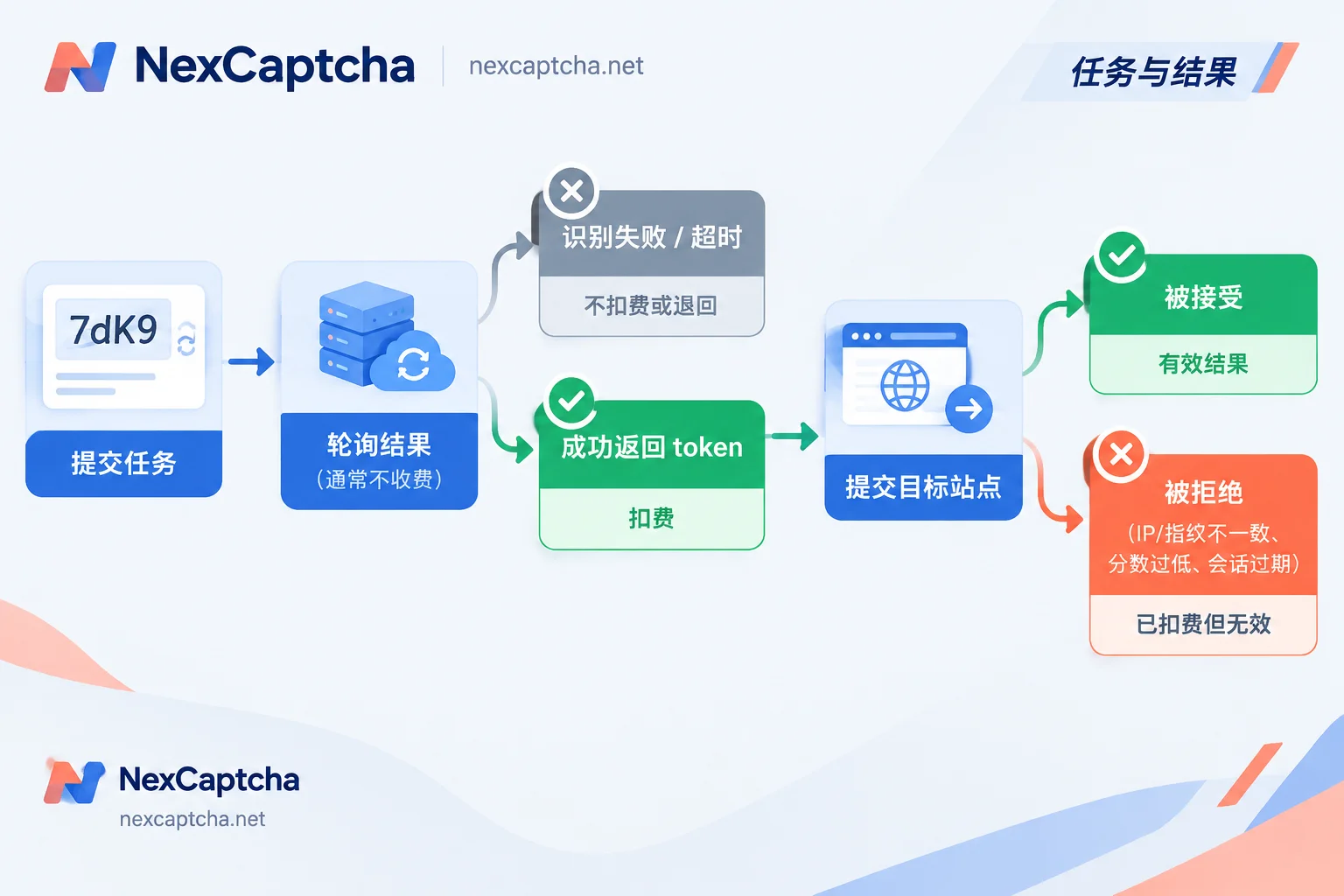
- Successfully returning a token or text answer: charged.
- Server recognition timeout, unable to recognize, returning error status: not charged, or the pre-authorized amount is automatically refunded.
- Request parameter error, task rejected at creation: usually does not enter the recognition process, so no recognition fee is generated. Follow each platform's error code documentation for specifics.
There are two ways to implement billing. One is to pre-authorize when creating a task and refund on failure; the other is to charge only after success. Both methods result in the same net cost, but the balance will fluctuate briefly during reconciliation. Therefore, when calculating costs, use balance transactions or billing details as the standard. Counting only "how many tasks were created" will include failed tasks; counting only "how many tokens were received" won't show whether refunds arrived.
The easiest thing to miscalculate: API success does not equal business pass
A CAPTCHA handling process can be divided into three results, decreasing layer by layer:
- API returns a result: the platform charges up to this point.
- Target site accepts the result: the token passes validation after submission.
- Business completes: the page obtains the data you need, or the test flow runs through.
In the following situations, step 1 has already succeeded and been charged, but step 2 fails:
- IP or fingerprint mismatch: the environment used for solving does not match the browser environment that actually submits the request. Under Cloudflare full-page Challenge, the issued cf_clearance is tied to the request IP and environment, and may become invalid if the proxy changes. Turnstile widget and full-page Challenge are two different mechanisms; for the difference, see What is the difference between Turnstile and 5-second shield.
- reCAPTCHA v3 score too low: the target site may require a score of 0.7 or 0.9 or higher. A low-score token is successfully returned but still rejected during validation. For how v3 works, see How reCAPTCHA works and automation chain.
- Session expired or token expired: after obtaining the result, you wait too long before submitting, and the page session or token validity has expired.
- Wrong task type selected: for example, submitting an Enterprise version as a regular version. The platform returns a result as usual, but the target site does not accept it.
These failures are not necessarily all problems of the recognition service, nor all problems of the IP; they need to be investigated item by item with logs. From a cost perspective, these are "charged but unused" calls. For automation teams, they are often the main reason the effective unit price is higher than the quote.
Why different CAPTCHA types have very different prices
"Per-1000 billing" does not mean the same price for all types. Different types consume different computing power, interaction complexity, and risk control difficulty, so unit prices differ. The industry reference ranges from several third-party review articles in early 2026 are as follows, only for understanding the order of magnitude, and cannot be taken as a quote from any platform:
- Simple image or text OCR: about $0.5–1.0 / 1K
- Common token types such as reCAPTCHA v2/v3: about $0.8–2.0 / 1K
- Complex types such as Cloudflare Turnstile/Challenge, GeeTest v4, DataDome, Arkose/FunCaptcha: about $1.2–3.0+ / 1K
When comparing prices, compare the same CAPTCHA type, same currency, and same billing unit. The "lowest price" on a platform's homepage generally corresponds to the cheapest type and cannot be multiplied by your total call volume. If your business mixes multiple CAPTCHA types, you should count call volume by type and multiply each by its corresponding unit price.
Volume discounts and other billing methods
Recognition services commonly have three charging methods:
- Prepaid, pay-as-you-go: deduct as you use, with tiered unit prices as call volume grows. Suitable for data collection, CI regression, and burst tasks with fluctuating call volume, and currently the most common method.
- Monthly concurrent thread package: charged by the number of tasks processed simultaneously. Suitable for scenarios with large call volumes evenly distributed throughout the day. If call volume is low or concentrated in certain periods, the average unit price becomes higher.
- Local or offline perpetual license: one-time upfront payment, after which deployment, maintenance, and updates are your responsibility.
When evaluating volume discounts, confirm what the tiers are based on: recharge amount or monthly successful count, whether types are calculated separately, and how often tiers reset. These details directly affect which tier price you actually get.
Calculating the true effective unit price based on business success count
For budgeting, it is recommended to use this metric:
Effective unit price = total charge for that type ÷ number of target site accepts (or business completions) × 1000
Example (all hypothetical data):
- Quote $1.00 / 1K, 500,000 successful returns this month, charged $500
- Of which 450,000 were accepted by the target site, acceptance rate 90%
- Effective unit price = 500 ÷ 450,000 × 1000 ≈ $1.11 / 1K
Now assume the client's timeout is set too short, and 10% of CAPTCHAs were resubmitted once, and both submissions successfully returned:
- Actual successful returns and charged count becomes 550,000, charged $550
- Effective results are still only 450,000
- Effective unit price rises to about $1.22 / 1K
It can be seen that two platforms with quotes differing by only a few cents, if the acceptance rate differs by a few percentage points, or one side's retry logic has problems, the final cost difference will be much larger than the quote difference.
These engineering issues will inflate the bill
- Retry storm: the client wait time is shorter than the average recognition time, so it abandons the old task and submits a new one. If the old task later succeeds, it will still be charged. It is recommended to bind one CAPTCHA instance to only one task ID, decide whether to continue polling or resubmit based on task status, and limit the maximum number of retries. For polling intervals, timeouts, and exception handling, see Python CAPTCHA recognition API integration.
- Only looking at success rate, not recording rejection reasons: request logs should at least record task ID, CAPTCHA type, recognition time, submission time, and target site return result; otherwise you cannot tell which layer the money was spent on.
- v3 score does not meet threshold: first confirm the score and action parameters required by the target site, then batch call.
- Self-provided proxy unstable: when using task types with proxies, if the proxy itself disconnects or is blocked, the task may fail, or the returned result may be unusable. Proxy cost and stability should be accounted for together with recognition fees.
- Submitting too slowly after getting the result: tokens have a validity period. Control the time interval between solving, submission, and next step.
Confirm item by item when comparing quotes
- The per-1000 unit price for each CAPTCHA type you will use, and the currency.
- Whether the billing trigger is "returning a result" or another criterion; whether polling and balance queries are charged.
- Which failures are refunded, whether refunds are automatic or require application, and how they appear in billing.
- The statistical method and tiers of volume discounts.
- For the same type, same period, and same environment, the target site acceptance rate and latency percentiles (record P50 and P95 separately) measured with small-volume tests.
For the complete selection process, see How to choose a CAPTCHA recognition API. If you plan to migrate from an existing platform, besides price, you also need to check fields and billing criteria task by task, see How to choose a 2Captcha alternative.
NexCaptcha's billing criteria
NexCaptcha's public statement on its official website is: billed per 1000 successful recognitions, refunds for recognition failures, volume discounts based on usage, and test credits provided. The homepage lists 33 pricing types, each priced separately; the lowest price on the homepage does not apply to all types. For specific tier levels and detailed price tables for each type, refer to the current content displayed on the official website and actual billing; this article does not speculate on discount ratios or refund time limits for the platform.
A suitable approach is: first use test credits, run a small-volume test for one or two main CAPTCHA types you use, record the number of charges, refund situations, and target site acceptance rate, calculate the effective unit price using the formula above, then decide how much to recharge. CAPTCHA types, prices, and the entry to contact engineers are all on the NexCaptcha official website homepage.



