
If you're using 2Captcha, it's worth evaluating alternatives when three situations arise: captcha wait times drag down browser sessions or task throughput; as call volume increases, the cost per thousand becomes a noticeable expense; and the classic submit-and-poll API is hard to integrate into your existing asynchronous architecture.
Currently, the mainstream alternative direction is to switch to API services that primarily use AI or machine learning for automatic recognition and adopt a JSON task model. When selecting, don't just look at advertised speed and unit price. A more reliable approach is to run small-traffic comparisons on your own captcha types, focusing on two numbers: the actual acceptance rate on the target site, and the total cost to complete one business operation. Migration should not be a full-scale switch; you should first build an adapter layer, then gradually increase traffic.
The following sections are organized in the order of "assessment, selection, cost calculation, migration." The scenarios discussed here are limited to testing of owned or authorized systems, accessibility assistance, and permitted public data workflows.
First confirm: Can switching platforms solve your problem?
2Captcha is a veteran platform that primarily relies on a global workforce of human solvers, supplemented by some automation. The human model has its strengths: broad coverage of obscure, non-standard, or particularly complex captchas, such as specific gesture puzzles, rare image puzzles, and some audio challenges. If your call volume is low, your captcha types are long-tail, and you're not sensitive to wait times, sticking with it may be a reasonable choice.
Switching platforms typically improves three types of problems.
- Latency causing upstream timeouts. Some third-party reviews show that 2Captcha's average processing time for reCAPTCHA v2 is often 30 to 50 seconds. In Playwright, Puppeteer, or RPA workflows, page sessions, token validity, and task timeouts are all ticking simultaneously. Long waits can directly translate to failures or reruns.
- Cost at scale. According to several third-party comparison articles from 2026, 2Captcha's standard text and image captchas cost about $0.5 to $1 per thousand, while reCAPTCHA v2, v3, and Enterprise cost about $1 to $2.99 per thousand, with complex types costing more. Actual prices are subject to their official website's current page. When call volume reaches tens of thousands per day, the unit price difference becomes significantly magnified.
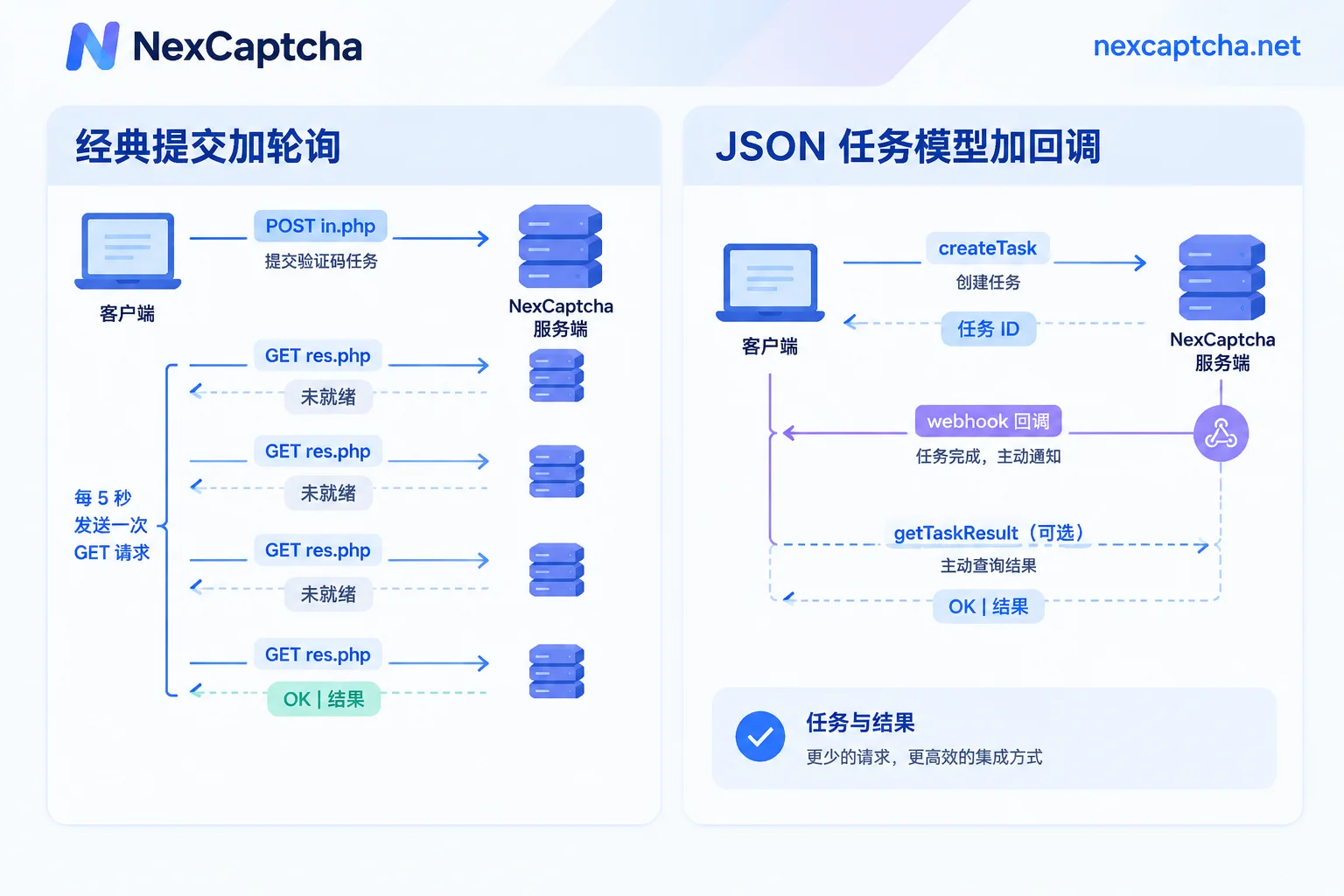
- API model mismatched with architecture. 2Captcha's classic integration method is to submit a task via a POST request to
in.php, then poll for results via a GET request tores.php. The official default recommendation is to poll every 5 seconds, and the response is often plain textOK|结果; to get JSON, you need to pass additional parameters. At high concurrency, the large number of polling requests itself becomes an overhead.
There's another category of problems that switching platforms may not solve. Mechanisms like Cloudflare Turnstile, reCAPTCHA v3, and DataDome score based on IP quality, browser fingerprint, and interaction behavior. Even if you obtain a token, the target site may reject it. In this case, the failure may lie in your exit IP, browser environment, or token injection timing, not in the recognition service itself.
So before deciding to replace, first check your failure logs to distinguish two situations: one is the recognition service returning an error or timeout; the other is the service returning a result but the business logic not passing. The two require completely different approaches. If you can't tell the difference between a Turnstile component and a full-page Challenge, you can first read What's the difference between Turnstile and the 5-second shield.
Alternatives roughly fall into three categories
- AI or machine learning automatic recognition APIs. Examples include CapMonster Cloud, CapSolver, NexCaptcha, etc. These services don't rely on human labor, typically return results in seconds for mainstream types, and have lower marginal costs. Some third-party comparison articles estimate cost reductions of 40% to 70% for high-concurrency tasks. However, this is an estimate based on specific captcha types and a point-in-time price, and cannot be directly applied to your task structure. Their weakness is that extremely obscure types may not be supported, or recognition accuracy may be unstable.
- Platforms primarily human-based or hybrid human-automated. Coverage of long-tail types is similar to 2Captcha, and latency characteristics are similar, making them suitable as a backup channel for obscure types.
- Full-page scraping Scraper APIs. Providers handle proxies, browsers, and captchas together, returning page data directly. They replace the entire scraping pipeline rather than just the captcha recognition step. Billing methods and controllability differ, so don't compare them on the same price table as pure token services.
Many teams end up with a hybrid approach: AI recognition APIs for mainstream types, and a human channel as a fallback for obscure types.
Which dimensions to compare when selecting
First, look at API model differences. The classic API is "submit and repeatedly ask at fixed intervals." Modern platforms mostly use a two-step JSON task model: first create a task with createTask, then query the result with getTaskResult, and usually support webhook callbacks, where the server notifies you proactively when the task is complete, eliminating a lot of useless polling.
| Dimension | Questions to ask | Common pitfalls |
|---|---|---|
| Latency | What are the P50 and P95 for your captcha types? How long is the statistical window? | Only looking at averages or "fastest x seconds" |
| Acceptance rate | Is the denominator the number of tasks submitted or the number of tokens returned? How many actually passed on the target site? | Mistaking "API returned success" for "business success" |
| API protocol | Is it classic submit-and-poll or JSON task model? Does it support callbacks? | Assuming "compatible with 2Captcha" just means changing the domain |
| Billing | Is billing only for successful results? Are failures or timeouts refunded? Are there volume discounts? Are currency and units consistent? | Comparing the lowest unit price for one type against all tasks |
| Type coverage | Are all types you actually use supported? Including Enterprise, invisible versions, and proxy vs. no-proxy variants | Assuming availability based on the homepage type list |
For session-sensitive automation workflows, P95 is often more critical than P50. It's the slow requests, not the median, that determine whether a session times out. If you want a more complete selection process, you can refer to How to Choose a Captcha Recognition API: Six-Step Assessment from Type Verification to Small-Traffic Comparison.
How to calculate cost accurately
Comparing unit prices alone easily leads to wrong conclusions. A more realistic formula is:
Cost per thousand successful solves ≈ unit price per thousand ÷ target site acceptance rate + proxy and browser time cost from failed retries
Here's an illustration with purely hypothetical numbers; they are not measured values from any platform.
- Platform A: $2.99 per thousand, 90% acceptance rate, about $3.32 per thousand successful solves.
- Platform B: $1.20 per thousand, 75% acceptance rate, about $1.60 per thousand successful solves.
Under these assumptions, B is still cheaper. But if each failure requires rerunning a browser session and consuming extra proxy traffic, the gap narrows.
Also note: most platforms charge for "successful recognition." If a token is returned but rejected by the target site, you're usually still charged. So you must measure acceptance rate yourself; you can't just use the provider's numbers.
Low-risk migration: six steps
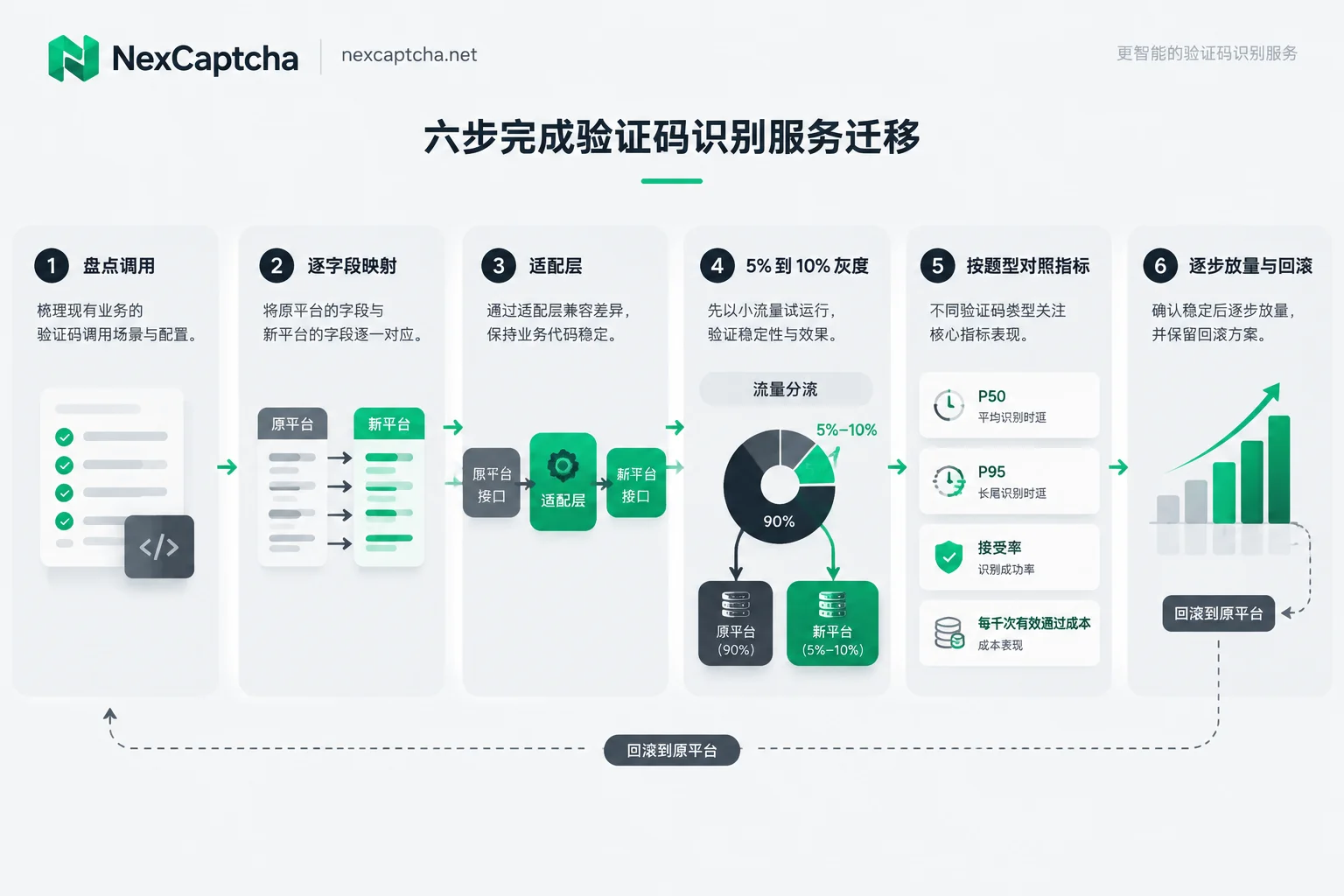
- Inventory existing calls. List the captcha types you use and corresponding parameters, such as sitekey, page URL, whether proxies are used, User-Agent, Enterprise additional parameters, etc. Also note your current timeout and retry settings, and SDK version.
- Map fields one by one. Compare the current official documentation of the original and new platforms, checking item by item: task type naming and case (classic API uses method parameter to distinguish types, JSON task model uses type field, names vary by provider), proxy parameter passing, result field location in response body, error code meanings, and callback format. Even if the other party claims 2Captcha format compatibility, confirm each task type and distinguish whether it's compatible with the classic API or the task JSON API.
- Add an adapter layer. Business code only calls a unified solving interface, with differences between platforms contained within the adapter. When you switch platforms or add backup channels later, you won't need to change business code.
- Small-traffic canary. First switch 5% to 10% of traffic to the new platform. You can also submit a sample to both sides simultaneously for comparison, but this will be double-billed, so control the sample size.
- Compare metrics by captcha type. In the same time window and for the same type, compare P50 and P95, error rate, target site acceptance rate, and cost per thousand successful solves. Don't mix all types together for averages.
- Gradually increase traffic, keep rollback. Expand traffic type by type. Keep the original platform's account and adapter code for a while as a readily available fallback channel.
The adapter layer structure is roughly as follows. This is pseudocode, only to illustrate structure. Field names and calling methods should follow each platform's current official documentation; it is not runnable as-is:
# 伪代码:统一的求解入口,平台差异收在各个 Provider 里
function solve(task):
    provider = route(task.type, gray_ratio)   # 按题型和灰度比例选择平台
    job_id = provider.submit(task)            # 经典接口或 createTask
    result = provider.wait(job_id, timeout)   # 轮询或等待回调
    log(provider.name, task.type, result.latency, result.status)
    return result                             # 业务是否通过另行记录
The key is: every call must record which platform was used, and write the subsequent business result back to the same record. That way, your comparison data includes "target site acceptance rate," not just "API success rate." If you're integrating with Python, you can refer to Python Captcha Recognition API Integration: Task Submission, Polling, Exception Handling, and Result Injection, which covers task status and exception handling in detail.
Where NexCaptcha fits in this selection
The following content is from the NexCaptcha official homepage checked on September 23, 2026, and is public information from the site, not independent test conclusions.
- API. Uses a unified REST task model, providing three endpoints: createTask, getTaskResult, and getBalance, with support for polling and webhook. The key is placed in the clientKey field of the request body.
- Types. Types listed on the homepage include reCAPTCHA v2, v3, and Enterprise, hCaptcha, Cloudflare Turnstile and Challenge, GeeTest v3 and v4, FunCaptcha (Arkose), DataDome, AWS WAF, and various image, slider, click, rotate, and audio captchas. The homepage pricing covers 33 types. However, being listed as supported in the catalog does not mean it will pass on any site or in any session; you still need to validate with your own tasks.
- Billing. Charges per thousand successful recognitions, refunds on failures, offers volume discounts, and provides test credits. The lowest unit price shown on the homepage does not apply to all types.
- Migration. The official website claims compatibility with some task formats of 2Captcha, Anti-Captcha, CapSolver, and CapMonster. Which tasks and fields are covered need to be confirmed item by item per step 2 above.
- Performance data. The P50, P95, and acceptance rates shown on the homepage are the site's own metrics. When citing, please note the statistical window and captcha types, and rely on your own canary comparison results.
A pragmatic approach: first use test credits, pick your top two or three highest-traffic captcha types, run a small-traffic comparison following the six steps above, then decide whether to scale up. Type coverage, pricing, and migration details can be found on the NexCaptcha official homepage, which also has a contact form for engineers to ask about specific task field mappings.



