
When integrating a CAPTCHA recognition API with Python, the common approach is a two-phase call. First, call createTask to submit a task and get taskId; then call getTaskResult every few seconds until the status becomes ready and retrieve solution, or give up after a set total timeout. This entire process can be done using just requests, without relying on a specific SDK.
There are three common pitfalls:
- Choosing the wrong task type, leading to incorrect parameters;
- Polling without an upper limit, continuing to send requests after an error;
- Failing to correctly inject the token into the page after obtaining it, or the site rejecting it, while mistakenly blaming the recognition service.
Below, we explain in the order of actual integration.
The scenarios discussed in this article are testing of owned or authorized systems, accessibility assistance, and permitted public data workflows.
Step 1: First Confirm Whether You Need Text or a Token
CAPTCHA recognition tasks fall into two main categories, with completely different inputs and outputs.
Image CAPTCHA (OCR type)
- You submit a CAPTCHA image, usually converted to Base64 first.
- The returned result is the plain text characters in the image, such as
x7Kp2. - You can directly fill it into the input field.
Interactive or behavioral CAPTCHA
- Includes reCAPTCHA v2/v3/Enterprise, Cloudflare Turnstile, hCaptcha, etc.
- You do not submit an image; instead, you submit the target page URL (common field name
websiteURL) and the site public key (websiteKeyor sitekey). - The returned result is an encrypted verification token (Token) that needs to be placed back into the page form for the target site's backend to validate.
This distinction determines how all subsequent code is written. For example, reCAPTCHA v2 and v3 have different task types, and v3 usually requires additional parameters like action. The Turnstile component and the Cloudflare full-page Challenge are also not the same type of task; see Difference between Turnstile and 5-second shield. For how reCAPTCHA works, refer to this reCAPTCHA automation chain explanation.
Task type names vary in case and field details across providers, such as whether they distinguish between proxy and proxyless versions. Always refer to the current documentation of the service you are using for these specifics.
Step 2: Write a Generic Client with Timeouts and Error Checking
Below is a generic two-phase structure. Field names follow common industry conventions like clientKey, taskId, errorId, status, solution. Before going live, check each item against your service's documentation to confirm endpoint paths and response fields.
import os
import time
import requests

API_BASE = os.environ['CAPTCHA_API_BASE']     # 服务商 API 地址,路径以其文档为准
CLIENT_KEY = os.environ['CAPTCHA_CLIENT_KEY'] # 密钥只从环境变量读取

class CaptchaError(Exception):
    pass

def _post(path, payload, timeout=15):
    resp = requests.post(f'{API_BASE}/{path}', json=payload, timeout=timeout)
    resp.raise_for_status()
    data = resp.json()
    if data.get('errorId', 0) != 0:
        # 业务错误(密钥无效、余额不足、参数错误等):立即停止,不要继续轮询
        raise CaptchaError(f"{data.get('errorCode')}: {data.get('errorDescription')}")
    return data

def create_task(task: dict) -> str:
    data = _post('createTask', {'clientKey': CLIENT_KEY, 'task': task})
    return data['taskId']

def wait_result(task_id, first_wait=5, interval=3, deadline=120):
    end = time.monotonic() + deadline
    time.sleep(first_wait)
    while time.monotonic() < end:
        try:
            data = _post('getTaskResult', {'clientKey': CLIENT_KEY, 'taskId': task_id})
        except requests.RequestException:
            time.sleep(interval)   # 网络抖动:只重试查询,不重新建任务
            continue
        if data.get('status') == 'ready':
            return data['solution']
        time.sleep(interval)
    raise TimeoutError(f'任务 {task_id} 在 {deadline} 秒内未完成')
There are several key decisions in this code; the reasons are explained below.
- Each request must set
timeout.requestsdoes not time out by default; if the server hangs, your script will hang indefinitely. Setting 10–15 seconds per request is common. - Polling must have a total time limit. Token tasks typically take from a dozen seconds to a few dozen seconds; a total limit of 60–120 seconds is reasonable. A polling interval of 2–3 seconds is sufficient; shorter intervals only increase request volume without getting results faster.
- Check
errorIdfirst, then look atstatus. A non-zero error means the task itself has a problem; continuing to poll only wastes time and quota, so you should report it immediately. - For network exceptions, retry only the query, not the task creation. If
createTasktimes out and you resend directly, you may create two tasks. It's better to log first, confirm the whereabouts of the first task, and then decide whether to recreate it. - Keep secrets only in environment variables or a secret management service. Do not write them into code repositories, logs, or include them in screenshots.
If concurrency is high, consider using callbacks (webhook) instead of polling, where the server pushes the result when the task is complete. The callback signature method and retry rules depend on the specific service's documentation.
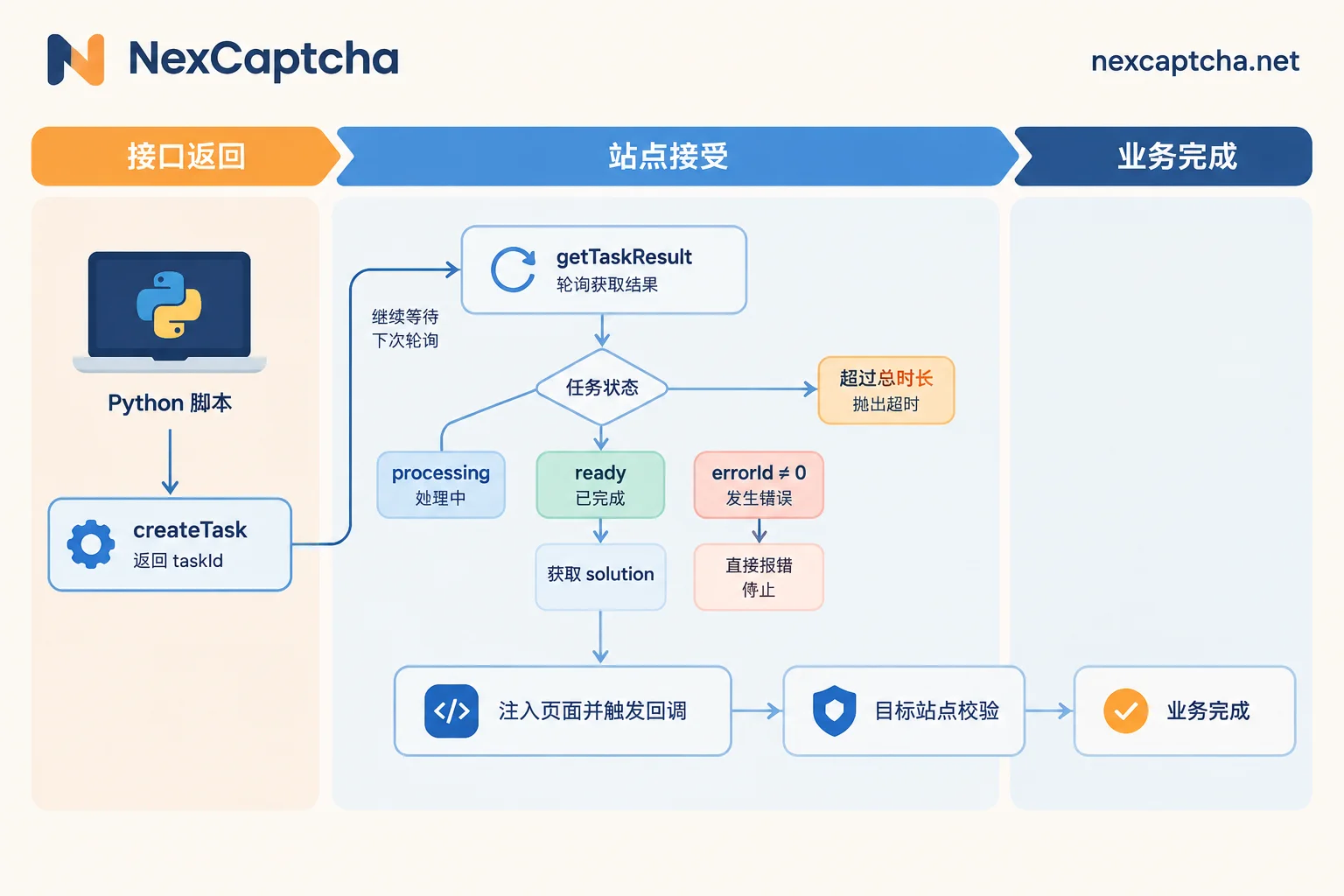
Step 3: Construct the task According to Task Type
For image CAPTCHA, the task is roughly as follows:
import base64

with open('captcha.png', 'rb') as f:
    img_b64 = base64.b64encode(f.read()).decode()

task = {'type': '<图形识别任务类型>', 'body': img_b64}
text = wait_result(create_task(task)).get('text')
For token-based CAPTCHA, the task is roughly as follows:
task = {
    'type': '<reCAPTCHA v2 任务类型>',
    'websiteURL': 'https://your-test-site.example/login',
    'websiteKey': '<页面上的 sitekey>',
}
solution = wait_result(create_task(task))
The contents in angle brackets above should be replaced with actual values from the service documentation. The field name for the Token in solution varies by service and task type; common ones include gRecaptchaResponse, token, etc. Please refer to the actual response.
Step 4: Inject the Token in Selenium / Playwright
Obtaining the Token is only half the battle; you also need to deliver it to the page.
The common approach is to use driver.execute_script() (Selenium) or page.evaluate() (Playwright) to write the Token into the hidden field corresponding to the CAPTCHA component:
- reCAPTCHA:
textarea#g-recaptcha-response - Turnstile:
[name="cf-turnstile-response"]
For example, with Playwright:
page.evaluate("""(token) => {
  const el = document.querySelector('#g-recaptcha-response');
  el.value = token;
  // 如果页面在组件上声明了 data-callback,需要手动调用它
  const cb = document.querySelector('[data-callback]')?.getAttribute('data-callback');
  if (cb && typeof window[cb] === 'function') window[cb](token);
}""", token)
The callback step is often missed. Many pages do not directly read the hidden field; they rely on a callback function to unlock the submit button or initiate a request. If you only fill in the field, the button won't light up, and the form won't submit.
Additionally, tokens are usually valid for only one or two minutes. Do not insert time-consuming operations between obtaining the token and submitting the form.
Step 5: Distinguish Three Types of "Success" Before Troubleshooting Failures
A request can stop at three different stages:
- The API returned a result: The recognition service delivered text or a Token.
- The target site accepted the result: The site's backend validation passed.
- The business goal was truly achieved: Login succeeded, or the correct data was obtained.
The recognition service is only responsible for the first step. When validating, the target site often also checks IP, TLS fingerprint, User-Agent, session cookies, and token timeliness. Therefore, success in step one but failure in step two is not necessarily a problem with the recognition service.
When encountering failures, it is recommended to troubleshoot in the following order:
- Task type and parameters: Is the sitekey taken from the current page? Did you choose the wrong reCAPTCHA version (v2, v3, Enterprise)? Is the v3 action consistent?
- Timeliness: How long did it take from obtaining the Token to submission? Did you perform page refresh or navigation during the wait?
- Injection: Was the field written into the correct iframe or form? Was the callback triggered?
- Session consistency: Did the browser session, cookies, or exit IP change during the entire process? If the service requires proxy parameters, does the proxy in the request match the one actually used by the browser?
- Service-side errors: Are
errorIdanderrorCodelogged? Are there many timeouts?
Only by counting these three stages separately can you calculate a truly meaningful success rate and clarify what the denominator is.
How It Corresponds on NexCaptcha
According to the public information on the NexCaptcha website, it uses a unified REST task interface:
- The interface includes
createTask,getTaskResult,getBalance, supporting both polling and webhook methods; - The API domain is
api.nexcaptcha.net; - The key
clientKeyis placed in the request body JSON, not in the request header.
Therefore, the generic client structure above can be directly reused. Currently, the official Python SDK package name and usage are still pending verification, so using requests to wrap it yourself is a more reliable approach. For specific endpoint paths, task type names, and solution fields, please refer to the actual responses during integration.
Regarding billing, the official website states billing is based on successful recognition, with refunds for failures, and provides test credits. It is recommended to start with small traffic, measure the three success criteria above on your own target tasks, and then decide whether to scale up. For selection, you can refer to Six-step judgment on how to choose a CAPTCHA recognition API.
For supported CAPTCHA types, pricing, and engineer contact information, please visit the NexCaptcha homepage.



