
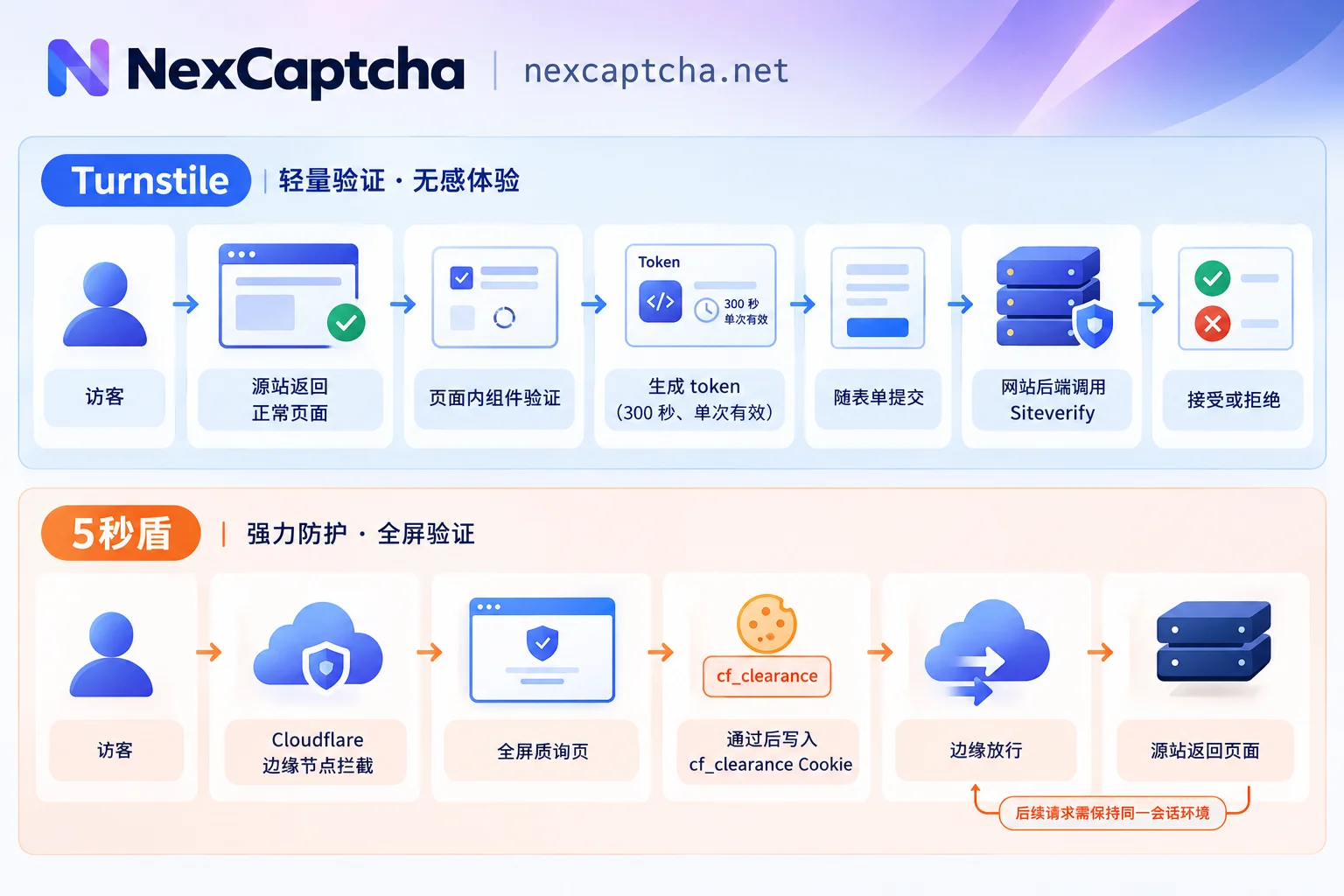
Let's start with the conclusion: Turnstile is a CAPTCHA component embedded in a webpage that protects a specific form or action; the "5-second shield" is a Cloudflare challenge page that intercepts at the edge network in front of the entire webpage, protecting access to the whole site or specified paths. After passing Turnstile, a token is produced, and the website's backend must use it to verify with Cloudflare; after passing the 5-second shield, the Cloudflare edge node directly writes the cf_clearance cookie, and the origin server doesn't need any verification code.
The two are often collectively called "Cloudflare verification." When troubleshooting or automating, conflating them most commonly leads to choosing the wrong approach: you might encounter a full-page block but look for a sitekey to get a token, and even if you get one, there's nowhere to use it.
What exactly is the "5-second shield"?
The "5-second shield" is a Chinese colloquialism, originating from Cloudflare's early I'm Under Attack Mode waiting page: visitors would first see "Checking your browser" when opening a website, and after waiting a few seconds, they'd be redirected to the real page.
Nowadays, Cloudflare's full-page challenges are more often triggered by WAF rules, Bot protection, etc., appearing as Managed Challenge and other challenge pages. Under Attack mode still exists and, when enabled, shows a challenge to all visitors. So today's "5-second shield" doesn't necessarily take 5 seconds: sometimes it flashes by, sometimes you need to check a checkbox, and sometimes it appears repeatedly. Its essence remains unchanged: an edge-layer check before visitors can access the webpage content.
Core differences comparison
| Dimension | Turnstile | 5-second shield (full-page challenge) |
|---|---|---|
| Protection layer | In-page component | Cloudflare edge gateway |
| Trigger timing | After page loads normally, triggered during login, registration, submission, etc. | Before request reaches origin, cannot get page HTML |
| Presentation | Widget in page, can be visible checkbox, non-interactive, or invisible mode | Full-screen transition page, original content and navigation invisible |
| Credential after passing | Short-lived token (form field usually cf-turnstile-response) | cf_clearance cookie |
| Who verifies | Website's own backend calls Siteverify API | Cloudflare edge node determines and allows |
| Depends on Cloudflare proxy | No, works on sites not using Cloudflare CDN | Yes, site must be proxied by Cloudflare |
Credential mechanism: the biggest difference and most error-prone area
Turnstile's token is a "one-time ticket". The frontend component generates a token after verification, which is submitted with the form. According to Cloudflare documentation, the token is valid for 300 seconds and can only be verified once. The website's backend must send it to the Siteverify endpoint (https://challenges.cloudflare.com/turnstile/v0/siteverify) and decide whether to accept the submission based on the response. This has two practical implications:
- If the website's backend doesn't perform Siteverify validation, Turnstile effectively provides no protection. When troubleshooting your own site, check this first.
- An expired or already-used token will fail verification. For automation, submit the token as soon as possible after obtaining it; do not cache it for reuse.
The 5-second shield's cookie is a "session pass". After passing the challenge, Cloudflare writes cf_clearance in the response, and subsequent requests in the same session carrying it are allowed directly by the edge. It is tied to the visitor environment that initiated the request: Cloudflare documentation requires the challenge to be completed by the same visitor environment that made the request. If subsequent requests use a different exit IP, User-Agent, or lose the cookie, they may be challenged again, known as a challenge loop.
How to identify which one you're facing
Follow this order, and you can usually tell within a minute or two:
- Can you see the website's original content? If the page and navigation are intact, and only a verification box appears next to a form, it's likely Turnstile. If the entire page is replaced with a waiting or verification screen, it's a full-page challenge.
- Check the first HTML response. Full-page challenges often have status codes 403 or 503, page titles like "Just a moment...", and request parameters often contain the
__cf_chlprefix. Turnstile pages typically return a normal 200, loadchallenges.cloudflare.com/turnstile/v0/api.js, and have elements withdata-sitekey. - See what you get after passing. If a
cf-turnstile-responsefield appears in the form, it's Turnstile; if acf_clearancecookie appears in the browser and it then automatically redirects to the real page, it's a full-page challenge.
One trap to note: A "Verify you are human" checkbox may also appear on a full-page challenge page, looking very similar to Turnstile. So don't judge by the checkbox alone; combine steps 1 and 2 to see if it appears within the target page. Also, a website may have both, e.g., first pass a full-page challenge, then encounter Turnstile on the login page. In that case, handle them as two separate stages.
Different impacts on testing and automation
QA for your own site: prioritize official mechanisms
When running CI regression on your own site, paid recognition services are usually unnecessary:
- Turnstile: Cloudflare provides test sitekeys and secrets (e.g., always pass, always fail). Use these in the test environment to reliably cover both pass and fail branches.
- Full-page challenge: You can configure skip rules for test traffic in Cloudflare, or disable Under Attack mode in the test environment, which is much more stable than handling challenges in CI.
Only when you need near-production integration testing or handling CAPTCHAs on third-party sites in authorized public data workflows should you consider external recognition services.
The tasks are completely different for real integration
Handling Turnstile: the core inputs are the page's sitekey and URL, sometimes action, cData, etc. The recognition service returns a token, which you need to fill into the form and submit within its validity period. Whether it's accepted is ultimately determined by the target site's backend Siteverify result.
Handling a full-page challenge: the goal is not to get a string to fill in, but to obtain cf_clearance in the same session and use it for continued access. Therefore, proxy exit, User-Agent, and other environment information must remain consistent with subsequent requests, and the cookie must be carried in subsequent requests. Many "got the cookie but still blocked" issues stem from inconsistent environments, not necessarily recognition failure.
In either case, track three outcomes separately: recognition service returned a result, target site accepted the result, business process actually completed. Looking only at the first can easily misjudge the availability of the entire chain.
How this maps to NexCaptcha
The NexCaptcha website lists Cloudflare Turnstile and Cloudflare Challenge as two different supported types, both using a task-based mode: submit tasks with createTask, then poll with getTaskResult or use webhook callbacks to get results. Before integration, first determine which category the target page belongs to using the methods above, then check the corresponding task type names and required parameters against the current official documentation. For full-page challenges, also confirm how proxy, UA, and other parameters should be kept consistent with subsequent requests.
Before full-scale rollout, run a small-scale comparison, recording return rate, target site acceptance rate, and business completion rate separately, while monitoring latency distribution. For specific evaluation methods, see How to choose a CAPTCHA recognition API: six-step judgment from type verification to small-scale comparison. For supported types, pricing, and engineer contact information, see NexCaptcha official website.



