
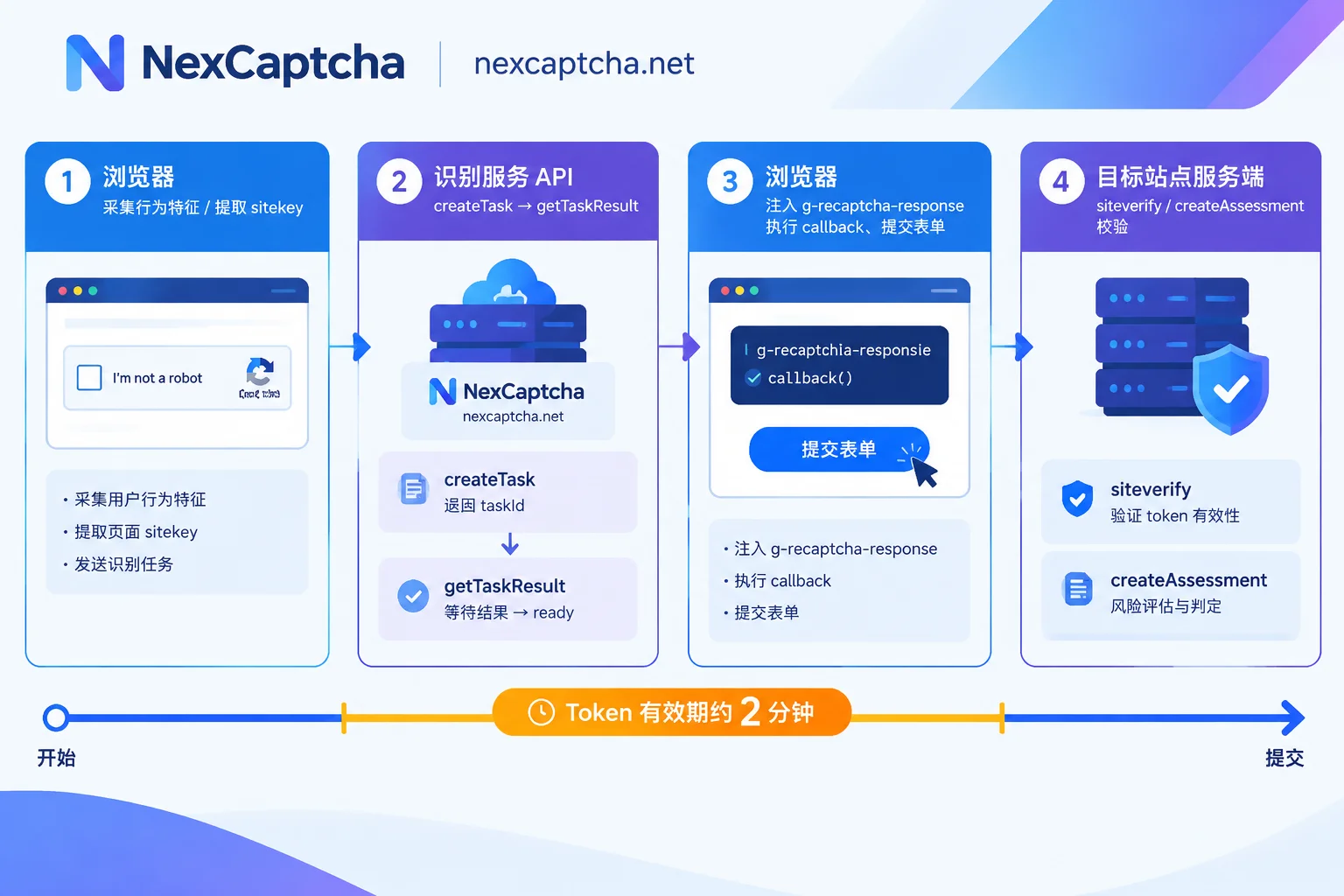
To bypass reCAPTCHA in an automation script, the key is not to "make a bot click those traffic light images," but to obtain a token signed by Google and place it in the correct position of the target site's submission request. With this in mind, the entire pipeline can be broken down into five controllable steps: extract parameters from the page → send parameters to the recognition service → retrieve the token → inject and trigger the callback → submit and validate the business result.
The following first explains what reCAPTCHA is doing, then covers how to implement each step of this pipeline and where it is most likely to break.
The Three-Stage Structure of reCAPTCHA
Whether v2 or v3, Google's verification process consists of three independent roles:
The first stage is in the browser. When the page loads api.js with the sitekey (public key), the script renders the widget or collects environmental features in the background: mouse trajectories, clicks and scrolls, dwell time, browser and device properties, etc. This stage runs entirely on the client side and is where automation is most easily exposed.
The second stage is Google issuing a token. After a decision is made, Google returns a base64-encoded signature string. It has a clear validity period, typically around two minutes—this time constraint directly determines your polling timeout and retry strategy, which will be expanded later.
The third stage is on the target site's server. The business form submits the token with the request, and the site's backend uses its own secret key to call Google's verification endpoint (the standard version is siteverify, Enterprise is createAssessment) to confirm the token's validity and risk indicators.
Key conclusion: The verification decision is not made on the page, but on the target site's backend. No matter how much your script simulates human behavior, it ultimately only affects whether the second stage can obtain a "good" token; whether the token is usable depends on the threshold configuration of the third stage.
Differences Between v2, v3, and Enterprise Determine What Parameters to Pass
These three are not version upgrades; their behavior patterns are completely different, and the integration parameters also differ.
v2 Checkbox and v2 Invisible: The decision is binary—pass or fail. If trust is sufficient, a single checkbox passes; if not, a 3x3 image challenge or audio challenge appears. After passing, the frontend writes the token into a hidden textarea named g-recaptcha-response on the page. Invisible mode has no visible checkbox and is triggered by a button click or grecaptcha.execute(), but the token placement is the same.
v3: Completely seamless, no popup. The script calls grecaptcha.execute(sitekey, {action: 'login'}) to get a token, and after server-side verification, the site backend receives a score from 0.0 to 1.0, where closer to 1.0 means more human-like. Note that the score threshold and handling are configured by the target site itself; Google does not allow or block on its behalf. So in v3 scenarios, you must pass the correct action value, because sites often set different thresholds for different actions.
Enterprise: Extends v3 scoring with more detailed risk signals and evaluation endpoints. The parameter format is similar to v3, but the backend uses createAssessment, and the site may enable additional challenge policies.
When integrating with a recognition service, these three types usually correspond to different task types and required fields: v2 generally only needs the page URL and sitekey; v3/Enterprise also require action, sometimes a desired minimum score, and Enterprise-specific additional parameters. Choosing the wrong task type results in a returned token whose structure matches but the site does not accept it—this is the most common first type of failure.
Step 1: Extract Parameters from the Page
There are three paths for parameter extraction, ordered by reliability:
- DOM attributes. The most direct is
data-sitekeyon the.g-recaptchaelement; the same element may also havedata-callback,data-action,data-s. - JS configuration object. When the widget is dynamically created by
grecaptcha.render(), the DOM may not have attributes, and parameters are stored in___grecaptcha_cfg. You can usepage.evaluate()to iterate over this object and extract the sitekey and callback name. - Network requests. Capture the query strings of
api.js,anchor,reloadrequests; thekparameter is the sitekey. The v3 action can also be seen in thereloadrequest body.
Practical advice: Do not hardcode the sitekey in your script. When the target site changes keys or uses different keys for different pages, hardcoding will cause a large batch of returned tokens to be rejected, and all you will see in the logs is "submission failed," making it very hard to diagnose.
Steps 2 and 3: Create a Task and Retrieve the Result
The recognition service here acts as an external token computation service; it does not take over your browser or maintain your session. You send the page parameters as JSON, and it returns a usable gRecaptchaResponse.
In NexCaptcha's public API documentation, this layer consists of three standard actions: createTask to create a task and get a taskId, getTaskResult to check status by taskId, and getBalance to check balance; authentication uses clientKey in the request body, the API domain is api.nexcaptcha.net, and it supports both polling and webhook for retrieving results.
The request format is roughly as follows (task type names are subject to the current official documentation or confirmation by engineers; placeholders are used below):
// POST https://api.nexcaptcha.net/createTask —— 示意结构,非可直接运行代码
{
  "clientKey": "<你的 clientKey,不要写进仓库>",
  "task": {
    "type": "<reCAPTCHA v3 对应的任务类型名,需核验>",
    "websiteURL": "https://example.com/login",
    "websiteKey": "<从页面提取的 sitekey>",
    "pageAction": "login"
  }
}
When retrieving results, poll at fixed intervals. For the first query, it is recommended to delay 3 to 5 seconds before initiating, then every 1 to 3 seconds after that. When status becomes ready, extract the token from solution; if it returns failed or times out, follow the retry branch.
What should the polling timeout be? Work backwards: the token is valid for about two minutes, and after obtaining the token you still need to inject it, trigger the callback, submit the form, and wait for the server response. So the recognition stage timeout should generally not exceed 60 to 90 seconds, otherwise even if you get the token, it may expire before submission—manifesting as "the service returns success but the site keeps saying verification failed," which is easily misdiagnosed as a recognition quality issue.
For high-throughput scenarios (e.g., batch page inspections), using webhook callbacks saves more resources than polling, but you must handle two things: mapping callbacks to sessions (using your own business ID), and fallback polling in case callbacks are lost.
Step 4: Inject the Token and Trigger the Callback
This step is where the loop is most often done incorrectly. Many people only "write it into the textarea" and click submit, then find nothing happens.
There are three complete actions:
// Playwright 示意,浏览器侧通用 API
await page.evaluate((token) => {
  // 1) 写入隐藏域;元素可能不止一个,且默认 display:none
  document.querySelectorAll('textarea[name="g-recaptcha-response"]')
    .forEach(el => { el.style.display = 'block'; el.value = token; });

  // 2) 若站点注册了回调,必须执行,否则表单状态不会变更
  //    回调名可能来自 data-callback,也可能藏在 ___grecaptcha_cfg 的 clients 里
  if (typeof window.onRecaptchaSuccess === 'function') {
    window.onRecaptchaSuccess(token);
  }
}, token);
3) Only then trigger submission: click the button, or directly construct an HTTP request with the token and send it.
For v2 Checkbox, writing to the hidden field is usually enough because the form reads that value on submit; but if the button's enabled state is controlled by the callback, not executing the callback leaves the button permanently disabled. For v2 Invisible and v3, the callback almost always must be executed, because the token is actively consumed by JS and does not go through static form fields at all.
There is also a simpler approach: skip the browser and use an HTTP client to insert the token directly into the business request body. This suits scenarios where the interface structure is stable and does not depend on frontend encryption parameters; the downside is that any change to the site's frontend logic requires you to rewrite it.
Step 5: Validate the Business Result, Not Just Whether There Is a Token
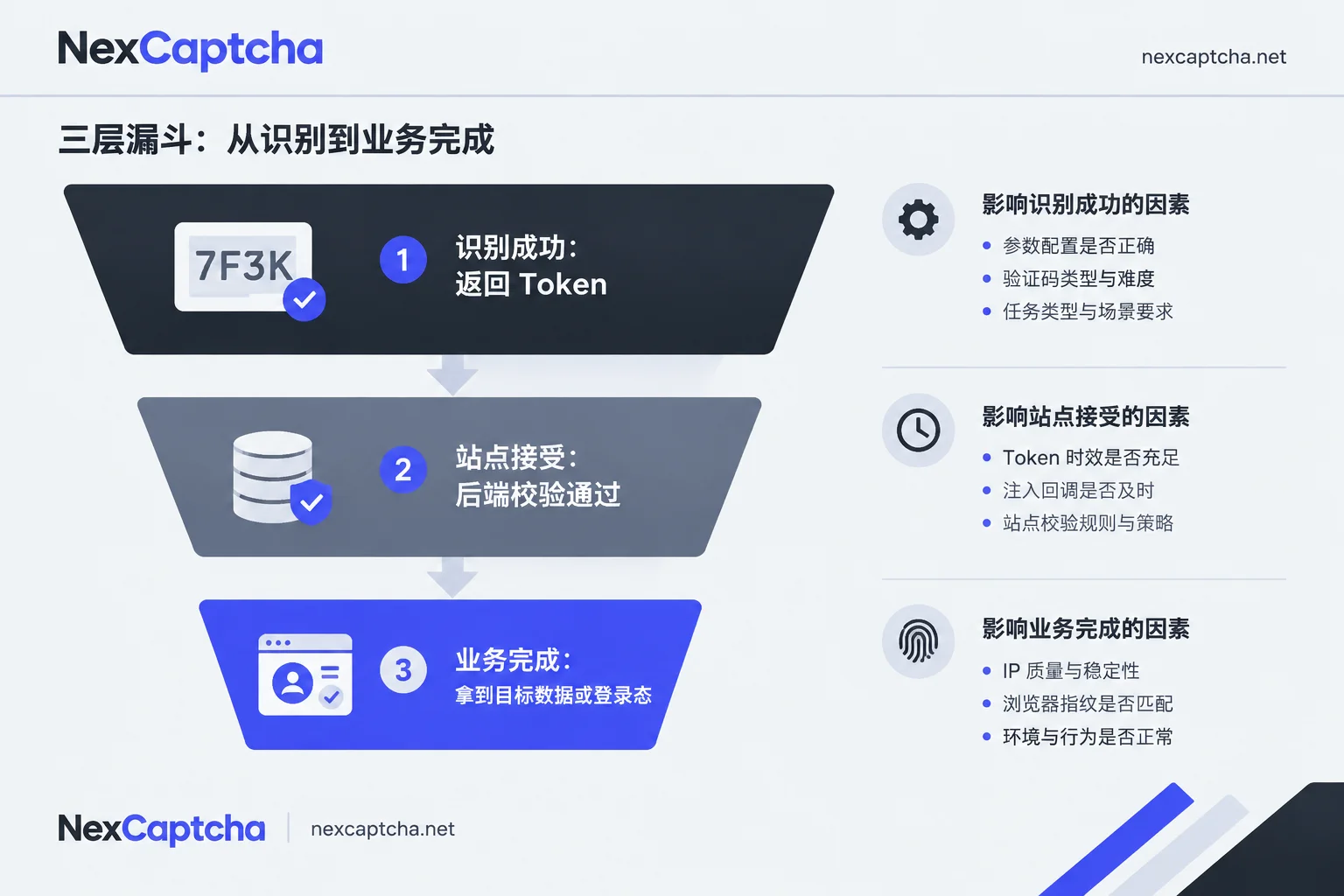
Treating "recognition service returns success" as "task complete" is the most common statistical error in automation teams. At minimum, look at three layers:
- Recognition success: the service returned a token.
- Site acceptance: the target site's backend passed verification, with no further challenge or verification error.
- Business completion: you actually got what you wanted—login state established, data fields non-empty, page rendered to the expected node.
These three layers often differ significantly, especially with v3. The scoring model considers the IP reputation of the client making the business request, browser fingerprint, and request context, while the recognition service is only responsible for issuing the token.
When failures occur, troubleshoot in this order to save a lot of ineffective trial and error:
- Parameter layer: Is the sitekey taken from the current page? Does the action match what the site expects? Is the task type (v2/v3/Enterprise) chosen correctly?
- Timing layer: Does the total time from task creation to request submission approach two minutes? Are expired old tokens being reused during retries?
- Injection layer: Does the hidden field exist and is it correctly assigned? Has the callback been executed? Are there multiple reCAPTCHA instances on the page and you only filled the first one?
- Environment layer: Does the outbound IP of the business request need to match the network environment used by the recognition service when solving? Does the browser carry obvious automation characteristics (
navigator.webdriver, abnormal plugin and font lists, missing permission APIs)? - Policy layer: Has the target site temporarily tightened thresholds or added protections beyond reCAPTCHA?
Item 4 deserves special attention: For high-risk targets, consistency between the token issuance environment and the actual request-sending IP is often decisive. Whether to bind a proxy in the task and in what form depends on each service's field design; NexCaptcha's details on this are not publicly expanded on its homepage, so it is recommended to confirm directly before integration rather than copying field names from other platforms.
Place the Recognition Service in the Right Position
The recognition API is an external dependency in the workflow, not a browser replacement or a data collector. It does not manage your cookies and sessions, handle proxy rotation, or guarantee that the target site's business logic remains unchanged. To build a stable fully automated pipeline, session management, fingerprint governance, retries and idempotency, and result validation must still be handled by your own framework.
For selection, several points publicly stated on the NexCaptcha homepage are directly relevant to this pipeline: a unified REST API covering reCAPTCHA v2/v3/Enterprise, hCaptcha, Turnstile, GeeTest, FunCaptcha, etc. (the homepage lists 33 pricing types), billing per thousand successful recognitions with refunds for failures and test credits, and claimed compatibility with some task formats from 2Captcha, Anti-Captcha, CapSolver, and CapMonster. Note: having a type in the catalog does not mean your target site or your particular session will pass; when migrating, verify each task type name's casing, field differences, callback form, error codes, and billing terms—the "just change the domain" claim does not apply to all integrations. P50/P95 and acceptance rate data shown on the homepage are the vendor's own figures; for evaluation, it is best to run a small-scale comparison using your own target site and the same time window, and look at the second and third layers of the three-layer metrics.
For the specific type list, pricing, and migration notes, see the NexCaptcha homepage. The page also has a contact entry for engineers; for code-impacting details such as task type enumeration names and whether proxy binding is supported, it is best to ask directly before starting.
Finally, a note on scope: the above process applies to testing on systems you own or are authorized to test, development of accessibility assistive tools, and public data workflows where rules permit. Before integrating, confirming the target site's terms and your own authorization boundaries is more important than getting any single parameter to work.



