
Conclusion first: judging in this order saves a round of rework
In one sentence: first determine the CAPTCHA types and interaction depth you actually encounter, then measure the target site's acceptance rate with real samples, and only then compare unit prices. If you reverse the order, most teams will redo the selection two weeks after launch.
The six actionable steps:
- List the CAPTCHA types actually encountered in production, not the support lists of candidate services;
- Determine whether these types require IP/session binding;
- Run a small-traffic comparison in your own or authorized environment, and count the proportion of "target site acceptance";
- Look at P50 and P95, not averages, and include the end-to-end chain;
- Calculate cost per "completed business action", not per thousand calls;
- Finally, assess integration effort and the cost of switching providers later.
The following expands in this order, explaining why each step is judged this way.
Step 1: Break down "CAPTCHA types" so they can be matched precisely
The phrase "supports CAPTCHA recognition" means very different things across products. By input/output form, they roughly fall into three categories:
- Pure image/character OCR: traditional image CAPTCHAs, strings, arithmetic expressions. The input is an image, the output is a string, and it is almost unrelated to your session.
- Token-based behavioral verification: reCAPTCHA v2/v3/Enterprise, hCaptcha, Cloudflare Turnstile, GeeTest v3/v4, FunCaptcha/Arkose, etc. The input is page parameters (site key, page URL, etc.), and the output is a credential or coordinate sequence to be submitted. Success depends on how the target site's server validates it.
- Full-page challenges and enterprise WAFs: Cloudflare's full-page Challenge, AWS WAF, DataDome, etc. The output is usually a set of cookies or credentials that must be used together with the context of your subsequent requests. Note that a Turnstile widget and a Cloudflare full-page Challenge are not the same thing: the former is a verification control embedded in a form, while the latter blocks the entire page. In candidate services, they are often two different task types.
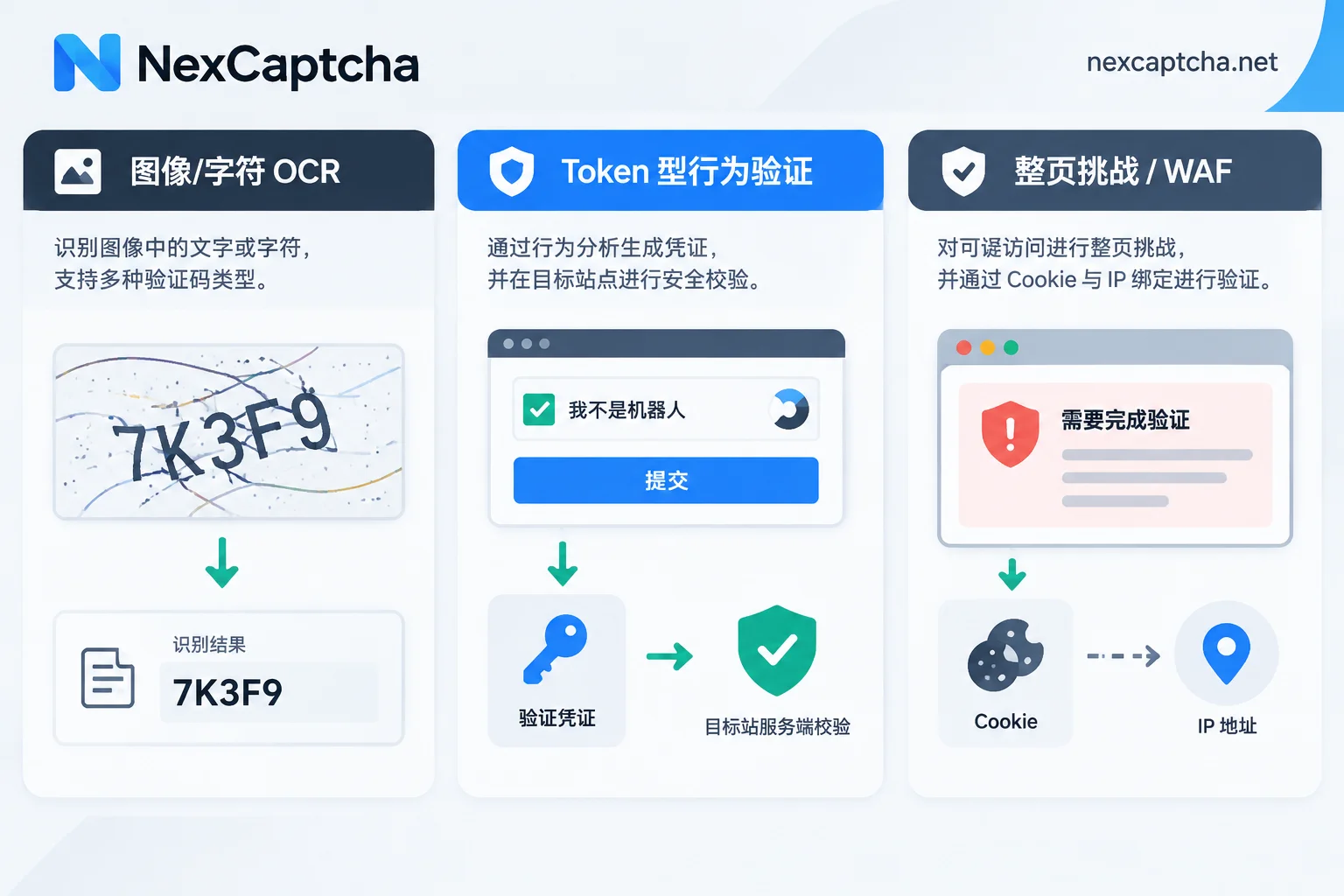
The output of this step should be your own checklist: for each entry, write "site/scenario + CAPTCHA type + frequency + trigger conditions". Without this checklist, all later comparisons are just comparing advertising copy. If you are not familiar with the validation chain for token tasks like reCAPTCHA, you can first read How Google reCAPTCHA works and how to build a fully automated chain with a CAPTCHA-solving API, then come back to type verification.
Step 2: Confirm whether proxy binding is required
This is the most easily overlooked point and the one most likely to cause "recognition succeeded but the site does not let you through".
For mechanisms like Cloudflare Challenge, AWS WAF, and DataDome, the issued pass credentials are often bound server-side to the client egress IP that initiated the solving (both the FAQ in CapMonster Cloud documentation dated 2026-08-23 and the Bright Data review article dated 2026-01-21 mention this). In other words, if the solving used an IP from data center A, but your scraper or Playwright pipeline submits from an IP in data center B, the credential will directly fail during validation.
Therefore, when selecting, clarify two things: whether the candidate service supports passing your own proxy in the task; if not, which types the credentials it provides are suitable for. Pure OCR and most token tasks usually do not need proxy parameters, while WAF types almost certainly do—do not apply the rules of one type to all types.
Step 3: Count "API returned success" and "target site allowed through" separately
An API returning HTTP 200 with a token only means the recognition service completed its part. Whether the task truly succeeded depends on the target site's final judgment. Typical inconsistencies:
- The credential returned by reCAPTCHA v3 has a low score, while the target site sets a higher threshold (each site defines its own; a common practice is above 0.5, and stricter risk control may be higher), so the request is still blocked;
- The Turnstile credential is obtained, but the submission lacks matching browser context and behavioral characteristics;
- The coordinates for a click-based result are correct, but the submission time exceeds the page's own credential validity period.
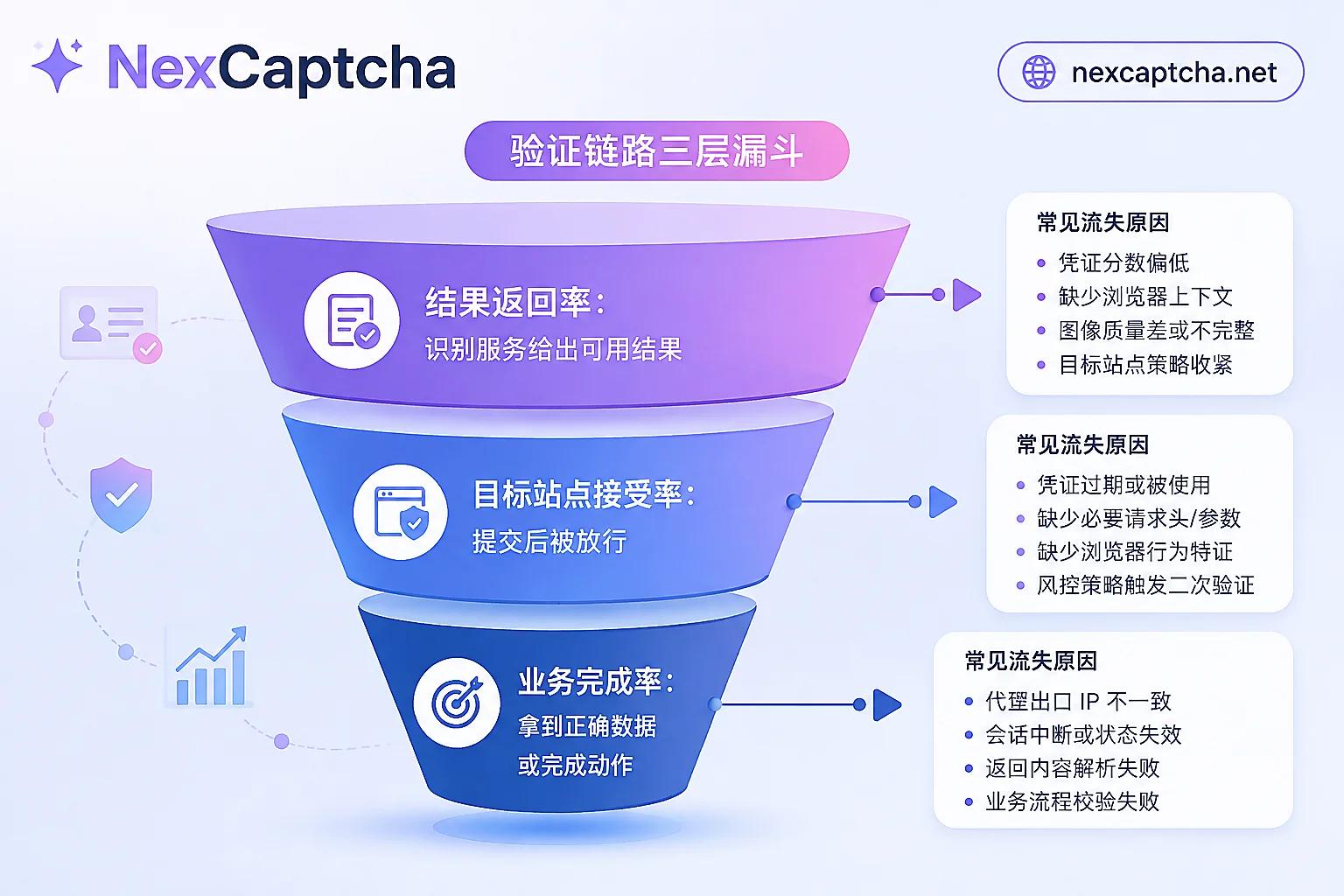
It is recommended to fix three metrics with different numerators and denominators in the evaluation table: result return rate (proportion of tasks where the service gives a usable result), target site acceptance rate (proportion of submissions that are allowed through), and business completion rate (proportion of tasks that obtain correct data or complete the final action such as placing an order). Procurement decisions should only look at the second and third. This is also the distinction emphasized by CapSolver's selection guide (2026-04-02) and 2Captcha's benchmark article (2026-05-25)—these two come from competing parties, so their conclusions should be cross-checked, but the metric definition itself is correct.
Step 4: Look at latency percentiles and calculate end-to-end
The advertised "average latency" is flattened by a large number of very fast tasks, while what actually causes script timeouts is the long tail. Ask for or measure P50 and P95 yourself; the two cannot be conflated, and the average cannot be used as P50.
End-to-end latency also includes: one round trip to create a task, the accumulated interval of polling getTaskResult (or the arrival time of a webhook callback), and the time to inject the result into the page and submit it. Improper polling intervals can by themselves add several seconds to each task.
Architectural differences directly reflect here. Services based on pure model recognition (in third-party benchmark articles and CapSolver/CapMonster self-descriptions, mostly in the range of hundreds of milliseconds to a few seconds) are suitable for high-concurrency, low-latency pipelines; modes involving human crowdsourcing are more flexible for rare variants, complex logic click tasks, and audio CAPTCHAs, but their latency is usually an order of magnitude longer. HasData's public benchmark repository and its 2026-02-16 comparison article can serve as references for ideas, but their samples, time windows, and site combinations may not overlap with your scenario and cannot be directly taken as your expected values.
Step 5: Calculate cost per "completed business action"
Price per thousand calls is the easiest item to compare and also the easiest to compare incorrectly. First confirm three things: whether billing is per request or per successful recognition; whether failures are refunded and how to appeal; and whether unit prices differ by CAPTCHA type (usually they do, with WAF and enterprise-grade types significantly more expensive).
A hypothetical example to illustrate the idea (numbers are for demonstration only and are not quotes for any product): a certain type is priced at a yuan per thousand successful recognitions, and the target site acceptance rate is 70%. Then every 1000 business actions require about 1429 successful recognitions, and the recognition cost is about 1.43a. Another provider charges 0.7a, but the acceptance rate is only 45%, requiring about 2222 successful recognitions, with a cost of about 1.56a—before counting the extra proxy traffic, concurrency occupied by retries, and engineering troubleshooting time. Low price with low acceptance rate often results in a higher overall cost.
Therefore, price comparisons should be unified to the same type, same currency unit, and similar statistical window, and the table should include two extra columns: proxy consumption caused by retries and whether failed tasks are billed.
Step 6: Integration and migration costs
The mainstream approach now is asynchronous task-based: create a task to get a taskId, then poll for the result or wait for a callback. Differences hide in the details—case sensitivity of task type names, parameter names, error code semantics, callback signature methods, and balance/billing conventions.
Some services claim compatibility with request formats such as 2Captcha and Anti-Captcha, which can save effort, but compatibility claims and the verified scope of compatibility should be written separately in your evaluation table. During actual migration, confirm task by task: field names and nested structures, task type strings, SDK versions, callback URLs and retry policies, error code mappings, and the correspondence between billing and deduction records. In addition, the traditional "upload an image and get text back" interface and the task JSON interface are not the same thing; you cannot assume that changing the domain name will make it work.
What to record in a small-traffic comparison test
The final step of selection is not reading documentation, but running a comparison in your own or authorized environment. A minimal viable approach:
- Extract a batch of request samples from real business, covering the 2–3 types with the highest frequency on your checklist;
- Write a unified test script that only replaces the service endpoint and authentication parameters, ensuring identical inputs;
- Run canary tests on 2–3 candidates simultaneously, with enough sample size per type to see differences;
- Record: target site acceptance rate, P50/P95, error code distribution, whether failures are billed, and actual deduction records for the same period;
- Record the time window of the test. Protection policies change, and conclusions from two weeks ago may no longer hold.
For QA scenarios, you can first use the candidate service's official test quota or test key to verify the integration chain, but be aware that test keys usually only verify "whether the call works" and do not represent the acceptance rate of real sites. A real integration test is still needed in the end.
Three common misjudgments
- Attributing all failures to the recognition service. Credential rejection may also come from proxy quality, browser fingerprint, request header order, submission timing, or business-side risk control. When troubleshooting, first confirm which layer is broken: result return, site acceptance, or business completion.
- Treating catalog support as scenario availability. A candidate service supporting a type does not mean it can pass under the specific configuration of your specific site.
- Confusing SMS verification code reception with CAPTCHA recognition. These are completely different services and should not be placed in the same comparison table.
Which items does NexCaptcha correspond to in this evaluation
If you have already organized types and metric definitions according to the checklist above and need candidates for comparison, the following are the parts of NexCaptcha's public product description that correspond to these evaluation items (checked on the official homepage on 2026-09-23; this is the site's own statement, not our independent stress-test conclusion):
- Type coverage: handles reCAPTCHA v2/v3/Enterprise, hCaptcha, Cloudflare Turnstile and Challenge, GeeTest v3/v4, FunCaptcha/Arkose, DataDome, AWS WAF, as well as image, slider, click, rotate, audio, etc. through a unified REST API. The homepage lists prices separately for 33 types. Whether a specific site or session is available still needs to be self-tested using the criteria in Step 3.
- Integration form: task mode with
createTask/getTaskResult/getBalance, supports polling and webhook, API domainapi.nexcaptcha.net, and the key is placed in theclientKeyfield of the request body. - Billing definition: billed per thousand successful recognitions, refunds for failures, volume-based tiered discounts, and provides test quota—exactly corresponding to the three things to verify in Step 5.
- Migration: the official website claims compatibility with partial task formats of 2Captcha, Anti-Captcha, CapSolver, and CapMonster; after verifying fields and error codes task by task according to Step 6, conduct small-traffic validation.
- Performance data: the homepage displays P50/P95, acceptance rate, nodes, and throughput figures. When citing, please include the statistical window and page date, and rely on your own comparison tests.
The type list, tiered pricing, and engineer contact entry are all on the NexCaptcha official homepage, which you can directly use to fill in your evaluation table.



